
Dustie DK2 Manuel utilisateur

Please read this operating manual,
Before using this product.
(请在使用本产品前,阅读本操作手册)
瑞典达氏空气净化器
Dustie Air Cleaner
DK2 Air Cleaner

Please use this product in a room on a horizontal desktop with air
circulation.
Do not place the product in a place where it is easy to touch the
curtains.
Place the product at least 10 cm away from the obstructing object.
Do not cover the surface of the product with objects such as towels,
to keep the surrounding air flowing.
Use the product safely to avoid fires, electric shocks and other
injuries.
The product must be erect in operation.
Please read the operating manual carefully before use and keep it properly for
future reference.
This manual is applicable to the DK2 series models. Please operate according
to the instructions of the purchased model.
When using electrical appliances, we should have basic safety knowledge to
avoid fires, electric shocks and other injuries.You are expected to follow the
instructions below.
Safety Instructions
1

Do not operate the product with wet hands. Do not wash the
product directly with water.
It is forbidden to block the inlet and outlet with foreign objects.The
product contains an internal high-speed rotating motor, please avoid
accidental injury or damage to the product.
If the power cord is damaged, in order to avoid danger, it must be
replaced by the manufacturer's maintenance department or a
professional in a similar department.
Do not use the product in a bathroom or in a place with gas.
Non-professionals or unauthorized repair personnel are not
allowed to repair or modify the product by themselves.
It is forbidden to use the air purifier as a toy for children to play.
Preparation prior to use
Take out the product from its packing box and place it on a table or flat floor.The
body of the product should be at least 60cm or more away from the walls or
other home furnishing to promote air circulation.
Prevent children or people who do not understand this product from using it.
You can start to use the air cleaner and enjoy the fresh air.
Caution: Please remove all packing materials before use so as not to block the
air inlet and outlet.
Safety Instructions
2

1
3
4
5
6
7
9
8
10
2
1Button 2Air outlet 3Host
4Power cord 5Ambient Light 6Filter
7Inlet grille 9Foot pad
10 Inlet
8Buckle
Names and specifications of parts
3

Product
Rated voltage
120m3/h (*1)
8-14 m2(*3)
Model DK2
Dustie Air Cleaner
Input power 50W
Weight 2.35kg
Dimensions 245(Width) X 280 (Height) mm
220V~/50Hz
Qualified level (*2)
Mode of dust
collection
CADR of
particular matters
Particle energy
efficiency
Applicable area
(m2)
Unidirectional vortex circulation
and filtration system
*Note 1: Section 5.3 of the implementation standard GB/T 188012015
*Note 2: Section 5.5.2 of the implementation standard GB/T 188012015
*Note 3: According to the relevant provisions of GB/T 188012015,
the applicable area is equal to (0.070.12*CADR)
*Note 4: The product meets the safety standards of GB4706.1-2005/GB4706.45-2008
Names and specifications of parts
4

1. Place the machine on the horizontal desktop and make sure
to follow the precautions on the first page.
2. Plug in the power
Plug the purifier power cord into a power socket with a voltage of 220V and a
frequency of 50Hz, and ensure good contact.
Note: Do not plug or unplug with wet hands to avoid electric shock.Unplug the power
cord when moving the machine.
3. On/off
Press and hold the power button for 3 seconds, the power indicator light is on, the
product is turned on; press again and hold for 3 seconds, the product is turned off.
4. Wind speed
Touch the power button to switch the product wind speed. Each time you touch the
button, the wind speed will shift into a higher gear, and the corresponding indicator
lights up; and so on; the default gear is gear I.
5. Ambient light on/off
Tap the power button twice to turn the ambient light on or off.Each time the power is
turned on, the ambient light is default to "on".
6. Filter replacement/reset
When the filter usage expires, the product will automatically enter the filter warning
mode. At this time, the red light at the top of the product will light up and flash, and the
motor will stop rotating, indicating that you need to replace the filter to prevent the used
old filter from affecting your health.
(Reset method: Press and hold the power button, and unplug the power plug and plug
it in again to release the filter warning mode.)
Operating instructions
I. Product Operation
5

product maintenance
II. Filter replacement
1. Turn off the machine, unplug the power,
and take off the inlet grille.
A. Press and hold the product power button for more than
3 seconds to turn off the machine;
B. Unplug the product power cord;
C. After turning the product upside down, gently pull the
air inlet grille out in the direction of the arrow.
2. Remove the old filter
Hold the filter handle and remove the old
filter in the direction of the arrow.
3. Take out the new filter
Use a pair of scissors to open the
sealed bag of the new filter and take
out the new filter.
6
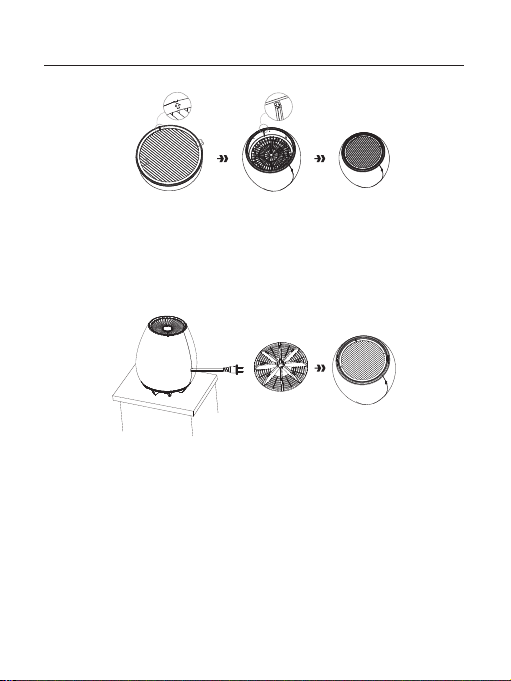
product maintenance
5. Install the inlet grille
Place the inlet grille vertically into the main unit in the direction of the arrow.Then
place the product on a horizontal desktop and plug it in again.
4. Install the new filter
Hold the handle of the new filter with both hands and place it vertically into the
filter slot of the main unit.
Note: The arrow A of the filter should be placed vertically at the position of the
filter slot B.
A B
Note:
If the red light still flashes after replacing the filter, you need to manually remove the filter warning
mode before you can use it!Press and hold the power button, and plug the power cord into the mains
socket and unplug it to remove the filter warning mode. Then you can safely continue to use it.
7

III. Cleaning and Maintenance
Please unplug the machine and ensure that the product is off before maintenance.
Install according to the filter sticker to avoid mistakes.
It is best to wear gloves when replacing the filter element, and put the old filter in a
plastic bag and dispose of it according to the garbage classification to prevent
secondary pollution of the environment.
If not regularly check the cleaning and replacement filter will affect product use and life.
Please use a soft, dry cloth to clean the machine;
Use a soft, dry cloth to clean the dust from the air inlet and air outlet regularly to prevent
dust accumulation.
Daily cleaning
Maintenance of the HEPA filter:
Do not wash the filter;
During use, do not use sharp objects to puncture the HEPA filter. This will reduce or even
damage the filtering capacity of the filter. When the replacement light is on, please
confirm and replace the filter.
Special hints:
Do not install the used filter element in reverse, otherwise the dust adsorbed by the filter
element may be sucked out by the wind and cause pollution.
Replace the filter
product maintenance
8

Common problem Troubleshooting Solution
Common problems
Loud noise
Plug the power and
ensure good contact.
Press and hold the power
button while plugging the
power cord into the mains
socket and then unplug it.
The machine is not
running
Poor smoke and
odor removal effects
The power is not plugged
in, or the socket is not in
good contact.
The filter life has expired
or the filter is too dirty.
Low smoke removal
efficiency.
Filter service life has
expired.
The air inlet is blocked by
foreign matter.
The use area exceeds the
machine use area.
Check to see whether the
filter blocked.
Replace with a new filter
or unblock the filter.
Please make sure the
filter is installed in place.
Please replace the filter
element in time.
Please remove foreign
matter from the air inlet.
Please use it within the
appropriate area.
If you need services or wan to purchase filters and other supplies, please call our
customer service line 4009-21-3058.
9
Table des matières
Autres manuels Dustie Purificateur d'air


