Dune HD Smart BE Manuel utilisateur

Dune HD Smart BE
Quick Start Guide
Guide de démarrage rapide
Schnellstartanleitung
Snel Start Gids
Guía de instalación rápida
Краткое руководство
Короткий посібник
Skrócona instrukcja Szybki Start
English ●Français ●Deutsch ●Nederlands ●Español ●Русский ●Українська ●Polski


3
Table of Contents
Table of Contents
4
6
8
10
12
13
16
18
English
Quick Start Guide
Français
Guide de démarrage rapide
Deutsch
Schnellstartanleitung
Nederlands
Snel Start Gids
Español
Guía de instalación rápida
Русский
Краткое руководство
Українська
Короткий посібник
Polski
Skrócona instrukcja Szybki Start

4Dune HD Smart BE Quick Start Guide
Introduction
Dune HD Smart BE is an extension module that adds a Blu-ray drive to your Dune HD media player.
Description
Using this extension module, you can play CDs, DVDs (both user-authored and retail) and Blu-ray discs
(both user-authored and retail) using your Dune HD media player.
Compatible models of Dune HD media players:
●Dune HD Smart D1
●Dune HD Smart H1
●NOTE: Future Dune HD media player models may be supported as well (check the information provided
for a particular Dune HD Media player model).
The extension module connects to the player via eSATA interface.
NOTE: Since the extension module uses the standard eSATA interface, you can also use the extension
module with a PC, another Dune HD media player model, or any other equipment supporting the
connection of eSATA devices. However, the extension module is intended primarily for the use with the
compatible models of Dune HD media players and is not guaranteed to work smoothly and reliably with
other equipment.
NOTE: A possibility to play retail Blu-ray discs is provided only for the compatible models of Dune HD
media players. Connecting the extension module to another model of Dune HD media player, to a PC, or
to any other equipment will not give such a possibility.
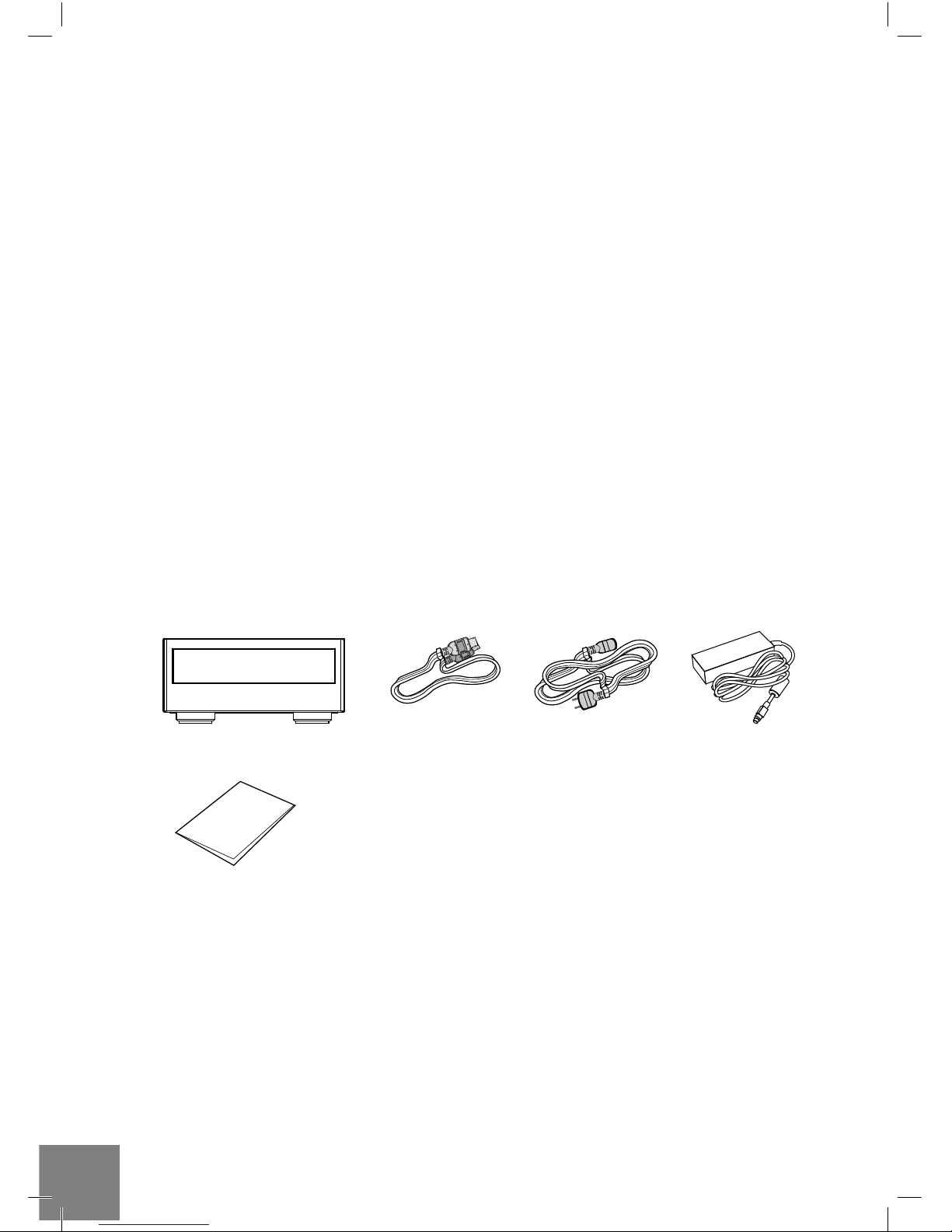
Package Contents
1. Dune HD Smart BE extention module
2. eSATA / eSATA cable
3. Power supply cord
4. External power supply
5. Quick start guide
123
5
4
BE

5
Exterior
Front view
1. Optical drive
1
Rear view
1. eSATA host
2. Power switch
3. DC power 12V
132
BE
eSATA DC IN 12V
Usage Instructions
To connect the extension module to your Dune HD media player:
●Connect the eSATA port of the extension module to the eSATA port of the player.
●Ensure power is connected to both the player and the extension module (NOTE: the extension module
has its own power connection, and is not powered from the player via eSATA connection).
●When you boot the player and navigate to the main screen of the player, the player will show an item
corresponding to the Blu-ray drive on the main screen.
●NOTE: For maximum safety and reliability, it is recommended to switch both the player and the extension
module off (full power off) before connecting and disconnecting them.
●NOTE: You can also use special fastening brackets (not included, can be purchased separately) to
physically connect the extension module to the player.
To eject the disc tray of the Blu-ray drive (to insert/remove an optical disc), use the EJECT button on the
remote control or on the front panel of the player.
Getting More Information
Please check here for more detailed and up-to-date information on Dune HD media players and Dune HD
Smart extension modules: http://dune-hd.com
ENGLISH

6Dune HD Smart BE Quick Start Guide
Introduction
Le Dune Smart BE est un module d’extension ajoutant un lecteur Blu-ray à votre lecteur multimédia Dune
HD.
Description
Avec ce module supplémentaire vous pouvez lire CD, DVD (personnels et commerciaux) et Blu-ray
(personnels et commerciaux) avec votre lecteur multimédia Dune HD.
Lecteurs multimédia Dune HD compatibles :
●Dune HD Smart D1
●Dune HD Smart H1
●NOTE: Les futurs modèles de lecteurs multimédia Dune HD pourraient être supportés (vérifiez à cet effet
les caractéristiques de ces lecteurs)
Le module d’extension se branche au lecteur via le port eSATA.
NOTE: Puisque le module d’extension utilise le port eSATA, vous pouvez également utiliser ce module
avec un PC, un autre lecteur multimédia Dune HD, ou tout autre équipement supportant la connexion
eSATA. Cependant, le module d’extension a été conçu pour fonctionner avec les lecteurs multimédia Dune
HD compatibles et le bon fonctionnement avec tout autre équipement n’est pas garanti.
NOTE: La lecture de disques Blu-ray commerciaux n’est effective que sur les lecteurs multimédia Dune HD
compatibles. Brancher le module d’extension sur un autre modèle de lecteur multimédia Dune HD, un PC
ou tout autre équipement ne garantit pas cette lecture.
Contenu de la boîte
1. Module d’extension Dune HD Smart BE
2. Cordon eSATA
3. Cordon d’alimentation
4. Bloc d’alimentation externe
5. Guide de démarrage rapide
123
5
4
BE

7
Vues extérieures
Face avant:
1. Lecteur optique
1
Panneau arrière:
1. Port eSATA
2. Interrupteur Marche/Arrêt
3. Alimentation 12V
132
BE
eSATA DC IN 12V
Instructions d’utilisation
Pour connecter le modèle d’extension à votre lecteur multimédia Dune HD :
●Branchez le module d’extension au lecteur sur leurs ports eSATA respectifs par l’intermédiaire du cordon
eSATA fourni.
●Assurez-vous que le lecteur ainsi que le module d’extension soient branchés au courant. (NOTE: le
module d’extension possède sa propre alimentation électrique et par conséquent n’est pas alimenté par
le lecteur via le port eSATA).
●Après allumage du lecteur et du module d’extension, une icône correspondant au lecteur optique Blu-ray
apparaîtra sur le menu de l’écran principal du lecteur.
●NOTE: Pour une sécurité et fiabilité maximale, il est recommandé d’éteindre complètement le lecteur
ainsi que le module d’extension (en utilisant l’interrupteur Marche/arrêt) avant toute manipulation.
●NOTE: Vous pouvez également utiliser le kit de fixation (non inclu et vendu séparément) permettant de
relier physiquement le module d’extension au lecteur.
Pour ouvrir le lecteur optique Blu-ray (afin d’insérer/retirer un disque optique), appuyez sur le bouton
EJECT situé sur la télécommande ou sur la face avant du lecteur.
Informations complémentaires
Pour de plus amples informations concernant les lecteurs multimédia Dune HD ainsi que les modules
d’extension Dune HD Smart, veuillez vous rendre à l’adresse internet suivante: http://dune-hd.com
FRANÇAIS

8Dune HD Smart BE Quick Start Guide
Einleitung
Das Dune HD Smart BE ist ein Erweiterungsmodul, mit dem Sie Ihren Dune HD Mediaplayer um ein Blu-
ray Laufwerk erweitern können.
Beschreibung
Durch dieses Erweiterungsmodul können Sie CDs, benutzererstellte und originale DVDs sowie
benutzererstellte und originale Blu-ray Discs) mit Ihrem Dune HD Mediaplayer abspielen.
Folgende Dune HD Mediaplayer sind mit dem Erweiterungsmodul kompatibel:
●Dune HD Smart D1
●Dune HD Smart H1
●HINWEIS: Auch die Unterstützung zukünftiger Modelle von Dune HD Mediaplayern ist möglich (bitte
prüfen Sie hierzu die Produktinformationen des jeweiligen Dune HD Player-Modells).
Das Erweiterungsmodul wird über eine eSATA-Schnittstelle an den Player angeschlossen.
HINWEIS: Da das Erweiterungsmodul mit einer handelsüblichen eSATA-Schnittstelle ausgestattet ist,
können Sie das Modul natürlich auch mit einem PC, einem anderen Dune HD Mediaplayer oder jedem
anderen Gerät mit eSATA-Unterstützung verwenden. Allerdings wurde das Erweiterungsmodul in erster
Linie für den Einsatz mit den kompatiblen Dune HD Mediaplayern entwickelt, und bei Verwendung des
Moduls mit anderen Geräten kann daher ein störungsfreier und zuverlässiger Betrieb nicht garantiert
werden.
HINWEIS: Das Abspielen originaler Blu-ray Discs ist nur mit den kompatiblen Dune HD Mediaplayern
möglich. Wenn das Erweiterungsmodul an einen anderen Dune HD Mediaplayer, an einen PC oder an
andere Geräte angeschlossen wird, besteht diese Möglichkeit nicht.
Lieferumfang
1. Dune HD Smart BE Erweiterungsmodul
2. eSATA / eSATA Kabel
3. Stromkabel
4. Externes Netzteil
5. Schnellstartanleitung
123
5
4
BE

9
Gehäuse
Vorderansicht
1. Optisches Laufwerk
1
Rückansicht
1. eSATA Host - Schnittstelle
2. An-/Ausschalter
3. 12V Gleichstromanschluss
132
BE
eSATA DC IN 12V
Bedienungshinweise
Anschließen des Erweiterungsmoduls an Ihren Dune HD Mediaplayer:
●Verbinden Sie die eSATA-Buchse des Erweiterungsmoduls mit der eSATA-Buchse des Players über das
mitgelieferte eSATA-Kabel.
●Stellen Sie sicher, dass sowohl der Player als auch das Erweiterungsmodul an die Stromversorgung
angeschlossen sind. (HINWEIS: Das Erweiterungsmodul hat eine eigene Stromversorgung und wird
nicht vom Player via eSATA-Verbindung versorgt).
●Wenn Sie den Player hochgefahren haben und das Hauptmenü öffnen, wird ein Icon in Form eines Blu-
ray Laufwerks im Hauptmenü angezeigt.
●HINWEIS: Für ein Höchstmaß an Sicherheit und Zuverlässigkeit wird empfohlen, sowohl den Player
als auch das Erweiterungsmodul komplett auszuschalten (Stromversorgung aus) bevor Sie die beiden
Geräte verbinden bzw. trennen.
●HINWEIS: Sie können auch spezielle Befestigungsbügel verwenden (separat erhältlich – nicht im
Lieferumfang enthalten), um das Modulgehäuse fest mit dem Gehäuse des Players zu verbinden.
Zum Öffnen der Disc-Schublade des Blu-ray Laufwerks (um eine optische Disc einzulegen bzw.
herauszunehmen) betätigen Sie die EJECT-Taste auf der Fernbedienung bzw. an der Frontblende des
Players.
Weitere Informationen
Weitere Details und aktuelle Informationen über die Dune HD Mediaplayer und die Dune HD Smart
Erweiterungsmodule finden Sie im Internet unter: http://dune-hd.com
DEUTSCH

10 Dune HD Smart BE Quick Start Guide
Introductie
De Dune HD Smart BE is een extensie module welke een Blu-ray speler aan uw Dune HD media speler
toevoegt.
Omschrijving
Middels deze module, kunt u zowel originele CD, DVD en Blu-Ray schijven afspelen, zowel zelf gemaakte
als originele met uw Dune HD media speler.
Ondersteunende Dune HD Media spelers:
●Dune HD Smart D1
●Dune HD Smart H1
●OPMERKING: Toekomstige Dune HD media spelers zullen mogelijk ook gebruik kunnen maken van
deze module. (indien dit het geval is, zal dit in de handleiding van toekomstige spelers vermeld worden).
De extensie module word verbonden met de speler middels de eSATA aansluiting.
OPMERKING: Aangezien de module gebruikt maakt van de standaard eSATA aansluiting, is deze tevens
te gebruiken op PC’s, echter hier kan geen ondersteuning vanuit de fabrikant worden gegeven. Om er
zeker van te zijn dat u volledig gebruik kunt maken van de module, raden wij u aan deze alleen op de
ondersteunende Dune HD media spelers te gebruiken.
OPMERKING: Originele Blu-Ray kunnen alleen afgepeeld worden op de ondersteunende Dune HD
media spelers.
Inhoud van de verpakking
1. Dune HD Smart BE extensie module
2. eSATE / eSATA kabel
3. Netsnoer
4. Externe voeding
5. Snel start gids
123
5
4
BE
Table des matières
Langues :
Autres manuels Dune HD Lecteur multimédia

Dune HD
Dune HD Smart H1 Manuel utilisateur

Dune HD
Dune HD TV-102AW Manuel utilisateur

Dune HD
Dune HD Smart B1 Manuel utilisateur

Dune HD
Dune HD Smart B1 Manuel utilisateur

Dune HD
Dune HD Duo 4K Manuel utilisateur

Dune HD
Dune HD Base3D Manuel utilisateur

Dune HD
Dune HD Lite 53D Manuel utilisateur

Dune HD
Dune HD Smart HE Manuel utilisateur

Dune HD
Dune HD TV-301 Manuel utilisateur

Dune HD
Dune HD TV-101 Manuel utilisateur