
Dual AMCP600W Mode d'emploi

INSTALLATION/OWNER'S MANUAL
AM/FM/CD Marine Receiver with Detachable Face
AMB600W
Front and Rear Inputs
2
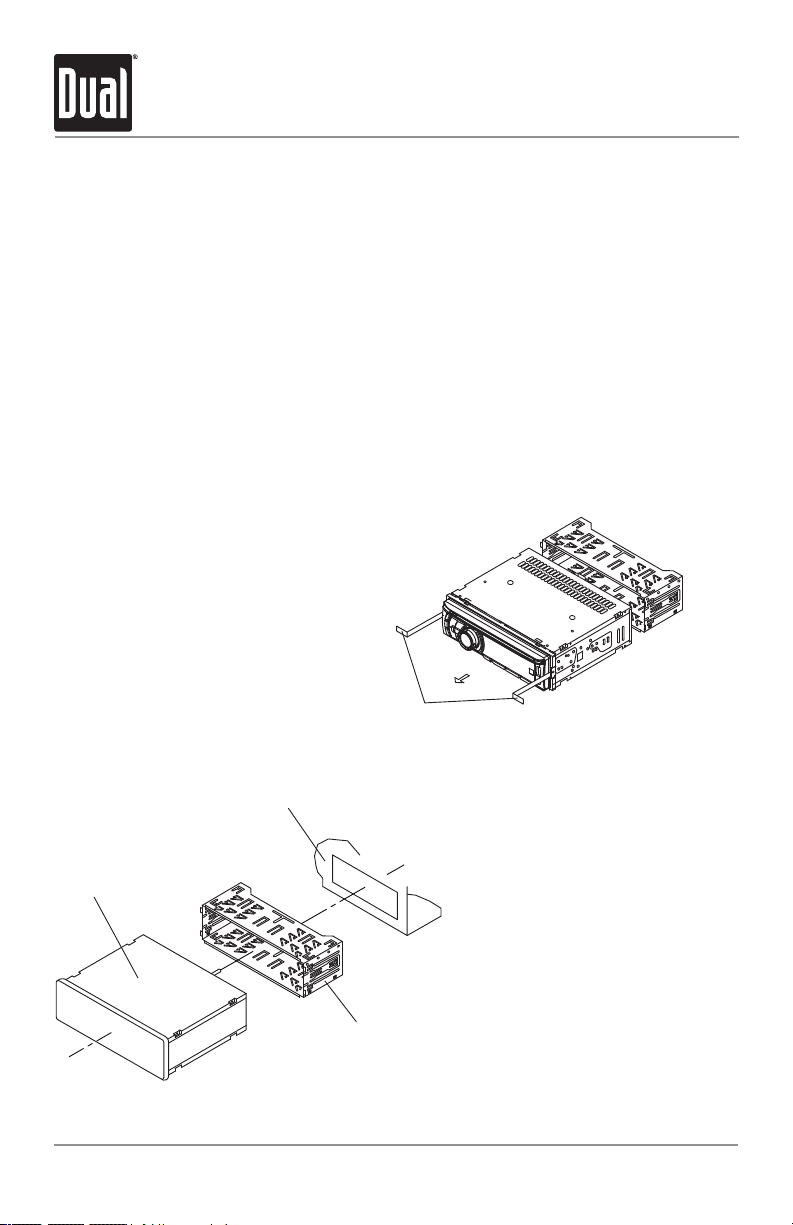
TYPICAL FRONT-LOAD DIN MOUNTING METHOD
Removal Keys
Head Unit
Mounting Sleeve
Dashboard or Installation Kit
AMB600W INSTALLATION
Preparation
Please read entire manual before installation.
Before You Start
•Disconnectnegativebatteryterminal.Consultaqualifiedtechnicianforinstructions.
•Avoidinstallingtheunitwhereitwouldbesubjecttohightemperatures,suchasfrom
directsunlight,orwhereitwouldbesubjecttodust,dirtorexcessivevibration.
Getting Started
•Removetrimringfromunit.
•Remove2transitscrewslocatedontopoftheunit.
•Insertthesuppliedkeysintotheslotsasshown,andslidetheunitoutofthemounting
sleeve.
•Installmountingsleeveintoopening,bendingtabstosecure.
•Connectwiringharnessandantenna.Consultaqualifiedtechnicianifyouareunsure.
•Certainvehiclesmayrequireaninstallationkitand/orwiring
harnessadapter(soldseparately).
•Testforcorrectoperationandslideinto
mountingsleevetosecure.
•Snaptrimringintoplace.

3
AMB600W INSTALLATION
Wiring Diagram
SiriusXM Vehicle Tuner Connection
(tuner sold separately)
Remote Control Input
(not used)
REAR/SUB
RCA Preamp Connections
FRONT
REAR AUXILIARY INPUT
BLACK
Bluetooth Microphone
(must be connected for Bluetooth functionality)
Bluetooth Microphone Input
Connect the included
Bluetooth microphone.
BLACK - Antenna Input
Connect the vehicle antenna
FUSE
Whenreplacingthe
fuse,makesurenew
fuseisthecorrecttype
andamperage.Using
anincorrectfusecould
damagetheradio.
TheAMB600Wuses
one10ampATMfuse
locatedbesidethewiring
connector.

4
AMB600W OPERATION
Control Locations - Receiver
5
16
13
14
15
16
17
22
Power
Release
Talk
Tune/TrackDown
Tune/TrackUp
Volume(turn)orSelect/Tag(push)
ModeUp
ModeDown
ModeIndicator
Eject
USBPort
1
2
3
4
5
6
7
8
9
AuxiliaryInput
Preset6/FolderUp
Preset5/FolderDown
Preset4/Play/Pause
Preset3/Intro
Preset2/Random
Preset1/Repeat
Display
Audio/Menu
Band/Escape
EndCall
14
15
16
17
18
19
12
13
10
711 12
18
10
20
19
21
21
20
234 8 9
11 22

5
AMB600W OPERATION
Control Locations - Remote
12
4
3
5
6
7
8
9
10
12
11
Key8
EndCall
Key0/Display
Talk
Key7/Key*
Preset5/FolderDown
Preset4/Play/Pause
Preset1/Repeat
Band/Escape
Tune/TrackDown
1
2
3
4
5
6
7
8
9
10
11
12
13
14
15
16
17
Mute/Power
VolumeUp
Audio/Menu
Select/Tag
Tune/TrackUp
VolumeDown
Mode
Preset3/Intro
Preset2/Random
Preset6/FolderUp
Key9/Key#
18
19
17
18
20
21
16
14
13
15
19
20
21

6
AMB600W OPERATION
Press oranyotherbutton(exceptEJECT)toturntheunit
on. Press toturntheunitoff.
Press MODE DOWNtocycledownorpressMODE UP to
cycleupthroughthefollowingoperatingmodes.Amode
indicatorlocatedtotheleftoftheLCDwillpointtothe
currentmodeofoperation.
AM/FM/WBTunerMode
CDPlayerMode
AuxiliaryInput(front/rear)Modes
USBandOperationofiPod®/iPhone®Modes
SDCardMode
BluetoothMode
SiriusXMSatelliteRadioMode
SiriusXMmodewillnotappearunlesstheSiriusXMConnect
VehicleTuner(soldseparately)isconnected.
OperationofiPodmodewillnotappearunlessaniPod
device(soldseparately)hasbeenconnected.
CD,USBandSDmodeswillnotappearunlessaCD,USB
deviceorSDcard(soldseparately)havebeenconnected.
TheAMB600Wofferstwoauxiliaryinputports,a3.5mm
portonthefrontpanelandanRCAconnectiononthebackof
theunit.Useeitherconnectiontoconnectaudiodevice,MP3
player,etc.PressMODE UP/DOWNtoselectAUXFRONTor
AUXREARmodes.
Adjustvolumeusingvolumeknob(00-46).
Press DISPtoselectbetweenclockanddifferenttypesof
information,suchasradiofrequency,CDtrack/elapsedtime
orMP3/WMAsonginformation.
Press RESETuponinitialinstallationorifabnormal
operationoccurs.Resetbuttonislocatedbehindthefront
panel.
Withtheuniton,pressandholdDISPuntiltheclockbegins
toflash,thenrelease.PressTUNE
nn
toadjustthehours
and TUNE
ll
toadjusttheminutes.PressDISP momen-
tarilytosavetheselectedtime.
Power On/Off
Changing Modes
Available Modes
Auxiliary Inputs
Volume
Display
Reset
Set the Clock
General Operation

7
AMB600W OPERATION
General Operation - Setup Menu
Menu Function Options Action
Auto Station
Store
AUTOPGM
STATIONS
Press SELECTtoseekandsave6strongstationsinthecurrent
band.(Tuner mode only)
Local/Distance
Tuning
LOCALOFF Activatesdistancetuning(Tuner mode only).
LOCALON Activateslocaltuningforstrongstationreceptiononly(Tuner mode
only).
Tuner
Frequency
Spacing
FREQ'NCYUSA ProgramstheunittoUSAtunerspacing.
(200kHzforFMand10kHzforAM).(Tuner mode only)
FREQ'NCYEURO ProgramstheunittoEuropeantunerspacing.
(50kHzforFMand9kHzforMW).(Tuner mode only)
Selectable iPod
Control
IPODCNT
FULL
ProgramstheheadunittoadvancedcontroloftheiPod/iPhone
device.
IPODCNT
MANUAL
ProgramstheheadunittomanualcontroloftheiPod/iPhonedevice
andallowsmusictobecontrolledfromtheiPod/iPhonedevice.
Loudness LOUDON Enablestheloudnessfeature,whichenhancesthebassandtreble
frequenciesatlowvolumes.
LOUDOFF Disablestheloudnesfeature.
Clock
Display
CLOCKOFF Programsunittonotdisplaytheclockwhenthepowerisoff.
CLOCKON Programsunittodisplaytheclockwhenthepowerisoff.
Front Auxiliary
Input
AUX-FRNTON Enablesthefrontpanel3.5mmauxiliaryinput.
AUX-FRNTOFF Disablesthefrontpanel3.5mmauxiliaryinput.
Rear Auxiliary
Input
AUX-REARON EnablestherearRCAauxiliaryinput.
AUX-REAROFF DisablestherearRCAauxiliaryinput.
Rear/Sub
RCA output
SUBWFRSUB Programstherear/subRCApreampoutputtosubwoofer.
SUBWFRREAR Programstherear/subRCApreampoutputtorear.
Beep Confirmation BEEPOFF Disablestheconfirmationbeep.
BEEPON Enablestheconfirmationbeep.
Programmable
Turn On Volume PROG-VOL# Programsunittoalwaysturnonataspecificvolume
(defaultisOFF).Anyvolumelevel1-46canbeselected.
Power on Message MESSAGEOFF Disablespoweronmessage.(example:GOODMORNING)
MESSAGEON Enablespoweronmessagetobedisplayed.
Scrolling
Option
SCROLL15SEC Programsunittoscrollinformationonceevery15seconds(default).
SCROLLONCE Programsunittoscrollonce,thenshowthefirst8characterson
display.
SCROLLON Programsunittoscrollcontinuously.
SCROLLOFF Programsunittoshowthefirst8charactersonthedisplay.
Illumination
Dimmer
DIMMERHIGH Programsunittothebrightestilluminationlevel.
DIMMERMEDIUM Programsunittothemiddleilluminationlevel.
DIMMERLOW Programsunittothedimmestilluminationlevel.
Demonstration
Mode
DEMOOFF Disablesthedemonstrationmode.
DEMOON Enablesthedemonstrationmessage.
Bluetooth Options Seepage31formenuoptions.
SiriusXM Setup (PressSELECT) Seepage12formenuoptions.

8
AMB600W OPERATION
Theclockwilldisplay12-hourAM/PMtimeinUSA
frequencyspacingmode(PM10:00).InEuropeanfrequency
spacingmode,theclockwilldisplay24-hourtime(22:00).
Press AUDIOmomentarilytoselectbetweenBass,Treble,
Balance,Fader,Equalizer,SubwooferandSourceVolume
Level.
Press AUDIO until BASSappears,thenrotatevolume knob
left/righttoadjust(-6minimum/+6maximum).
Press AUDIO until TREBLEappears,thenrotatevolume
knobleft/righttoadjust(-6minimum/+6maximum).
Press AUDIO until BALANCEappears,thenrotatevolume
knobleft/righttoadjust(BALANCELEFT12-BALANCE
RIGHT12).BALANCEEVENrepresentsequalbalance.
Press AUDIO until FADERappears,thenrotatevolume knob
left/righttoadjust(FADERFRONT12-FADERREAR12).
FADEREVENrepresentsequalfader.
Press AUDIO until EQappears,thenrotatevolume knob
toselectfromthefollowingequalizationcurves:FLAT
(default),POP,JAZZ,CLASSIC,BEAT,ROCKandUSER.Any
manualadjustmentstothebassandtreblesettingsare
automaticallysavedasUSER.
Press AUDIO until SUBWFR appears,thenrotatevolume
knobleft/righttoadjust(0minimum/+12maximum).
Note: SubwooferoptionwillnotappeariftheREAR/SUB
optioninthesetupmenuissettoREAR.Refertopage7for
details.
Thesourcevolumelevelcontrolallowsagainadjustment
foreachaudiosource:AM,FM,WB,CD,AUXFRONT/REAR,
operationofiPod,USB,SDcard,BluetoothandSiriusXM.
Setthesourcevolumelevelforeachmode,dependingon
therelativevolumeofeachaudiosource.
Tosetthesourcevolumelevel,pressAUDIOuntilSOURCE
LEVELappears.Afteronesecond,thecurrentmodewill
appearonthedisplay.Turnthevolume knobtoadjust
theaudiolevelofthecurrentsource(-6minimum/+6
maximum).
Note: Onlythecurrentmodewillbeavailablefor
adjustment.Toadjustanothermodeofoperation,press
MODE UP/DOWNuntilthedesiredmodeisselected,then
setthesourcevolumelevelforthatmode.
12/24-hour Clock
Audio
Bass
Treble
Balance
Fader
EQ
Subwoofer
Source Volume Level
General Operation
BASS TREBLE BALANCE FADER EQ SUBWOOFER SOURCE LEVEL

9
AMB600W OPERATION
Seek Tuning
Manual Tuning
Band
Storing and Recalling
Station Presets
Press TUNE
nn
or TUNE
ll
formorethanonesecond
toseektothenextstrongstation.Pressandholdtoadvance
quickly.
Press TUNE
nn
or TUNE
ll
momentarilytochange
radiofrequencyupordownonestepatatime.
Press BANDtoselectbetweenFM1,FM2,FM3,AM1,AM2
andWBbands.
Upto18FMstationsand12AMstationscanbestored.To
storeastation,selectthedesiredbandandstation.Press
andholdthedesiredpresetbutton(1-6)formorethan
2seconds.
Whenstored,thepresetnumberwillappearinthedisplay.
Thestationcanberecalledanytimebypressingthe
correspondingpresetbutton.
Weather Band Tuner Operation
Band
Manual Tuning
Storing and Recalling
Presets
Press BANDtoselectweatherband(WB).
Press TUNE
nn
or TUNE
ll
momentarilytoseekthe
nextweatherbandstation.
Upto6weatherbandstationscanbestored.Tostorea
station,selecttheweatherbandandthedesiredstation.
Pressandholdthedesiredpresetbutton(1-6)formore
than2seconds.
Whenstored,thepresetnumberwillappearinthedisplay.
Thestationcanberecalledanytimebypressingthe
correspondingpresetbutton.
AM/FM Tuner Operation

10
AMB600W OPERATION
SiriusXM Vehicle Tuner Connections
SiriusXM Vehicle Tuner Operation
Connecting the
SiriusXM Vehicle Tuner
(sold separately)
SiriusXM Satellite Radio
Overview
Tuner Activation
SiriusXMSatelliteRadiooperationrequirestheconnectionofthe
SiriusXM-ConnectVehicleTuner(soldseparately).
Note:TheSiriusXM-ConnectVehicleTunermusthavetheSiriusXM
logotobecompatiblewiththeAMB600W.
ToconnecttheSiriusXMVehicleTuner,followtheinstructions
providedwiththetuner.WhenconnectingthetunertotheAMB600W,
thecableorientationshouldbeconnectedasshownbelow.
EverythingworthlisteningtoisonSiriusXM,gettingover130
channels,includingthemostcommercial-freemusic,plusthebest
sports,news,talkandentertainment.ASiriusXMVehicleTuner(sold
separately)andSubscriptionarerequired.Formoreinformation,
visitwww.siriusxm.com.
Sirius,XMandallrelatedmarksandlogosaretrademarksofSirius
XMRadioInc.anditssubsidiaries.Allothermarksandlogosarethe
propertyoftheirrespectiveowners.Allrightsreserved.
TolistentoSiriusXMSatelliteRadio,asubscriptionisrequired.
ActivatetheSiriusXMVehicleTunerusingoneofthetwomethods
below:
• Online:Goto"www.siriusxm.com/activatenow"andchoose
ACTIVATERADIO.
• Phone:Call1-800-XM-RADIO(1-800-967-2346).
Activationtypicallytakes10-15minutes,butmaytakeuptoanhour.
Itisrecommendedtoleaveyourvehicleonuntilthe"Subscription
Updated"messageappears.
AMB600WHead
Unit
SiriusXM-Ready
Input
SiriusXMVehicle
TunerCable
Lineuptheconnectorwiththepinsonthecable.Itcanonlybeinsertedasshownabove.Pushthe
cableintotheheadunit'sconnectoruntilitclicks.Attemptingtoinsertthecabledifferentlyfrom
shownabovemaycausedamagetothecableorheadunit.
Table des matières
Autres manuels Dual Équipement marin






Manuels Équipement marin populaires d'autres marques


Clarion
Clarion GR10BT Manuel de réparation

Raymarine
Raymarine Maxiview ST80 Guide de l'utilisateur

GUIDANCE MARINE
GUIDANCE MARINE 20- Series Instructions de montage

Raymarine
Raymarine ST60 Tridata Guide de l'utilisateur

olympia electronics
olympia electronics ΒS-531/1/MAR Manuel utilisateur

Sonic
Sonic 2024 Manuel utilisateur