
Dual DXDM280BT Mode d'emploi

INSTALLATION/OWNER'S MANUAL
AM/FM/CD Receiver
DXDM280BT

2
DXDM280BT INSTALLATION
Decorative
Bezel
Preparation
Please read entire manual before installation.
Before You Start
• Disconnect negative battery terminal. Consult a qualified technician for instructions.
• Avoid installing the unit where it would be subject to high temperatures, such as from
direct sunlight, or where it would be subject to dust, dirt or excessive vibration.
Getting Started
• Remove trim ring from unit.
• Remove 2 transit screws located on top of the unit.
• Connect wiring harness and antenna. Consult a qualified technician if you are unsure.
• Certain vehicles may require an installation kit and/or wiring harness adapter (sold
separately).
• Test for correct operation.
• Snap trim ring into place.
TYPICAL FRONT-LOAD DIN
MOUNTING METHOD

3
DXDM280BT INSTALLATION
Wiring Diagram
10 AMP
AGC Fuse
Antenna
Connector
SUBREARFRONT
L-CH
R-CH
FUSE
When replacing the
fuse, make sure new
fuse is the correct type
and amperage. Using
an incorrect fuse could
damage the radio.
The unit uses one 10 amp
AGC fuse located beside
the wiring connector.

4
DXDM280BT OPERATION
Control Locations
Bluetooth Talk
Auxiliary Input
Audio / Menu
USB Input
Display
Preset 6 / Folder Up
Preset 5 / Folder Down
Preset 4 / Play / Pause
Eject
Preset 1 / Repeat
Preset 2 / Random
Preset 3 / Intro
Power / Mute
Tune / Track Down
Tune / Track Up
Mode
Band / Go Back
Volume Knob
1 10
2 11
3 12
4 13
5 14
6 15
7 16
8 17
9 18
14
13
12
5
18
9
4
17
16
15
1
2
3
11
10
8
76

5
DXDM280BT OPERATION
Remote Control
12
4
5
7
8
9
3
10
12
14
15
16 6
17
Preset 6 / Folder Up
Mute
Audio / Menu
Preset 5 / Folder Down
Preset 4 / Play / Pause
Preset 1 / Repeat
Bluetooth Talk
Tune / Track Down
1
2
3
4
5
6
7
8
10
11
12
13
14
15
16
17
Mode
Volume Up
Power
Select
Tune / Track Up
Volume Down
Band / Go Back
Preset 3 / Intro
Preset 2 / Random
11
13
9

6
DXDM280BT OPERATION
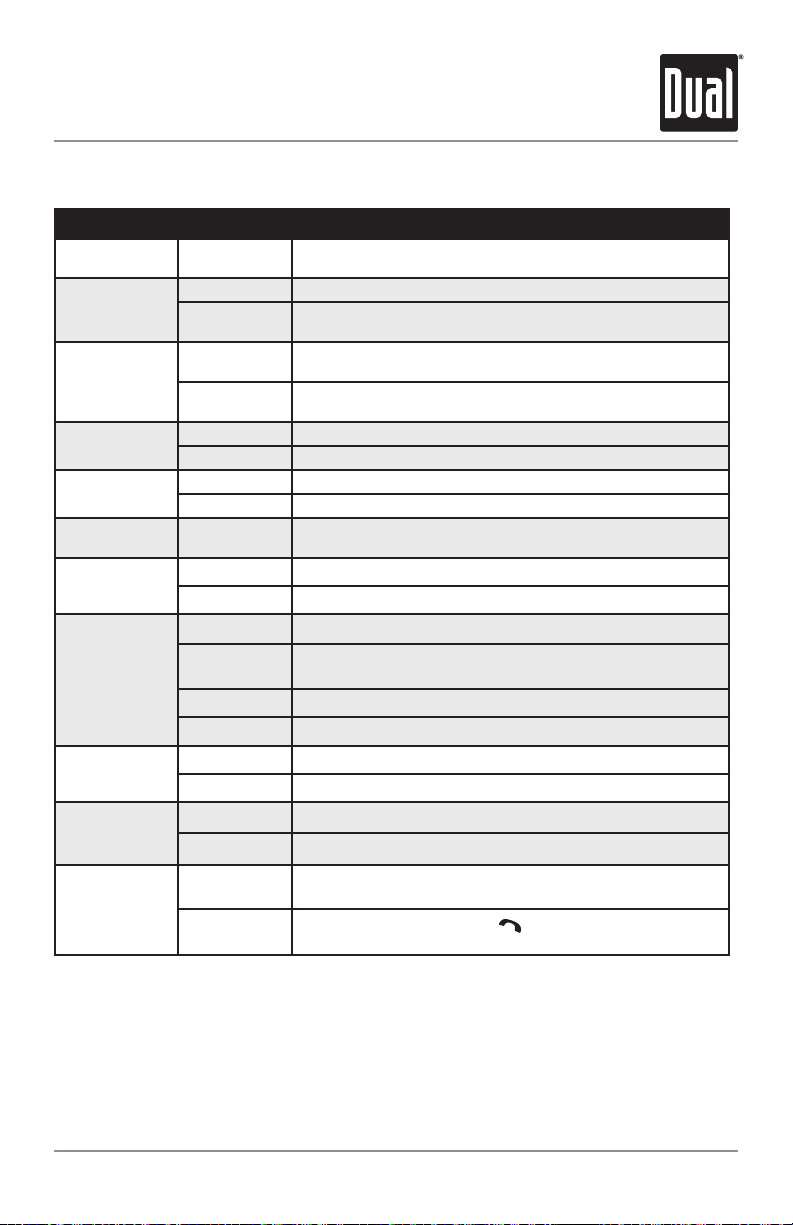
Press or any other button (except EJECT) to turn the unit
on. Press to turn the unit off.
Press MODE to select between AM/FM, CD player, Bluetooth,
auxiliary and USB. Modes of operation are shown in the
display.
NOTE: CD and USB modes will not appear unless a CD is
inserted or USB device is connected.
The DXDM280BT offers a 3.5 mm auxiliary input port on the
front panel of the unit for connecting an audio device, MP3
player, etc. Press MODE to select auxiliary input mode.
Adjust volume using volume knob (00-46).
Press DISP to show the clock. During playback of MP3/files,
ID3 tag information, elapsed time, track number and file/
folder names will automatically rotate on the display.
Press RESET upon initial installation or if abnormal
operation occurs.
With the unit on, press and hold DISP until the clock begins
to flash, then release. Press the ll button to adjust the
HOUR and press the nn to adjust the minutes.
The clock will display 12-hour AM/PM time in USA frequency
spacing mode (PM 10:00). In European frequency spacing
mode, the clock will display 24-hour time (22:00).
Press and hold AUDIO for more than 3 seconds to access the
setup menu. Press AUDIO momentarily to select between
the menu functions and rotate the volume knob left/right to
adjust or activate the desired function.
Power On/Off
Mode
Auxiliary Input
Volume
Display
Reset
Set the Clock
12/24-hour Clock
Setup Menu
General Operation
7
DXDM280BT OPERATION
General Operation - Setup Menu
Menu Function Options Action
Auto Station
Store AUTO STORE Press the volume knob to seek and save 6 strong stations in
the current band. (Tuner mode only)
Local/Distance
Tuning
LOCAL OFF Activates distance tuning (Tuner mode only).
LOCAL ON Activates local tuning for strong station reception only (Tuner
mode only).
Tuner
Frequency
Spacing
FREQ USA Programs the unit to USA tuner spacing.
(200kHz for FM and 10kHz for AM). (Tuner mode only)
FREQ EURO Programs the unit to European tuner spacing.
(50kHz for FM and 9kHz for AM). (Tuner mode only)
Auxiliary Input AUX ON Enables the front panel 3.5mm auxiliary input.
AUX OFF Disables the front panel 3.5mm auxiliary input.
Beep
Confirmation
BEEP OFF Disables the confirmation beep.
BEEP ON Enables the confirmation beep.
Programmable
Turn On Volume PRO-VOL # Programs unit to always turn on at a specific volume (default is
OFF). Any volume level 1-30 can be selected.
Power On
Message
MSG OFF Disables power on message. (Example: GOOD MORNING)
MSG ON Enables power on message to be displayed.
Scrolling
Option
SCROLL 15 SP Programs unit to scroll information every 15 seconds (default).
SCROLL ONCE Programs unit to scroll once then show the first 10 characters
on display
SCROLL ON Programs unit to scroll continuously.
SCROLL OFF Programs the unit to show the first 10 characters on display.
Demonstration
Mode
DEMO OFF Disables the demonstration mode.
DEMO ON Enables the demonstration mode.
Bluetooth
BT ON Enables Bluetooth functionality.
BT OFF Disables Bluetooth functionality.
Auto Answer
ANSWER
Auto
Programs unit to automatically answer every incoming phone
call after 2-3 rings.
ANSWER
Manual
Programs unit to require the button must be pressed to
answer incoming phone calls (default).

8
DXDM280BT OPERATION
Press AUDIO momentarily to select between Bass, Treble,
Balance and Fader.
BASS TREBLE BALANCE FADER EQ LOUD SOURCE LEVEL
Press AUDIO until BASS appears then rotate volume knob
left/right to adjust ( -6 minimum / +6 maximum).
Press AUDIO until TREBLE appears then rotate volume knob
left/right to adjust ( -6 minimum / +6 maximum).
Press AUDIO until BAL appears then rotate volume knob
left/right to adjust (BAL 12L - BAL 12R).
BAL EVEN represents equal balance
Press AUDIO until FAD appears then rotate volume knob
left/right to adjust (FAD 12R - FAD 12F).
FAD EVEN represents equal fader
Press EQ, then turn the volume knob to cycle through the
following equalization curves: FLAT (default), POP, JAZZ,
CLASSIC, BEAT, ROCK and USER. Any manual adjustment
to the Bass or Treble settings are automatically saved as
USER.
Press AUDIO/MENU until LOUD appears then rotate volume
knob left/right to adjust LOUD ON/OFF.
The source volume level control allows a gain adjustment
for each audio source: AM, FM, CD, AUX and USB. Set the
source volume level for each mode, depending on the
relative volume of each audio source.
To set the source volume level, press AUDIO/MENU until
SRC LEVEL appears. After one second, the current mode
will appear on the display. Turn the volume knob to adjust
the audio level of the current source (-3 minimum/+3
maximum).
Note: Only the current mode will be available for
adjustment. To adjust another mode of operation, press
MODE until the desired mode is selected, then set the
source volume level for that mode.
Audio
Bass
Treble
Balance
Fader
EQ
Loudness
Source Volume Level
General Operation

9
DXDM280BT OPERATION
AM/FM Tuner Operation
Seek Tuning
Manual Tuning
Band
Storing and Recalling
Station Presets
Automatically Store
Stations
Press TUNE
nn
or TUNE
ll
momentarily to seek to the
next strong station.
Press and hold TUNE
nn
or TUNE
ll
until "MANUAL"
appears, then press TUNE
nn
or TUNE
ll
momentarily
to change radio frequency up or down one step at a time.
Press and hold to advance quickly.
Note: Seek and manual tuning functions are reversed if
Seek Priority is set to SEEK 2 in the setup menu (refer to
page 7 for details on setting Seek Priority).
Press BAND to select between FM1, FM2, FM3, AM1 and
AM2 bands.
Up to 18 FM stations and 12 AM stations can be stored. To
store a station, select the desired band and station. Press
and hold the desired preset button (1-6) for more than
2 seconds. When stored, the preset number will appear in
the display. The station can be recalled anytime by pressing
the corresponding preset button.
Press and hold AUDIO/MENU for more than 3 seconds to
find auto store in the display. Then press volume knob to
automatically store strong 6 stations in the current band.

10
DXDM280BT OPERATION
Insert CD
Eject CD
Track Select
Fast Forward/Reverse
Pause
Intro
Repeat
Random
CD-R/CD-RW
Compatibility
With the label facing up, insert a standard size CD into the
CD slot. The CD will automatically begin playback.
Press EJECT to eject the CD. The unit will change to
previous mode of operation. If the disc is not removed
within 10 seconds, the unit will reload the disc. The unit
does not have to be turned on to eject CD.
Press TRACK
ll
to skip to the beginning of the next
track. Press TRACK
nn
to return to the beginning of the
current track. Pressing TRACK
nn
again skips to the
beginning of the previous track.
Press and hold TRACK
ll
or TRACK
nn
on the remote
control to fast forward or reverse a track.
Press
l
/
II
to temporarily stop CD playback.
Press
l
/
II
again to resume playback.
Press INT to enter the Intro menu, then turn the volume
knob to select one of the following options:
• OFF - Cancels the INT function.
• ALL - Plays the first 10 seconds of each track.
Press RPT to enter the Repeat menu, then turn the volume
knob to select one of the following options:
• ALL - Plays all tracks on CD.
• TRACK - Continuously repeats selected track.
Press RDM to enter the Random menu, then turn the
volume knob to select one of the following options:
• OFF - Cancels the RDM function.
• ALL- Plays all tracks in random order.
Some CD-Rs and CD-RWs may be incompatible with this
unit, depending on media type and recording method. In
addition, the following CDs may be incompatible with this
unit:
CDs exposed to extreme temperatures or direct sunlight
for extended periods of time, CDs recorded in which a
recording session failed or a re-recording was attempted
and, or encrypted or copy-protected CDs which do not
conform to the audio CD-DA red book recording standard.
CD Player Operation
Table des matières
Autres manuels Dual Récepteur de voiture

Dual
Dual XD6150 Mode d'emploi
Dual
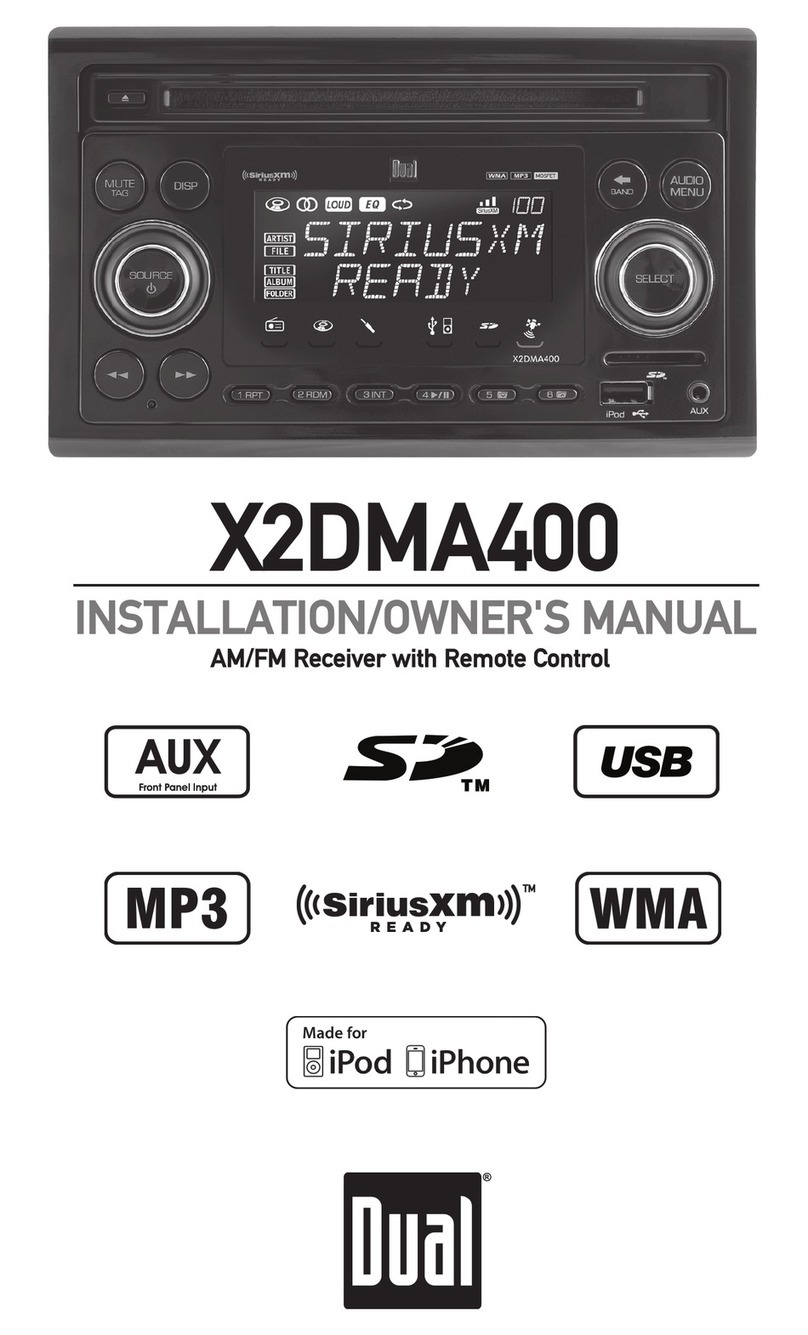
Dual X2DMA400 Mode d'emploi

Dual
Dual XD6320 Mode d'emploi

Dual
Dual XMR6900 Mode d'emploi

Dual
Dual DSA2062 Mode d'emploi

Dual
Dual DXRM59BT Mode d'emploi

Dual
Dual XDCPA10BT Mode d'emploi

Dual
Dual XHD7714 Mode d'emploi

Dual
Dual DC208BT Manuel utilisateur

Dual
Dual XDMA6855 Mode d'emploi

Dual
Dual MXCP44 Mode d'emploi

Dual
Dual AXXERA XDMA7600 Mode d'emploi

Dual
Dual XDVDN8290 Mode d'emploi

Dual
Dual MXD105 Mode d'emploi

Dual
Dual DSA1007BT Manuel utilisateur

Dual
Dual XDMA6540 Mode d'emploi

Dual
Dual DSA2062 Manuel utilisateur

Dual
Dual XD5120 Mode d'emploi

Dual
Dual XHD7720 Mode d'emploi

Dual
Dual XDMA6438 Mode d'emploi


