
DOVOH K3-360G Manuel utilisateur

User Manual
Professional Plane Laser Level
Model
K3-360G / KF3-360G / K4-360G
English
Deutsch
Français
Italiano
Español
Русский
日本語
01~13
14~29
30~45
46~61
62~78
79~94
95~108
. . . . . . . . . . . . . . . . . . . . . . .
. . . . . . . . . . . . . . . . . . . . . . .
. . . . . . . . . . . . . . . . . . . . . . .
. . . . . . . . . . . . . . . . . . . . . . .
. . . . . . . . . . . . . . . . . . . . . . .
. . . . . . . . . . . . . . . . . . . . . . .
. . . . . . . . . . . . . . . . . . . . . . .

Thank you for purchasing DOVOH Self-leveling Plane Laser Level.
Please read this manual carefully to ensure proper use.
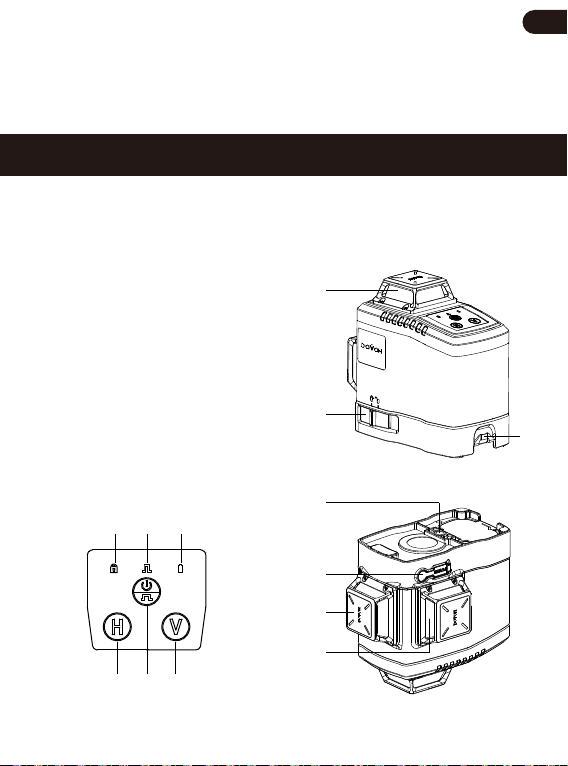
K3-360G
Product Overview
1. ON/OFF Button & Pulse Mode Button
2. Horizontal Line Switch
3. Vertical Line Switch
4. Manual Mode Indicator
5. Pulse Mode Indicator
6. Battery Power Indicator
7. Laser Window
8. Pendulum/Manual Mode Lock
9. Battery Cover
10. Type-C Charging Port
11. 1/4”-20 Thread Mount
7
8
9
11
10
7
7
4 5 6
2 1 3
- 01 -
EN

KF3-360G
1. ON/OFF Button & Pulse Mode Button
2. Horizontal Line Switch
3. Vertical Line Switch
4. Manual Mode Indicator
5. Pulse Mode Indicator
6. Battery Power Indicator
7. Laser Window
8. Pendulum/Manual Mode Lock
9. Battery Cover
10. Type-C Charging Port
11. 1/4”-20 Thread Mount
12. Embedded Mount
4 5 6
2 1 3
78 9 7 7
1112 10
- 02 -
EN

K4-360G
1. ON/OFF Button & Pulse Mode Button
2. Horizontal Line Switch
3. Vertical Line Switch
4. Manual Mode Indicator
5. Pulse Mode Indicator
6. Battery Power Indicator
7. Laser Window
8. Pendulum/Manual Mode Lock
9. Battery Cover
10. Type-C Charging Port
11. 1/4”-20 Thread Mount
7
8
79
11
10
7
7
4 5 6
2
1
3
12. 7.4V 2600mAh
Li-ion Battery
13. Type-C
USB Cable
14. Battery Charger
- 03 -
EN

DOVOH Self-leveling Plane Laser Level
Specification
520nm, <1mw
Green
20m/66ft
40-60m/130-197ft
27 hours
18 hours
9 hours
7 hours
±2mm/10m ( ±1/13 in. at 33ft )
±4°
< 4 seconds
5V=1A
7.4V 2600mAh Li-ion Battery
Input: 5V=1A, Output: 500mA
About 6 hours
Type-C
1/4”-20
IP54
90%
-10°C ~ 40°C ( -14°F ~ 104°F )
-20°C ~ 70°C ( -4°F ~ 158°F )
K3-360GModel
Laser Class
Dimension
Weight
Laser Type
Laser Beam
Working Range (300LUX)
Working Range (with laser receiver)
Working Time (with 4 laser lines)
Working Time (with 8 laser lines)
Working Time (with 12 laser lines)
Working Time (with 16 laser lines)
Leveling Accuracy
Self-leveling Range
Self-leveling Time
Power Adapter
Battery
Charger
Charging Time
Charging Port
Thread Mount
IP Rating
Operation Max. Humidity
Operation Temperature
Storage Temperature
KF3-360G K4-360G
Ⅱ
130x85x124mm 130x85x128mm 130x85x141mm
416g 415g 466g
- 04 -
EN

NOTE:
Keep the pulse mode on when using with receiver for larger working range.
Appearance and specification may differ due to product improvement.
Working range may differ depending on the operating environment.
NOTE:
If the warning label is not written in your national language, please stick
the supplied sticker in your national language on the original warning
label before first use.
Do not remove any labels from the tool.
Safety Instruction
Please read thoroughly and comply with the Safety Instruction and User
Manual before using the laser tool. Failure to read and follow may void the
warranty.
The laser tool is delivered with a warning label:
WARNING!
LASER RADIATION:
DO NOT STARE INTO BEAM
DO NOT DIRECT EYE EXPOSURE
AVOID VIEW WITH OPTICAL INSTRUMENTS IEC / EN60825-1: 2014
Do not direct the laser beam at persons or animals
and do not stare into the laser beam.
It will disturb others’ ability to see and lead to
accident or hurt eyes. IEC / EN60825-1: 2014
- 05 -
EN

User Guide, Maintenance and Care
Please power off the laser tool and place the pendulum lock in locked
position when not in use.
Do not touch the glass window in case leaving any fingerprint, which
may affect the performance of the laser.
Do not disassemble or modify the laser tool in any way.
Do not operate the laser tool around children or allow children to
operate the tool without supervision.
Do not attempt to view the laser beam through optical instruments.
Do not use the laser viewing glasses as safety goggles or sunglasses.
Do not dispose of the tool with household waste.
Please dispose of batteries per local code and disposal of electrical
and electronic waste under the WEEE Directive.
Store the tool with box or case when not in use. Remove the batteries
if storing for a long time.
Do not store the laser tool in direct sunlight or expose it to
high temperatures.
Do not immerse the laser tool in water or other liquids.
Always wipe off debris using a moist and soft cloth.
Description of Symbols
Read User Manual Recycling
Laser Radiation Do not be disposed of
with household wast
Battery Power Indicator Pulse Mode Indicator
- 06 -
EN

Charging & Battery Safety
Please read thoroughly and comply with the lithium battery safety instruction
before charging. Fail to read and follow may result in serious injury, fire, or
property damages.
Charging Safety
The battery can ONLY be charged with the battery charger provided
instead of being charged in the device directly.
Always use the charger or adapter provided by the manufacturer.
Please remove the battery and store it in a dry and room temperature
environment if the tool is not used for a long period.
The best charging temperature is 0°C to 20°C (32°F ~ 68°F).
The laser tool can be directly powered by USB Type-C cable.
Battery Safety
Do not short circuit. Short circuits may cause fire, serious injury or
property damages!
Do not disassemble or modify the battery.
Do not charge the battery unattended.
Do not place the battery in high-pressure containers, microwave ovens
or other induction cookware.
Do not carry or store the battery together with hairpins, necklaces or
other metal objects.
Do not store or charge the battery in vehicles. Extreme high or low
temperature may ignite the battery and cause a fire.
Keep the battery away from children and pets.
- 07 -
EN

If the battery becomes abnormal or deformed ( emits an unusual smell,
feels hot, changes color or shape, or appears abnormal in any other
ways ), please discontinue using it and contact us at
Operation & Indicator Guide
Please fully charge the Li-ion battery at least 8 hours before first use
and put the battery in the instrument.
Turn ON the laser tool
Slide the pendulum to the unlocked position to turn ON the laser, the
self-leveling mode is activated by default.
The laser tool beeps and the beams blink fast when the laser is out of
self-leveling range (±4°).
Method 1 - Self-leveling Mode
Method 2 - Manual Mode
- When the pendulum in locked position, press and hold for at least 2
seconds to turn ON the laser tool, the manual mode is activated by default.
The manual mode indicator will light on when in manual mode.
Under manual mode, user can position the laser tool at various angles.
Please notice the laser beam projected in manual mode cannot be
used as a horizontal or vertical reference in nature.
Turn OFF the laser tool
Method 1 - When the tool in Self-leveling Mode
- 08 -
EN
Ce manuel convient aux modèles suivants
2
Table des matières
Langues :


