Doro 6041 Manuel utilisateur

English
Doro 6041

3
4
5
6
14
20
13
11
10
7
1
8
12
9
19
21
22
23
18
17
16
215
24

25
The items supplied with your phone might
vary depending on the software and accesso-
ries available in your region or offered by your
service provider. You can obtain additional ac-
cessories from your local Doro dealer. The
supplied accessories provide the best per-
formance with your phone.
1. Earpiece
2. Display
3. Left selection button
4. Call button
5. Top 10 shortcut
6. Voice mail
7. *International prefix/
Symbols
8. Microphone
9. #Input method/Silent
10. Camera shortcut
11. Message shortcut
12. End call / Power on/off
13. Arrow buttons
14. Right selection button
15. Camera flash/torch
16. Red light = Battery level low/
Charging
17. Green light = New message/
Missed call
18. Camera lens
19. Headset socket
20. Charging socket
21. Assistance button
22. Loudspeaker
23. Volume control
24. Lanyard hold (lanyard
optional)
25. Charging stand (optional)

English
Contents
Congratulations on your purchase ................................................................ 1
Get started ..................................................................................................... 1
Insert SIM card, memory card and battery ........................................... 1
Charge the phone................................................................................... 3
Get to know your phone................................................................................ 5
Assistive functions.................................................................................. 5
Turn the phone on and off..................................................................... 5
Start-up wizard....................................................................................... 5
Phone indicators .................................................................................... 6
Navigate the phone ........................................................................ 6
Enter text ........................................................................................ 7
Hearing aid compatible.......................................................................... 8
Phone settings........................................................................................ 9
Calls .............................................................................................................. 11
Make a call ........................................................................................... 11
Call from the phonebook ..................................................................... 11
Receive a call........................................................................................ 11
Volume control..................................................................................... 11
Call options........................................................................................... 12
SOS calls ............................................................................................... 13
Call log.................................................................................................. 13
Call settings .......................................................................................... 14
Phonebook ................................................................................................... 16
Add contact .......................................................................................... 16
Manage phonebook contacts .............................................................. 17
Phonebook settings.............................................................................. 18
ICE (In Case of Emergency) ............................................................ 20
Assistance button ................................................................................... 21
Make an assistance call........................................................................ 21
Activation ............................................................................................. 22
Number list........................................................................................... 22
Activate text messages (SMS) .............................................................. 23
Position SMS......................................................................................... 23
Confirm with "0" .................................................................................. 24
Signal type ............................................................................................ 24

English
Messages...................................................................................................... 24
Create and send text message (SMS) .................................................. 24
Create and send picture message (MMS) ........................................... 25
Create and send voice message........................................................... 25
Inbox, Outbox and Sent ....................................................................... 26
Message settings.................................................................................. 27
Camera (take photos) .................................................................................. 32
Adjustments ......................................................................................... 32
Camera settings............................................................................................ 32
Image viewer................................................................................................ 33
Connectivity.................................................................................................. 34
Bluetooth®............................................................................................ 34
Network setup...................................................................................... 35
File manager......................................................................................... 35
Connect the phone to a computer ...................................................... 36
Sound & Display ........................................................................................... 37
Audio setup ..................................................................................... 37
Tone setup (ringtone) .......................................................................... 37
Ringtone volume ............................................................................. 38
Silent..................................................................................................... 38
Alert type.............................................................................................. 38
Extra tone............................................................................................. 38
Main menu ........................................................................................... 38
Wallpaper............................................................................................. 39
Text size ........................................................................................ 39
Idle display ........................................................................................... 39
LCD backlight........................................................................................ 39
Brightness ..................................................................................... 39
Additional functions..................................................................................... 40
Response by Doro ................................................................................ 40
Alarm .................................................................................................... 40
Organiser.............................................................................................. 40
Calculator ............................................................................................. 42
Torch..................................................................................................... 42
Display status symbols ......................................................................... 42
Display main symbols........................................................................... 43
Reset settings ....................................................................................... 44

English
Troubleshooting ........................................................................................... 44
Safety instructions........................................................................................ 46
Network services and costs ................................................................. 46
Operating environment ....................................................................... 47
Medical units........................................................................................ 47
Areas with explosion risk ..................................................................... 47
Li-Ion battery........................................................................................ 48
Protect your hearing ............................................................................ 48
Emergency calls.................................................................................... 48
GPS/Location based functions ............................................................. 48
Vehicles ................................................................................................ 49
Protect your personal data .................................................................. 49
Malware and viruses............................................................................ 49
Care and maintenance ................................................................................. 50
Warranty ...................................................................................................... 51
Copyright and other notices ........................................................................ 51
Content copyright ................................................................................ 52
Specifications ............................................................................................... 52
Hearing aid compatibility..................................................................... 52
Specific Absorption Rate (SAR) ............................................................ 53
Correct disposal of this product........................................................... 54
Correct disposal of batteries in this product ....................................... 54
Declaration of Conformity ................................................................... 54

English
Congratulations on your purchase
The Doro 6041 is a stylish clamshell phone that prevents accidental key
presses when folded, and lets you answer and end calls with a simple flip.
Easily call, message and share photos with family and friends thanks to
widely separated, high contrast keys and a large, 2.8" screen. The easy to
use 3MP camera is great for taking and sharing photos, and there is an as-
sistance button featuring support for Response by Doro™ with GPS posi-
tioning. Other features include HAC (Hearing Aid Compatibility) as well as
shortcut keys for the camera, favourite contacts and messages. For more
information about accessories or other Doro products please visit
www.doro.com.
IMPORTANT!
Your device may use data services and you may incur additional charges
for data services, such as messaging or using location services depending
on your data plan. We recommend that you check your data rates for
your subscription with your service provider.
Get started
Insert SIM card, memory card and battery
Remove the battery cover
IMPORTANT!
Be careful not to damage your fingernails
when you remove the battery cover. Do
not bend or twist the battery cover
excessively as it may be damaged.
1

English
Insert the SIM cards (required)
Remove the battery if it is already installed.
Locate the SIM card holder and gently slide
the card in the holder. See the label right next
to the holder for guidance on how to insert
the card.
A. Insert the first SIM card by gently sliding
it into the SIM1 card slot.
B. Insert the second SIM card by gently slid-
ing it into the SIM2 card slot.
B
A
IMPORTANT!
This device accepts micro SIM or 3FF SIM card. Use of incompatible SIM
cards may damage the card or the device, and may corrupt data stored
on the card.
Note! If you are using only one SIM card, we recommend using SIM1.
Insert the memory card (optional)
Locate the SD card holder and follow the in-
structions for the SIM card. The device works
with or without a SD card installed.
IMPORTANT!
Use only compatible memory cards with
this device. Compatible card type:
microSD, microSDHC.
Incompatible cards may damage the card
itself, the device and corrupt any data
stored on the card. Depending on the
market some phones may have a pre-
installed memory card.
Note! Since the SIM card holder and the memory card holder are located
beneath the battery you need to turn off the phone to insert or remove
the cards.
2

English
Tip: Take care not to scratch or bend the contacts on the memory or on
the SIM card when inserting them into the card holders.
Insert the battery and replace the battery cover
Insert the battery by sliding it into the battery
compartment with the contacts facing down-
wards to the right. Replace the battery cover.
Tip: It is recommended to remove the protective plastic film from the
display to enhance the visibility.
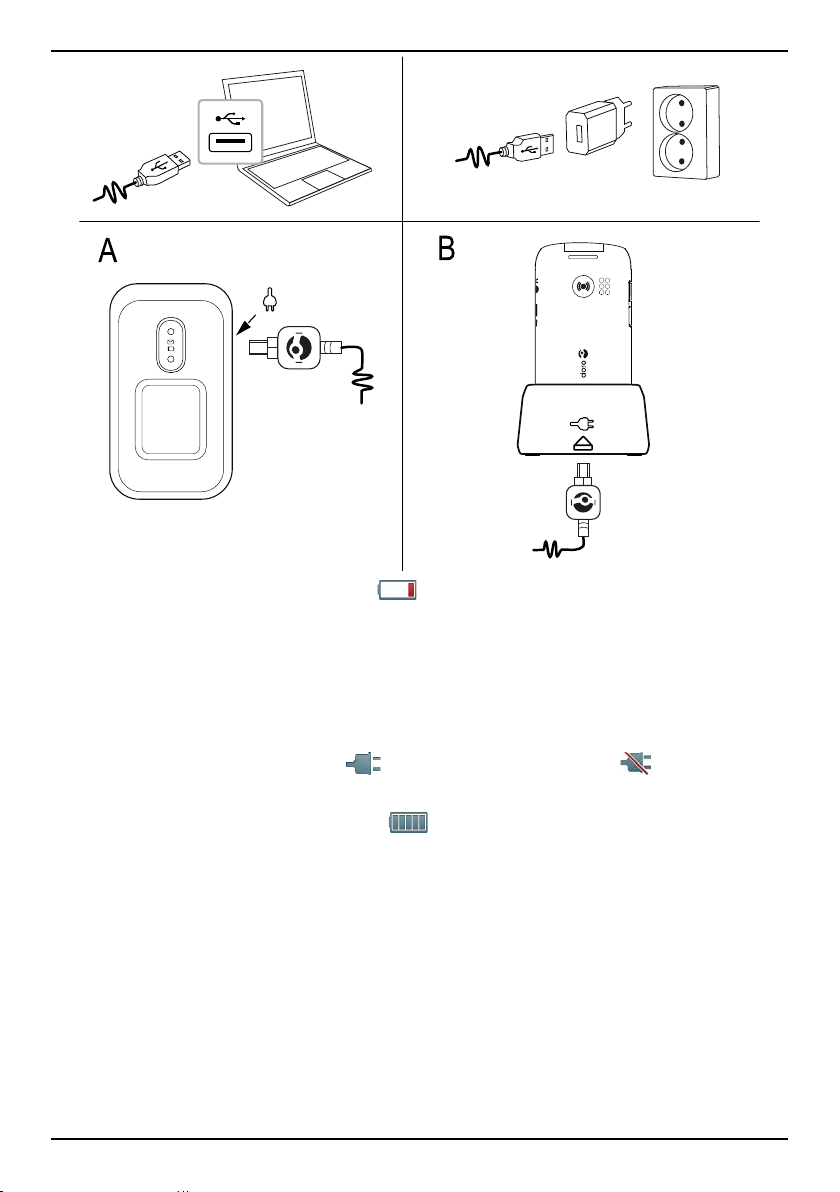
Charge the phone
CAUTION
Only use batteries, chargers and accessories that have been approved for
use with this particular model. Connecting other accessories may be
dangerous and may invalidate the phone's type approval and warranty.
3

English
AB
When the battery is running low, is displayed and a warning signal is
heard.
1. Connect the mains adapter to a wall socket and to the charging socket
y.
The battery charge indicator is animated while charging. It takes ap-
proximately 3 hours to fully charge the battery. When the charger is
connected to the phone, is displayed briefly, and when it is
disconnected.
2. When charging is completed, is displayed on the screen.
If the phone is turned off when the charger is connected to the phone
only the battery charge indicator will be shown on the display.
Note! To save power the LCD backlight goes off after a while. Press any
button to illuminate the display. Full battery capacity will not be reached
until the battery has been charged 3–4 times. Batteries degrade over time,
which means that call time and standby time will normally decrease with
regular use.
4
Table des matières
Autres manuels Doro Téléphone portable

Doro
Doro 780X Manuel utilisateur

Doro
Doro 6250 Manuel utilisateur

Doro
Doro PHONEEASY 510 Manuel utilisateur

Doro
Doro 6030 Manuel utilisateur

Doro
Doro 780X IUP Manuel utilisateur

Doro
Doro 6060 Manuel utilisateur

Doro
Doro 824 Manuel utilisateur

Doro
Doro 8035 Manuel utilisateur

Doro
Doro 6520 Manuel utilisateur

Doro
Doro 5860 Manuel utilisateur

Doro
Doro 8020X Manuel utilisateur

Doro
Doro PhoneEasy 624 Manuel utilisateur

Doro
Doro PHONEEASY 515 Manuel utilisateur

Doro
Doro 1881 Manuel utilisateur

Doro
Doro secure 628 Manuel utilisateur

Doro
Doro 2820 Manuel utilisateur

Doro
Doro PhoneEasy 509 Manuel utilisateur

Doro
Doro 8040 Manuel utilisateur

Doro
Doro 731X Manuel utilisateur

Doro
Doro 6050 Manuel utilisateur