DigitaLinx DL-HDM44 Manuel utilisateur

11675 Ridgeline Dr
Colorado Springs, CO 80921
Rev 140411 Phone: 719-260-0061
Toll-Free: 800-530-8998
Fax: 719-260-0075
DL-HDM44 Installaon and
Operaon Guide

DL-HDM44 Installaon Guide
2

DL-HDM44 Installaon Guide
3
Important Safety Instrucons
»Please completely read and verify you understand all instrucons in this manual before operang this equipment.
»Keep these instrucons in a safe, accessible place for future reference.
»Heed all warnings.
»Follow all instrucons.
»Do not use this apparatus near water.
»Clean only with a dry cloth.
»Do not install near any heat sources such as radiators, heat registers, stoves, or other apparatus (including ampliers)
that produce heat.
»Use only accessories specied or recommended by Intelix.
»Explanaon of graphical symbols:
◊ Lightning bolt/ash symbol: the lightning bolt/ash and arrowhead within an equilateral triangle
symbol is intended to alert the user to the presence of uninsulated “dangerous voltage” within the
product enclosure which may be of sucient magnitude to constute a risk of shock to a person or
persons.
◊ Exclamaon point symbol: the exclamaon point within an equilateral triangle symbol is intended
to alert the user to the presence of important operang and maintenance (servicing) instrucons
in the literature accompanying the product.
»WARNING: TO REDUCE THE RISK OF FIRE OR ELECTRIC SHOCK, DO NOT EXPOSE THIS APPARATUS TO RAIN OR
MOISTURE AND OBJECTS FILLED WITH LIQUIDS, SUCH AS VASES, SHOULD NOT BE PLACED ON THIS APPARATUS.
»Use the mains plug to disconnect the apparatus from the mains.
»THE MAINS PLUG OF THE POWER CORD MUST REMAIN READILY ACCESSIBLE.
»Do not defeat the safety purpose polarized or grounding-type plug. A polarized plug has two blades with one wider
than the other. A grounding-type plug has two blades and a third grounding prong. The wide blade or the third prong
is provided for your safety. If the provided plug does not t into your outlet, consult an electrician for replacement of
your obsolete outlet. Cauon! To reduce the risk of electrical shock, grounding of the center pin of this plug must be
maintained.
»Protect the power cord from being walked on or pinched parcularly at the plugs, convenience receptacles, and the
point where they exit from the apparatus.
»Do not block the air venlaon openings. Only mount the equipment per Intelix’s instrucons.
»Use only with the cart, stand, table, or rack specied by Intelix or sold with the equipment. When/if a
cart is used, use cauon when moving the cart/equipment combinaon to avoid injury from p-over.
»Unplug this apparatus during lightning storms or when unused for long periods of me.
»Cauon! Shock Hazard. Do not open the unit.
»Refer to qualied service personnel. Servicing is required when the apparatus has been damaged in any way, such as
power supply cord or plug is damaged, liquid has been spilled or objects have fallen into the apparatus, the apparatus
has been exposed to rain or moisture, does not operate normally, or has been dropped.

DL-HDM44 Installaon Guide
4
Table of Contents
Product Overview��������������������������������������������������������������������������������������������������������������������������������������� 6
Package Contents ��������������������������������������������������������������������������������������������������������������������������������������� 7
Front and Rear Panels��������������������������������������������������������������������������������������������������������������������������������� 8
Front Panel���������������������������������������������������������������������������������������������������������������������������������������������������� 8
Rear Panel����������������������������������������������������������������������������������������������������������������������������������������������������� 8
IR Remote��������������������������������������������������������������������������������������������������������������������������������������������������� 9
Installaon Instrucons���������������������������������������������������������������������������������������������������������������������������� 10
Quick Start ��������������������������������������������������������������������������������������������������������������������������������������������������10
Mount the Matrix ���������������������������������������������������������������������������������������������������������������������������������������10
Shelf Mounng Instrucons .................................................................................................................10
Rack Mounng Instrucons..................................................................................................................10
Connect Sources������������������������������������������������������������������������������������������������������������������������������������������11
Connect Displays�����������������������������������������������������������������������������������������������������������������������������������������11
Connect External IR Control ������������������������������������������������������������������������������������������������������������������������11
Connect RS232 Control��������������������������������������������������������������������������������������������������������������������������������12
Connect TCP/IP (Ethernet) Control ��������������������������������������������������������������������������������������������������������������12
Router Connecon ...............................................................................................................................13
Crossover Cable Connecon .................................................................................................................13
Web Browser Control ...........................................................................................................................13
Apply Power ������������������������������������������������������������������������������������������������������������������������������������������������14
Front Panel and IR Remote Operaon������������������������������������������������������������������������������������������������������� 15
Front Panel Operaon���������������������������������������������������������������������������������������������������������������������������������15
IR Remote Operaon�����������������������������������������������������������������������������������������������������������������������������������15
Web Browser Control�������������������������������������������������������������������������������������������������������������������������������� 16
Matrix Status ����������������������������������������������������������������������������������������������������������������������������������������������16
Matrix Control���������������������������������������������������������������������������������������������������������������������������������������������16
Network Seng ������������������������������������������������������������������������������������������������������������������������������������������17
EDID Management ����������������������������������������������������������������������������������������������������������������������������������� 18
RS232 Commands������������������������������������������������������������������������������������������������������������������������������������� 19
Roung Commands�������������������������������������������������������������������������������������������������������������������������������������19
System Commands��������������������������������������������������������������������������������������������������������������������������������������19
EDID Commands �����������������������������������������������������������������������������������������������������������������������������������������20
TCP/IP Setup Commands�����������������������������������������������������������������������������������������������������������������������������20

DL-HDM44 Installaon Guide
5
Troubleshoong ��������������������������������������������������������������������������������������������������������������������������������������� 21
Matrix does not power on���������������������������������������������������������������������������������������������������������������������������21
Cannot view 3D content������������������������������������������������������������������������������������������������������������������������������21
Cannot view 4K content ������������������������������������������������������������������������������������������������������������������������������21
Cannot hear surround sound audio ������������������������������������������������������������������������������������������������������������21
Technical Specicaons ���������������������������������������������������������������������������������������������������������������������������� 22

DL-HDM44 Installaon Guide
6
The Digitalinx DL-HDM44 is a four input by four output HDMI matrix switcher. The DL-HDM44 supports up to
4K video resoluons, Deep Color, and 3D video.
The DL-HDM44 can be controlled via front panel buons, front panel IR, external IR, RS232, and through a web
browser when the matrix is connected to a network. The matrix includes a simple IR remote control to allow
IR switching. The EDID sengs for the matrix, either 1080p with stereo audio or the EDID of the display on
Output A, are toggled by a buon on the front of the matrix.
To extend the inputs or the outputs of the DL-HDM44 beyond the 5 meter cable limitaon, please use the
DL-HD70 or DL-HDE100.
Product Overview

DL-HDM44 Installaon Guide
7
Package Contents
IR Receiver
1 ea
5V DC 3.6A Power
Supply
1 ea
DL-HDM44 Installaon
and Operaon Guide
1 ea
DL-HDM44
Matrix Switcher
1 ea
Infrared Remote Control
1 ea
US Power Cable
1 ea
Rack Ears
2 ea
Please verify the following items are in the shipping box prior to installaon of the DL-HDM44.

DL-HDM44 Installaon Guide
8
Front and Rear Panels
Front Panel
Rear Panel
Part#: DL-HDM44
POWER
4x4 HDMI Matrix Switcher
EDID AB C D
A
B
C
1 2 3 4
D
Inputs
Outputs
1 2 3 4 5
BA C D
OUTPUTSINPUTS
1 2 3 4
EthernetRS232IR In Power
DC5V
Service
A B C D E F G
1. IR receiver for matrix control via IR remote
2. Power buon and LED
3. EDID buon and LED
4. Output cycle buons
5. Matrix roung status LEDs
A. HDMI Inputs
B. HDMI Outputs
C. IR input for matrix when front is covered or matrix is located in a concealed locaon
D. RS232 control input
E. TCP/IP (Ethernet) control input for control via web browser
F. Mini USB for rmware updates
G. 5V DC power input

DL-HDM44 Installaon Guide
9
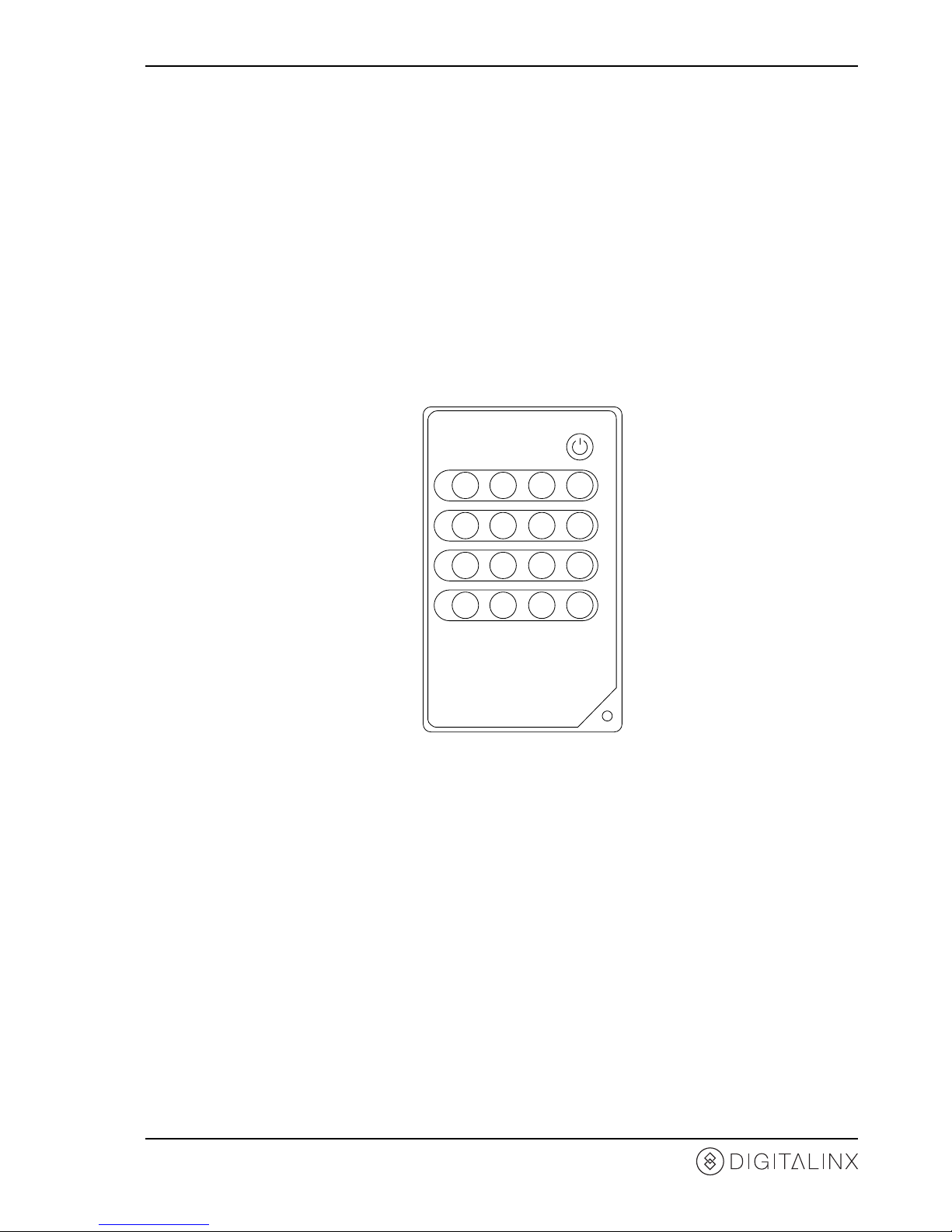
IR Remote
The included IR remote features discrete input selecon buons for each output. It also has a power toggle
buon to turn o the matrix when not in use. Please see page 15 for IR Remote Operaon.
OUTPUT
B 1 2 3 4
OUTPUT
D 1 2 3 4
OUTPUT
C 1 2 3 4
OUTPUT
A 1 2 3 4
POWER

DL-HDM44 Installaon Guide
10
Installaon Instrucons
Quick Start
Mount the Matrix
Shelf Mounng Instrucons
Rack Mounng Instrucons
1. Mount the matrix
2. Connect sources
3. Connect displays
4. Connect control (oponal)
5. Apply power
At least 2 inches of free air space is required on both sides of the DL-HDM44 for proper side venlaon. Avoid
mounng the DL-HDM44 near a power amplier or any other source of signicant heat.
Rubber shelf feet are already aached to the boom of the DL-HDM44 to help accelerate the installaon of
the DL-HDM44.
Remove the rubber feet from the boom of the matrix. Remove
the larger two screws on both sides of the DL-HDM44.
Aach the supplied rack ears to the sides of the DL-HDM44
matrix. The matrix requires one rack unit (1 RU) of space. It is
recommended that you leave an empty rack space above and
below the DL-HDM44 for addional cooling.
Table des matières
Autres manuels DigitaLinx Commutateur matriciel

DigitaLinx
DigitaLinx DL-HDM88-SS Mode d'emploi

DigitaLinx
DigitaLinx DL-A31 Manuel utilisateur

DigitaLinx
DigitaLinx DL-HDM88A-H2 Manuel utilisateur

DigitaLinx
DigitaLinx DL-A51 Manuel utilisateur

DigitaLinx
DigitaLinx DL-HDM44-FS Mode d'emploi

DigitaLinx
DigitaLinx DL-HDM88A-H2 Manuel utilisateur

DigitaLinx
DigitaLinx DL-S42-H2 Manuel utilisateur

DigitaLinx
DigitaLinx DL-HDM88-FS Mode d'emploi

DigitaLinx
DigitaLinx DL-44E-KIT Mode d'emploi