
Dickey-John Flex4 Pro Manuel utilisateur

FLEX4 PRO™
PUBLIC WORKS CONTROL SYSTEM
Operator’s Manual
SINCE 1966
®
FLEX
PRO

OPERATOR’S MANUAL
Safety Notices........................................................................................................1
Disclaimer............................................................................................................................1
Introduction........................................................................................................... 3
Features ..............................................................................................................................3
Component Overview........................................................................................... 5
Flex4 Pro tablet..................................................................................................................5
Switch module functions......................................................................................................8
Rate control module............................................................................................................9
Output module...................................................................................................................11
Miscellaneous components...............................................................................................15
Installation............................................................................................................17
Operator switch module mounting bracket........................................................................17
Ram mount bracket installation.........................................................................................18
Operate screen overview....................................................................................27
Display settings (Camera/Display/Alarms)........................................................................29
Operation..............................................................................................................31
Pre-operating checklist......................................................................................................32
Spreading material............................................................................................................32
Blast...................................................................................................................................33
Pause ................................................................................................................................34
Material selection ..............................................................................................................35
Unload material .................................................................................................................36
Manual ground speed override..........................................................................................38
Automatic manual control channel override......................................................................39
Driver login ........................................................................................................................40
Route selection..................................................................................................................40
Boom section control.........................................................................................................41
Anti-ice feature ..................................................................................................................42
Accessory sensors ............................................................................................................42
Hydraulic accessory tool operation ...................................................................................44
Current and season run totals...........................................................................................44
Flex4 Pro programming ......................................................................................47
Passcode restrictions........................................................................................................47
Keyboard functions............................................................................................................48
Flex4 ProTM Control System / 1
6010541 Rev A

OPERATOR’S MANUAL
System programming.........................................................................................53
Operate mode (F1)............................................................................................................53
Anti-ice button mode feature.............................................................................................53
Granular Channel Setup (F2)............................................................................................55
Granular rate setup ...........................................................................................................56
Granular configuration (f2)................................................................................................59
Liquid channel setup (f3)...................................................................................................62
Liquid rate setup................................................................................................................63
Boom configuration (liquid/Anti-Ice)..................................................................................66
Auxiliary control channel configuration (f5).......................................................................71
Accessory sensors (F9) ....................................................................................................72
System setup (F10)...........................................................................................................84
Blast setup ........................................................................................................................84
Date and time....................................................................................................................85
Units and language...........................................................................................................86
Service ..............................................................................................................................87
Troubleshooting ................................................................................................................89
Output module setup (f11) ................................................................................................91
Data logging (F12) ............................................................................................................93
Driver setup.......................................................................................................................95
Calibrations .......................................................................................................103
Material and spinner system response calibrations (f6) .................................................103
Recording calibration data ..............................................................................................104
Maintaining calibration accuracy.....................................................................................105
Granular drop test calibration..........................................................................................106
Liquid drop test calibration (F6) ......................................................................................109
Auxiliary system response and drop test........................................................................112
Spinner system response calibration..............................................................................112
Import/export data files ....................................................................................121
Passcode enabled...........................................................................................................121
Export configuration files.................................................................................................121
Export log data files.........................................................................................................122
Import configuration files.................................................................................................125
Capture screen shot .........................................................................................127
Diagnostics........................................................................................................129
Perform a Diagnostics check (f7)....................................................................................129
Display PCECU...............................................................................................................131
Control module................................................................................................................131
Output module.................................................................................................................135
Troubleshooting................................................................................................137
Appendix A ........................................................................................................143
Appendix B Converting Constants..................................................................145
Fine Tuning Application...................................................................................................145
Calculating Spreader Constants .....................................................................................146
Appendix C.........................................................................................................147
2 / Flex4 ProTM Control System
6010541 Rev A

OPERATOR’S MANUAL
SAFETY NOTICES
Safety notices are one of the primary ways to call attention to potential
hazards. An absence of specific alerts does not mean that there areno
safety risks involved.
This Safety Alert Symbol identifies important safety
messages in this manual. When you see this symbol,
carefully read the message that follows. Be alert to
the possibility of personal injury or death.
Use of the word WARNING indicates a potentially hazardous
situation which, if not avoided, could result in death or serious
injury.
Use of the word CAUTION with the Safety Alert Symbol indicates a
potentially hazardous situation which, if not avoided, may result in
minor or moderate injury.
Use of the word CAUTION without the safety alert symbol
indicates a potentially hazardous situation which, if not avoided,
may result in equipment damage.
DISCLAIMER
DICKEY-john reserves the right to make engineering refinements or
procedural changes that may not be reflected in this manual. Material
included in this manual is for informational purposes and is subject to
change without notice.
Flex4 ProTM Control System
6010541 Rev A
SAFETY NOTICES / 1

OPERATOR’S MANUAL
Flex4 ProTM Control System
6010541 Rev A
SAFETY NOTICES / 2

OPERATOR’S MANUAL
INTRODUCTION
The DICKEY-john Flex4 ProTM Control System can simultaneously control
both granular and liquid snow and ice removal materials. Separate
channels for granular and liquid precisely controls and maintains the
desired applications.
The flow of material varies automatically in proportion to the changes in
ground speed so the application rate remains uniform. When Automatic
mode is enabled, spreading automatically starts when the truck begins to
move and automatically stops when the truck stops.
The operator interface consists of a:
•
Flex4 ProTMTablet
•
Operator Switch Module
Desired material application rates are entered on the Setup screens by
attaching a keyboard.
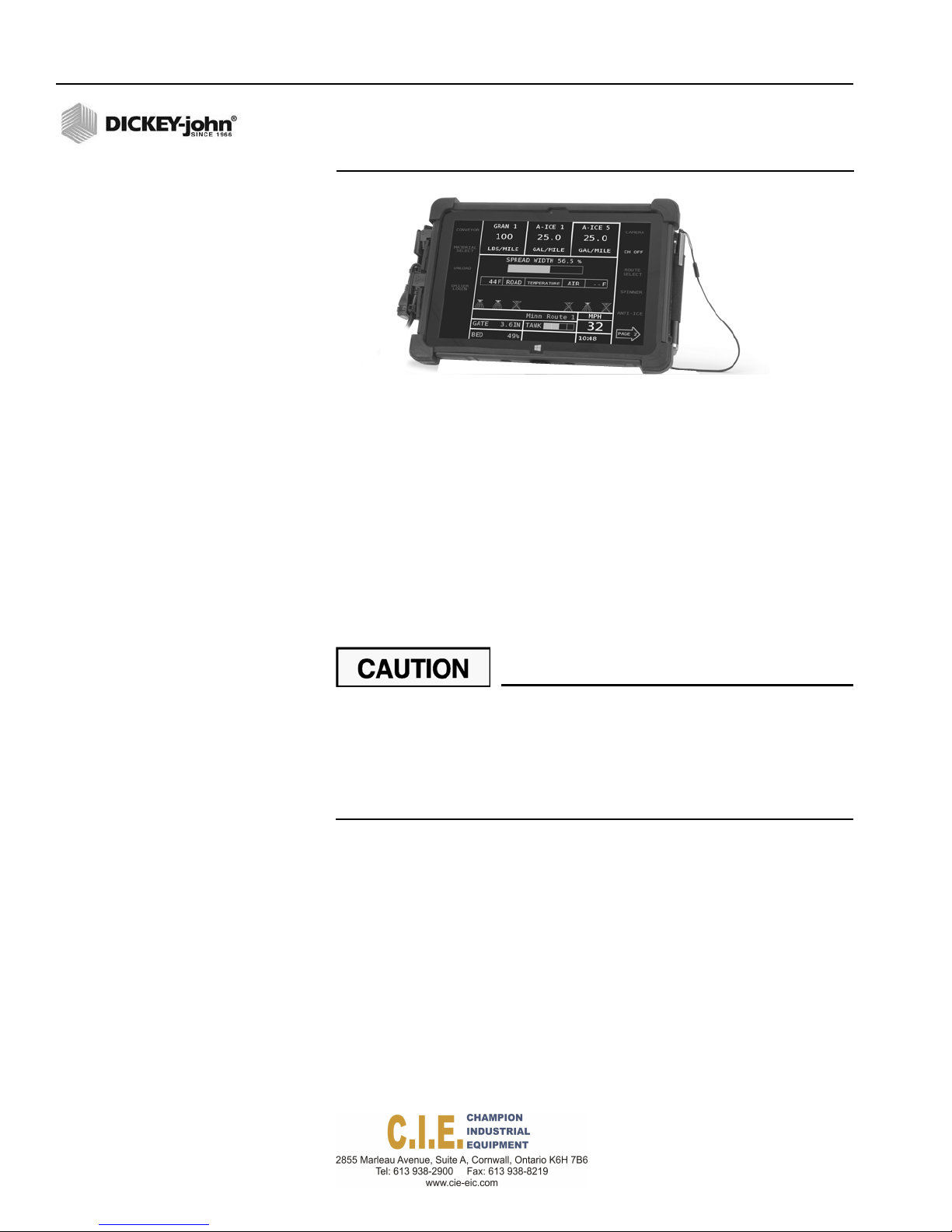
Figure 1e
Flex4 ProTM Tablet and Remote Operator Switch Module
FEATURES
•
Color touch screen display withstylus
•
4 channel closed-loop control of granular, liquid, auxiliary (liquidor
granular), and spinnerfunctions
•
Year-round application for roadside spraying, berming, and operation
of hydraulic tools
•
Day/night mode
•
Optional camera to view rear of truck to monitor material dispensing
and to avoid potentialaccidents
•
Compatible with vehicle and fleet data management systems
Flex4 ProTM Control System
6010541 Rev A
INTRODUCTION / 3

OPERATOR’S MANUAL
4 / INTRODUCTION
Flex4 ProTM Control System
6010541 Rev A

OPERATOR’S MANUAL
NOTE: Contact DICKEY-john Technical
Support to order optional
components at
1-800-637-3302.
COMPONENT OVERVIEW
Components included with the Flex4 ProTM Control System:
•
Flex4 ProTMtablet
•
Flex4 ProTM tablet mounting plate, bracket, andhardware
•
Rate control module
•
Operator Switch Module
•
Operator Switch Module mounting bracket andhardware
•
Cab power harness
•
Rate control moduleharness
•
PCECU (power controllerECU)
•
USB port hub
•
USB-CAN adapter
•
DC-DC converter
Optionalcomponents:
•
10’ CAN extensionharness
•
Output module andharness
•
Solenoid driver
•
Electric motor/pumpdriver
•
Camera 4.3mmlens
•
Camera to USB adaptercable
•
12V power adapter cameracable
•
20’ camera extension
•
Feedback sensors
FLEX4 PROTM TABLET
The Flex4 ProTM tablet is a color touch screen display providing
simultaneous viewing of:
•
Rates
•
Spread width
•
Vehiclespeed
•
Spread direction
•
Road temperature
•
Joystick selection
•
Accessory inputmonitoring
•
Multiple vehiclecameras
Flex4 ProTM Control System
6010541 Rev A
COMPONENT OVERVIEW / 5
OPERATOR’S MANUAL
Figure 2
Flex4 ProTM Tablet
TABLET SPECIFICATIONS
Physical and Environmental Characteristics:
Dimensions with case: 10.43”W x 7.07”H x0.70”D
(265 mm W x 179.6 mm H x 17.9 mm D)
Operating Temperature: 32 degrees F to +120 degrees F
(0 degrees C to +49 degrees C)
Storage Temperature: -22 degrees F to +160 degreesF
(-30 degrees C to +71 degrees C)
Humidity: 5% - 95% non-condensing
The Flex4 ProTM tablet should not be turned on until product
temperature stabilization occurs when exposed to different
temperature extremes.
Cab temperatures should be above 32 degrees for proper
operation.
Humidity levels should be below 95% before powering on device.
6/COMPONENTOVERVIEW
Flex4 ProTM Control System
6010541 Rev A

OPERATOR’S MANUAL
TABLET CONNECTIONS
Two tablet connections on the Flex4 ProTM tablet are used.
1.
Tablet power cable
2.
USB port (connects to ToughHub)
Figure 3
Flex4 ProTM Tablet Connections
volume
adjustment
power
button
Stylus
Flex4 ProTM Control System
6010541 Rev A
COMPONENT OVERVIEW / 7
USBport
Power
cable
Ce manuel convient aux modèles suivants
1
Table des matières
Autres manuels Dickey-John Système de contrôle

Dickey-John
Dickey-John Control Point Manuel utilisateur

Dickey-John
Dickey-John seed manager Manuel utilisateur

Dickey-John
Dickey-John Control Point Manuel utilisateur

Dickey-John
Dickey-John IntelliAg MVT Manuel utilisateur

Dickey-John
Dickey-John IntelliAg Manuel utilisateur

Dickey-John
Dickey-John IntelliAg Manuel utilisateur


