
Denso BHT-100BF Manuel

This guide has been
prepared expressly for
the hands-on user.
Always keep it nearby
for speedy reference.
Operator's Guide

Related Publications
BHT-100QF/100BF User’s Manual (Contained in the Manual Pack CD)
Instructions for using the handy terminal (BHT-100QF/100BF) and optical
communication unit (CU-7000).
BHT-BASIC Programmer’s Manual (BHT-100 series)
(Contained in the BHT-BASIC Compiler CD and Manual Pack CD)
Description for developing application programs of the handy terminal in
BHT-BASIC.
Transfer Utility Guide (that comes with Transfer Utility)
Description about software that transmits data and programs between the
handy terminal and computer.
Ir-Transfer Utility C Guide (that comes with Ir-Transfer Utility C)
Description about software that transmits data and programs between the
handy terminal and computer via the optical communication unit (CU).
Ir-Transfer Utility E Guide (that comes with Ir-Transfer Utility E)
Description about software that transmits data and programs between the
handy terminal and computer via the computer’s integrated IR port or any
of the specified external IR transceivers.

Alerts you to those conditions which could cause
serious bodily injury or death if the instructions
are not followed correctly.
WARNING
CAUTION Alerts you to those conditions which could cause
minor bodily injury or substantial property dam-
age if the instructions are not followed correctly.
Meaning of Symbols
A triangle ( ) with a picture inside alerts you to a warning of dan-
ger. Here you see the warning for electrical shock.
A diagonal line through a circle ( ) alerts you to something you
should not do; it may or may not have a picture inside. Here you
see a screwdriver inside the circle, meaning that you should not dis-
assemble.
A black circle ( ) with a picture inside alerts you to something you
MUST do. This example shows that you MUST unplug the power
cord.
WARNING
Handling the battery cartridge
•Never disassemble or heat the re-
chargeable battery cartridge, nor put
it into fire or water; doing so could
cause battery-rupture or leakage of
battery fluid, resulting in a fire or
bodily injury.
Never
put me
into fire!
SAFETY PRECAUTIONS
Be sure to observe all these safety precautions.
Strict observance of these warning and caution indications are a MUST for
preventing accidents which could result in bodily injury and substantial prop-
erty damage. Make sure you fully understand all definitions of these terms
and related symbols given below, before you proceed on to the text itself.

WARNING
Do not
short-
circuit me!
Charge only
with the
dedicated
device.
Undedicated
•Do not carry or store the battery car-
tridge together with metallic ball-
point pens, necklaces, coins, hair-
pins, etc.
Doing so could short-circuit the ter-
minal pins, causing the batteries to
rupture or the battery fluid to leak,
resulting in a fire or bodily injury.
•Avoid dropping the battery cartridge or letting it undergo any
shock or impact.
Doing so could cause the batteries to break, generate heat, rup-
ture or burn.
•Only use the dedicated charger (CU-
7001, C-700 or C-750) for charging
the rechargeable battery cartridge.
Using a different type of charger
could cause battery-rupture or leak-
age of battery fluid and result in a
fire, bodily injury, or serious damage
to property.
•Never charge the rechargeable battery cartridge where any in-
flammable gases may be emitted; doing so could cause fire.

Handling the BHT
•The BHT-100BF uses a laser light for indicating the scanning
range. The intensity of the laser light might be too low to
inflict bodily injury. However, do not look into the laser beam.
The BHT-100BF complies with Laser Safety Standard, Class II
of 21 CFR Chapter 1, Subchapter J.
The BHT-100BF does not mount beam attenuator and laser
radiation emission indicator required by this standard. Instead,
the software-controlled Magic keys (see Section 2.2
"Components and Functions") function as them because the
laser light is not enabled without the Magic keys pressed.
WARNING
•Do not look into the light source through the reading window or
point the light source towards the eyes.
The light emitted through the reading window is harmful to the
eyes.
•Do not poke at the eyes with the stylus that comes with the
BHT.
CAUTION
Refrigeration
Hot-
house
This
humidity
is killing
me!
Refrigeration
Refrigeration
I'm
freezing!
I'm burning
up!
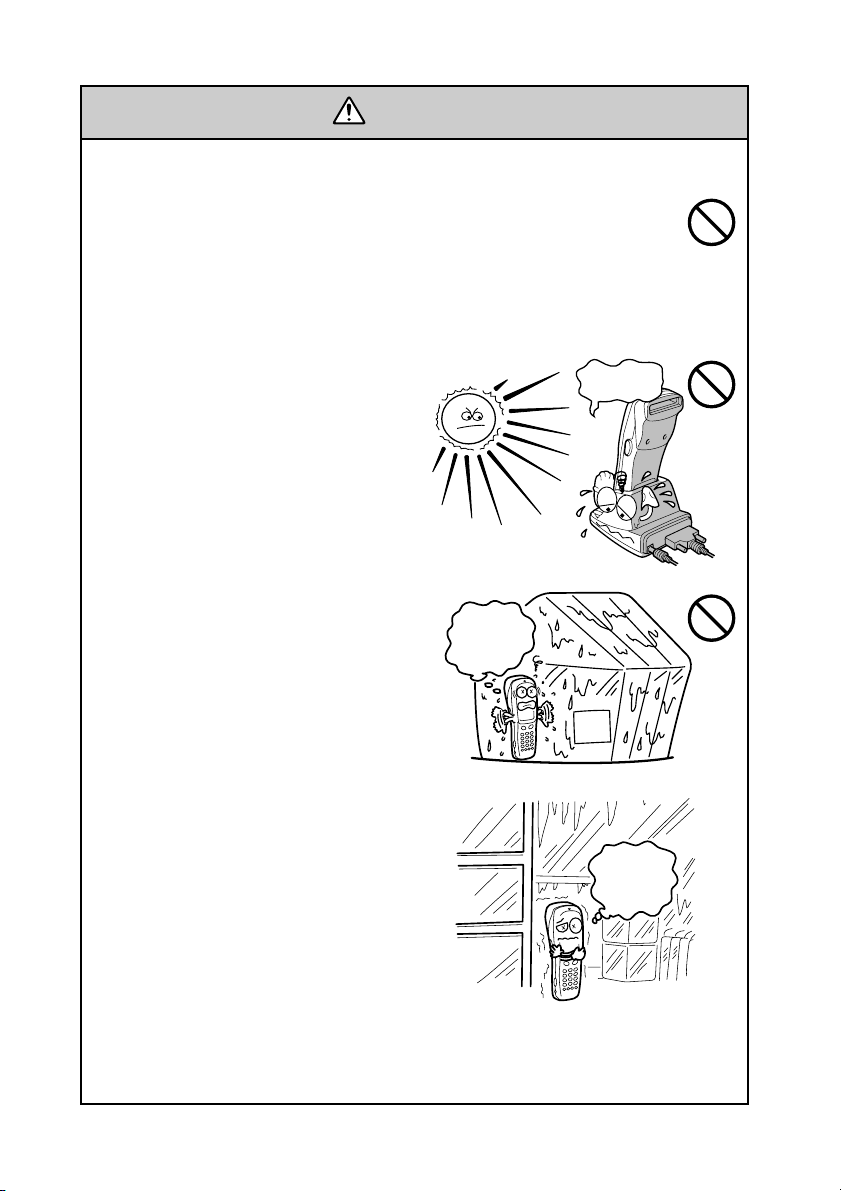
Handling the BHT
•Never put the BHT in places where
there are excessively high tempera-
tures, such as inside closed-up auto-
mobiles, or in places exposed to di-
rect sunlight.
Doing so could affect the housing or
parts, resulting in a fire.
•Avoid using the BHT in extremely
humid or dusty areas, or where there
are drastic temperature changes.
Moisture or dust will get into the
BHT, resulting in malfunction, fire or
electrical shock.
Handling the rechargeable battery cartridge
•Never charge a wet or damp rechargeable battery cartridge.
Doing so could cause the batteries to break, generate heat, rup-
ture or burn.

Do not
drop me!
Keep me
away from
water!
•If foreign material or water gets into
the BHT, immediately turn off the
power, pull out the battery cartridge,
and contact your nearest dealer.
Failure to do so could cause smoke
or fire.
•If you drop the BHT so as to damage
its housing, immediately turn off the
power, pull out the battery cartridge,
and contact your nearest dealer.
Failure to do so could cause smoke
or fire.
•Never disassemble or modify the BHT; doing so could result in
an accident such as break or fire.
•If smoke, abnormal odors or noises come from the BHT, imme-
diately turn off the power, pull out the battery cartridge, and
contact your nearest dealer.
Failure to do so could cause smoke or fire.
Never
disassemble
CAUTION
•Do not use batteries or power sources other than the specified
ones; doing so could generate heat or cause malfunction.
•In environments where static electricity can build into signifi-
cant charges (e.g., if you wipe off the plastic plate with a dry
cloth), do not operate the BHT. Doing so will result in malfunc-
tion or machine failure.
•Touch the LCD only with the stylus that comes with the BHT.
Using the tip of a pen or any pointed object will result in a dam-
aged or broken LCD.

Components and Functions
Release button
Press this button to remove the
battery cartridge.
Touch screen LCD (liquid crystal display)
Shows the characters and graphic patterns. You may
directly touch the screen with the stylus for data
entry.
Indicator LED
Illuminates in green when the BHT has successfully read a bar
code.
Trigger switch (M4 key)
Press this switch to start bar code
reading.
Hand strap
Be sure to put your
hand through this
strap to prevent
you from dropping
the BHT
accidentally.
Trigger switch
(M3 key)
Press this switch to start bar
code reading.
Optical interface port
Used to exchange data/programs
with the host computer via its
integrated IR port or via the optical
communication unit CU-7000.
Connector cover
Inside this cover is the direct-connect
interface port.
Rechargeable battery
cartridge
Main power source of
the BHT.
Reading
window
Stylus
Built-in antenna
Do not cover this antenna
section with metal-evaporated
tape or by hand. Doing so
may result in communications
failures.
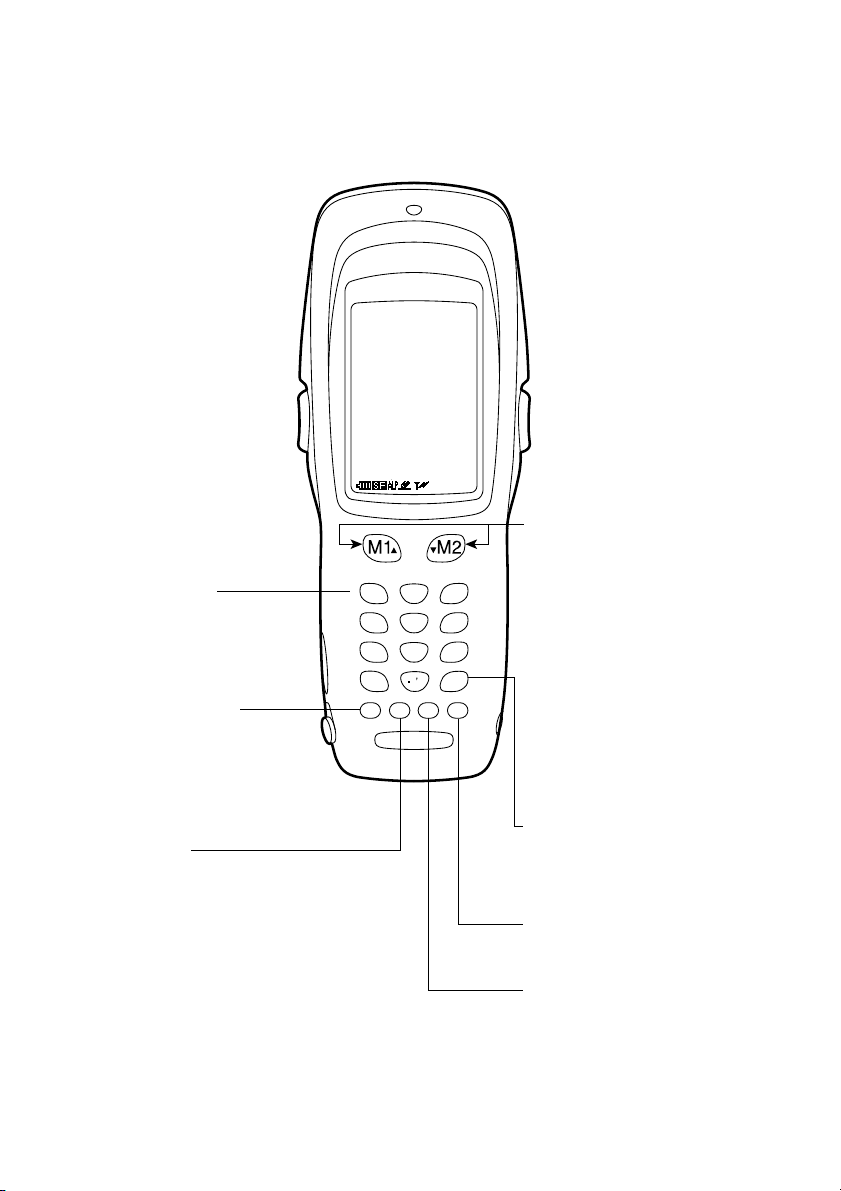
The functions of the keys may be set by user programs. Shown below is a set
of sample functions.
SF (Shift) key
Used in combination with
numerical keys for special
input procedures.
C (Clear) key
Clears the last inputted data or
returns to the original screen.
0$
-
%
SP
7ABC 9GHI
8DEF
1STU 3YZ
2V
W
X
ENT
4JKL 6P
Q
R
5
M
N
O
PWBS C SF
M1/M2 (Magic) keys
Up- and down-arrow keys
are assigned to the M1 and
M2 keys by default, respec-
tively. If the SF key is held
down, left- and right-arrow
keys are assigned to the M1
and M2 keys, respectively.
These keys may be used as
an SF key, ENT key, or
backlight function on/off key
depending upon definition in
System Mode or in user
programs. They may be also
assigned string data in user
programs.
ENT (Enter) key
Finalizes the inputted data or
operations, and starts the
corresponding processing.
PW (Power) key
Turns the BHT on or off.
Numerical keys
Used for numerical input.
BS (Backspace) key
Moves back one character.

Reading Bar Codes
•If the BHT fails to read due to specular effects
or other factors, change the scanning angle of
the reading window or the distance from codes
as shown at right, and try it again. (Specular
effects occur when the reflection of the light
from the bar code becomes excessively strong.
This can easily happen when the reflecting
surface is polished or covered with vinyl.)
•The laser light indicates the scanning range as a guide. The indicated
scanning range will deviate a little bit from the actual one. Keep the
BHT so that the laser light comes to almost the center of the bar code
height.
•The BHT can read bar codes at a maximum distance of 40 cm (15.7")*
from the reading window. (*For details about the scanning conditions,
refer to the BHT-100QF/100BF User’s Manual.)
•The bar code reading procedure may differ depending upon the
application used, so follow the application's manual.
Turn the BHT power on, bring the bar-code reading window to the bar code
to be scanned, and press the trigger switch. The BHT emits a laser light to
indicate the scanning range and turns on the illumination LED to scan the bar
code.
When the BHT has read the bar code successfully, the indicator LED will
illuminate in green.
PW key
Indicator LED
Illuminates in green when the BHT
has successfully read the code.
Touch screen LCD
Bar code scanning range
covered by the laser light
Max. 40 cm
(15.7")*
Trigger switch
(M4 key)
Trigger switch
(M3 key)
Table des matières
Autres manuels Denso portable


