
DeltaTRAK FlashLink 40516 Manuel utilisateur

Quick Start Guide
Model 40516
USB PDF Data Logger

2www.deltatrak.com
Getting Started with the FlashLink USB PDF Data Logger
Installing the Software
Insert the FlashLink Program Manager ash drive into a USB port of a PC.
There are two les, a license and FlashLink.exe software installation le.
Save these to the PC hard drive. If you do not have a ash drive and only
have the license, download the software from the DeltaTrak web site
http://www.deltatrak.com/support/software-drivers
Note: The license key can be used on two computers.
Navigate to the les on the hard drive. Open the license document and
note the license key number. Double click on FlashLink.exe and follow
instructions in the dialog boxes that appear on the screen. When you get to
the Enter License dialog box, key in the number provided in the license and
select Activate.
The FlashLink shortcut icon will appear on the desktop and system tray.
Double click the icon to open the program. FlashLink
Program Manager runs automatically and detects when a
data logger is connected to the USB port for programming
and downloading.
During software installation, subfolders for PDF and CSV
le storage are created in the main FlashLink folder. When a data logger is
downloaded, PDF and CSV reports are automatically generated and saved
in these folders for record keeping.

3www.deltatrak.com
Programming the Logger
Right click on the FlashLink icon to open the
main menu.
• Options - Customize FlashLink software
display, le storage location, report
appearance, enable 21 CFR administration
• Setup - Create/save logger conguration
les, including logging periods, intervals,
alarm thresholds
• Import - Import and reuse saved Setup
conguration les
• ColdTrak File Processing - Send data
les to ColdTrak Server Database (optional cloud service)
• Data Analysis - View trends and details, compare multiple charts from a single
data logger or several loggers
• About - Displays FlashLink software version, provides a link to Help les
• Update - Checks DeltaTrak server for available FlashLink software updates
• Exit - Closes FlashLink application
FlashLink Help is a complete user guide that is accessible from any screen by
clicking on the [ ? ] symbol in the top, right corner. Specic topics can easily be
found in the table of contents or by using the keyword search bar.
Plug the FlashLink Data Logger into the USB port of the computer, select
Setup to open the Logger Configuration Wizard. The current conguration
is displayed. Click on Next to access Logging Options and select desired
conguration parameters. New Configuration window will conrm settings,
select Next and OK to upload the conguration to the data logger. The
Reactivate option will keep the settings currently programmed in the unit.
If alarms are used, it is also recommended to set delay start time for at least 30
to 60 minutes, in order to allow the logger to equilibrate to the temperature in
the environment where it will be monitoring. Otherwise, a false alarm could be
triggered if the unit is started within the set alarm zones.
Once congured, the logger can now be activated, downloaded and reset
without having to use FlashLink Program Manager. The software will be needed
when conguration changes are required.
Alarm Notifications
The alarm must be enabled during logger conguration, including high and low
Options
Setup
Import
ColdTrak File Processing
Data Analysis
About
Update
Exit
4www.deltatrak.com
set points. The bell icon and ashing LED will activate with the rst alarm event.
Alarm icon and ashing LED remain on the LCD until the logger is reset or
recongured.
Alarm delay can be programmedto triggeronly when temperature
excursionscontinue beyond theset delayperiodthat starts with
therstalarmevent.
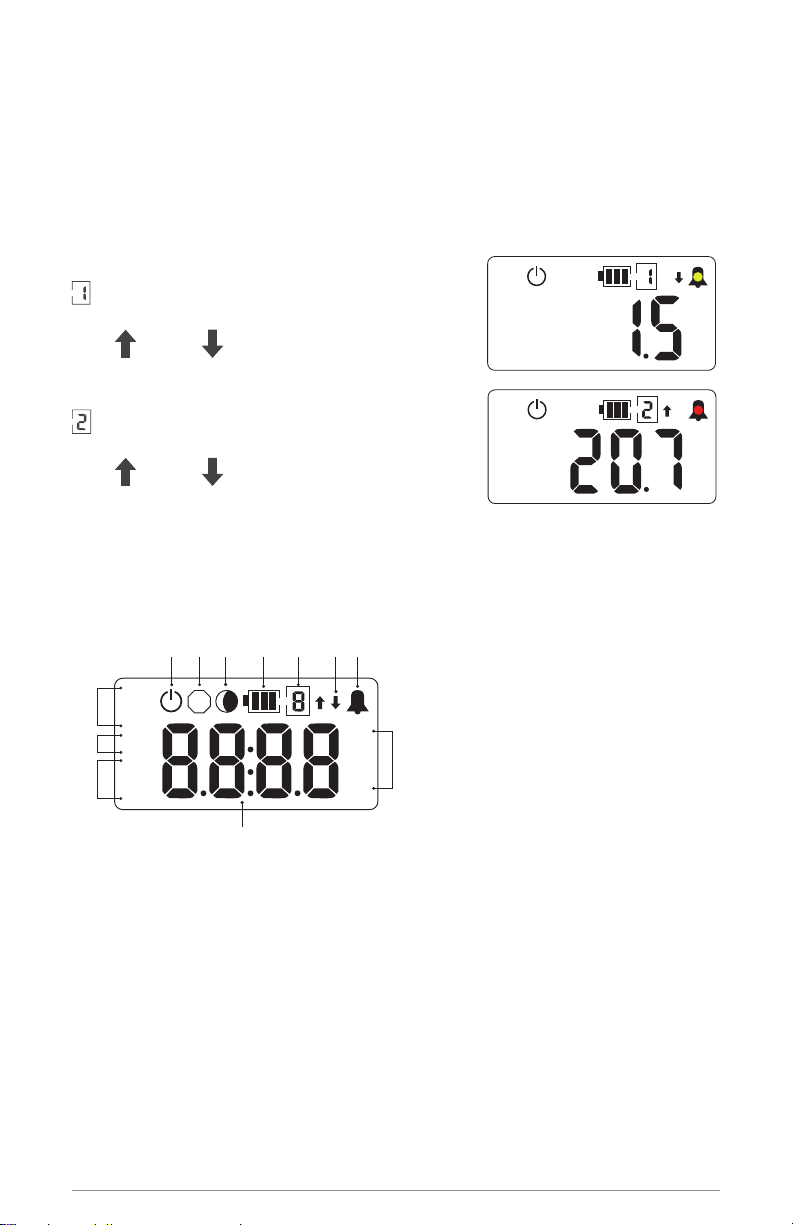
Level 1 High/LowAlarm
Numeral 1 icon
Yellow LED ashes every 5 seconds
High or Low
Level 2 Extreme High/LowAlarm
Numeral 2 icon
Red LED ashes every 5 seconds
High or Low
The LCD Screen
Starting the Logger
Press and hold the START button until a temperature reading appears on
the LCD without ashing.
Daily Statistics on LCD
Temperature statistics of recorded data are available for viewing on-
demand at any time without stopping the logger.
A single press of the green START button shows a statistic on the LCD,
each subsequent button-press advances to the next statistic. The LCD
1
11
5 6
43
10
2 12
8
9
S
°C
°F
%
MAX
MIN
AVG
HI
LO
day
hrs
min
7
1. Sensor/alarm channel enumerator
2. Shadow logging icon
3. Active mode icon
4. Stop mode icon
5. High and low alarm arrows
6. Alarm icon
7. °C, °F & % scale icons
8. Day, Hours and Minutes icons
9. High and Low Alarm set point icons
10. Statistical icons
11. 4 digit numerical display
12. Battery Capacity Gauge
°C
HI
°C
LO

5www.deltatrak.com
automatically reverts to current reading about ve seconds after button
release and showing a statistic. The LCD scrolls through values in this order:
• Maximum temperature
• Minimum temperature
• Average temperature
If alarms limits are programmed:
• High alarm set point
• Accumulated time above high alarm, if no excursions, 00:00 is displayed
• Low alarm set point
• Accumulated time below low alarm, if no excursions, 00:00 is displayed
Inserting Waypoints
If a temperature reading needs to be conrmed at a check point during
transportation or storage, a waypoint can be inserted as a marker to ag
date/time of this event. The waypoint option must rst be enabled during
logger conguration.
Press and hold the START button until FLA9 appears on the LCD and
release when it stops ashing. The waypoint has been
inserted and the LCD will revert to current temperature
reading. When reports are created at the end of the
logging period, waypoints appear as a vertical line on
the graph and have an asterisk in the data table.
Stopping the Logger
Press and hold the red STOP button until StoP appears on the LCD without
ashing.
Downloading Reports
Option 1 - When the STOP button is pressed, FlashLink PDF Data Logger
automatically generates PDF and CSV reports using its onboard software
and saves these les to an internal memory. This allows personnel to
download and save reports on any PC and does not require FlashLink
Program Manager software.
Option 2 - Download data to a PC which is running FlashLink Program
Manager software. When a data logger is plugged into the USB port, the
software automatically detects the logger, generates and saves Adobe® PDF
and CSV reports to the subfolders in the FlashLink main folder.

6www.deltatrak.com
FlashLink PDF Report

7www.deltatrak.com
Succeeding pages list
all data points in table
format
Resetting After Download
Resetting the logger will clear recorded data from its memory. After saving the
PDF and CSV les, remove the logger from the USB port, the LCD should still
display StoP. To restart the unit without changing settings, press and hold down
both the START and STOP buttons at the same time until stops ashing on
the LCD.
Release the buttons and the LCD will ash all icons while
it resets. When you see a blank screen with the
icon, the logger is in waiting mode and ready to start.
Press and hold the green START button until the current
temperature reading appears on the LCD and it stops
ashing. The logger will now resume recording.
Remaining Battery Voltage
The LCD can show a battery icon to indicate when the
battery is low. When conguring the logger using FlashLink Program Manager,
select Show Battery Capacity on the LCD from the Logging Options menu.
Troubleshooting
Contact Tech Support:
Phone: 925-249-2250 Ext 5120 Toll Free 800-962-6776 US & Canada
Email: [email protected]
S
°C
°F
%
MAX
MIN
AVG
HI
LO
day
hrs
min

6116 21B2
P.O. Box 398 Pleasanton CA 94566
(925) 249-2250 (800) 962-6776
www.deltatrak.com
DeltaTrak Corporate
Guadalajara, Mexico
+52-33-3188-3161 / 36712190
www.deltatrakmexico.com
DTI Mexico International
Shenzhen China
+86-755-8442-9388/2837-2741
2837-2664 | 8923-2778
www.deltatrakchina.com.cn
DTI China Limited
NT, Hong Kong
+852-3568-5538
www.dtiap.com
DTI Asia Pacific
Auckland, New Zealand
+64 9 5757 886
www.deltatraksouthpacific.com
DTI South Pacific
Osaka, Japan
+81-6-6616-5900
www.dtijapan.co.jp
DTI Japan Limited
Antwerp Belgium
+32 (0) 3-455-61-25
www.deltatrakeurope.be
DTI Europe bvba
DTI South America SA
Santiago, Chile
+562 2758 2866
+569 7477 1061
www.deltatraksouthamerica.com
Table des matières
Autres manuels DeltaTRAK Enregistreur de données

DeltaTRAK
DeltaTRAK FlashLink 40528 Manuel utilisateur

DeltaTRAK
DeltaTRAK FlashLink Manuel utilisateur

DeltaTRAK
DeltaTRAK FlashLink 40527 Manuel utilisateur

DeltaTRAK
DeltaTRAK FlashLink 40909 Manuel utilisateur

DeltaTRAK
DeltaTRAK FLASHLINK RTL Manuel utilisateur

DeltaTRAK
DeltaTRAK FlashLink 20932 Manuel utilisateur

DeltaTRAK
DeltaTRAK FlashLink 40527 Manuel utilisateur

DeltaTRAK
DeltaTRAK FlashLink 22367 Manuel utilisateur

DeltaTRAK
DeltaTRAK FlashLink 40909 Manuel utilisateur


