
CZEM Drill One Evo Manuel utilisateur

DISPLAYS - MANUAL
2
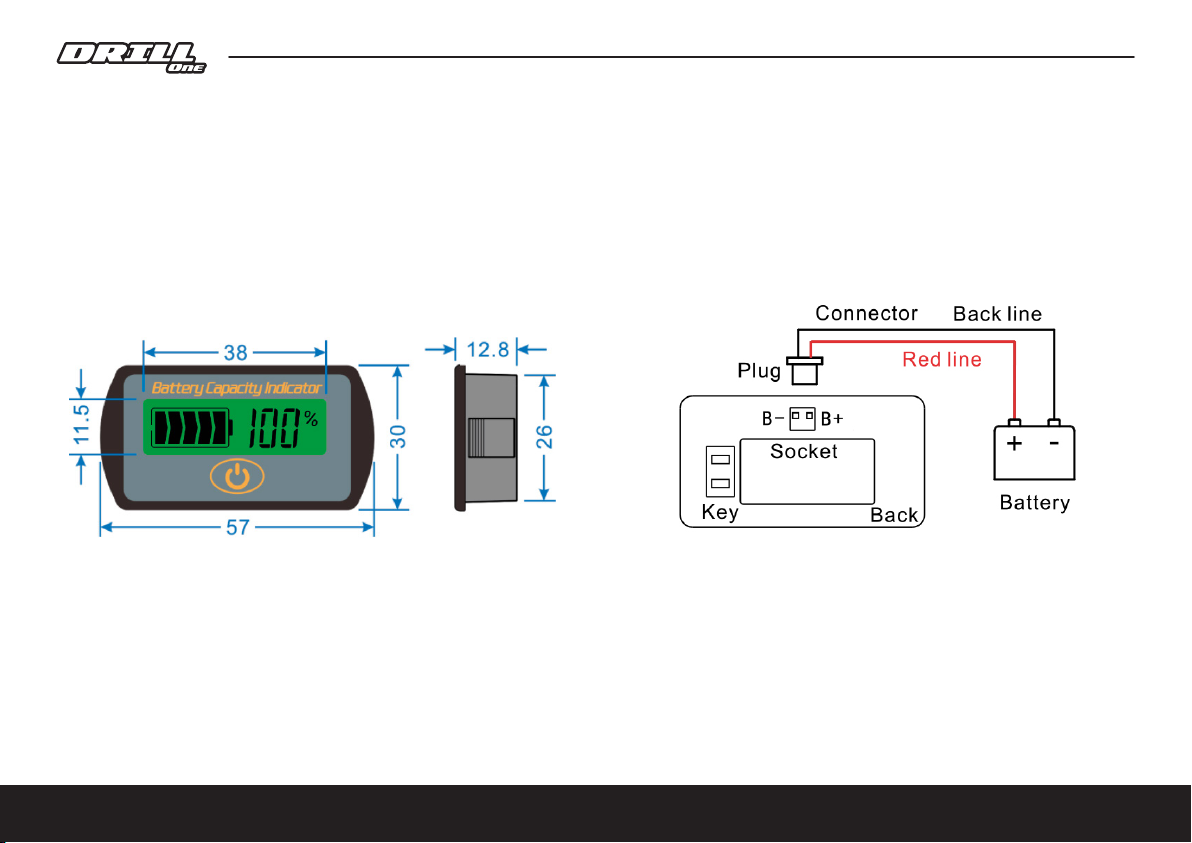
LCD and OLED displays for DRILL ONE EVO motorcycles
The DRILL ONE EVO motorcycle comes in standard with an LCD display
providing information on battery capacity and voltage.
LCD display 7S
Settings
When turn o hold on the K key on the back and power on. 7S displays the present speci cation. Use K+ and K
keys to adjust speci cations, select desired speci cation you need, then press the OK key on the front, 7S will
work normally (correspond with code as below). Description of settings 13 CEL.

3
Press the "K+" button on the back of the device to set the mode function. The 7S has two functions: F0 and
F2. Use the "K+" button to select the F0 or F2 function. To conrm the selection, press the "OK" button on the
front to start the selected function. The default function is F2.
F0 Backlight - 7S is always on, LCD and backlight are always on.
F2 Power saving mode - 7S switches to power saving mode (<15uA) after 10s, LCD and backlight turns o.
Press "OK" button, LCD and backlight will turn on for 10s.
Press the "K-" button on the back of the device to set the display mode. The 7S has three types of display
mode. Use the "K-" button to change the display mode setting. Press the "OK" button to turn on the
selected mode.

4
V&% Volt and Percentage Display - The 7S displays the current volt and percentage capacity status.
Press the "OK" button to change the display.
V Volts Display - The 7S displays only the current volt level.
% Percentage Display - 7S displays only the current percentage status.
Warning and warranty
During use or storage, the 7S must not be exposed to direct sunlight or be in an environment with strong
ultraviolet radiation, such as winter (< -20°C) and summer (> 60°C), as this may lead to shortened LCD life.
Any defects not caused by improper handling will be repaired free of charge within one year of purchase.

BATTERY
F1 250A
F3 500mA
SILIXCON
13S/16P 48Ah
BMS
ON
OFF
KILL SW THROTTLE
MAP
SW
MAP
DIODE
CHARGER TYPE
KP600A-60L
53,9V/10A
ONLY!!!
F3 30A
A
B
C
100%
F2 1A
AS150
(Black-F)
AS150
(RED-M)
AS150
(Black-M)
AS150
(RED-F)
CON1-FCON1-M
CON5-M
CON5-F
CON6-FCON6-M
CON7-M
CON7-F
CON8-MCON8-F
CON9-MCON9-F
CON10-F CON10-M
CON2-MCON2-F
3x
XT150-F
3x
XT150-M
CON9-MCON9-F
CON8-MCON8-F
GREY CABLE
(40cm)
XT150-F
XT150-F
XT150-M
XT150-M
RE255002RE255003 050552ER100552ER020552ER
RE255025
RE255060
RE255051
RE650003
RE600051
RM500000
ENGINE
DC 53,9V
AC230V/110V
TEMP SENSOR
DRILL ONE WIRE DIAGRAM v0.1
5
Diagram

6
OLED extended display
OLED display can be selected as an optional extra
with a resolution of 128 x 64 pixels. The display does not have
a backlight as each dot is active.
The advantage of this display is the ability to display additional
data, especially the driving speed or engine speed.
There are also other data available, see Section: "Description of
OLED display functions".
The OLED display reads information via CAN bus directly from the controller located on the battery.
The reading is done with a period of 100 ms, which makes the display of values very fast.
The OLED display kit consists of two components:
1/ OLED display with bracket for mounting under motorcycle handlebars (code RE255070)
2/ Display control unit mounted on the battery next to the motor controller (code 255170)
The connection is shown in the wiring diagram at the end of this document. The control unit has four cable
terminals which are used to connect to the main battery connector (3-pin male connector, red, green and
black wires) , the CAN bus data connector (3-pin female connector, green, yellow and black wires), the ON/OFF
switch connection (2-pin female connector, red and green wires) and the OLED display connection (6-pin
female connector).

7
Switch on the display
To turn on the display, switch the ON/OFF switch to the ON position.
After switching on, the CZEM logo appears on the display and the CAN data on the motorcycle
is initialised.
If proper initialization is not achieved, the display will automatically restart within a few seconds
and attempt to re-establish communication.
If the display still shows only the CZEM logo, please check that:
- the CAN communication cable is correctly tucked in (3-pin female connector, green, yellow
and black wires)
- the fuse cap is correctly positioned
- the remaining wiring is correctly connected
After establishing communication with the controller, the CZEM logo disappears and the display shows
the remaining battery capacity for a few seconds. Then the display switches to the mode of displaying the
values read from the controller.
By default, the display always shows the speed of the motorcycle rst. You can change this option and
set the display to show, for example, the engine speed as the rst value when switched on.
A description of the change is given in the chapter "Display conguration".

8
Description of OLED display functions
Display of the selected map
The currently selected map is shown in the upper left part of the display with three indicator bars.
One (smallest) bar indicates map 1 with the lowest power, two bars the medium power and three bars the highest
power of the motorcycle. If the text SELECT MAP is displayed instead of the bars, then no map has been
selected yet. Press the MAP button on the handlebars to select your desired map stored in the controller.
If your motorcycle includes a colored LED, then the selected map is also indicated by a colored light on the LED.
In the main section, the display shows the following parameters:
You can switch between the dierent data by briey pressing the button below the display. The upper
right corner shows which parameter is currently indicated on the display:
- KMH/MPH - speed o f the motorcycle
- RPM - engine rev counter
- VOLT - battery voltage
- CAPA - remainin g battery capacity
- ODO - odomete r
DRIVING SPEED
ENGINE REV COUNTER
BATTERY VOLTAGEBATTERY CAPACITY
DISTANCE COUNTER

97
The lower part indicates the remaining battery capacity with a bar. One part corresponds to 20% of the
battery capacity.
The number of functions displayed can be expanded in the future. The functions described are up-to-date
as of the released version 1.4.3.
When the display rmware update is released, the new rmware can be downloaded from www.czem.pro
and uploaded as a user to the controller. For a description of the update, see the section Updating rmware.
Display of speed
Speed is displayed in kilometres per hour (kmh) or miles per hour (mph).
The units can be easily switched in the setup mode, see the chapter on the display
conguration.
Display of engine revolutions
In this mode, the engine speed (revolutions per minute) is displayed.
Display of battery voltage
The battery voltage is displayed to one tenth of a volt.
Remaining battery capacity
The remaining battery capacity is indicated as a percentage (0-100%).
Distance travelled
The display shows the total distance travelled (ODO) since the motorcycle was sold.
In the current version 1.4.3, only the ODO (total distance) is displayed,
In a future version we are preparing to display the "daily" counter (TRIP),
which will display the distance travelled since the motorcycle was switched on.
10
Display conguration
The display allows the user to change the following data:
- speed units (kmh/mph)
- gear ratio
- the default value displayed when the display is switched on
Entering conguration mode.
- make sure the motorcycle is switched o (ON/OFF switch is in OFF position)
- press and hold the button on the display
- switch the motorcycle on with the ON/OFF button
- wait until the entire display is white, release the button
At this point you are in the display conguration menu.
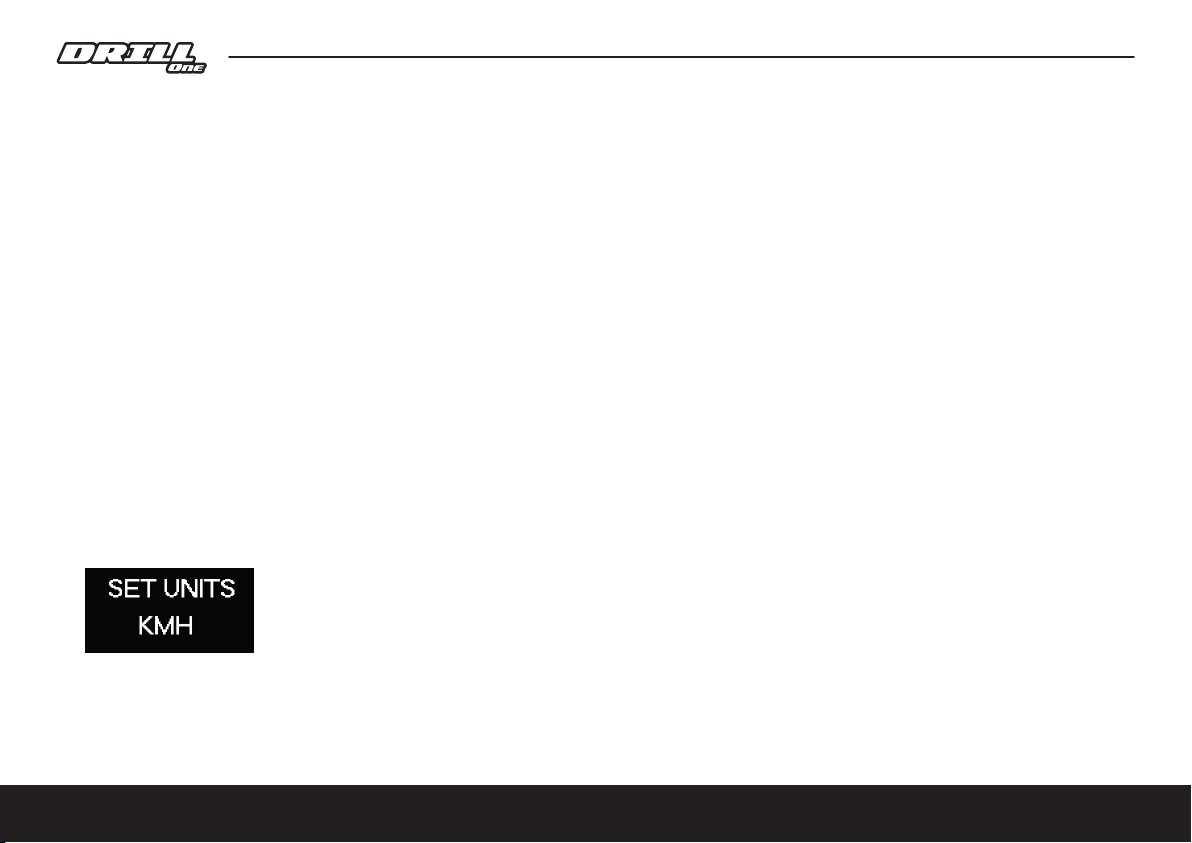
The display should show text like this image:
Short press to switch between the KMH or MPH option.
Long press to switch to the next parameter conguration.
Table des matières
Manuels Moto populaires d'autres marques


MOTO GUZZI
MOTO GUZZI QUOTA 1100 ES Manuel utilisateur

APRILIA
APRILIA ETV MILLE CAPONORD - PART1 02-2001 Manuel utilisateur

Yamaha
Yamaha 2006 YZF-R1V Manuel utilisateur

KTM
KTM Freeride E-XC 2021 Manuel utilisateur

Fantic
Fantic Enduro 125 Manuel utilisateur

Ducati
Ducati Supersport 750 desmodue Manuel utilisateur


