
Cuddeback G Series Manuel utilisateur

G Size Camera Manual
Version 4.0.0
R E A D T H I S M A N U A L
This manual explains the camera hardware. Refer to
the Advanced User Interface Manual for instrucons
to program and deploy the camera.
F R E E 2 Y E A R E X T E N D E D W A R R A N T Y
See page 13 for details

2
Design Highlights
This Cuddeback camera has been designed for
reliability.
User Interface is weather resistant and covered
with a sealing door. This resilient rubber/plasc
door is more robust than a convenonal hinge
door.
The SD card ts into a socket in the boom of the
camera to prevent water from entering the
camera when you check your camera in the rain.
The SD card socket is not spring loaded. We
believe pull-out style sockets are more reliable.
The baery door and SD card door are secured
with brass thumb screws instead of breakable
latches.
The moon sensor’s Fresnel lens is user
replaceable.
The Genius mount is inexpensive and replaceable.
If abused by a person or animal, the bracket will
break before the camera, potenally saving your
camera from damage.

3
Flash LEDs
Moon
Sensor
Zone Control
Camera
User Interface
(behind door)
Test LED
(behind lens)
SD card on boom

4
SD Card
This Cuddeback camera is compable with SD cards
sizes 2GB to 32GB. Do not use SDXC cards. Micro SD
cards will funcon with the proper adapter (usually
included with the micro SD card). Treat your SD cards
nice. They are very sophiscated electronic devices
made with billions of stac sensive transistors. Keep
them dry and do not bend them.
WARNING – Never insert a wet or damp SD card into your
camera or computer.
Internal Memory
You can use this camera without an SD card. Up to
120MB of internal memory is available for image
storage - videos and me lapse images cannot be
stored to internal memory. Images stored in internal
memory will automacally be copied to an SD card
when a card is inserted. This feature is handy if you
check a camera without a spare SD card. You can
remove the SD card and take it home, yet sll leave
the camera a-eld. When you return, all you need to
do is install the SD card & ARM the camera to transfer
images from internal memory to the SD card.

5
Install SD Card
Insert the SD card into the camera label side down.
Do not force the card. If it does not go in easily check
to make sure you are inserng it correctly. You will
break the card socket if you force the card.
Insert SD card with
label facing down
SD Card Tip
The SD Card reader on this camera is not spring
loaded. We believe a pull out SD socket is more
reliable. You can make your SD card easier to access
by placing electrical tape on the SD card, as shown
below, to create a pull tab.

6
Baery Noce
Remove baeries when the camera is not going to be
used for an extended period of me. Failure to follow
these guidelines may result in baery leakage which
will damage your camera.
Never mix old and new baeries.
Never mix dierent types of baeries.
Never mix lithium and alkaline baeries.
Replace all baeries at the same me.
Always remove baeries when the camera is not
going to be used for a period of me.
Dispose of baeries properly as recommended by
the baery manufacturer.
Never expose skin or eyes to baery acid. Refer
to baery manufacturer’s precauons.
This camera can use alkaline D baeries.
DC INPUT. This camera has a baery input
connector. Only use CuddePower baery packs or
cables. Maximum input voltage is 9 volts DC.
DO NOT ATTACH CAMERA TO A 12 VOLT BATTERY!

7
Install Baeries
Install baeries by loosening the 2 baery door
thumb screws and opening the baery door. Insert 4
D baeries as shown then secure the baery door
with the thumb screws. Tighten fully but do not
overghten.
Make sure to observe the correct polarity. Baeries
can explode, leak acid, or ignite if inserted
incorrectly.
We recommend Rayovac, Duracell, or Energizer brand
baeries only. (Choose baeries carefully – there is a
dierence, especially in
cold temperatures).
This camera will not
operate with rechargeable
baeries. The baery
voltage is too low.

8
Zone Control
This camera is equipped with Cuddeback’s patented
Zone Control. The moon sensor can be set to detect
animals in a wide angle or a narrow view.
Wide view will capture more animals but is more
suscepble to triggering by non-target animals (such
as birds) which can lead to blank images and can
result in images of the nose or tail of the animal.
Narrow view is very accurate and generates images
with the animals centered in the image but will not
capture images to the side of the camera.
Slide the Zone Control shuer to the appropriate
posion by placing your thumb as shown in the next
diagrams (be careful not to damage the Fresnel lens).
Important: When changing the Zone Control shuer
posion we recommend you also change the ZONE
seng as explained in the User Interface Manual.
Set the ZONE seng to WIDE if the Zone Control
Shuer is down. Set to CENTERED if the Zone Control
Shuer is up.
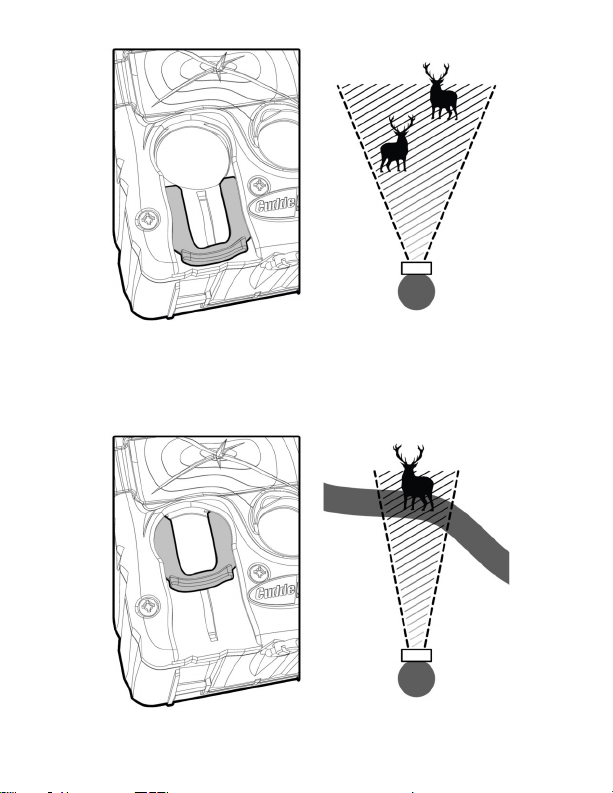
9
Push the Zone Control shuer down for wide detecon.
Push the Zone Control shuer up for centered detecon.

10
LIMITED WARRANTY FOR THIS CUDDEBACK CAMERA
1. Limited Warranty. Non Typical, Inc. (“Non Typical”)
warrants the Product to be free from malfuncons
and defects in both materials and workmanship for
the period of the warranty (“Warranty Period”). Non
Typical will repair or replace, at its opon, the Product
if it fails to funcon properly during the Warranty
Period, subject to the condions and/or limitaons
stated herein. Such repair or replacement is your sole
and exclusive remedies under this Limited Warranty.
2. Limitaons. Limited Warranty service will not be
provided unless the Product is returned in the manner
set forth below.
3. Warranty Period. The Warranty Period shall
commence on the date of the product’s purchase and
shall expire on either: (a) the 1st annual anniversary
of the Product’s Acvaon Date*; or (b) the 181st Run
Day of the Product, whichever comes rst.
This Limited Warranty does not cover the following:
a. Any defect in or damage to the Product that
occurs due to mishandling of the Product;
b. Any defect in or damage to the Product that
occurs due to repair, modicaon, or other similar
Table des matières
Autres manuels Cuddeback Appareil photo numérique


