Crestron infiNET Gateway C2N-MNETGW Manuel utilisateur

Crestron C2N-MNETGW
infiNET™ Gateway/Transceiver
Operations Guide

This document was prepared and written by the Technical Documentation department at:
Crestron Electronics, Inc.
15 Volvo Drive
Rockleigh, NJ 07647
1-888-CRESTRON
All brand names, product names and trademarks are the property of their respective owners.
©2008 Crestron Electronics, Inc.

Crestron C2N-MNETGW infiNET™ Gateway/Transceiver
Operations Guide – DOC. 6317B Contents •i
Contents
infiNET™ Gateway/Transceiver: C2N-MNETGW 1
Introduction ...............................................................................................................................1
Features and Functions................................................................................................1
Applications.................................................................................................................2
Specifications ..............................................................................................................3
Physical Description....................................................................................................4
Industry Compliance ...................................................................................................7
Setup ..........................................................................................................................................8
Network Wiring........................................................................................................... 8
Identity Code ...............................................................................................................8
Installation Tips...........................................................................................................8
Hardware Hookup ....................................................................................................... 9
Programming Software............................................................................................................11
Earliest Version Software Requirements for the PC .................................................11
Programming with Crestron SystemBuilder..............................................................11
Programming with D3 Pro.........................................................................................12
Programming with SIMPL Windows ........................................................................12
Example Program ......................................................................................................14
Uploading and Upgrading........................................................................................................ 15
Establishing Communication.....................................................................................15
Programs and Firmware ............................................................................................ 16
Program Checks ........................................................................................................ 16
Operation .................................................................................................................................17
Problem Solving ......................................................................................................................22
Troubleshooting......................................................................................................... 22
Check Network Wiring..............................................................................................24
Reference Documents................................................................................................26
Further Inquiries ........................................................................................................ 26
Future Updates .......................................................................................................... 27
Appendix A: The infiNET Spectrum......................................................................................28
Appendix B: Optimum RF Reception Guidelines .................................................................. 29
Minimize Interference ...............................................................................................29
Gateway Placement ...................................................................................................29
Antenna Orientation ..................................................................................................30
Return and Warranty Policies ..................................................................................................33
Merchandise Returns / Repair Service ...................................................................... 33
CRESTRON Limited Warranty.................................................................................33


Crestron C2N-MNETGW infiNET™ Gateway/Transceiver
Operations Guide – DOC. 6317B infiNET™ Gateway/Transceiver: C2N-MNETGW •1
•Two-way radio frequency (RF) wireless transceiver/gateway
•infiNET™ mesh network technology
•Dynamic discovery for fast, easy setup
•"Wi-Fi friendly" channel selection for trouble-free operation
•Up to 150 foot range indoors, 250 feet outdoors
•Supports up to 30 infiNET devices
infiNET™ Gateway/Transceiver:
C2N-MNETGW
Introduction
The C2N-MNETGW is a 2-way RF gateway/transceiver designed to
enable communications and management for a complete infiNET
wireless network of dimmers, thermostats, and other devices. The
C2N-MNETGW links the infiNET network to the Cresnet®wired
network to enable communications with a 2-Series control system.
Features and Functions
infiNET™
Crestron's groundbreaking infiNET wireless technology provides reliable
2-way communications throughout a home or office structure without the
need for physical control wiring. Employing a 2.4 GHz mesh network
topology, most infiNET devices function as an RF repeater, increasing
effective range and reinforcing the complete network by providing

infiNET™ Gateway/Transceiver Crestron C2N-MNETGW
2 •infiNET™ Gateway/Transceiver: C2N-MNETGW Operations Guide – DOC. 6317B
multiple redundant signal paths within the mesh network. Adding more
infiNET devices or repeaters to the network effectively increases the
range, strength, and reliability of the network.
Up to 30 infiNET dimmers, switches, and other devices can be linked to
a control system via a single C2N-MNETGW gateway. Additional
gateways may be installed to support additional devices, with up to 16
gateways possible in a complete system (RF conditions allowing).
Easy Setup
Setting up a complete infiNET network is simple, utilizing dynamic
discovery to locate and acquire each RF device automatically. Most
infiNET devices also function as repeaters. These devices are capable of
automatically repeating messages for any other infiNET devices within
range (approximately 150 feet indoors) that operate on the same infiNET
RF channel, thereby strengthening the mesh network and increasing its
effective range. At all times, the C2N-MNETGW monitors each device
on the network, ignoring any other 2.4 GHz signals, and reconfiguring
the entire network automatically in response to new sources of
interference and other changes in RF conditions.
Applications
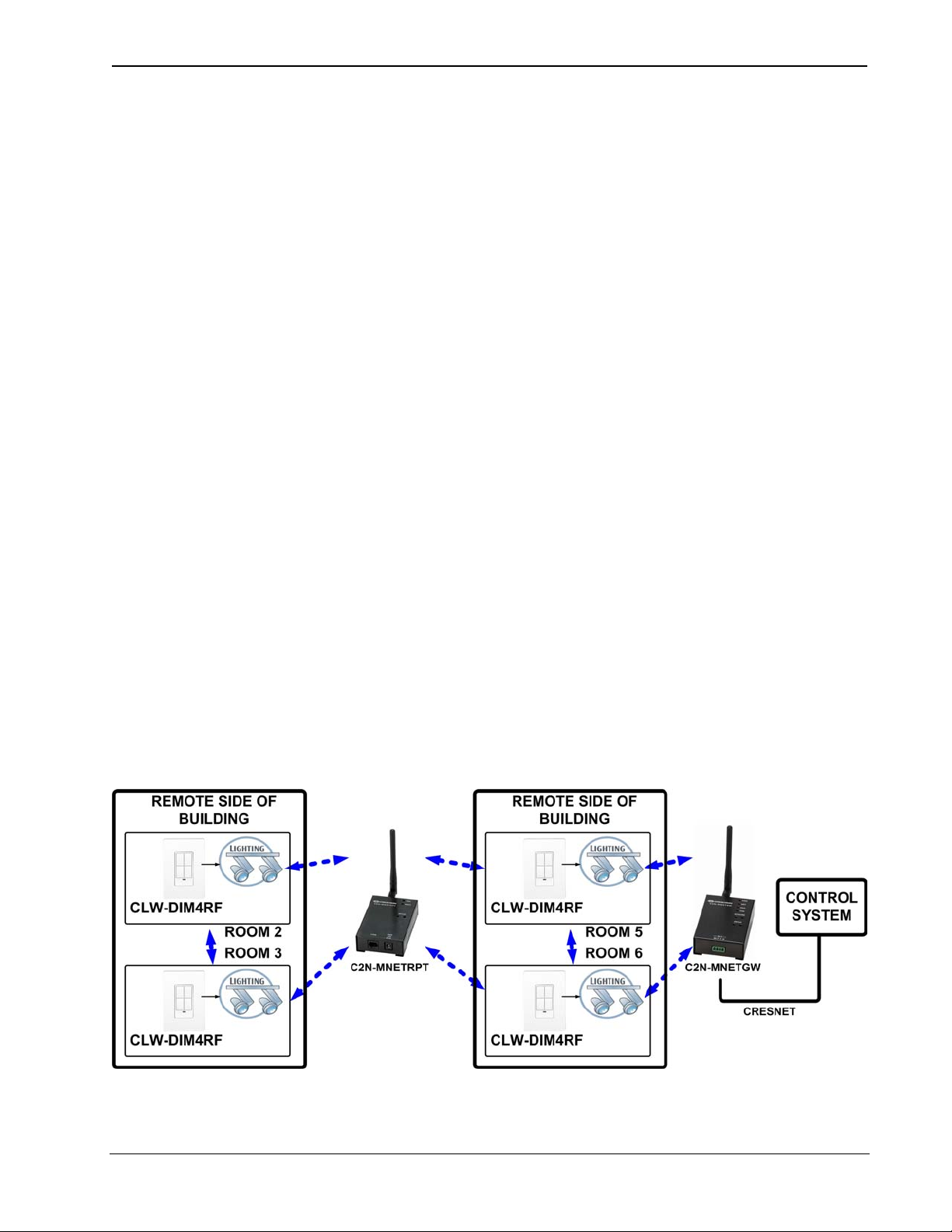
The following diagram shows a C2N-MNETGW in an infiNET
application with infiNET dimmers and a C2N-MNETRPT infiNET
repeater.
C2N-MNETGW in an infiNET Application

Crestron C2N-MNETGW infiNET™ Gateway/Transceiver
Operations Guide – DOC. 6317B infiNET™ Gateway/Transceiver: C2N-MNETGW •3
Specifications
Specifications for the C2N-MNETGW are listed in the following table.
C2N-MNETGW Specifications
SPECIFICATION DETAILS
Wireless
RF Transceiver
RF Transmitting Power
Range (typical)
Two-way RF, 2.4 GHz ISM
Channels 11-26 (2400 to 2483.6
MHz), IEEE 802.15.4 compliant
10 mW
150 feet indoor, 250 feet outdoor,
subject to site-specific conditions;
Range is increased by adding
additional devices or
C2N-MNETRPT infiNET repeater
Power Requirements
Cresnet®Power Usage 3 Watts
(0.125 Amps @ 24 Volts DC)
Default NET ID 0F
Minimum 2-Series Control
System Update File1, 2
Version 3.154 or later
Enclosure Black metal, freestanding
Environmental
Temperature 32º to 104ºF (0º to 40ºC)
Humidity 10% to 90% RH
(non-condensing)
Dimensions
(without antenna)
Height 1.24 in (3.15 cm)
Width 2.47 in (6.28 cm)
Depth 3.88 in (9.85 cm)
Weight 8.3 oz (0.24 kg)
(Continued on following page)

infiNET™ Gateway/Transceiver Crestron C2N-MNETGW
4 •infiNET™ Gateway/Transceiver: C2N-MNETGW Operations Guide – DOC. 6317B
C2N-MNETGW Specifications (Continued)
SPECIFICATION DETAILS
Available Accessories C2N-MNETRPT infiNET
Repeater
1. The latest software versions can be obtained from the Crestron®website. Refer to
the NOTE following these footnotes.
2. Crestron 2-Series control systems include the AV2 and PRO2. Consult the latest
Crestron Product Catalog for a complete list of 2-Series control systems.
NOTE: Crestron software and any files on the website are for authorized
Crestron dealers and Crestron Authorized Independent Programmers
(CAIP) only. New users may be required to register to obtain access to
certain areas of the site (including the FTP site).
Physical Description
This section provides information on the connections, controls and
indicators available on your C2N-MNETGW.
C2N-MNETGW Physical View

Crestron C2N-MNETGW infiNET™ Gateway/Transceiver
Operations Guide – DOC. 6317B infiNET™ Gateway/Transceiver: C2N-MNETGW •5
C2N-MNETGW Overall Dimensions (antenna not shown)
1
2
3
4
5
6
7
8
Connectors, Controls & Indicators
# CONNECTORS*,
CONTROLS &
INDICATORS
DESCRIPTION
1 ANTENNA
Reverse SMA, female; Dipole
antenna included.
NOTE: Only the included
antenna should be used.
2 PWR LED Indicates DC power supplied
from Cresnet network.
3 NET LED Indicates communication with
Cresnet system.
4 RXD LED Indicates data is being
received from wireless network
devices.
(Continued on following page)

infiNET™ Gateway/Transceiver Crestron C2N-MNETGW
6 •infiNET™ Gateway/Transceiver: C2N-MNETGW Operations Guide – DOC. 6317B
Connectors, Controls & Indicators (Continued)
# CONNECTORS*,
CONTROLS &
INDICATORS
DESCRIPTION
5 TXD LED Indicates data is being
transmitted to wireless network
devices.
6 ACQUIRE
(LED and button)
Recessed pushbutton with red
LED;
Used to configure the wireless
network.
7 SETUP
(LED and button)
Recessed pushbutton with red
LED;
Used for touch-settable ID
(TSID).
8 NET
Four-position terminal block
connector for data and power.
Connects to Cresnet control
network.
Pin 1 (24) Power
Pin 2 (Y) Data
Pin 3 (Z) Data
Pin 4 (G) Ground
* Interface connector for the NET port is provided with the unit.
Autres manuels pour infiNET Gateway C2N-MNETGW
2
Table des matières
Autres manuels Crestron Émetteur-récepteur

Crestron
Crestron CWD7567 Manuel utilisateur

Crestron
Crestron CWD6922 Manuel utilisateur

Crestron
Crestron CWD6660 Manuel utilisateur

Crestron
Crestron CWD6781 Manuel utilisateur

Crestron
Crestron CWD1014 Manuel utilisateur

Crestron
Crestron CWD7787 Manuel utilisateur

Crestron
Crestron TPS-RFGWX Manuel utilisateur

Crestron
Crestron TPS-XTXRF Comment utiliser

Crestron
Crestron CWD7191 Manuel utilisateur

Crestron
Crestron TPS-RFGWX Manuel