
COXEM EM-30PLUS Manuel utilisateur
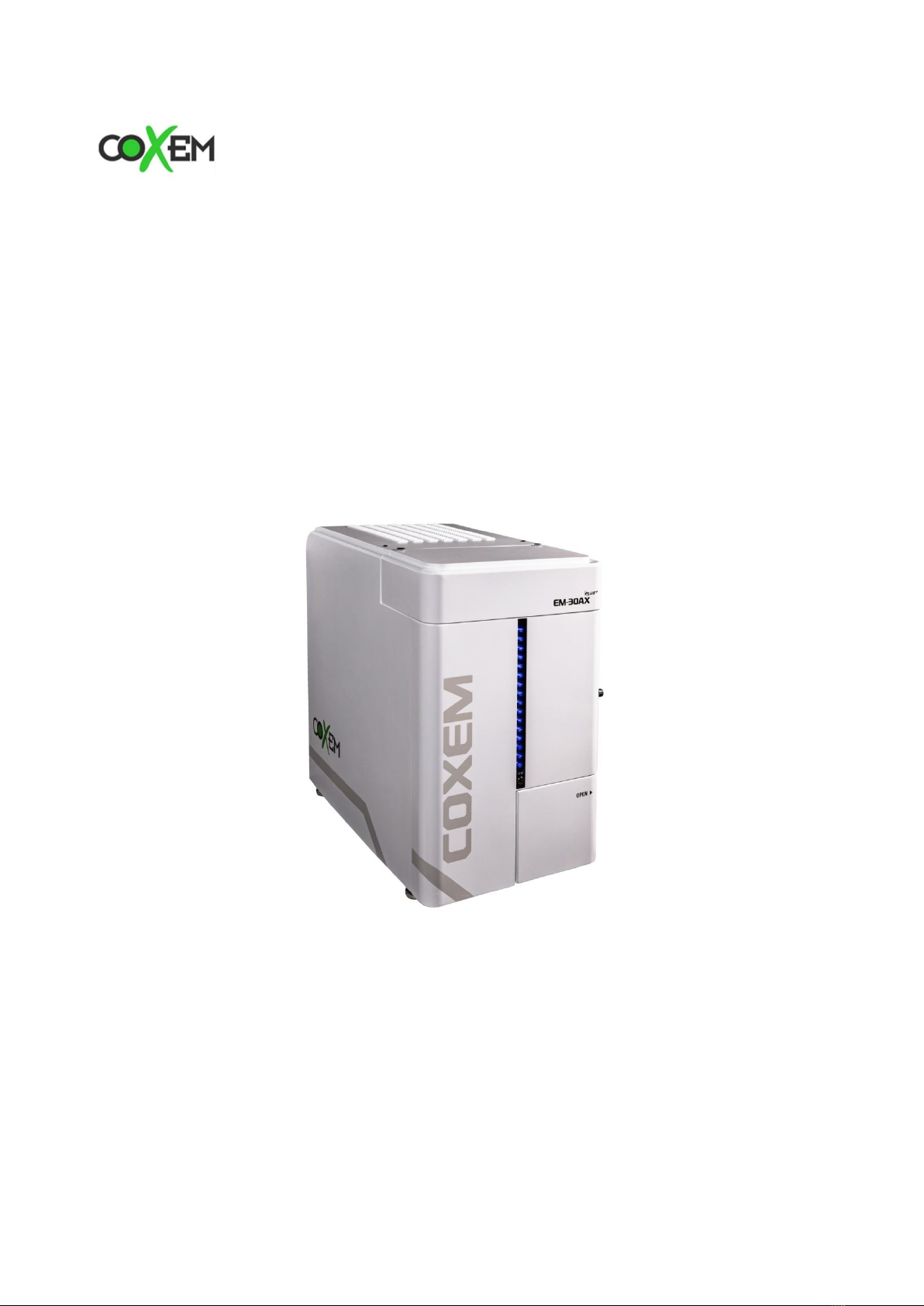
Scanning Electron Microscope
EM-30PLUS Operating Manual
COXEM Co., Ltd.

Scanning Electron Microscope EM-30PLUS Operating Manual
2
Contents
1. Introduction.................................................................................................................. 7
1.1 Descriptions on Product Parts ..................................................................................................7
1.1.1 Main Body of EM-30PLUS ....................................................................................................................... 7
1.1.2 Back and Inside of EM-30PLUS............................................................................................................. 8
1.2 Operational Procedure of Equipment ......................................................................................9
1.3 Cautions before Use..................................................................................................................10
1.3.1 Handling.........................................................................................................................................................10
1.3.2 Permission by Operation........................................................................................................................11
1.3.3 Safety Precautions .....................................................................................................................................12
2. Screen Composition.................................................................................................. 14
2.1 Main Screen of NS.....................................................................................................................14
2.2 Explanations on Buttons ..........................................................................................................15
2.2.1 E-Gun Power Button.................................................................................................................................15
2.2.2 Vacuum State Buttons .............................................................................................................................16
2.2.3 Selection of Detector Mode .................................................................................................................17
2.3 Display Mode..............................................................................................................................18
2.4 Image Mode................................................................................................................................20
2.5 Stage & Holder Information....................................................................................................20
2.5.1 Maximum Tilt Angle .................................................................................................................................21
2.6 Right Function Tap ....................................................................................................................22
2.6.1 Function..........................................................................................................................................................22
2.6.2 Magnification ...............................................................................................................................................23
2.6.3 Image Viewer Setting...............................................................................................................................24
2.7 Top Function Tap........................................................................................................................25
2.7.1 Setup................................................................................................................................................................26
2.7.2 Option .............................................................................................................................................................33
2.7.3 Help..................................................................................................................................................................36
2.8 Image Viewing............................................................................................................................37
2.8.1 Screen for Image Viewing .....................................................................................................................37
2.8.2 Image Tools ..................................................................................................................................................37
2.8.3 Image Correction .......................................................................................................................................38
2.8.4 Image Shift....................................................................................................................................................38
2.9 Other Buttons .............................................................................................................................39
2.9.1 Delete All .......................................................................................................................................................39

Scanning Electron Microscope EM-30PLUS Operating Manual
3
2.9.2 Wobble ...........................................................................................................................................................39
3. Specimen Preparation .............................................................................................. 40
3.1 Summary .....................................................................................................................................40
3.2 Types of Stub..............................................................................................................................41
3.2.1 Basic Components of Stub ....................................................................................................................41
3.2.2 Directions for Multi Holder ...................................................................................................................42
3.2.3 Stub Cleaning ..............................................................................................................................................43
3.3 Types of Materials .....................................................................................................................44
3.3.1 Classification by Height ..........................................................................................................................44
3.3.2 Classification by Material .......................................................................................................................44
3.4 Production of Specimen ...........................................................................................................46
3.4.1 Checklist before Specimen Preparation ..........................................................................................46
3.4.2 Material Preparation .................................................................................................................................46
3.4.3 Measurement of WD................................................................................................................................48
3.4.4 Specimen Mounting on Stub ...............................................................................................................49
3.5 Specimen Mounting ..................................................................................................................51
3.5.1 Preparation and Mounting of Specimen ........................................................................................51
3.5.2 Specimen Storage......................................................................................................................................53
4Preparation for Taking Photos ............................................................................... 54
4.1 Power ON/OFF............................................................................................................................54
4.1.1 Turning on the Main Body of EM-30PLUS.....................................................................................54
4.1.2 Turning off EM-30PLUS...........................................................................................................................55
4.2 Setting up of Electron Beam ...................................................................................................56
4.2.1 Turning on the Electron Beam.............................................................................................................56
4.2.2 Filament Optimization .............................................................................................................................57
4.3 Location Movement of Specimen...........................................................................................59
4.3.1 Use of Multi Holder..................................................................................................................................59
4.3.2 Use of Stub Except Multi Holder........................................................................................................60
4.3.3 Use of Tilt Function...................................................................................................................................62
4.3.4 Adjustment of Minimum Magnification..........................................................................................64
4.3.5 Specimen Selection and Moving using Mouse ...........................................................................65
4.3.6 Driving Mode...............................................................................................................................................66
5Image Acquisition ..................................................................................................... 69
5.1 Setting Observation Mode.......................................................................................................70

Scanning Electron Microscope EM-30PLUS Operating Manual
4
5.1.1 RED & Focus Mode ..................................................................................................................................70
5.1.2 Fast Mode......................................................................................................................................................70
5.1.3 Slow Mode....................................................................................................................................................71
5.1.4 Photo Mode .................................................................................................................................................71
5.2 Setting Acceleration Voltage ...................................................................................................72
5.2.1 Summary of Acceleration Voltage .....................................................................................................72
5.2.2 Setting Acceleration Voltage ................................................................................................................76
5.3 Setting Observation Magnification/Spot size ......................................................................78
5.3.1 Methods for Magnification Selection...............................................................................................79
5.3.2 Setting Spot size ........................................................................................................................................80
5.4 Focus Adjustment ......................................................................................................................81
5.4.1 Focus Setting ...............................................................................................................................................83
5.5 Fine Movement of Images .......................................................................................................89
5.5.1 Use of Image Shift ....................................................................................................................................89
5.5.2 Use of Beam Rotation..............................................................................................................................90
5.6 Control of Contrast and Brightness .......................................................................................91
5.6.1 Control of Contrast/Brightness............................................................................................................91
5.7 BSE Mode ....................................................................................................................................92
5.7.1 Precautions for Using BSE Sensor......................................................................................................93
5.7.2 BSE Setting....................................................................................................................................................94
5.7.3 Directions for BSE Mode ........................................................................................................................94
5.8 LV Mode (Low Vacuum Mode) - Optional................................................................................98
6Wobble Operation for Aperture ..........................................................................100
6.1 Structure of Aperture............................................................................................................. 100
6.2 Wobble (Procedure of Aperture Alignment) ..................................................................... 101
6.2.1 Wobble Operation 1.............................................................................................................................. 102
6.2.2 Wobble Operation 2.............................................................................................................................. 106
6.2.3 Methods for Aperture Setting .......................................................................................................... 110
6.2.4 Aperture Alignment (Resetting) ....................................................................................................... 112
7Image Save ...............................................................................................................113
7.1 Management of Image Information ................................................................................... 113
7.2 Use of Image Tools................................................................................................................. 114
7.2.1 Addition of Figures ................................................................................................................................ 114
7.3 Image Save Function .............................................................................................................. 120
7.3.1 Image Save ................................................................................................................................................ 120

Scanning Electron Microscope EM-30PLUS Operating Manual
5
8Alignment Operation.............................................................................................. 121
8.1 Summary of E-Gun Alignment ............................................................................................. 121
8.2 Method for E-Gun Alignment .............................................................................................. 122

Scanning Electron Microscope EM-30PLUS Operating Manual
6
Before using the product, please read this manual carefully and understand the
directions. Be sure to keep the manual in a conspicuous place.
Some devices or functions in manual may not be provided and they can be different
depending on optional items or options.
Images on the cover or in the manual are for illustration, which may be different from
actual products.
The functions and performance of this product and manual can be changed without
prior notification.
Scanning Electron Microscope EM-30PLUS Operating Manual
7
1. Introduction
1.1 Descriptions on Product Parts
It describes the names and functions of the parts of EM-30PLUS.
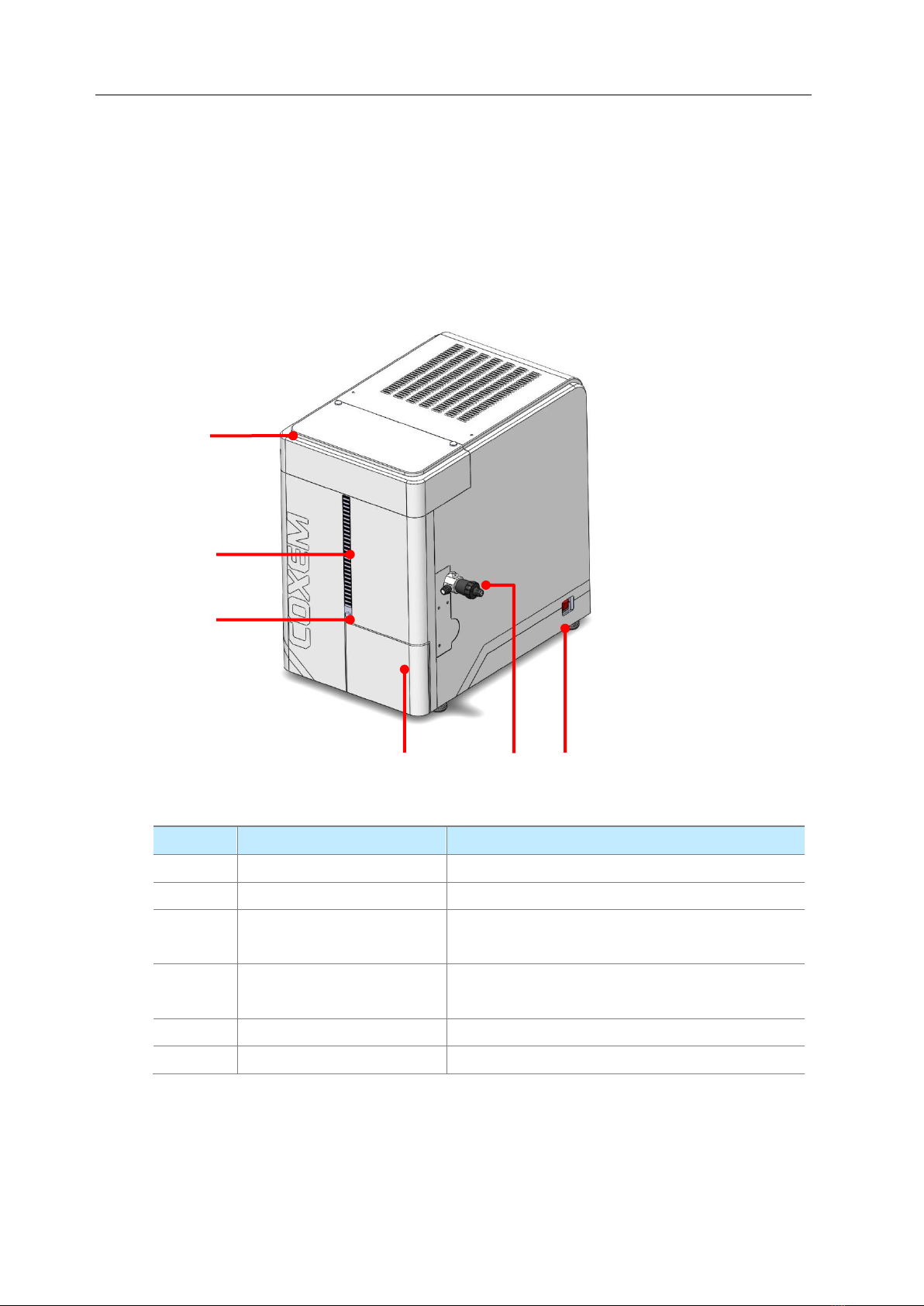
1.1.1 Main Body of EM-30PLUS
No.
Items
Descriptions
①
E-Gun cover
It is a cover for protecting e-gun.
②
LED Display for vacuum
Its vacuum state is displayed with LED lamp.
③
Pump/Vent button
It cancels or set up the state of vacuum by
force.
④
Chamber door
It is a door for chamber in which a specimen is
placed.
⑤
Variable Aperture
It is a handle used when controlling aperture.
⑥
Power switch
It is used for turning on the power.
①
②
③
④
⑤
⑥
Scanning Electron Microscope EM-30PLUS Operating Manual
8
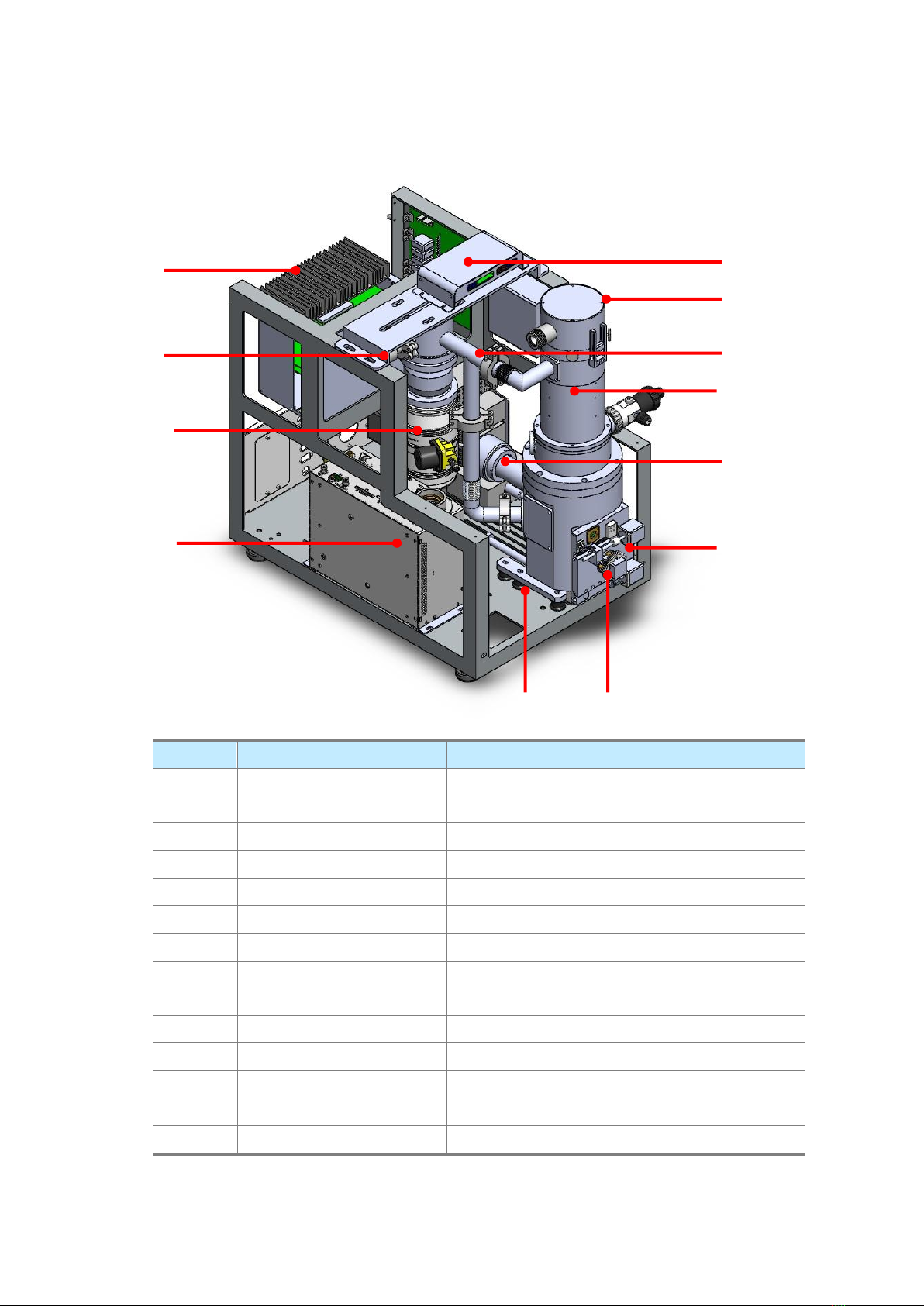
1.1.2 Back and Inside of EM-30PLUS
No.
Items
Descriptions
①
Electronic board and
radiator
It is an electronic board and a radiator.
②
Vacuum gage
It measures the vacuum state.
③
Turbo molecular pump
It keeps vacuum state high.
④
HV power tank
It provides the power of high voltage.
⑤
Damper
It absorbs vibrational energy.
⑥
Auto Stage
It moves X axis, Y axis, and T axis Stage.
⑦
Chamber
It is a vacuum chamber in which a specimen is
placed.
⑧
SE Detector
It detects SE.
⑨
Condenser lens
It is a lens condensing electron beam.
⑩
Main vent pipe
It is a vacuum vent pipe.
⑪
E-Gun
It radiates electronic beams.
⑫
BSE Board
It is a BSE electronic board.
①
②
③
④
⑫
⑪
⑩
⑨
⑧
⑦
⑥
⑤

Scanning Electron Microscope EM-30PLUS Operating Manual
9
1.2 Operational Procedure of Equipment
Operational procedures of EM-30PLUS electron microscope (EM) are as follows.
Stages
Detailed performances
1
Specimen Preparation
3.2.2 Assembling Method for Stub
3.4.2 Preparation of Materials
3.4.3 Measurement of Specimen Height
3.5.2 Specimen Mounting on Equipment
2
Power ON
4.1.1 Turning on the Main Body of EM-30PLUS
3
Preparation for Taking
Photos
4.3.1 Use of Multi Holder
4.3.2 Use of Stub Except Multi Holder
4.3.5 Specimen Selection and Moving Using Mouse
4
Image acquisition
5.1 Setting up Observation Mode
5.2 Setting Acceleration Voltage
5.3 Setting up Observation Magnification/Spot Size
5.4 Focus Adjustment
5.5 Fine Movement of Image
5.6 Control of Contrast & Brightness
5
Image save
7. Image Save

Scanning Electron Microscope EM-30PLUS Operating Manual
10
1.3 Cautions before Use
1.3.1 Handling
If fine dust or debris gets into electron microscope (EM), the equipment performance can
be degraded. Therefore, be sure to handle the equipment with plastic gloves.
Example of Plastic Gloves
Table des matières
Manuels Microscope populaires d'autres marques




VWR
VWR VisiScope 384 Series Manuel utilisateur

Nikon
Nikon ECLIPSE E200 POL Manuel utilisateur

Leica
Leica DI C800 Manuel

ThermoFisher Scientific
ThermoFisher Scientific Continuµm Manuel utilisateur

ThermoFisher Scientific
ThermoFisher Scientific Continuµm Manuel utilisateur
Olympus
Olympus SZ61 Manuel utilisateur