
CoolingTech S05-200X Manuel utilisateur

Wireless Digital Microscope 2.4GHZ
1/22
Wireless Digital Microscope
S05-200X
User Manual
(English)
Prepared by Coolingtech Digital Engineering Dept.
2012.10.1
confidentialconfidential

Wireless Digital Microscope 2.4GHZ
2/22
Thank you for Purchasing our S05-200X Digital
Microscope, it is a slim type tool and can be easily
used in different fields including
1. Textile industrial for textile inspection
2. Printing inspection
3. Industrial inspection: PCB, Precision machinery…
4. Educational purpose
5. Hair examination
6. Skin examination
7. Microbiological observation
8. Jewelry & coin (Collections) inspection
9. Visual Assistance
10. Others
S05 Wireless Digital Microscope break the limitation of distance, it works within
10 meter’s range. Equipped with measurement software and can tell simple
measure data conveniently. To know more about this product, please read
below manual and follow the instructions to operate.
CONTENTS
Introduction ······································································2
Parts of Microscope ···························································3
Specification ·····································································3
Notes before use ·······························································4
Product Outlook & How to Use ·············································4
Hardware and system requirements ······································6
How to install the Driver software ··········································6
How to install the measurement software ································7
Function options ································································13
How to do the calibration ·····························································22
confidentialconfidential

Wireless Digital Microscope 2.4GHZ
Parts of Microscope
1
3 2
4
5
67
①DC5Vsocket ②Switch On/Off & light brightness adjust wheel
③2.4GHZ indicator light ④Focus Roller ⑤Ratioscale ⑥Lens
⑦LED Light source
Specification
Image CMOS Sensor
Controller High Speed DSP (Driver Free available)
Focus Range 0mm ~ 40mm
Snap Shot Software
Frequency 2.4GHZ
Video Capture Resolution 1.3M.
Built-in4 ~ 8 White-light LED and adjustable illumination ensure the
magnified images are clear and bright
Still Image Capture Resolution 640*480, 320*2401280*960,
3/22
confidentialconfidential

Wireless Digital Microscope 2.4GHZ
4/22
1600*1200 ,800*600,
Frame Rate 25 f/s VGA under 600 LUX Brightness
20f/s QVGA under 600 LUX Brightness
Brightness Control Manual adjustment
Magnification Range 5X ~ 200X (Manually)
Power Supply TX Rechargeable lithium battery
RX5VDCfromUSBport
USB 2.0 & USB 1.1 Compatible
Operation System Windows XP, Vista, Win 7 32 bit and 64 bit.
Language: English, Chinese and other language by selection
System Requirement: Pentium Computer with 700M Hz & above,
20M HD Space CD ROM Driver, 64MB RAM, Direct X VGA Card
CD disk Driver and Micro-Measurement Tool
Product dimension 142mm ( L ) X 37 mm ( R )
Product net weight: 100g
Available color:Black.
Notes before use
1. Don’t dissemble the digital Microscope or change the interior parts,
it can cause damage.
2. Don’t clean the Microscope with alcohol organic solvents
3. Don’t touch the lens with your fingers.
4. Avoid outdoor use if possible.
5. Storage temperature , 0°C ~ 40°C,Humidity:45%RH ~ 85RH%.
6. In case the product gets wet, leave PC connection immediately.
And do not dissemble or dry by hair dryer. Send to repair center if
the digit microscope was effected by liquid or other elements.
confidentialconfidential
Wireless Digital Microscope 2.4GHZ
7. Measurement Data only for reference.
8. The effective range is 10m.
Standard parts and accessories
1. Digital Microscope (1pc)
2. Charger (1pc) include power line
3. Signal receive base (1pc)
4. CD ROM (Driver & Measurement)
5. Warranty card (1pc), quick guide (1pc)
HOW to Use
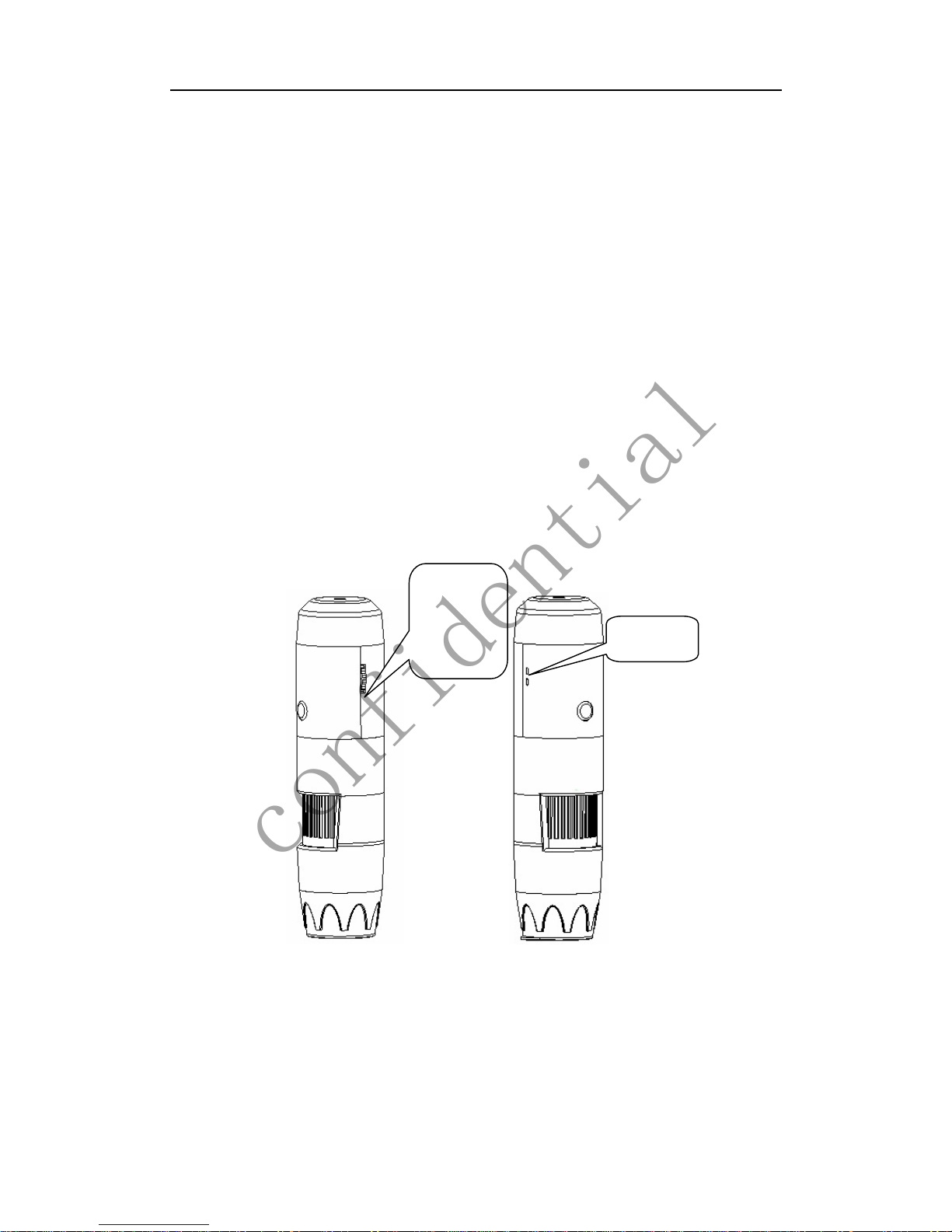
1 Turn on the power, adjust the light to the brightest, the LED starts
blink.
Brightness
adjust
wheel
Switch,
Indicator
5/22
confidentialconfidential

Wireless Digital Microscope 2.4GHZ
2 Connect the signal receive base to the PC, after connected, the
indicator light on.
LED
indicato
r
USB port
Wireless Signal Receive Base
3 If the transmitter indicator stops blink, and lights on all the time, it
means the signal connected already. Then you can continue to
operate in relative software.
Hardware system requirements
Windows 2000、XP、VISTA、WIN7 Pentium 1G, Celeron, AMD 1G &
above, 128MB Memory, 150MB Hard Disc memory space,16-bit &
above VGA ,CD-ROM, USB2.0 or USB1.1.
How to install the Software
S05 Wireless Digital Microscope is a Free Driver product, it can be worked
immediately after connected to the computer with operation system above
win2000 version. Detailed operation procedures as below:
1. Connect the receiver base to the computer, turn on the microscope, the
signal will connect automatically, after the receiver base indicator light
stops blink, it means the signal have been connected. Then, click and
open “My Computer” , below interface will shown up.
Double click the USB Video device as above red marked in your
computer. Now it is ready to use.
6/22
confidentialconfidential
Wireless Digital Microscope 2.4GHZ
If you can’t find the Video device, or if your computer can’t recognize it,
please follow below steps to install the software
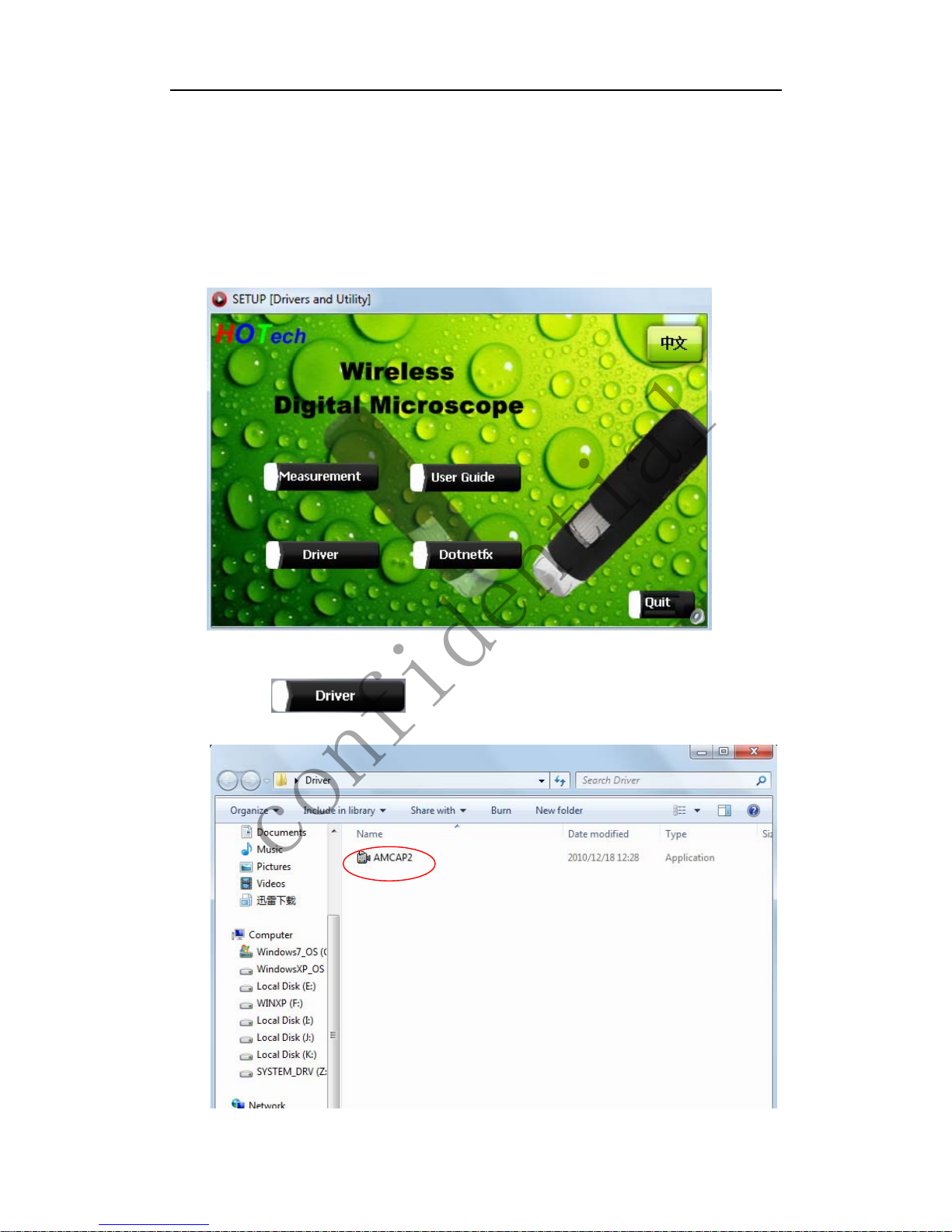
Insert the attached CD, system will auto run to the interface as below and
follow the steps to complete the installation:
(NOTE:If the computer can’t auto run the disc, you need to operate
manually by click “My Computer” →”DVD/CD Driver” →
run”AUTORUN.EXE”)
1Driver installation
Click ,open driver folder, drag the AMCAP file to
the desktop, like below .
7/22
confidentialconfidential
Wireless Digital Microscope 2.4GHZ
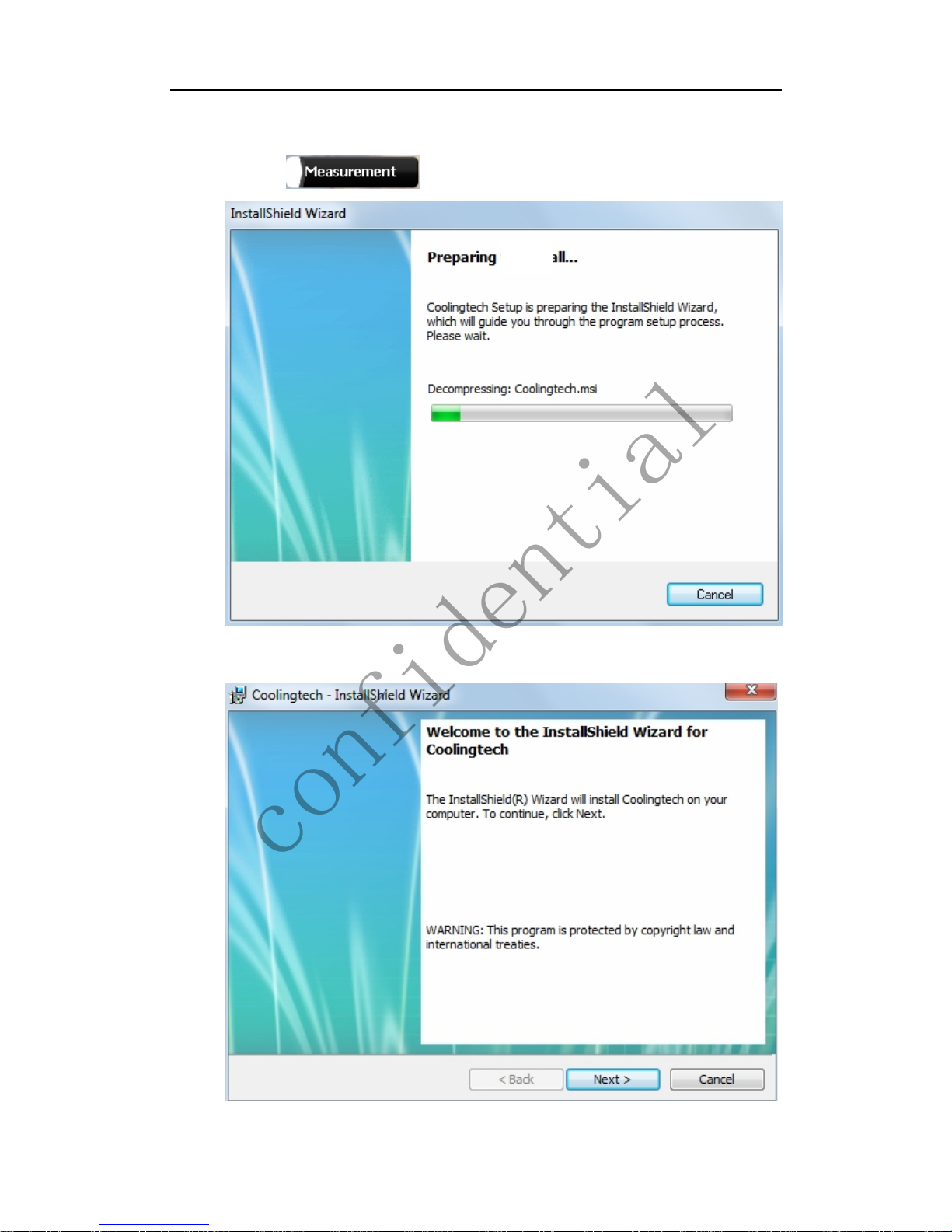
2 Measurement installations
1 Click to continue, as followings
2 Click “next” to continue, as followings
8/22
confidentialconfidential
Wireless Digital Microscope 2.4GHZ
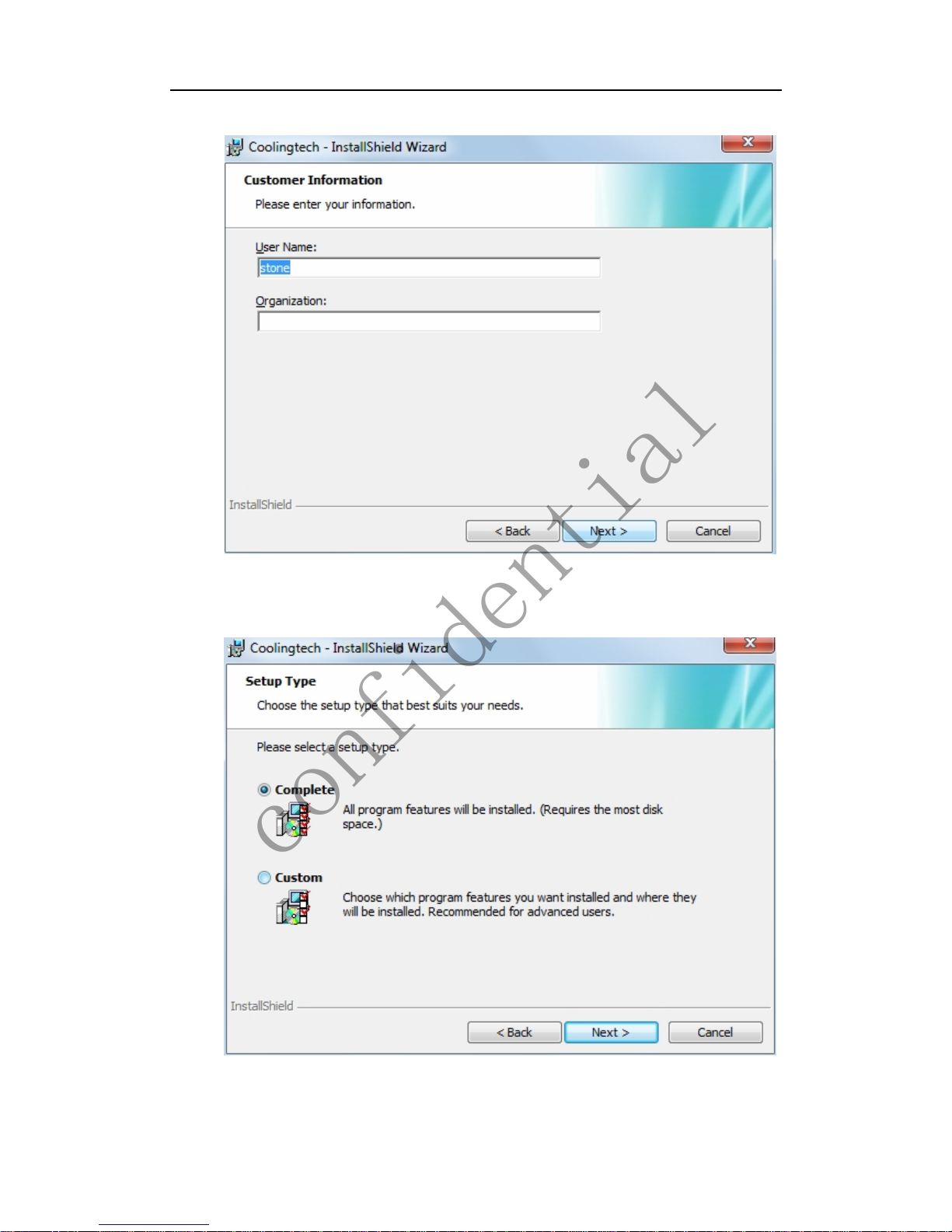
3Click “next” to continue, as followings
4 Click “next” to continue, as followings
9/22
confidentialconfidential

Wireless Digital Microscope 2.4GHZ
5 Click “next” to continue, as followings
6Click “Install” to continue, as followings
Wait a few seconds while the installation taking place.
10/22
confidentialconfidential
Table des matières
Autres manuels CoolingTech Microscope


Manuels Microscope populaires d'autres marques




VWR
VWR VisiScope 384 Series Manuel utilisateur

Nikon
Nikon ECLIPSE E200 POL Manuel utilisateur

Leica
Leica DI C800 Manuel

ThermoFisher Scientific
ThermoFisher Scientific Continuµm Manuel utilisateur

ThermoFisher Scientific
ThermoFisher Scientific Continuµm Manuel utilisateur
Olympus
Olympus SZ61 Manuel utilisateur