
Commax DRC-2AB1(B&W) Manuel utilisateur

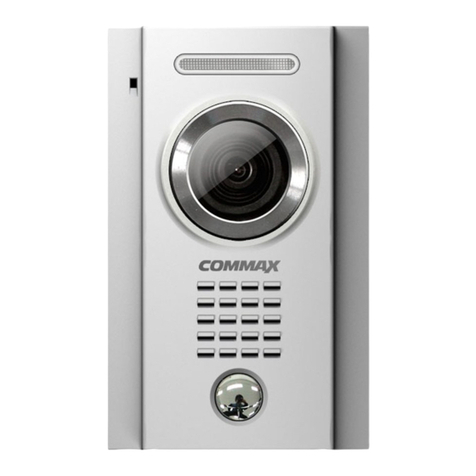
OUT DOOR CAMERA DRC-2AB1(B&W)/DRC-2AC1(COLOR)
User Manual
•Thank you for purchasing COMMAX products.
•Please carefully read this User’s Guide (in particular, precautions for safety) before using a product and follow
instructions to use a product exactly.
•The company is not responsible for any safety accidents caused by abnormal operation of the product.

2
Introduction ........................................................3
Important Safeguard ...........................................4
General Features................................................6
Preparation .........................................................7
Location And Function Of Controls....................8
Attaching Consideration....................................10
How To Installation ...........................................11
Notes On Use and Installation ......................... 12
Troubleshooting Guide .....................................13
Specifications....................................................15
COMMAX Limited Warranty .............................16
Table Of Contents

3
Your unit is designed so it can be flush mounted on the or used. When flush mounted on the wall, the stand permils you to the
unit for an gular of unit view. The model number is located on the bottom and record the serial number in the space provided
below(available). Refer to these numbers whenever you call upon your COMMAX dealer regarding this product.
Model No. Serial No.
To prevent fire or shock hazard, do not expose the unit to rain or moisture.
This symbol is intended to alert the use to the presence of uninsulated
“
“dangerous Voltage”
”
within the product’s enclose that
may be of sufficient magnitude to constitute a risk of electric shock to persons.
This symbol is intended to alert the use to the presence of important operating and maintemance(servicing) instructions in the
literature accompanying the appliance
Introdution
CAUTION: To reduce the risk of electrix shick, do not remove cover(or back) no user-serviceable
part sinside refer servicing to quaured service personnel
caution
Rosk of electric shock
do not open

4
Important Safeguard
▲
Damage Requiring Service: This equipment from the power source and source and refer servicing to qualified service personnel under the following
conditions:
ⓐwhen the power is damaged.
ⓑif liquid has been spiled or objects have hallen into the unit
ⓒif the equipment has been exposed to rain or water.
ⓓif the equipment has beem dropped or otherwise damaged.
ⓔwhen the equipment exhibits a distinct change in performance- this indicates a need for service.
▲
Water and Moisture: Do not use this product near water, for example, near a bath tub, wash bowl, kitchen sink, or laundru tub, in a wet basement, or near
a swimming pool, and the like.
▲
Accessories: The product may fall, causing serious injury to a child or adult, and serious damage to the appliance. Any mounting of the manufacture’s
insturctions, and should use a mounting accessory recommended by the manufacturer.
▲
Object and Liquid Entry: Never push objects of any kind into this product through openings as they may touch dangerous voltage points or short-out parts
that could result in a fire or electric shock. Never spill liquid of any kind on the product.
▲
Lightning: For added protection for this product before a lihgtning storm, or when it is left un attached and un used for long periods of time, unplug it from
the wall outlt and disconnect the other system. This will prevent damage to the product due to lightming and power-line surges. If you live in an
ared heavily prone to lightning stoms, it is recommended that you invest in power-line, telephone-line, RFcable and actuator/ polarization surge
protectors to protect your appliance system from possiple damage

Important Safeguard
5
▲
Servicing - Do not attempt to service this product yourself as opening or removing covers may expose you to dangerous volt-
age or other hazards. Refer all servicing to qualified service personnel.
▲
Replacement Parts - When replacement parts are require, be sure the service technician has used replacement parts speci-
fied by the manufacturer or having the same characteristics as the original part. Unauthorized substitu-
tions may result in fire, electric shock or other hazards.
▲
Safety Check - Upon completion of service or repairs to this product, ask the service technician to perform safety checks to
determine that the product is in proper operating condition.
▲
Power Line -The commax door aamera system should not be located near overhead power lines or other electric light or
power circuits, or where it can fall into power lines or circuits. When installing a door camera system, avoid dan-
gerous contact with power lines or circuits.
▲
Attachment - Do not use attachments not recommended by the product manufacturer as they may cause hazards.
▲
Safety Check - Upon completion of service or repairs to this product, ask the service technician to perform safety checks to
determine that the product is in proper operating condition.
▲
Power Sources - This equipment should be operated only from the type of power source indicated on the marking label.
▲
Grounding - This product is equipped with a polarized alternating - current line plug. This plug will fit into the power outlet only
oneway. This is a safety feature. If the plug should fail to fit, contact your electrician to replace your obsolete out-
let.
▲
Power Cord Protection - Power- supply cords should be routed so that they are not likely to be walked on or pinched by items
placed upon or against them; pay particular attention to cords at plugs, convenience receptacles and
the point where cords exit from the equipment.
▲
Overloading - Do not overload power outlets and extension cords as this can result in a risk of fire or electric shock.

General Features
6
General Characteristics
The system consists of :
- For 12V DC Operation ( power supplied from the monitor).
- Recess-Flushed Box
- Most Easy To Installation
- Rain Protection Housing For Recess
- Operating Temperature : -10°C ~ +40°C
- A Wide Variety Of Door Camera System To Suit Various Applications Are Available.
There is no where better than surveillance home, factory, office to make your house a security home COMMAX sur-
veillance system are here to provide positive visual and convenience life.

7
Preparation
- For DC operation, operate the unit on 12V DC.
- Should any solid object or liquid fall into the cabinet, disconnected the unit and have it checked by quali-
fied personnel before operating it any further.
- The Connector will fit into the power outlet only one way. If you are unable to insert the connector fully
into the outlet, contact your dealer.
- Allow adequate air circulation to prevent internal heat build-up.
- Do not place the unit on surfaces (rugs, blankets,etc) or near materials(curtains, drapereis) that may
block the ventilation slots.
- Do not install the unit near heat sources such as radiators or air ducts or in a place subejct to direct sun-
light, excessive dust, mechanical vibration or shock.
- Keep the unit and glass away from equipment with strong magnets, such as a microwave oven or large
loudspeakers.
- When the unit is not in use, turn off the power to conserve energy and to extend its useful life.
- Clean the cabinet, glass and controls with a drt soft cloth, or a soft cloth lightly moistened with mild deter-
gent solution.
- Do not use any type of solvent, such as alcohol or benzene, which might damage the finish.
If you have any questions about this unit, contact your Commax dealer.
On Safety
On Installation
On Operating
On Cleaning

8
Location and Control of Functions
❶Microphone
When Turn on the [CALL] button on the panel, and conversation with residents.
❷C.C.D. Camera Lens
Built-in Black & White C.C.D. 1/3" lens (for DRC-2AB1) and Color 1/4"
C.C.D lens (for DRC-2AC1).
❸Front Panel
No surface on corrosion material.
❹Name Card
Indicated in resident address.
❺Calling Button
Turn on the [CALL] button if desired calling.
❻Speaker
Aural from the resident.
❼Camera Protection Window
Prevent the scratch from the other matters.
5
6
7
8
9
10
11
Front View

9
Location and Control of Functions
❽Screw Hole
Use the assembly panel. NOTE: Before connection, contact to technical engi-
neer.
❾Angular Field Of View For Camera
Adjust the angular field of the camera for manually.
❿Connection Wire Release
Connection Terminal
Use the connection with your residents.
Note: Do not make any wire connections these terminals
or level the cover off while the unit is plugged into an DC powersup-
plier.
Rear View
5
6
7
8
9
10
11

10
Attaching Consideration
When selecting the location for attaching your unit,
please remember...
- Bottom should be of sufficient strength to permit attach-
ing.
- Allow adequate space on the both side of the unit for
proper ventilation access to cable and unit for viewing
easy.
- For angular field of camera view adjust by manually be
sure there is sufficient space behind the unit to adjust-
ment to angular field of view its position.
- A power cord should be within reach of the DC line cord
with the cord properly extended and secured (For using
adapter is supplied and optional).
- The area directly below the unit should not be used for
cooking radiator or by other appliances generating heat or steam.
- Hold the unit and in various locations while you think through what will be the mos convenient location in
your surveillance place.
Keep in mind your normal work pattern especially the use of other counter top electrical appliances.
- Try your unit in various location in the Hotel Super Convention Department Store Factory Apt to find the
area offering the best possible reception.
5
6
7
8
9
1
0
1
1
Ce manuel convient aux modèles suivants
1
Table des matières
Autres manuels Commax Caméra de sécurité

Commax
Commax 388027030 Manuel utilisateur

Commax
Commax CNV-2M03RS Manuel utilisateur

Commax
Commax DRC-4BG Manuel utilisateur

Commax
Commax DRC-4U Manuel utilisateur

Commax
Commax drc-4g Manuel utilisateur

Commax
Commax DCP-328R-S Manuel utilisateur
Commax
Commax DRC-4MC Manuel utilisateur

Commax
Commax DRC-4U Manuel utilisateur

Commax
Commax DRC-40KPT Manuel utilisateur

Commax
Commax drc-4g Manuel utilisateur


