
Comino GRANDO RM V2L Manuel utilisateur
GRANDO RM. User Manual 1
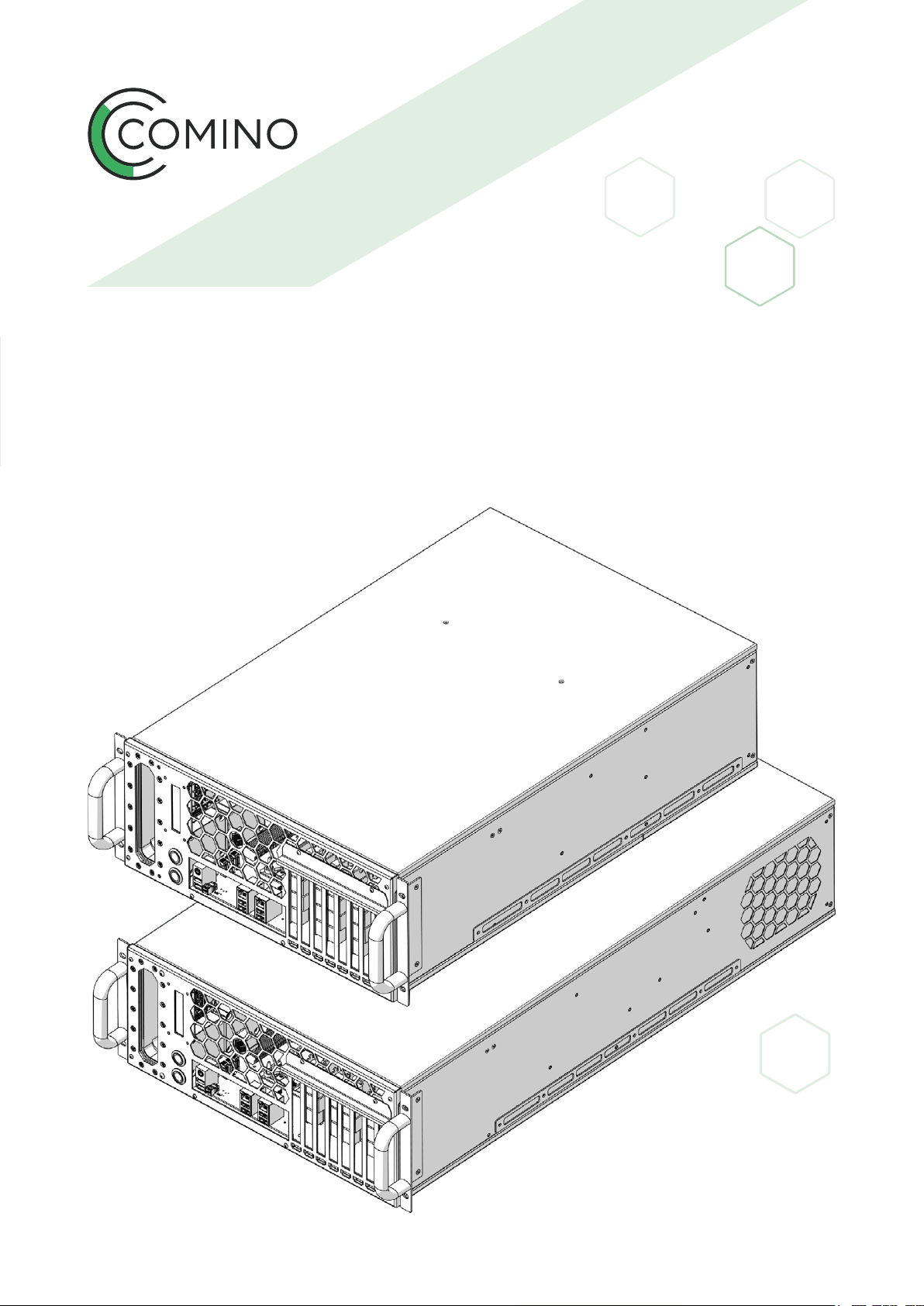
GRANDO RM
V2L/V2S
USER MANUAL
COMINO
HOLDING LTD.
2020

GRANDO RM. User Manual 2
OVERVIEW
1. INTRODUCTION
1.1 Intended use
2. PRODUCT DESCRIPTION
2.1 Product elements
3. SAFETY INSTRUCTIONS
3.1 Warnings and safety information
3.2 General
3.3 Intended use
3.4 Information for vulnerable people
3.5 Installation
3.6 Usage
3.7 Maintenance and reparations
3.8 Explanations of the signs on the computer
4. INSTALLATION
4.1 Unpacking and checking the contents
4.2 Installing
4.3 Power supply unit
4.4 Inrush current
4.5 Line fuse
4.6 Eciency
4.7 Power modules replacement
5. STARTING UP THE DEVICE
5.1 Self-diagnostic
5.2 Self-diagnostic errors
5.3 Menu navigation
5.4 Main part
5.4.1 Internal cooling system control buttons usage
5
5
6
6
7
7
7
8
9
9
11
12
12
13
13
14
15
17
17
17
17
18
18
20
21
23
23

GRANDO RM. User Manual 3
5.4.2 Control buttons illumination
5.3.4 Actual values menu
5.5 Commands menu
5.6 Control hotkeys
5.7 Service menu
6. POSSIBLE ACCIDENTS
6.1 Possible accidents during operation and self-diagnostic
6.2 Temperature sensors accidents
6.3 Fans and pumps
6.4 Operational reasons
6.5 Failure: No signal from the computing unit
7. SHUTDOWN PROCEDURE
7.1 Sound alerts
8 TROUBLESHOOTING
9. MAINTENANCE AND CLEANING
9.1 Checking and relling coolant
9.1.1 V2 Coolant control procedure
9.1.2 Relling coolant
9.1.3 Draining the coolant from the system
10. 10.2.5” DRIVES INSTALLATION
11. DISPOSAL
12. WARRANTY
OVERVIEW
24
25
29
30
32
34
34
34
36
37
39
42
42
42
49
49
49
50
51
52
54
55
GRANDO RM. User Manual 4
Congratulations on purchasing your GRANDO RM Professional Computing
Device. We are pleased to welcome you as a customer. These user instructions
contain all safety information and instructions necessary for using your
GRANDO RM.
Before using your device, please familiarise yourself with all relevant
information. Only use the device in the manner described and for the
applications indicated. If you pass on the device, be absolutely sure
to also pass on all instructions and other relevant documents.
!

GRANDO RM. User Manual 5
Intended Use
This device is intended for use as a Professional Computer. The device shall
not be used in caustic or potentially explosive environments, or for medical
purposes. The device may only be used as specied in these user instruc-
tions.
A GRANDO Professional Computer may only be used with the original
accessories and original components.
INTRODUCTION
1.1
1.
DANGER INDICATES AN IMMINENTLY HAZARDOUS
SITUATION WHICH, IF NOT AVOIDED, WILL RESULT
IN DEATH OR SERIOUS INJURY
DANGER
!
WARNING INDICATES A POTENTIAL HAZARDOUS SITUATION
WHICH, IF NOT AVOIDED, COULD RESULT IN DEATH
OR SERIOUS INJURY
WARNING
!
CAUTION INDICATES A POTENTIALLY HAZARDOUS SITUATION
WHICH, IF NOT AVOIDED, COULD RESULT IN MINOR
OR MODERATE INJURY
CAUTION
!
NOTICE INDICATES A SITUATION WHICH, IF NOT AVOIDED,
COULD RESULT IN PROPERTY DAMAGE
NOTICE
!
GRANDO RM. User Manual 6
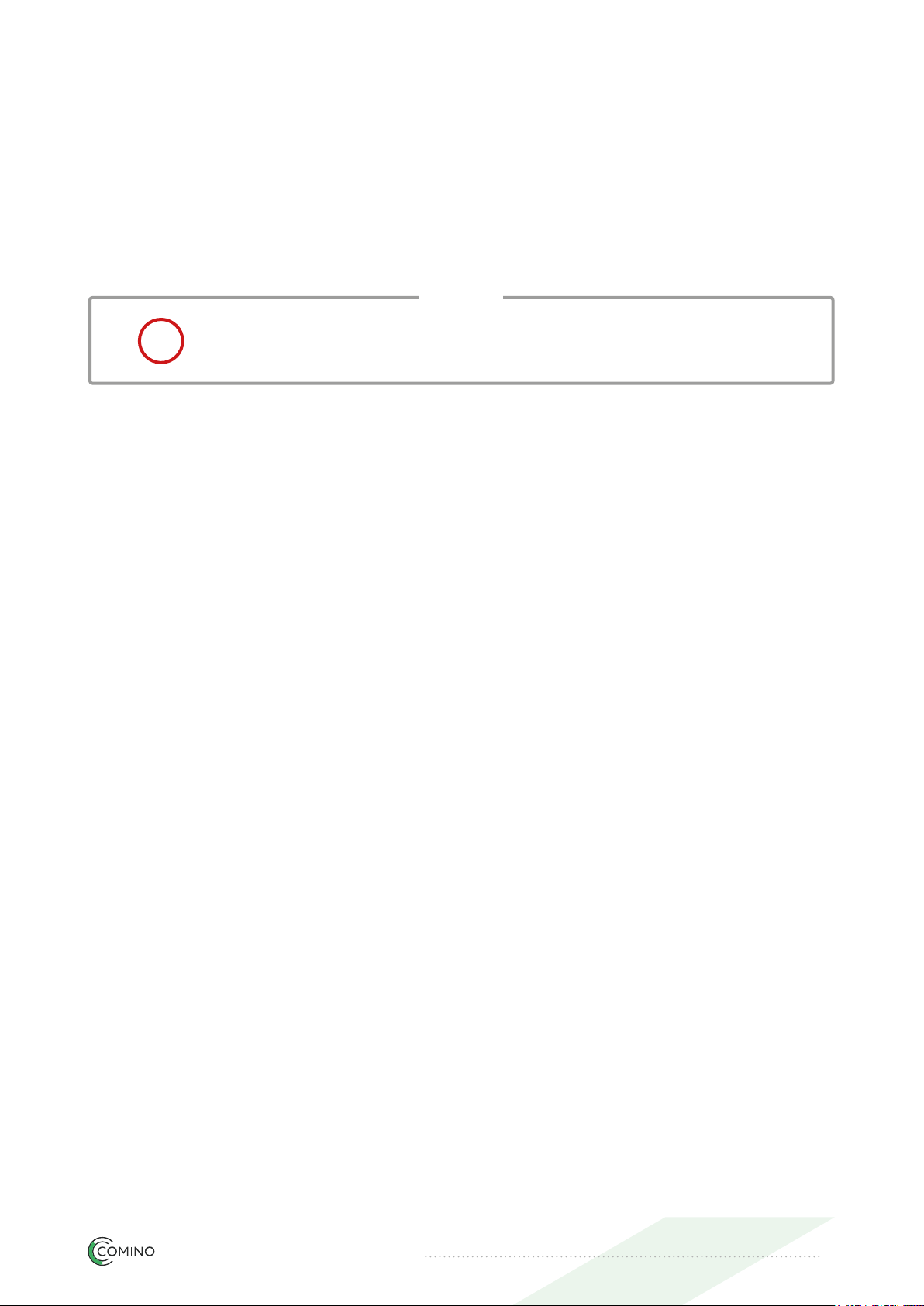
Product Elements
Rack mounting handles kit
PRODUCT DESCRIPTION
2.1
2.
Display
Power button 1 (PB1)
Power button 2 (PB2)
GRANDO RM. User Manual 7
Warnings and safety information
General
• Follow all the instructions. This will avert re, explosions, electric shock
and other hazards that can cause material damage and/or severe injury
or death
• Please ensure that all those who use the device have read these
warnings and instructions and follow them
• Keep all safety information and instructions available for future reference
and pass them onto users who subsequently use the device
• The manufacturer assumes no liability for instances of material damage
or personal injury caused by any incorrect use of the device or non-
compliance with safety instructions. The warranty is invalidated in such
cases.
SAFETY INSTRUCTIONS
3.1
3.2
3.
MAKE SURE YOU READ AND UNDERSTAND ALL SAFETY
INSTRUCTIONS
WARNING
!
GRANDO RM. User Manual 8
Intended use
• The device is intended for indoor use. Never use it outdoors
• Only use the device within the power limits specied. In the event
the device suffers damage, it shall be disconnected from the mains
and no longer used
• To prevent overheating, the device shall not be covered or placed near
to sources of heat or in direct sunlight, and it shall only be used
in ambient temperatures between +3°C and +38°C
• To prevent the system from overheating, do not cover the air intake
and outtake vents of the device
• Do not use the device during a gas leak
• Do not use the device close to magnetic or electric elds
• Do not use the device during a thunderstorm
• To prevent electric shocks, unplug the cable from the socket before
moving the system
• Do not turn on the device with the side covers removed
• Do not place objects on the surface of the device or insert foreign
objects into it
• Use the device with care, avoid impacts and mechanical damage,
moisture on the device both outside and inside
• Use the device in a well-ventilated area
3.3
THE DEVICE IS NOT SUITABLE FOR USE IN POTENTIALLY
EXPLOSIVE ENVIRONMENTS
DANGER
!
SAFETY INSTRUCTIONS3.
GRANDO RM. User Manual 9
Information for vulnerable people
• This device shall not be used by those (including children) with physical
or mental-health issues or a lack of experience and/or knowledge,
unless they are supervised by somebody who assumes responsibility for
their safety and gives them corresponding instructions on how to use
the device correctly.
• To avert injuries, keep the device away from children. Children shall be
supervised to ensure they do not play with the device.
Installation
3.4
3.5
NEVER LEAVE CHILDREN UNSUPERVISED WITH THE PACKAG-
ING MATERIAL. THE PACKAGING MATERIAL REPRESENTS
A RISK OF SUFFOCATION.
CHILDREN FREQUENTLY UNDERESTIMATE THESE DANGERS.
KEEP CHILDREN AWAY FROM THE PACKAGING MATERIAL.
DANGER
!
BE VIGILANT AT ALL TIMES, AND ALWAYS BE CAREFUL WHAT
YOU ARE DOING. DO NOT USE ELECTRICAL EQUIPMENT IF
YOU ARE LACKING IN CONCENTRATION OR AWARENESS, OR
ARE UNDER THE INFLUENCE OF DRUGS, ALCOHOL OR MED-
ICATION. A BRIEF MOMENT OF CARELESSNESS CAN CAUSE
SERIOUS ACCIDENTS AND INJURY WHEN USING ELECTRICAL
APPLIANCES.
DANGER
!
NEVER TOUCH A MAINS POWER PLUG WITH WET HANDS.
KEEP THE DEVICE AWAY FROM MOISTURE.
DANGER
!
SAFETY INSTRUCTIONS3.

GRANDO RM. User Manual 10
• Only use the mains power cord supplied with the device. Other power
cables can damage the device. Do not use the power cable together
with any other devices.
• Before using the device, check it for any signs of damage. If there is any
visible damage, a strong odour or excessive heating of components,
disconnect all power plugs immediately and do not use the device.
• Do not place the device on uneven or unstable surfaces.
• Do not expose the device to dirty or dusty environments.
• Do not expose the device to direct sunlight, or place it on heat-sensitive
surfaces or close to heaters, air-conditioners or combustible materials.
• Keep the device away from combustible materials such as curtains
and drapes.
• Do not use any damaged power cables, accessories or other peripheral
devices.
• Do not use the device near liquids or in rainy or humid conditions,
or expose it to them.
• Before using an adapter or extension cable, seek the assistance
of a specialist because they can cut out the protective earthing circuitry.
• The software and hardware shall be installed as in the user instructions.
• If the device is not installed and used as in these user instructions, it can
cause interference to radio and television reception and other electronic
devices in residential areas.
• Before connecting the device to the power supply, ensure your local
mains voltage matches that indicated on the device. If you are uncertain
about the voltage of the power supply, contact your electricity supplier.
SAFETY INSTRUCTIONS3.
Ce manuel convient aux modèles suivants
1
Table des matières
Autres manuels Comino Ordinateur de bureau


