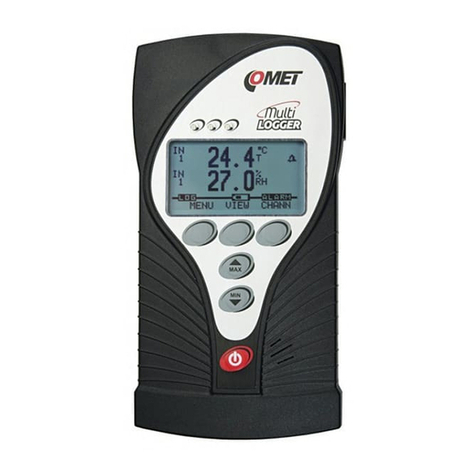
Comet Commeter D3121P Manuel utilisateur

2IE-COM-D3121P-05
Table of contents
GENERAL DESCRIPTION ............................................................................................................. 3
TECHNICAL PARAMETERS .......................................................................................................... 4
Measured and calculated values ............................................................................................ 4
General .................................................................................................................................. 5
Operation conditions .............................................................................................................. 6
Dimensions ............................................................................................................................ 8
OPERATION OF THE DEVICE ....................................................................................................... 9
Switching ON and OFF the device ......................................................................................... 9
Displaying of actual measured values .................................................................................... 9
Function HOLD (storing of actual measured values) and minimum a maximum memory ..... 10
Functions and settings available from menu ........................................................................ 10
Alarm indication and setting ................................................................................................. 12
LOGGING MODE ......................................................................................................................... 13
Logging start from device keyboard ..................................................................................... 13
Logging start with clearing memory and logging mode selection .......................................... 14
Logging stop from keyboard ................................................................................................. 15
CONNECTION OF THE DEVICE TO A PERSONAL COMPUTER ............................................... 16
THE PC SOFTWARE FOR THE DEVICE ..................................................................................... 17
Installation of program for PC with OS Windows .................................................................. 17
Software for Windows – instruction manual ......................................................................... 17
BATTERY REPLACEMENT .......................................................................................................... 19
TECHNICAL SUPPORT AND SERVICE ...................................................................................... 20
APPENDIX A ................................................................................................................................ 21

IE-COM-D3121P-05 3
General description
Instrument is designed for measurement and logging temperature and relative humidity of the
compressed air with the possibility of displaying the dew point temperature. Measured values are
displayed on a dual line LCD display and it is possible to store values into the non volatile memory.
Then it is possible to transfer data to a personal computer. Temperature is measured by RTD
sensor Ni1000/6180ppm. Instrument compares measured values of temperature, humidity and
dew point with two adjustable levels for each measured quantity. Breaking the level is indicated by
blinking the proper value on display and by audio indication (switchable). Instrument is equipped
with minimum and maximum memory and Hold function. Minimum and maximum values and Hold
value are possible to display on the LCD anytime.
The sensing element of the device is the external probe designed for compressed air
measurement up to 25 bars. It is good to mount probe directly into high pressure area (i.e. air
pressured pipe) if it is possible. There is other possibility to use flow chamber SH-PP, see
Appendix A.

4IE-COM-D3121P-05
Technical parameters
Measured and calculated values
Temperature:
Measuring range: -30 to +105 °C
Resolution: 0.1 °C
Accuracy: ±0.4 °C
Response time t90 < 9 min with sensor cover with filter from stainless steel mesh
_____________________________________________________________________________________________________________________
Air flow approximately 1m/s, temperature step 20 °C
Relative humidity:
Measuring range: 0 to 100 %RH
Resolution: 0.1 %RH
Accuracy: ± 2.5 %RH from 5 to 95 %RH at 23 ºC
Response time: t90 < 30 s with sensor cover with filter from stainless steel mesh
_____________________________________________________________________________________________________________________
Air flow approximately 1m/s, humidity step 65 %RH, constant temperature
Dew point temperature:
Measuring range: -50 to +80 ºC
Resolution: 0.1 ºC
Accuracy: ±1.5 °C at temperature T<25 °C and RH>30%
(for more details see graphs)

IE-COM-D3121P-05 5
General
Measuring interval and display reading refresh approximately:
0.7 s in FAST mode
0.7 to 5 s in dynamic mode
Logging interval:
10 s to 24 h (in automatic logging mode)
Total memory capacity:
1000 sets of all input quantities manual logging mode
8124 values automatic noncyclic logging mode
7644 values automatic cyclic logging mode
______________________________________________________________________________________________________________________________________________________________
The above specified numbers are maximum possible. Capacity is slightly lower if logging was interrupted by
communication with computer, by stopping logging or switching OFF the instrument.
Real time clock:
Adjustable from computer, integrated calendar including leap years
Real time clock accuracy: < 200 ppm (i.e. 0.02 %, 17.28 s in 24 h)
Power:
Battery 9V or ac/dc adapter 12 V with NiMH accumulator 9V
_____________________________________________________________________________________________________________________________________________________________
If instrument is supplied from external ac/dc adapter, internal 9V battery should be replaced with rechargeable
NiMH accumulator. In usual operation from adapter accumulator is charged only with small current. If
accumulator is totally discharged, its full charging in instrument takes approximately 100 hours. Instrument
with accumulator is not recommended for permanent operation without ac/dc adapter plugged. Accumulator
works only as a standby source in case of power mains failure.
Average current consumption:
0.15 to 0.7 mA (depending on operation mode)
_____________________________________________________________________________________________________________________________________________________________
Battery life depends on selected display refresh mode (see below). In FAST mode display is refreshed in
shortest possible interval with highest current consumption. In dynamic mode display is refreshed in interval
up to 5 s in case measured values remain stable. Refresh interval is shortened to approximately 0.7 s only if
measured values change. Current consumption in this mode in usual operation is lower, battery life is up to 4
times longer. The FAST mode is recommend to use only in cases, when slower display response is not
acceptable.
Battery voltage drop below 7 V is indicated with blinking of "BAT" in default display mode (displaying of actual
values) and FAST mode is automatically cancelled to save the battery. At the same time audio indication of
alarms is automatically switched OFF.

6IE-COM-D3121P-05
Electromagnetic compatibility:
Device conforms in accordance with EN 61326-1 these norms:
Radiation: EN 55022 class B
Immunity: EN 61000-4-2 (levels 4/8 kV, class A)
EN 61000-4-3 (intensity of electromagnetic field 3 V/m, class B)
EN 61000-4-4 (levels 1/0.5 kV, class A)
EN 61000-4-6 (intensity of electromagnetic field 3 V/m, class B)
EN 61000-4-11 (class A)
EN 61000-4-5 (class A)
Communication with computer:
USB port (USB mini connector)
Display:
Backlit two-line LCD
______________________________________________________________________________________________________________________________________________________________
Backlighting turns off automatically 10 seconds after the last keystroke
Protection:
IP20 device, sensors are located in cover with IP40 protection
Dimensions:
141 x 71 x 27 mm
Weight:
Approximately 150 g including battery without probe
Material of the probe housing:
Duralumin with the black eloxal surface finish
Operation conditions
Ambient temperature operating range:
-10 to +60 °C, device
-30 to +105 °C, probe
Ambient rel. humidity operating range:
5 to 95 %RH (no condensation), device
0 to 100 %RH, probe
Temperature and rel. humidity restriction:
The measuring range of the external
probe is limited in accordance with the
graph and must not be exceeded!

IE-COM-D3121P-05 7
Operating pressure range of the probe:
Up to 25 bar
Air flow velocity:
Up to 25 m/s at a pressure of 1 bar (1 m/s at a pressure of 25 bar)
Mechanical connection of probe:
G1/2 with O-ring
Working position of the probe:
Vertical with the cover downwards
Not allowed manipulation:
It is not allowed to touch the sensors under the cover to prevent damage the sensors.
The sensors (under the cover) should not be exposed to direct contact with water or
other liquids.
Dismounting of the probe must not be carried out under the pressure.

8IE-COM-D3121P-05
Dimensions

IE-COM-D3121P-05 9
Operation of the device
Switching ON and OFF the device
Switch ON the instrument by pressing ON/OFF key. After switching ON
the instrument all symbols on the LCD are displayed. If the ON/OFF key
is being held pressed, all LCD symbols are displayed till the key is
released. In usual operation instrument then starts the measurement
mode and actual measured values are displayed.
If a voltage drop below critical limit occurred since last adjustment of
internal real time clock or battery disconnection longer than
approximately 1 min, new instrument initialisation is performed (reading
INIT could be displayed up to 12 s !).
After initialization is finished instrument starts to display internal time to
warn to incorrect internal time. New time adjustment is performed by the
computer. Press MENU key to switch instrument to actual measurement
mode.
It is possible to switch OFF the instrument anytime, all instrument setting
is kept saved. If automatic logging was active before instrument is
switched OFF, logging will continue with the same parameters after new
switching ON.
Displaying of actual measured values
In this mode is instrument anytime after switching ON. It is possible to enter this mode from
other modes by pressing or by repeating pressing of MENU key.
Temperature is displayed on the upper LCD line (°C) and relative
humidity in %RH is displayed on the lower LCD line.
Press DISPLAY key to display other readings - temperature in °C on
upper line and dew point temperature on lower line (°C DP).

10 IE-COM-D3121P-05
Function HOLD (storing of actual measured values) and
minimum a maximum memory
Press HOLD key in the default mode (displaying of actual measured value) to store actual
measured values to internal memory (indicated by short beep). Anytime it is possible to display
stored values from MENU (see below). Each pressing of the HOLD key in the default mode
causes values stored in HOLD memory are replaced with actual ones.
Switched ON instrument permanently updates minimum and maximum
memory of each measured values. Press MIN key (resp. MAX key) in
the default mode to display minimum (resp. maximum) reading. These
minimum and maximum readings are indicated by MIN (MAX) symbols
on the LCD. Press DISPLAY key to display minimum (resp. maximum)
value of other values. Pressing MIN (MAX) or MENU key again to return
to default mode. Minimum and maximum memory is cleared from menu
after confirmation selection CLR (see below). Values in HOLD, MIN and
MAX memories remain stored even after instrument is switched OFF.
Functions and settings available from menu
Press MENU key to enter mode of viewing menu items one by one. Press arrow keys up and
down to list all menu items. Press MENU key again to return to default mode (displaying of
actual measured values).
First selection is START/STOP logging. There are two possibilities: if
logging is stopped, logging start is offered (symbol Strt = START), if
logging is in progress already, logging stop is offered (reading STOP).
Press ENTER key to confirm one of two possibilities. Notice: if battery
voltage is low it is not possible to start logging.
Press ENTER key to enter alarm setting mode (see below).
Table des matières
Autres manuels Comet Enregistreur de données

Comet
Comet Commeter D0211 Manuel utilisateur

Comet
Comet Commeter D0221 Manuel utilisateur

Comet
Comet U0111 Manuel d'instructions

Comet
Comet MS5 Manuel utilisateur

Comet
Comet S Series Manuel utilisateur

Comet
Comet U0110G Manuel utilisateur

Comet
Comet U0110 Manuel utilisateur

Comet
Comet U0110M Manuel d'instructions

Comet
Comet U0110M Manuel utilisateur

Comet
Comet M1140 Manuel utilisateur