CloudByte ESA - A100 Manuel utilisateur

CloudByte User Guide
ElastiStor Appliance
ESA - A100

The information in this User’s Manual has been carefully reviewed and is believed to be accurate.
The vendor assumes no responsibility for any inaccuracies that may be contained in this document,
makes no commitment to update or to keep current the information in this manual, or to notify any
person or organization of the updates. Please Note: For the most up-to-date version of this
manual, please see our web site at www.cloudbyte.com.
CloudByte, Inc. ("CloudByte") reserves the right to make changes to the product described in this
manual at any time and without notice. This product, including software and documentation, is the
property of CloudByte and/or its licensors, and is supplied only under a license. Any use or repro-
duction of this product is not allowed, except as expressly permitted by the terms of said license.
IN NO EVENT WILL CLOUDBYTE BE LIABLE FOR DIRECT, INDIRECT, SPECIAL, INCIDENTAL,
SPECULATIVE OR CONSEQUENTIAL DAMAGES ARISING FROM THE USE OR INABILITY TO
USE THIS PRODUCT OR DOCUMENTATION, EVEN IF ADVISED OF THE POSSIBILITY OF SUCH
DAMAGES. IN PARTICULAR, CLOUDBYTE SHALL NOT HAVE LIABILITY FOR ANY HARDWARE,
SOFTWARE, OR DATA STORED OR USED WITH THE PRODUCT, INCLUDING THE COSTS OF
REPAIRING, REPLACING, INTEGRATING, INSTALLING OR RECOVERING SUCH HARDWARE,
SOFTWARE, OR DATA.
Unless you request and receive written permission from CloudByte, Inc., you may not copy any
part of this document.
Information in this document is subject to change without notice. Other products and companies
referred to herein are trademarks or registered trademarks of their respective companies or mark
holders.
Copyright © 2014 by CloudByte, Inc.
All rights reserved.

iii
Preface
Preface
About This Manual
This manual is written for professional system integrators and PC technicians.
It provides information for the installation and use of the CloudByte ElastiStor
Appliance-A100 (ESA-A100). Installation and maintenance should be performed
by experienced technicians only.
The ESA-A100 is a high-end storage server solution based on the rackmount chas-
sis and the dual processor serverboard.
Manual Organization
Chapter 1: Introduction
The rst chapter provides a checklist of the main components included with the
server system and describes the main features of the serverboard and the chassis.
Chapter 2: Server Installation
This chapter describes the steps necessary to install the ESA-A100 into a rack and
check out the server conguration prior to powering up the system. If your server
was ordered without processor and memory components, this chapter will refer you
to the appropriate sections of the manual for their installation.
Chapter 3: System Interface
Refer here for details on the system interface, which includes the functions and
information provided by the control panels on the chassis as well the HDD carrier
LEDs.
Chapter 4: Standardized Warning Statements
You should thoroughly familiarize yourself with this chapter for a general overview of
safety precautions that should be followed when installing and servicing ESA-A100.

CloudByte ESA-A100 User's Manual
iv
Chapter 5: Advanced Serverboard Setup
Chapter 5 provides detailed information on the serverboard, including the loca-
tions and functions of connections, headers and jumpers. Refer to this chapter
when adding or removing processors or main memory and when reconguring the
serverboard.
Chapter 6: BIOS
The BIOS chapter includes an introduction to BIOS and provides detailed informa-
tion on running the CMOS Setup Utility.
Appendix A: BIOS Error Beep Codes
Appendix B: System Specications

Notes
Preface
v

vi
Table of Contents
Appendix A
BIOS Error Beep Codes
Appendix B
System Specications
Chapter 1
Introduction
1-1 Overview ......................................................................................................... 1-1
1-2 Serverboard Features ..................................................................................... 1-2
Processors ...................................................................................................... 1-2
Memory ........................................................................................................... 1-2
SAS Disk Controller ........................................................................................ 1-2
SAS Expander................................................................................................. 1-2
SATA .............................................................................................................. 1-2
NTB Connectivity ............................................................................................ 1-2
PCI Expansion Slots ....................................................................................... 1-2
Rear Chassis Ports ......................................................................................... 1-3
Graphics Controller ......................................................................................... 1-3
1-3 Server Chassis Features ................................................................................ 1-3
System Power ................................................................................................. 1-3
SAS Subsystem .............................................................................................. 1-3
Front Control Panel......................................................................................... 1-3
Cooling System ............................................................................................... 1-3
1-4 Contacting CloudByte ..................................................................................... 1-5
1-5 SBB: Storage Bridge Bay ............................................................................... 1-6
Chapter 2
Server Installation
2-1 Overview ......................................................................................................... 2-1
2-2 Unpacking the System .................................................................................... 2-1
2-3 Preparing for Setup......................................................................................... 2-1
Choosing a Setup Location............................................................................. 2-1
2-4 Warnings and Precautions .............................................................................. 2-2
Rack Precautions ............................................................................................ 2-2
Server Precautions.......................................................................................... 2-2
Rack Mounting Considerations ....................................................................... 2-3
CloudByte ESA-A100 User's Manual

vii
Ambient Operating Temperature ................................................................ 2-3
Reduced Airow ......................................................................................... 2-3
Mechanical Loading ................................................................................... 2-3
Circuit Overloading..................................................................................... 2-3
Reliable Ground ......................................................................................... 2-3
2-5 Installing the System into a Rack ................................................................... 2-4
Installing the Inner Rack Rails ........................................................................ 2-4
Installing the Outer Rack Rails ....................................................................... 2-5
Installing the Chassis into a Rack................................................................... 2-6
Chapter 3
System Interface
3-1 Overview ......................................................................................................... 3-1
3-2 Control Panel Button....................................................................................... 3-1
Power .............................................................................................................. 3-1
3-3 Control Panel LEDs ........................................................................................ 3-1
Power Fail ....................................................................................................... 3-1
Overheat/Fan Fail: .......................................................................................... 3-2
NIC1 ................................................................................................................ 3-2
NIC2 ................................................................................................................ 3-2
Heartbeat......................................................................................................... 3-2
Power .............................................................................................................. 3-3
3-4 Drive Carrier LEDs.......................................................................................... 3-3
Chapter 4
Standardized Warning Statements for AC Systems
4-1 About Standardized Warning Statements....................................................... 4-1
Warning Denition ........................................................................................... 4-1
Installation Instructions.................................................................................... 4-2
Circuit Breaker ................................................................................................ 4-2
Power Disconnection Warning ........................................................................ 4-2
Equipment Installation..................................................................................... 4-2
Restricted Area................................................................................................ 4-2
Battery Handling.............................................................................................. 4-3
Redundant Power Supplies ............................................................................ 4-4
Backplane Voltage .......................................................................................... 4-4
Comply with Local and National Electrical Codes .......................................... 4-4
Product Disposal ............................................................................................. 4-4
Hot Swap Fan Warning................................................................................... 4-4
Power Cable and AC Adapter ........................................................................ 4-4
Table of Contents

viii
Chapter 5
Advanced Serverboard Setup
5-1 Handling the Serverboard ............................................................................... 5-1
Precautions ..................................................................................................... 5-1
5-2 Cable and Device Connections....................................................................... 5-2
Power Connections .................................................................................... 5-2
Fan Cabling ................................................................................................ 5-2
Control Panels............................................................................................ 5-2
5-3 Installing the Processor and Heatsink ............................................................ 5-3
Installing an LGA 1356 Processor .................................................................. 5-3
Installing a CPU Heatsink ............................................................................... 5-5
Chapter 6
BIOS
6-1 Introduction...................................................................................................... 6-1
Starting BIOS Setup Utility.............................................................................. 6-1
6-2 IPMI.................................................................................................................6-2
6-3 Boot.................................................................................................................6-4
6-4 Security ...........................................................................................................6-5
6-5 Save & Exit .....................................................................................................6-5
CloudByte ESA-A100 User's Manual

A-1
Appendix A: BIOS Error Beep Codes
Appendix A
BIOS Error Beep Codes
During the POST (Power-On Self-Test) routines, which are performed at each
system boot, errors may occur.
Non-fatal errors are those which, in most cases, allow the system to continue to
boot. The error messages normally appear on the screen.
Fatal errors will not allow the system to continue with bootup procedure. If a
fatal error occurs, you should consult with your system manufacturer for possible
repairs.
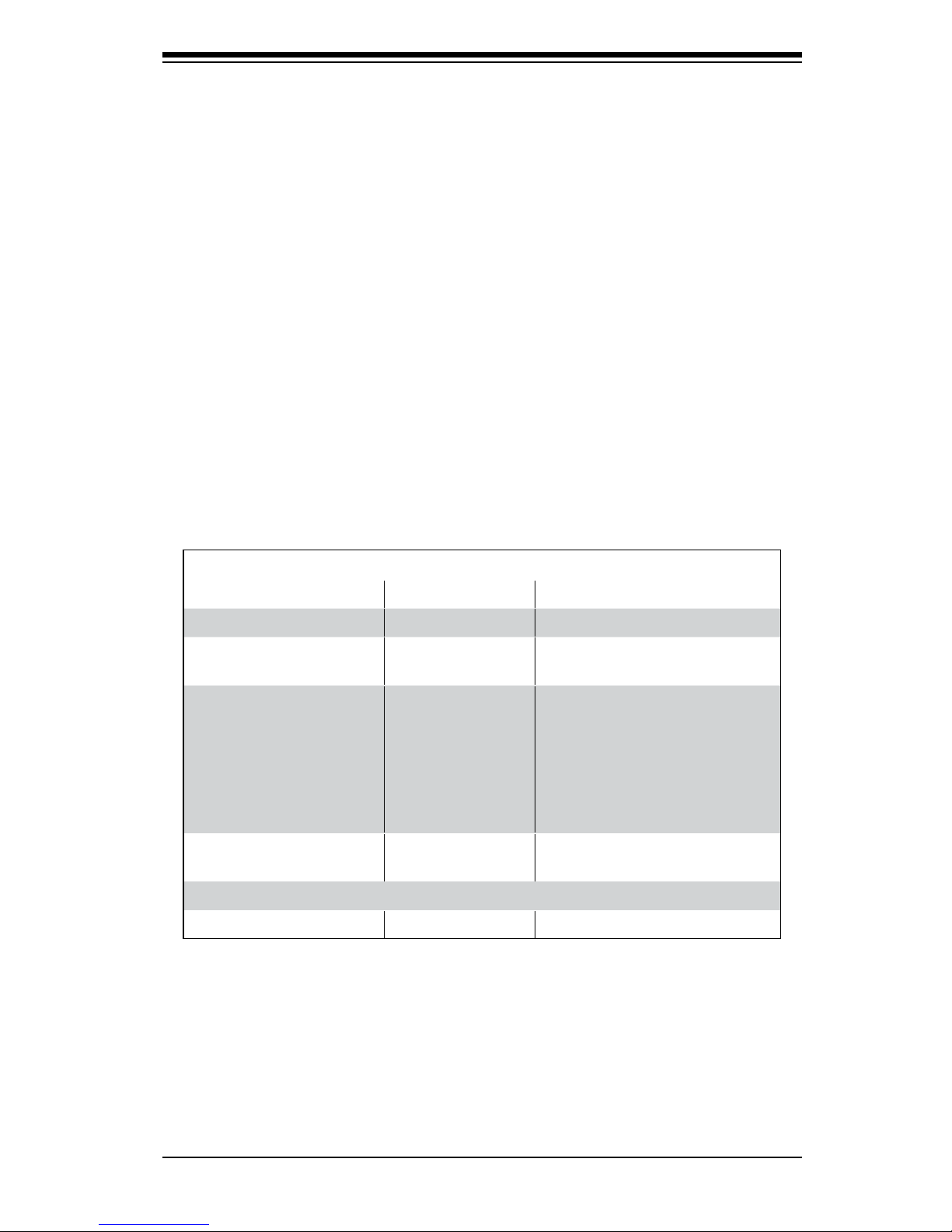
These fatal errors are usually communicated through a series of audible beeps.
The numbers on the fatal error list correspond to the number of beeps for the
corresponding error.
BIOS Error Beep Codes
Beep Code/LED Error Message Description
1 beep Refresh Ready to boot
5 short beeps + 1 long
beep
Memory error No memory detected in the
system
5 beeps No Con-In or No
Con-Out devices
Con-In: USB or PS/2 key-
board, PCI or Serial Console
Redirection, IPMI KVM or SOL
Con-Out: Video Controller, PCI
or Serial Console Redirection,
IPMI SOL
1 beep Refresh 1 beep for each USB device
installed
X9 IPMI Error Codes
1 Continuous Beep System OH System Overheat

A-2
CloudByte ESA-A100 User's Manual
Notes
Ce manuel convient aux modèles suivants
1
Table des matières
Manuels Serveur de stockage réseau populaires d'autres marques

HP
HP NetStorage 6000 Manuel utilisateur

Seagate
Seagate U10 ST320423A Manuel utilisateur

Synology
Synology RackStation RS816 Manuel

D-Link
D-Link ShareCenter Pro DNS-1200-05 Manuel utilisateur

Avid Technology
Avid Technology VideoRAID ST Guide de sécurité

Western Digital
Western Digital My Cloud Home Duo Manuel utilisateur

PrimeArray
PrimeArray 4xxx Manuel utilisateur

Buffalo
Buffalo TeraStation WSS WSH5010N6 Manuel utilisateur

Planex
Planex MZK-NAS01SG Manuel utilisateur

Intel
Intel SS4000-E - Entry Storage System NAS Server Manuel utilisateur

Synology
Synology RS2212+ Manuel utilisateur

Allnet
Allnet ALL69000 Manuel utilisateur