
Clack CleanSource Manuel utilisateur

‑ 1 ‑
CleanSource
Drinking Water System
Owner’s and Operator’s
Manual

‑ 2 ‑
INTRODUCTION
Thank you for purchasing your new
CleanSource®Drinking Water System,
an advanced
filtration system
combined with
state–of–the–art
electronic capacity
monitoring.
Your new system
was designed to be a convenient,
highly capable countertop water
filter for today’s needs. Its integrated
meter provides information on filter
life.Your system has a rated capacity
of 1,000 gallons or 18 months,
whichever comes first.
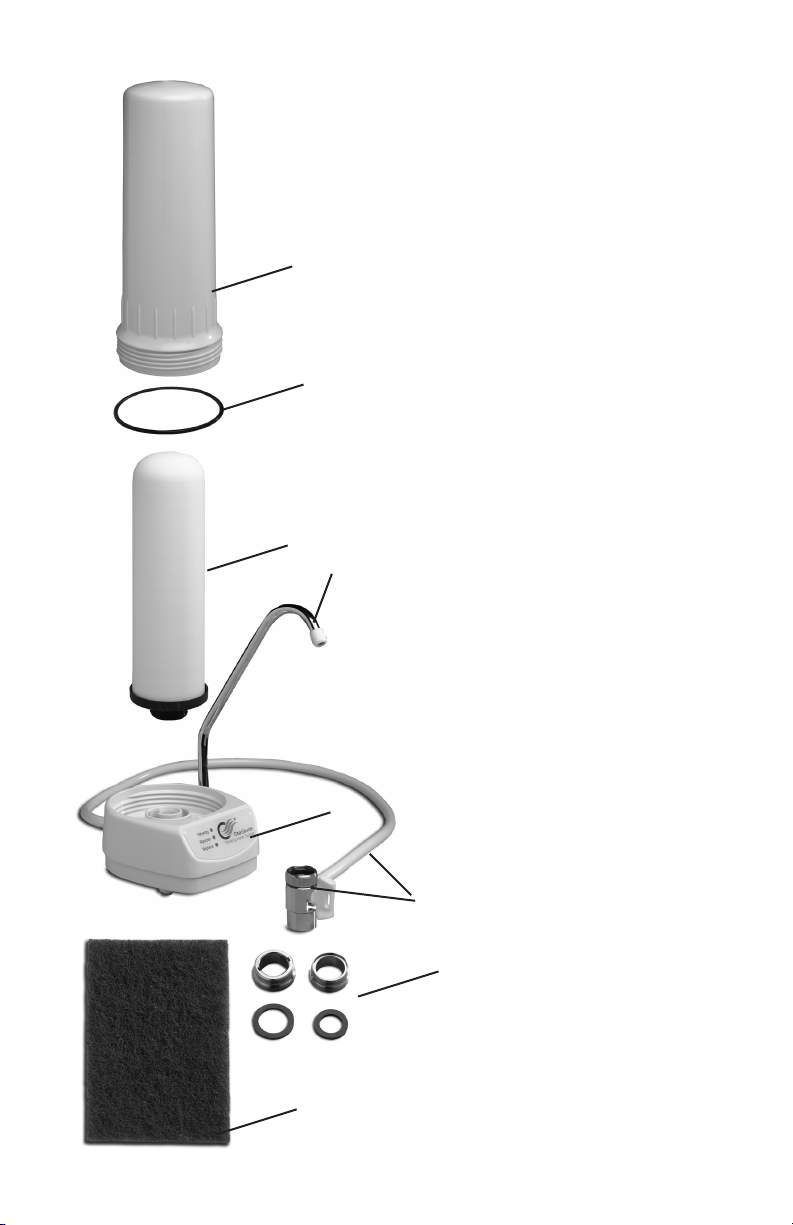
‑ 3 ‑
PARTS LIST
1. Filter Housing
2. O-ring
3. UltraCarb Ceramic
Filter
4. Faucet
5. Base Assembly
6. Diverter Valve and
Tubing Assembly
7. Scouring Pad
8. Adapter and Gasket Kit
9. Battery Door (not
shown)
10.Two (2) AAA Batteries
Included and Installed
(not shown)
1.
2.
3.
8.
5.
7.
4.
6.

‑ 4 ‑
PREPARATION
1.
Unscrew the Filter Housing (item 1) from the
Base Assembly (item 5) by holding the
base securely and turning the Filter
Housing in a counterclockwise direction
(Figure 2).
2.
Remove the protective packaging from
the UltraCarb Ceramic Filter (item 3).
IMPORTANT NOTE: This packaging
material must be removed and the filter
inspected before use to be sure the filter
has not become dislodged or damaged
during shipping.
3.
After checking the UltraCarb filter,
screw the housing back into the base.
Make sure the O-ring (item 2) is seated
properly in the Filter Housing.You may
need to invert the unit (Figure 3) to
ensure that the O-ring is properly seated
in the Filter Housing.
4.
Remove the existing aerator from your
faucet (Figure 4). If necessary, use padded
o r locking pliers.
Figure 3
Figure 2
Figure 4

‑ 5 ‑
5.
Remove the protective foam wrap from the
Diverter Valve Assembly (item 6).
SYSTEM INSTALLATION
1.
Thread the Diverter Valve (item 6) onto the faucet,
hand-tighten only. Do not over tighten
as it could damage the threads. (Figure 5)
NOTE: If the Diverter Valve is not
compatible with your faucet, an Adapter
and Gasket Kit (item 8) is provided to
obtain a proper fit.
2.
Place the CleanSource Drinking Water System on
a flat surface near the sink.With the water spout
pointing into the sink, turn on the COLD water and
divert the water through the filter by turning the
Diverter Valve’s white handle 90o. Check for leaks.
To stop the flow through the filter turn off the
faucet or turn the handle in the opposite direction.
3.
Run COLD water through the filter for several
minutes to remove any small carbon particles and
expel excess air.
NOTE: For best results, after sitting overnight or
after several hours of non-use, run water through
Figure 5

‑ 6 ‑
Figure 6
the filter for 15 seconds before using.
THE FLOW METER
Your CleanSource Drinking Water System features
a state-of-the-art water meter to monitor the life
of the replaceable UltraCarb Ceramic Filter (Figure
6).When water is flowing through your filter, one
of the LED (light emitted diode) lights will flash to
indicate the folowing:
FILTERING: As water flows through the unit, a
flashing green light indicates that the filter is
operating within the rated capacity of the filter.
The capacity is 1,000 gallons or 18 months,
whichever comes first.
REORDER:The yellow warning light lets you know
when approximately 10% of the filter capacity
(gallons or time) is left in the UltraCarb Ceramic
Filter. Please order a replacement filter when the
yellow light is flashing.

‑ 7 ‑
Figure 8
REPLACE:The red warning light indicates the
filter capacity is exhausted. Replace the UltraCarb
Ceramic Filter before continuing to use your
system.
CLEANING THE ULTRACARB CERAMIC FILTER
Clean the UltraCarb Ceramic Filter whenever the
water flow falls below an acceptable rate. Sanitary
precautions should be taken whenever handling
soiled components of your filter.We suggest using
waterproof gloves.
1.
There will be water in the Filter Housing.
To reduce spillage, invert the filter over
the sink. (Figure 7)
2.
While holding the base firmly, unscrew
the filter housing from the base assembly
by turning in a clockwise direction
(Figure 8). Drain out the water and set the
housing aside.
3.
Turn the filter base right-side up, then
remove the UltraCarb Ceramic Filter
from the base by pulling it up with a
twisting motion. (Figure 9)
4.
Dampen and scrub the UltraCarb
Ceramic Filter with a scouring pad (item
Figure 7

‑ 8 ‑
7) (included) until the filter returns
to its original white color, then rinse
thoroughly with cold water.
NOTE: Never use soap or detergents to
clean the UltraCarb Ceramic Filter. Be
sure to be very careful when handling
the filter as it will break or crack if
dropped.
5.
Set filter aside.
6.
Each time the UltraCarb Ceramic Filter is
cleaned or replaced, it is recommended that
the CleanSource Drinking Water System is
cleaned and sanitized.
Fill the Filter Housing with warm soapy water
and scrub the inside surface with a soft brush or
sponge.To avoid scratches, do not use abrasive
pads or cleaners inside the filter housing. Rinse
thoroughly.
7.
Add 2 capfuls of unscented chlorine bleach to the
Filter Housing and fill 2/3 full with cold water.
Do not yet install the replacement
filter.
8.
Leaving the chlorine solution in the Filter Housing,
invert the Base Assembly and screw the base
into the Filter Housing. Make sure the O-ring is
Figure 9

‑ 9 ‑
properly seated in its groove in the Filter Housing.
Place the housing and base right side-up with the
faucet pointing into the sink. Allow to stand for 15
minutes.
9.
After allowing the CleanSource Drinking Water
System to stand for 15 minutes, rinse the chlorine
solution from the system by turning on the COLD
WATER faucet and opening the Diverter Valve to
the system.The system will be adequately rinsed
after approximately five minutes, or when no
chlorine smell is present.Turn off the water.
10.
Hold the system upside down, unscrew the Filter
Housing by turning clockwise and empty.
11.
Insert the replacement UltraCarb Ceramic Filter
into the base by applying a downward pressure,
then twisting the UltraCarb filter to slide it into
place (Figure 10).
12.
Turning clockwise, screw the Filter
Housing back into the Base Assembly.
Figure 10

‑ 10 ‑
REPLACING THE ULTRACARB CERAMIC FILTER
When the flow meter’s red warning light flashes,
replace your old UltraCarb Ceramic Filter with a
new filter.
1.
Follow steps1, 2 and 3 under “Cleaning the
UltraCarb Ceramic Filter.”
2.
Discard the used UltraCarb Ceramic Filter.
3.
Follow steps 6 through 12 in the CLEANING THE
ULTRACARB CERAMIC FILTER section.
4.
Insert the replacement UltraCarb Ceramic Filter
into the base by applying a downward
pressure, then twisting the UltraCarb
filter to slide it into place (Figure 10).
5.Turning clockwise, screw the Filter
Housing back into the Base Assembly.
6.
Position the filter so that the water spout
points into the sink. Each time a new
UltraCarb Ceramic Filter is installed, run
cold water through the filter for several
minutes to remove any small carbon
Figure 10
Table des matières
Manuels Système d'eau populaires d'autres marques

Spirotech
Spirotech SPIROVENT SUPERIOR S250 Manuel utilisateur

Culligan
Culligan Aqua-Cleer Aqua-Cleer Advanced Drinking Water... Manuel utilisateur

A.O. Smith
A.O. Smith Dura-Max AJH - 1000A - P Manuel utilisateur

Microline
Microline T.F.C.-4 Manuel

Eureka Forbes
Eureka Forbes Aquaguard Select Manuel utilisateur

Cetetherm
Cetetherm AquaEfficiency Manuel utilisateur


