
Citiwell NG3TP1G Manuel utilisateur

Talking
Projector
Instructions
and
Owner’s Manual
Manual Part # 259962
2
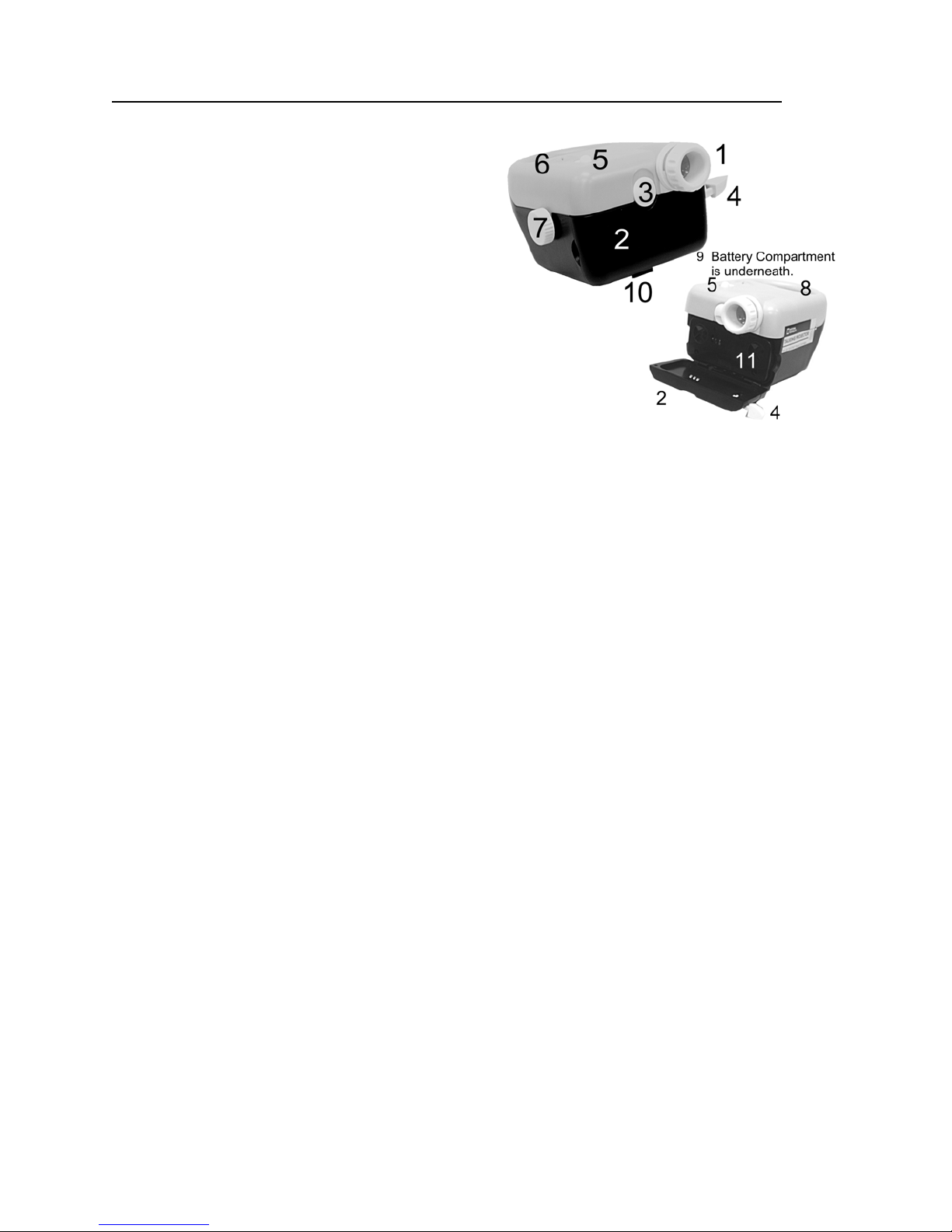
Here are the main parts of the National Geographic Talking Projector:
1. Focusing projection lens
2. Picture cartridge compartment
3. Cartridge compartment lock
4. Picture advance lever
5. ON/OFF switch for light
6. Speaker
7. Projector leveling and elevation knob
8. Handle
9. Battery compartment
10.Leveling and elevating foot
11.Talking picture cartridge (1 included)
The National Geographic Talking Projector will project the images from any National
Geographic (or compatible) 3D cartridge or 3D Talking Cartridge onto any light colored
wall or other light colored vertical surface. (Note: The images will not be projected in 3D.
To see the pictures in 3D you must view them with a National Geographic 3D Viewer or
Talking 3D Viewer.
As each image is viewed you will hear an interesting fact about the subject of the
picture. Of course, if you are viewing pictures from a regular 3D picture cartridge there
will not be any sound.
The National Geographic Talking Projector uses a new Dual LED light source that never
needs replacing and provides a light that is brighter than that produced by conventional
light bulbs, while placing less demand on the batteries.
Getting Started:
This projector is powered by 4 ‘C’ size batteries. Use good alkaline or heavy-duty
batteries. When the projector’s light becomes dim it is time to replace the batteries.
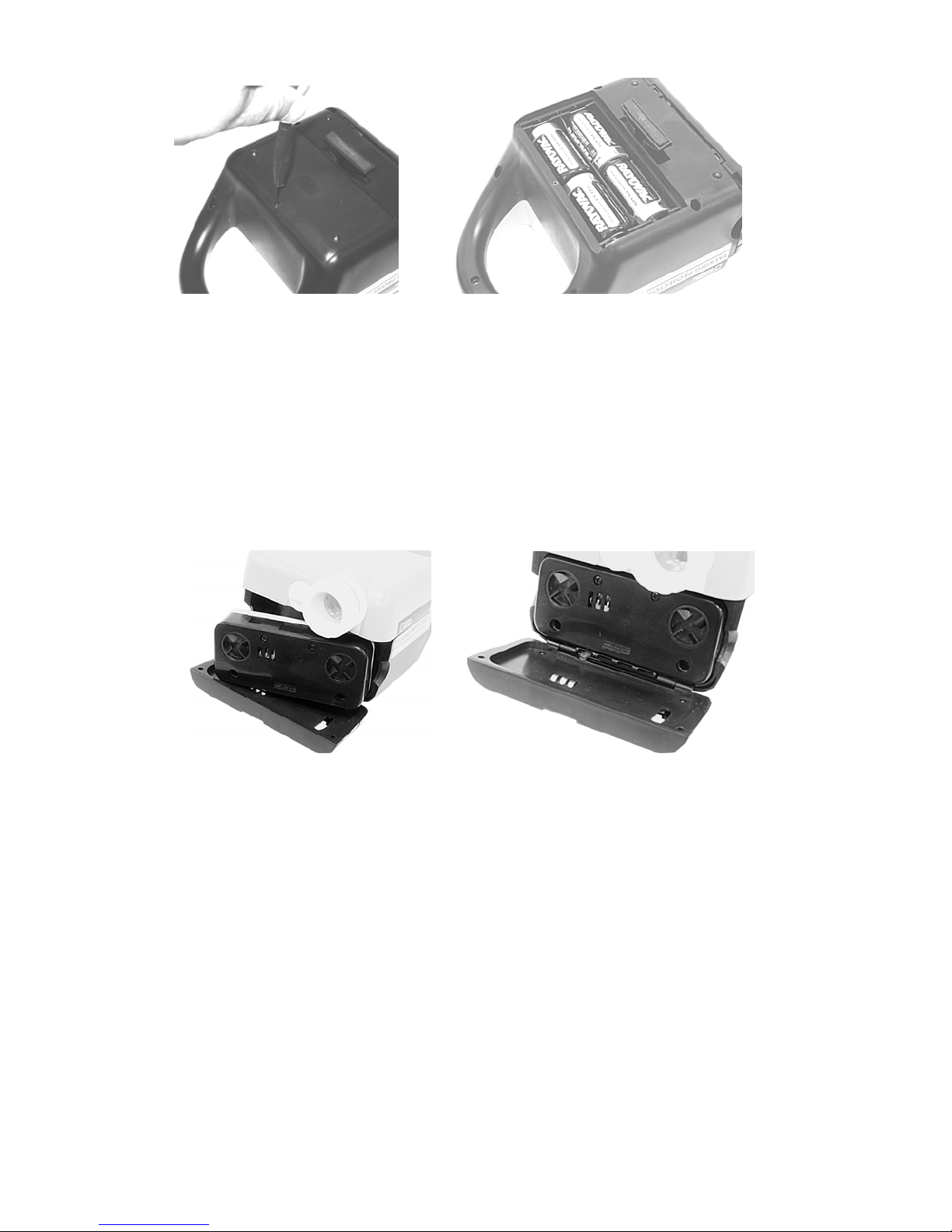
1) Use a small Phillips head (+) screwdriver to remove the small screw that holds
the battery compartment cover in place by turning it counter-clockwise. See
Figure 1. Insert 4 fresh ‘C’ size batteries as shown in Figure 2. Ensure that the
batteries are inserted facing in the right direction or the projector will not function.
2) Replace the battery compartment cover.
3
(Figure 1) (Figure 2)
3) Insert the Phillips head screw and tighten it by turning it clockwise. Do not
overtighten this screw.
4) Slide the picture cartridge compartment lock down and open the compartment
door.
5) Place a 3D picture cartridge (Talking or Silent) in the compartment as shown in
Figures 3 and 4.
(Figure 3) (Figure 4)
6) Close the compartment door and slide the cartridge compartment lock down to
keep the door securely closed.
Using the Projector
1) Place the projector on a level surface with the projection lens facing a white wall.
You can also project the picture onto a screen used for showing slides or old
home movies. You can even make a screen from a piece of white cardboard or
Bristol board.
2) To level the projector, or to project the image higher up on the wall or screen,
adjust the projector angle by turning the leveling/adjusting control knob on the
right side of the projector.

4
3) Start out by positioning the projector a meter (3 feet) or so from the screen or
wall.
4) Best results are obtained in a very dark room.
5) Turn the projector light on by sliding the ON/OFF switch on top of the unit to the
forward position. If the light does not come on the batteries may not have been
correctly installed, or may be exhausted. Re-install or replace the batteries.
6) Turn the white collar around the projection lens while observing the projected
image until you see a sharp picture.
7) If you move the projector further away from the wall or screen you will see a
larger image. As you move the projector closer the image will get smaller.
Smaller images are brighter.
8) To see the next picture on the cartridge push the picture advance lever all the
way down. Each cartridge contains 12 pictures.
9) When you have finished using the projector be sure to turn the light off.
10)If the projector will not be used for more than two weeks, please remove the
batteries to avoid possible battery leakage.
BATTERY INFORMATION:
This unit uses four C size batteries. Always use fresh batteries. Do not use
rechargeable batteries. If the projector will not be used for a long time, remove the
batteries. Nonrechargeable batteries are not to be recharged. Different types of
batteries or new and used batteries are not to be mixed. Do not take batteries apart.
Exhausted batteries are to be removed from the projector. The supply terminals should
not be short-circuited. Do not dispose of batteries in fire. They may explode.
!
Made in China
Manual Part # 259962
National Geographic’s net proceeds support vital exploration, Experience the National Geographic Channel.
conservation, research, and education programs. Call your cable or satellite provider for availability.
Visit our website: www.nationalgeographic.com
2003 National Geographic Society. NATIONAL GEOGRAPHIC and Yellow Border are trademarks of National Geographic
Society. All rights reserved.
WARNING! CHOKING HAZARD –
Small parts. Not suitable for children
under 3 years.
Table des matières
Manuels Projecteur populaires d'autres marques


Panasonic
Panasonic PTL735NTU - LCD PROJECTOR-NETWORK IB Manuel utilisateur

NEC
NEC NP600S EDU Manuel utilisateur

BenQ
BenQ SH753P Manuel utilisateur

Eiki
Eiki EK-623U series Manuel utilisateur

Epson
Epson PowerLite Pro Cinema 6020UB Manuel utilisateur

Epson
Epson PowerLite Home Cinema 705HD Manuel utilisateur


