
Cattron Aquavx Manuel utilisateur
Quick Start Guide
Aquavx™ (Legacy)
1. Wire Your Aquavx
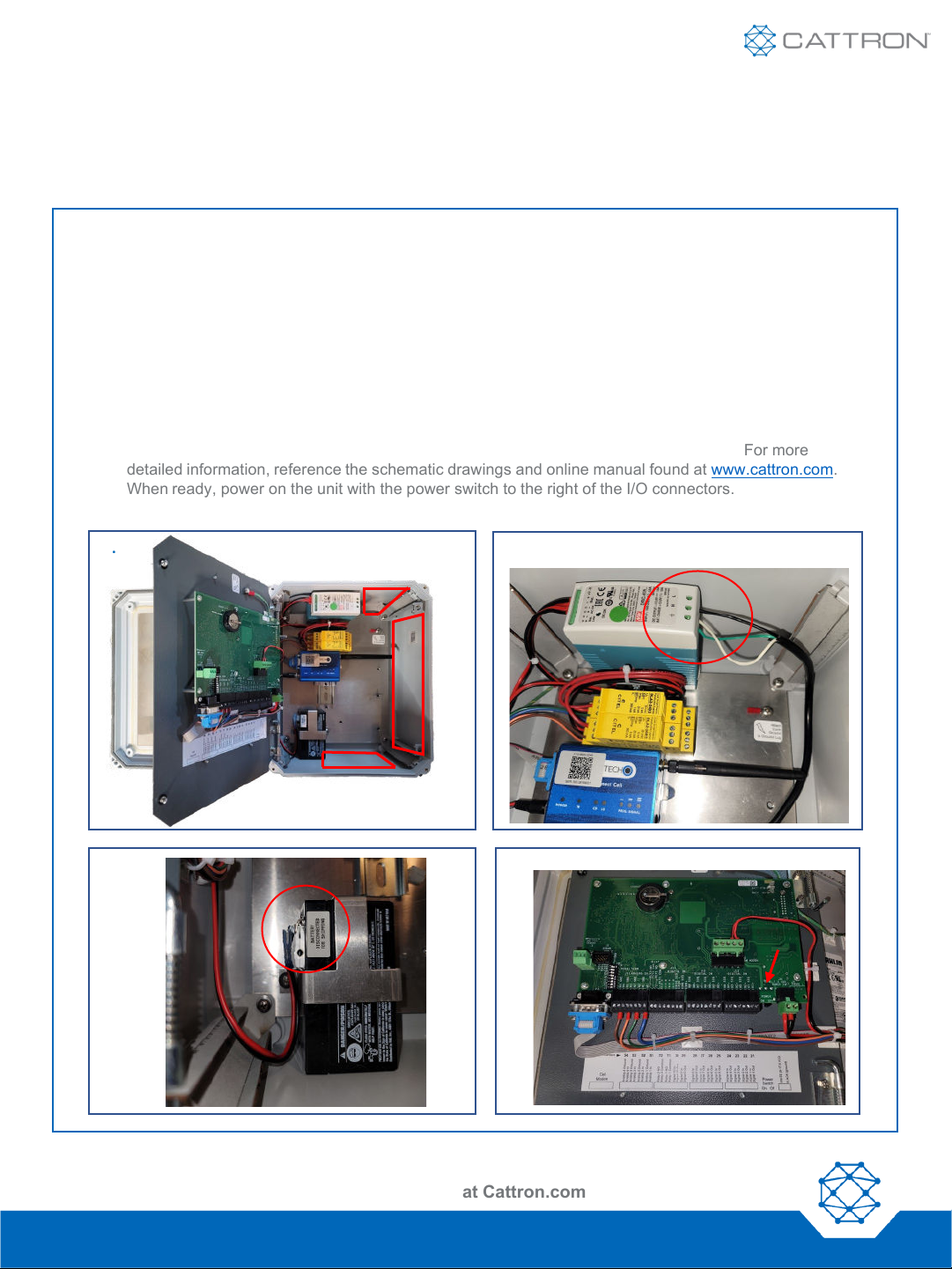
1. Drill holes in the unit enclosure for the power feed as well as for the amount of I/O wiring required. Affix
the necessary conduit fittings and assure proper waterproofing.
2. Wire 100-240VAC power to the Line (Black), Ground (Green), and Neutral (White) terminals on the
#1700-0101 power supply at the top of the panel.
3. Attach the black wire from the power supply BAT- terminal to the negative battery post.
4. Wire I/O connections using the screw terminals on the quick disconnect plugs in their respective
channels. There is a quick reference diagram below the connectors on the swing panel. For more
detailed information, reference the schematic drawings and online manual found at www.cattron.com.
When ready, power on the unit with the power switch to the right of the I/O connectors.
Configuration Sheets and Manuals Are Available at Cattron.com
Nimble: 9M01-9207-A001 | EN-2023-11-V4
1. 2.
3. 4.
Power
Switch

Quick Start Guide
Aquavx™ (Legacy)
Configuration Sheets and Manuals Are Available at Cattron.com
Nimble: 9M01-9207-A001 | EN-2023-11-V4
2. Access RemoteIQ(TM)
•If you purchased a data plan with the hardware, your device arrives activated and ready to use. If you have
877.399.2937.
•For existing customers on the RemoteIQ cloud platform, navigate to https://antx.trihedral.com/(sitename).
The site name is your company name. Log in with the credentials that you provided us or contact customer
service if you need to create credentials.
•For new or existing customers who recently migrated to the new RemoteIQ cloud platform, navigate to
http://my.remoteiq.com. Log in with the credentials that you provided us or contact customer service if you
need to create credentials.
•If your system is preconfigured, the I/O will arrive programmed per the configuration sheet you provided to
us. If it is not preconfigured or if changes are required, the legacy Aquavx can be programmed via a locally
connected PC, remotely over the cellular network, or the keypad on the unit. Programming instructions can
be found in the manual. If you need configuration assistance, contact customer support.
3. Access Device Information
Using a QR Code scanning app, scan the QR
codes on the legacy Aquavx device to access
device identification information such as IMEI,
SIM, IP, and Serial Numbers
Quick Start Guide
Aquavx™ (Legacy)
Configuration Sheets and Manuals Are Available at Cattron.com
Nimble: 9M01-9207-A001 | EN-2023-11-V4
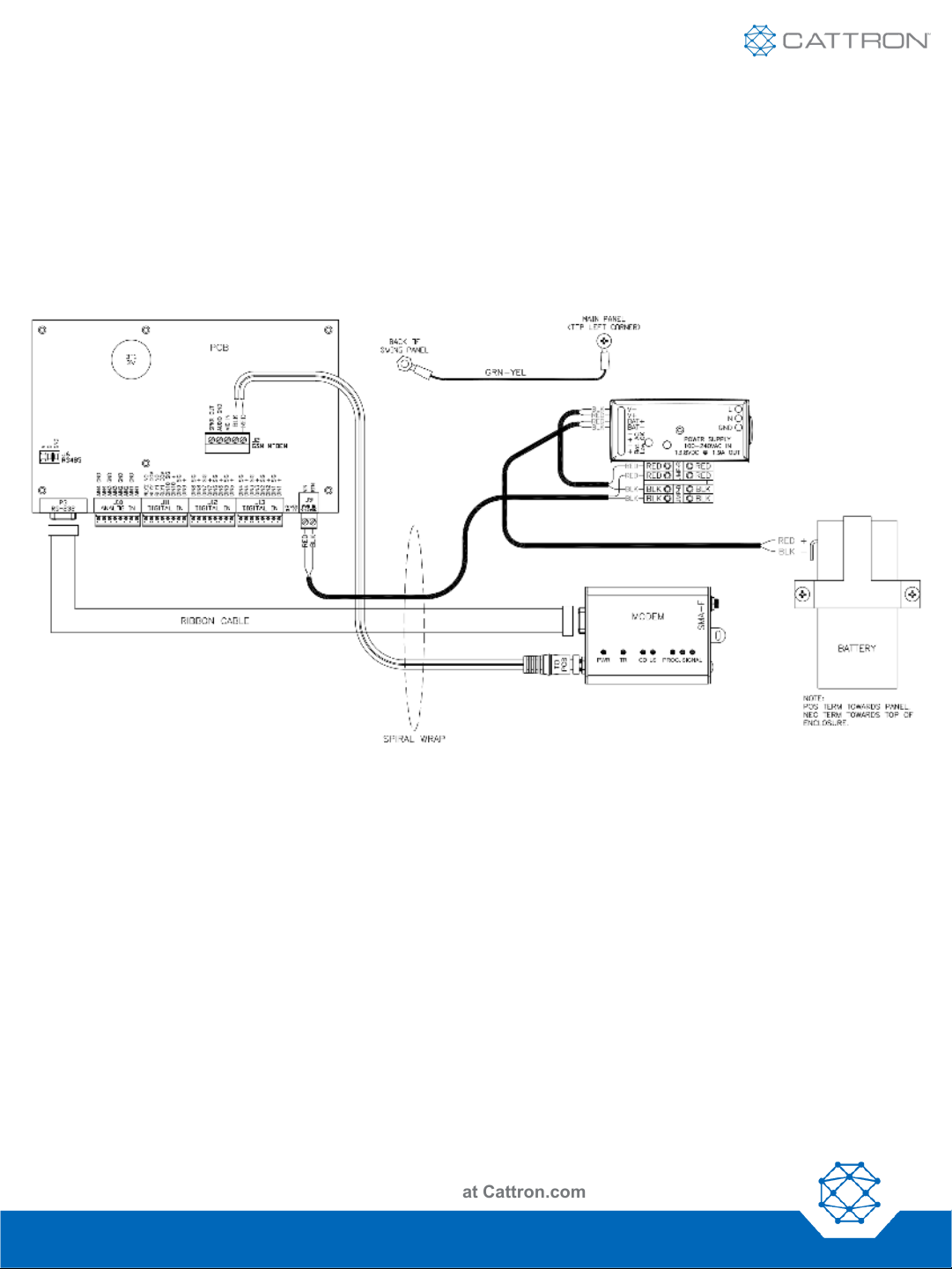
Wired Aquavx
Autres manuels pour Aquavx
2
Table des matières
Autres manuels Cattron Système d'eau

Manuels Système d'eau populaires d'autres marques

Spirotech
Spirotech SPIROVENT SUPERIOR S250 Manuel utilisateur

Culligan
Culligan Aqua-Cleer Aqua-Cleer Advanced Drinking Water... Manuel utilisateur

A.O. Smith
A.O. Smith Dura-Max AJH - 1000A - P Manuel utilisateur

Microline
Microline T.F.C.-4 Manuel

Eureka Forbes
Eureka Forbes Aquaguard Select Manuel utilisateur

Cetetherm
Cetetherm AquaEfficiency Manuel utilisateur


