Cassia X1000 Manuel utilisateur

1 Cassia Networks Copyright 2018
Cassia Networks Headquarters:
97 East Brokaw Road, Suite 130
San Jose, CA 95112
(408)444-9150
Cassia Bluetooth Router
User Manual
Contents
1. What is a Cassia Router?................................................................................................2
1.1. Cassia X1000.............................................................................................................................. 2
1.2. Cassia E1000.............................................................................................................................. 3
2. Installation.........................................................................................................................4
2.1. X1000 ........................................................................................................................................... 4
2.2. E1000 ........................................................................................................................................... 7
3. Deployment.......................................................................................................................9
3.1. X1000 ........................................................................................................................................... 9
3.2. X1000 Antenna Radiation Graphs ......................................................................................... 10
3.3. E1000 .........................................................................................................................................12
3.4. E1000 Antenna Radiation Graphs ......................................................................................... 13
4. Getting Started................................................................................................................14
4.1. Understanding the Cassia Access Controller (AC).............................................................. 14
4.2. Prerequisites.............................................................................................................................. 15
4.3. Connecting Your Router to the AC......................................................................................... 17
5. Cassia Bluetooth Router Configurations ....................................................................18
5.1. Overview Tab ............................................................................................................................19
5.2. Common tab..............................................................................................................................20
5.3. Networks tab.............................................................................................................................. 21
5.3.1. Connection Priority...............................................................................................................21
5.3.2. Wired Settings.......................................................................................................................22
5.3.3. Wireless Settings.................................................................................................................. 22
5.3.4. 3G/4G Dongle .......................................................................................................................23
5.4. Bypass tab.................................................................................................................................26
6More on Access Controller............................................................................................27
7Cassia Restful APIs........................................................................................................30
7.1. Room-based Location Tracking..............................................................................................31
7.2. Secure Pairing........................................................................................................................... 31
8Cassia Demo...................................................................................................................31
8.1 TI Sensor Tag............................................................................................................................ 31
8.2 Cassia TI Sensor Demo........................................................................................................... 33

2 Cassia Networks Copyright 2018
1. What is a Cassia Router?
Cassia Router is a long-range enterprise Bluetooth router that can be used in indoor and
outdoor environments. It extends the range of Bluetooth connectivity up to 1000 feet (305-
Meters) and enables remote control of up to 40 Bluetooth low energy devices without
requiring any changes to the Bluetooth end devices. Cassia Bluetooth router acts as a
protocol gateway, which translates between the Bluetooth protocol and the Internet
Protocol (IP) protocol. This enables your Bluetooth low energy devices to be accessible, and
controllable, remotely via an Internet application.
1.1. Cassia X1000
The Cassia X1000 enterprise Bluetooth router has an IP65-rated enclosure, which is fully
weather proof, and may be deployed in both indoor and outdoor environments. The X1000
may be attached to a pole or wall (a mounting kit is included) or placed on surface like a
desk or counter space. It receives power from Power-over-Ethernet (PoE) via the uplink
Ethernet port.
Figure 1: Cassia X1000 Bluetooth Router
The X1000 has a built-in smart antenna array designed specifically for Bluetooth. It also
supports Ethernet, 2.4 GHz WIFI or 3G/4G cellular dongle as IP backhaul. The X1000 is
capable of extending Bluetooth’s range up to 1000 feet (305 Meter). The X1000 increases
the number of devices that can be simultaneously paired and connected to 22 Bluetooth
low energy devices or listens to potentially hundreds of devices at the same time when
operating in broadcast mode.
Processor & Memory
•CPU: quad core Amlogic Cortex-A5, up to 1.5GHz
•256MB RAM DDR3, 4GB eMMC storage

3 Cassia Networks Copyright 2018
Bluetooth
•BLE chip: 2x CSR8811
•Bluetooth version: 4.0/4.1/4.2 LE
•LE Connections: Up to 22 connections
•Frequency: 2.400 to 2.483 GHz
•Data rates: up to 2x1Mbps
•TX power: +8 to +20dBm, continuously adjustable: 4db step
•RX sensitivity: -105dBm
•Antenna Gain: 5.7dbi vertical polarized
WIFI (802.11 b/g/n)
•Frequency: 2.4 GHz
•Working Mode: WIFI client or Access Point, can switch between modes
•TX power: 17.5 to 12.5dBm
•RX sensitivity: -96 to -71dBm
•Antenna: Omnidirectional
Certification
•FCC (US), IC (Canada), CE (Europe), BQB, SRRC (China), TELEC (Japan), REACH, CB
For a full datasheet of the X1000 specifications, please check out
https://www.cassianetworks.com/products/x1000-bluetooth-router/
1.2. Cassia E1000
The Cassia E1000 is an enterprise Bluetooth router with edge computing capability,
designed for deployments in industrial, hospitals, senior centers, schools, gyms, and other
indoor locations. The Cassia E1000 can be attached to the ceiling or wall (a mounting kit is
included) or may be placed on a desktop or counter space. The E1000 is powered via a
Micro-USB adapter or from a switch using Power over Ethernet (PoE) via the uplink Ethernet
port.
Figure 2: Cassia E1000 Bluetooth Router

4 Cassia Networks Copyright 2018
The E1000 increases the number of devices that can be paired and controlled to up to 40
Bluetooth low energy devices. In broadcast mode the E1000 can listen to several hundred
Bluetooth low energy end devices. Its patented smart antenna is optimized for horizontal use.
It supports Ethernet, 2.4Ghz and 5Ghz Wi-Fi, or 3G/4G cellular dongle as an IP backhaul. This
enables your Bluetooth low energy devices to be accessible, and controllable, remotely via an
Internet application.
Processor & Memory
•CPU: 4 core ARM Cortex-A5, up to 1.5GHz
•256MB RAM DDR3, 4GB eMMC storage
Bluetooth
•BLE chip: 2 Nordic nRF52832
•Bluetooth version: 4.2 LE, 5.0 compliance
•LE Connections: Up to 40 connections
•Frequency: 2.400 to 2.483 GHz
•Data rates: up to 2x1Mbps
•TX power: 0 to +20dBm, continuously adjustable: 4db step
•RX sensitivity: -105dBm
•Antenna Gain: 5dbi PEAK
•Increased broadcast capacity (x8)
For a full datasheet of the E1000 specifications, please check out
https://www.cassianetworks.com/products/e1000-bluetooth-router/
2. Installation
2.1. X1000
Hardware
1. Cassia X1000 Router
2. Power-over-Ethernet (POE) 802.3af/at compliant source
Note: The Cassia X1000 is only powered via Power-over-Ethernet (POE)
3. PoE injector, if PoE network is not available
4. Ethernet cable (Patch cord): 1 unit if PoE available, or 2 units if used with PoE injector
5. Internet connection
6. Computer System (Desktop / Laptop/ Android Phone/Tablet) with WIFI connectivity
7. Required only if setup over SIM-based Internet connection is required
a. 3G/4G dongle
Included in Package

5 Cassia Networks Copyright 2018
Mounting

6 Cassia Networks Copyright 2018
4) Connect the X1000 Router to the PoE injector or a PoE switch.

7 Cassia Networks Copyright 2018
2.2. E1000
Hardware
•Cassia E1000 Router
•Power-over-Ethernet (PoE) 802.3af/at compliant source
•PoE injector, if PoE network is not available
•Micro USB power cable and plug, if not using PoE
•Ethernet cable (Patch cord): 1 unit if PoE available, or 2 units if used with PoE injector
•Internet connection
•Computer System (Desktop / Laptop/ Android Phone/Tablet) with WIFI connectivity
•Required only if setup over SIM-based Internet connection is required
o3G/4G dongle (Only if 3G/4G setup is required)
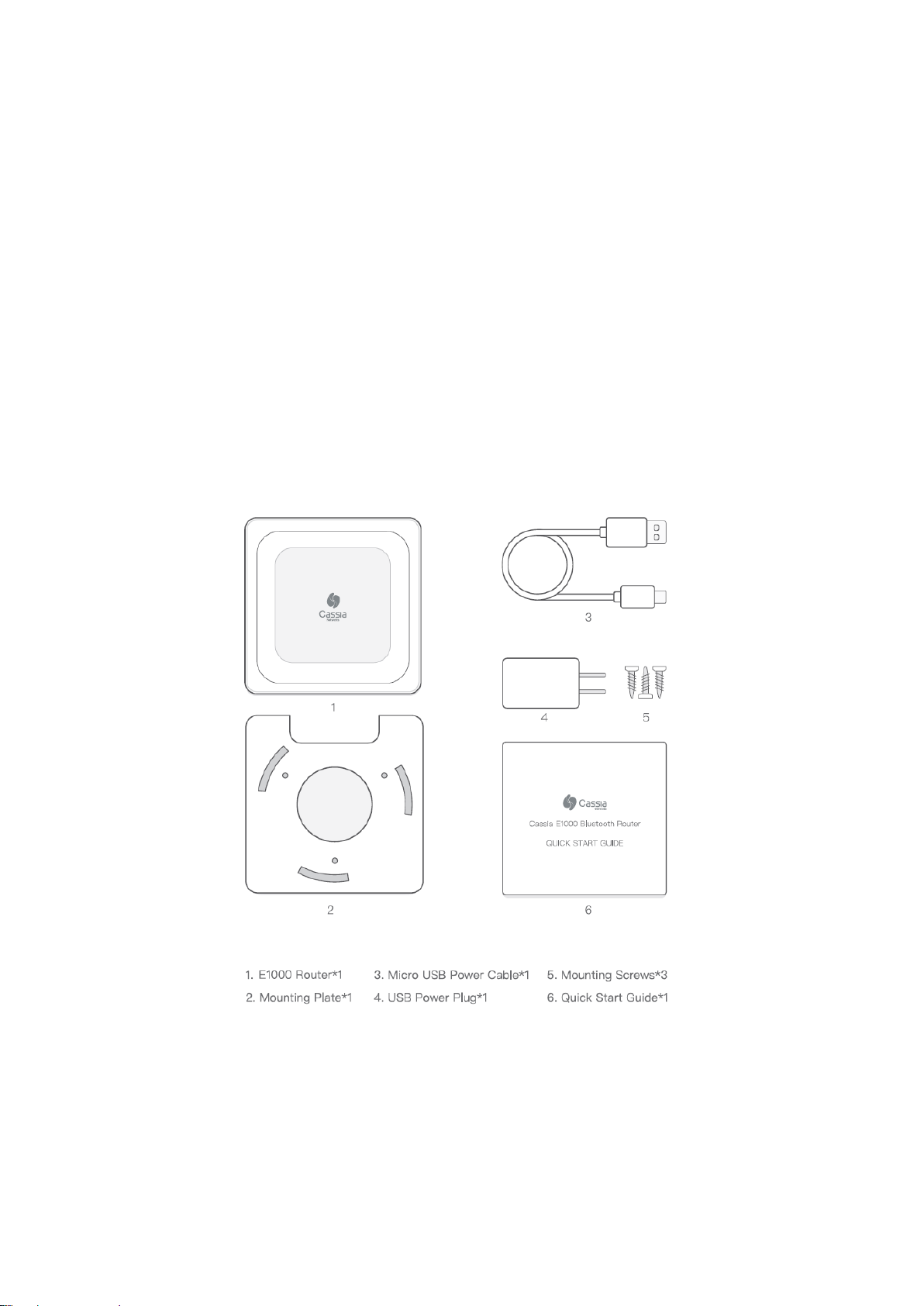
Included in Package

8 Cassia Networks Copyright 2018
Mounting

9 Cassia Networks Copyright 2018
3. Deployment
3.1. X1000
Cassia Bluetooth router coverage varies based on conditions. In outdoor “open air” locations
with no obstructions, the coverage radius of Cassia Bluetooth routers is greater than that of
indoor locations with walls and obstructions.
In general, the radius of outdoor coverage may vary from 100-300 meters, depending on the
wireless interference, obstructions, and line of sight. A rule of thumb for deployment is to
ensure that the Bluetooth device can be connected consistently and the Bluetooth signal
strength is strong.
Deployment principles:
•Poles or walls are required
•Power over Ethernet (PoE) is required
▪Installation height is better be between 3 to 30 meters

10 Cassia Networks Copyright 2018
•Install at locations away from radio transmitters, such as radio towers and cellular
base stations
•Ground cable and lightning protection is required
Figure 3: Cassia X1000 outdoor deployment
3.2. X1000 Antenna Radiation Graphs
If you place your router as pictured above, below are its Antenna Gain 3-D pictures.
Autres manuels pour X1000
2
Ce manuel convient aux modèles suivants
1
Table des matières
Autres manuels Cassia Routeur sans fil