
Canon AW-PS200 Manuel utilisateur
Canon
AW-PS200
ALL
WEATHER
CASE
Canon
Digital
Camera
All
Weather
Case
User
Guide
IEBII
Canon
Allwettertasche
fOr
Digital
Kamera
Bedienungsanleitung
---1_
Canon
Funda
protectora
impermeable
para
camaras
digitales
Guia
del
usuario
---1
....
Canon
Etui
de
protection
tout
temps
pour
appareil
de
photo
numerique
Guide
de
I'utilisateur
-----1
...
Canon
Custodia
per
tutte
Ie
stagioni
per
fotocamera
digitale
Guida
per
I'utente
--J
.....
Disclaimer
Trademark
Acknowledgments
•
Canon
is
a
trademark
of
Canon
Inc.
•
CompactFlash
is
a
trademark
of
SanDisk
Corporation.
•
Other
names
and
products
not
mentioned
above
may
be
trademarks
or
registered
trademarks
of their
respective
companies.
Copyright
©
2000
Canon
Inc.
All
rights
reserved.
..
2
Please
read
this manual carefully
to
operate
the All Weather
Case
correctly.
Keep
this
manual
for
further reference.
Introduction
•
Thank
you
for
purchasing
this
All
Weather
Case.
It
will
allow
you
to
use
your
Canon
Digital
Camera
in
the
rain,
at
the
beach
or
on
the
ski
slopes.
You
can
also
use
it
underwater
at
depths
down
to
3
meters
(9.8
ft)
and
in
wet
or
dusty
environments.
•
Before
you
use
the
All
Weather
Case,
please
make
sure
the
case
is
functioning
correctly
and
water
does
not
leak
into
it.
To
do
so,
close
the
All
Weather
Case
before
installing
the
camera
and
hold
it
underwater
at
a
depth
of
about
15
cm
(6.0
in)
for a
few
minutes
to
check
for
leaks.
If
water
leaks
in
to
your
All
Weather
Case,
please
contact
your
Canon
Customer
Support
Help
Desk.
•
Canon
Inc.,
its
subsidiaries
and
affiliates,
and
distributors
of
the
All
Weather
Case
are
not
liable
for
any
consequential
damages
arising
from
corrupted
or
lost
data
due
to
mistaken
operation
or
malfunction
of
the
All
Weather
Case,
the
digital
camera,
the
battery
or
the
CompactFlash™
card
(CF
card)
that
results
in
the
failure
of
an
image
to
be
recorded
or
to
be
recorded
in
a
format
that
is
machine
readable.
•
Please
read
your
digital
camera's
user
manual.
Unpacking
The
All
Weather
Case
is
shipped
with
the
items
listed
below.
Please
check
your
package
now
to
confirm
that
it
is
complete.
Contact
your
Canon
dealer
if
anything
is
missing.
•All Weather
Case
AW-PS200
•
Neck
Strap
•
Silicone
Grease
for the Waterproof
Seal
•Anti-Condensation Solution
•
User
Guide
(this
guide)
Safety
Precautions
Before
you
use
the
All
Weather
Case,
thoroughly
read
these
precautions
to
ensure
correct
use.
The
precautions
described
below
are
for
ensuring
safe
use
of
the
All
Weather
Case
and
for
preventing
danger
and
damage
to
yourself
and
others.
Thoroughly
understand
the
details
of
these
precautions
before
reading
the
rest
of
this
manual.
•
Do
not
use
the
All
Weather
Case
as
a
life
preserver.
It
may
sink
if
water
leaks
into
the
case,
and
may
not
save
you
from
drowning.
•
Do
not
disassemble
or
modify
the
All
Weather
Case.
This
may
cause
it to
leak.
•
Do
not
damage
the
waterproof
seal,
scratch
its
contact
surfaces,
or
allow
dirt
to
accumulate
between
the
waterproof
seal
and
the
case.
This
may
cause
the
All
Weather
Case
to
leak.
•
Do
not
use
the
All
Weather
Case
in
water
at
temperatures
above
40°C
(104
OF).
Heat
may
warp
the
All
Weather
Case
or
cause
it to
leak.
•
Do
not
leave
the
All
Weather
Case
in
direct
sunlight,
inside
a
car
in
hot
weather
or
near
a
heater.
Heat
may
warp
the
casing
and
cause
the
All
Weather
Case
to
leak.
Cover
the
All
Weather
Case
with
a
towel,
for
example,
if
you
have
to
leave
it
in
the
sun.
3
..
4
Handling
Precautions
•
Do
not
throw
the
All
Weather
Case
into
water,
nor
drop
it
in
snow.
•
Use
only
the
supplied
silicone
grease.
Use
of
other
waterproofing
products
may
impair
the
strength
of
the
All
Weather
Case.
If
any
other
waterproofing
product
is
mistakenly
applied,
wipe
it off
immediately.
•
Avoid
opening
or
closing
the
All
Weather
Case
near
water.
When
you
are
installing
the
camera
or
changing
the
CF
card
or
the
battery,
choose
a
place
with
low
humidity
well
away
from
salty
sea
air.
•
Avoid
using
the
All
Weather
Case
for
long
periods
of
time
in
hot
temperatures.
•
The
life
of
the
battery
is
reduced
in
cold
temperatures.
When
you
use
the
All
Weather
Case
in
very
cold
places,
keep
it
warm
by
putting it
in
a
bag
whenever
you
are
not
shooting.
It
is
not
advisable
to
use
the
All
Weather
Case
in
temperatures
below
freezing
point.
•
Moving
the
All
Weather
Case
rapidly
between
hot
and
cold
temperatures
may
cause
condensation
(water
droplets)
to
form
on
its
external
and
internal
surfaces.
Condensation
may
cause
malfunctions.
You
can
avo'ld
this
by
placing
the
All
Weather
Case
in
an
airtight
plastic
bag
and
letting
it
adjust
to
temperature
changes
slowly
before
removing
it
from
the
bag.
Stop
using
the
camera
immediately
if
you
detect
condensation,
wipe
off
the
condensation
from
the
All
Weather
Case
and
the
camera
with
a
soft,
dry
cloth,
and
wait
until
the
moisture
evaporates
completely
before
resuming
use.
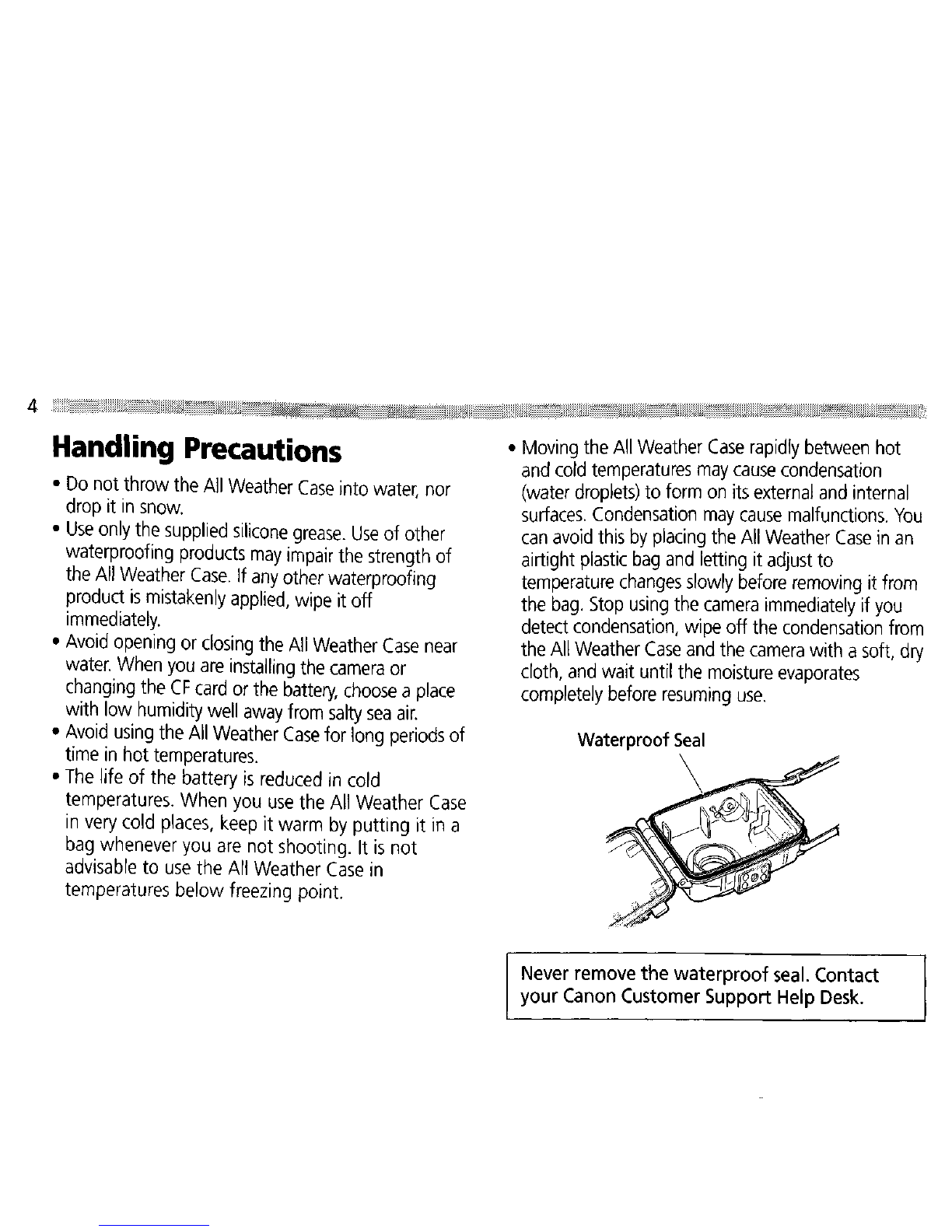
Never
remove
the waterproof
seal.
Contact
your
Canon
Customer
Support
Help
Desk.
About Water Leakage
If
there
is
any
leakage
of
water
in
the
All
Weather
Case,
immediately
stop
shooting.
Thoroughly
wipe
the
All
Weather
Case
interior
and
the
camera
dry.
Please
contact
your
Canon
Customer
Support
Help
Desk.
Treat
the
Waterproof Seal
with
care
•
Before
you
release
the
Catch
after
using
the
All
Weather
Case
in
salty,
sandy
or
gritty
environments,
wash
the
All
Weather
Case
thoroughly
with
clean,
running
tap
water
to
remove
any
sand
or
grit.
Then
wipe
it
with
a
soft,
dry
cloth.
If
you
wipe
the
All
Weather
Case
with
sand
or
grit
on
it,
it
may
become
scratched.
Also,
if
the
All
Weather
Case
is
left
in
contact
with
salty
seawater,
the
metal
parts
may
rust.
•
To
prevent
wear
on
the
waterproof
seal,
apply
a
thin
coating
of
grease.
Do
not
use
a
cloth
or
paper
to
apply
the
grease,
as
fibers
may
stick
to
the
seal.
Apply
a
small
amount
(droplet)
of
grease
to
your
fingertip,
and
coat
the
entire
surface
of
the
waterproof
seal
taking
care
not
to
scratch
the
surface.
• A
damaged
or
cracked
waterproof
seal
may
cause
the
All
Weather
Case
to
leak.
Please
contact
your
Canon
Customer
Support
Help
Desk.
To
ensure
that the
All
Weather
Case
remains
waterproof,
it
is
recommended
to
replace
the
seal
once
a
year.
Please
contact your
Canon
Customer
Support
Help
Desk.
5
•
6
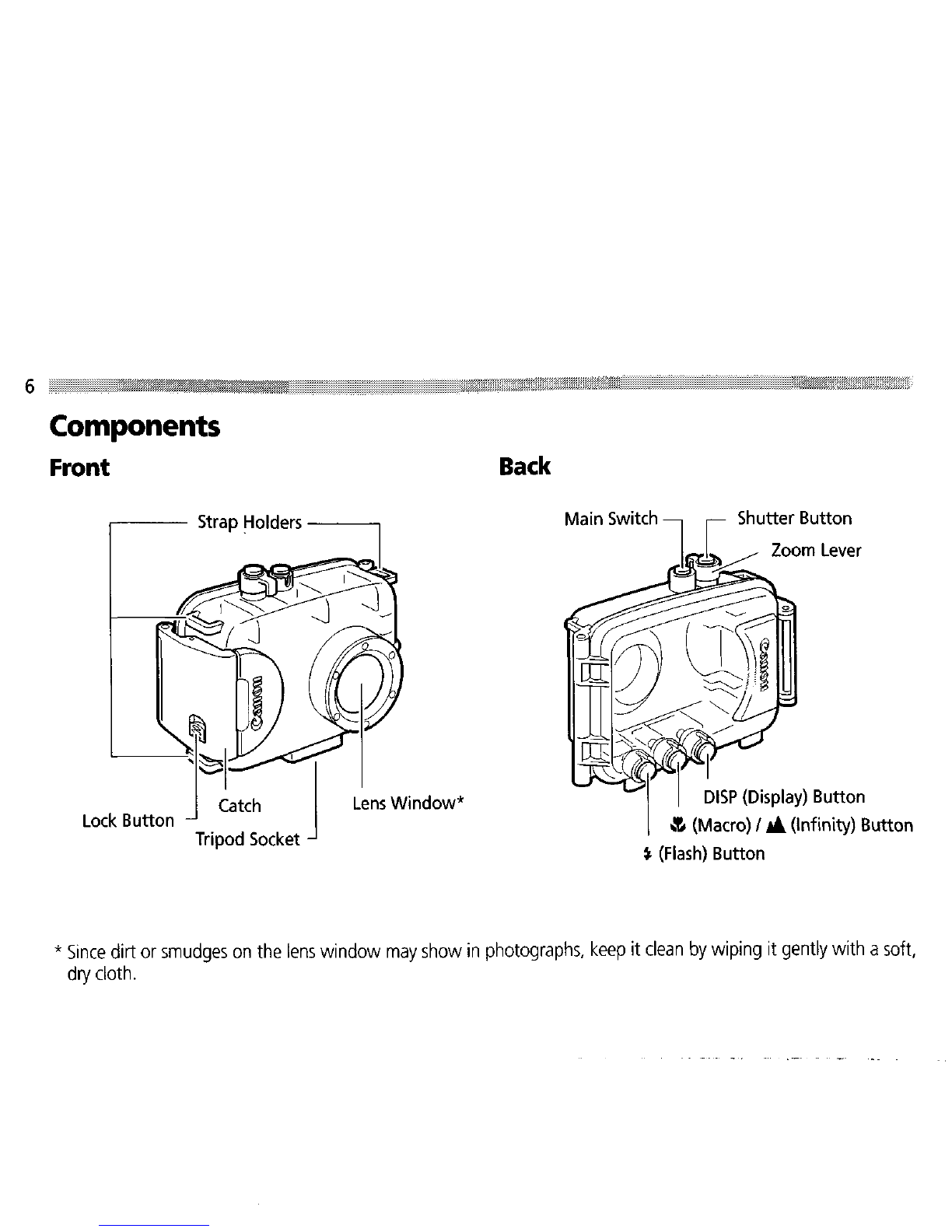
Components
Front
Lens
Window'
Back
•
Since
dirt
or
smudges
on
the
lens
window
may
show
in
photographs,
keep
it
clean
by
wiping
it
gently
with
a
soft,
dry
cloth.

Preparations
Preparing
the
Camera
Please
also
read
the
camera's
user's
manual
for
detailed
instructions.
Insert
Battery
Pack
NB-1l
and
the
CF
card
.
•
Use
a
battery
that
is
adequately
charged
.
•
Ensure
you
have
enough
storage
space
on
your
CF
card
to
record
your
images.
2
Check
the
camera
power
to
ensure
that it
is
off.
3
Remove
the
wrist
strap.
7
•

8
Preparing
the All Weather
Case
4
Fasten
the
neck
strap
to
the
strap
holders
and
adjust
it
to
a
comfortable
length.
5
Slide
the
Lock
Button
to
the
release
position,
and
open
the
cover
while
you
release
the
catch.
•
To
prevent
condensation
on
the
lens
window,
apply
the
supplied
anti-condensation
solution
to
the
inside
surface
of
the
window,
using
a
soft
cloth.
(When
the
supplied
solution
is
used
up,
you
can
use
a
commercially
available
product
for
preventing
condensation
on
the
glass.)
Use
a
soft,
dry
cloth
to
apply
the
anti-condensation
solution.
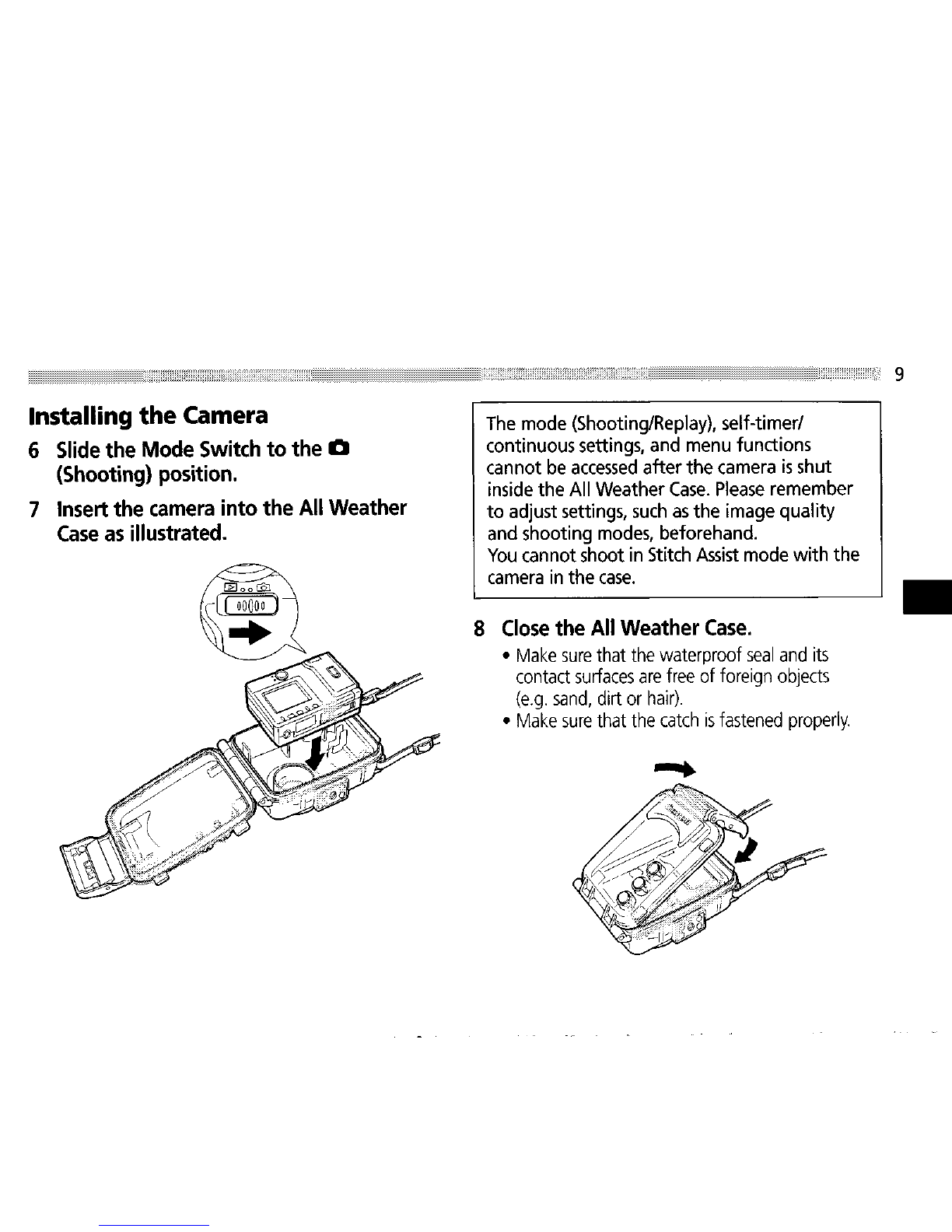
Installing
the
Camera
6
Slide
the
Mode
Switch
to
the
a
(Shooting)
position.
7
Insert
the
camera
into
the
All
Weather
Case
as
illustrated.
The
mode
(Shooting/Replay),
self-timer/
continuous
settings,
and
menu
functions
cannot
be
accessed
after the
camera
is
shut
inside
the All Weather
Case.
Please
remember
to adjust
settings,
such
as
the
image
quality
and
shooting
modes,
beforehand.
You
cannot shoot
in
Stitch
Assist
mode
with the
camera
in
the
case.
8
Close
the
All
Weather
Case
.
•
Make
sure
that
the
waterproof
seal
and
its
contact
surfaces
are
free
of
foreign
objects
(e.g.
sand,
dirt
or
hair)
.
•
Make
sure
that
the
catch
is
fastened
properly.
9
•
Table des matières
Autres manuels Canon Étui de transport


