
CAMMHD DSJ-C11 Manuel utilisateur


Introduction
Thank you all for purchasing our company's recorder. Please read this manual carefully before using it. At the
same time, please keep this manual properly for inquiries when needed.
This manual is the user manual of the product. It briefly introduces the product's features, performance indicators,
appearance structure, usage methods and precautions for the general users to refer to when using it. Please read
it carefully before use.
If the equipment breaks down or you have any questions about the contents of this manual, please contact our
company in time. Suggestions and criticisms are also welcome..
Warning:
1. Keep away from fire sources;
2. Avoid placing the LCD screen and camera lens directly in sunlight.
Note:
1. Electromagnetic waves of specific frequencies may affect the image quality;
2. Before you start working with the product, please make a trial video
3. The product will not be used for a long time, please fully charge it in advance before using it again;
4. When the machine breaks down, please do not disassemble and repair arbitrarily, the machine can only be
repaired by authorized maintenance personnel;
5. After the machine is turned on and off, if the color of the machine's screen has a color difference (redness),
please restart the machine to restore the normal color.

Product overview
The body camera is a product created by CAMMHD, which contains a number of the latest video
and audio processing technologies, with comprehensive functions and reliable performance. It can
be widely used in law enforcement agencies such as public security, inspections, courts, justice,
armed police, industry and commerce, and taxation. Body camera users use DSJ-C11 at the law
enforcement scene, which can record the scene in time, collect evidence, regulate law
enforcement behavior, reproduce scenes, and ensure the accuracy and fairness of law
enforcement.
01
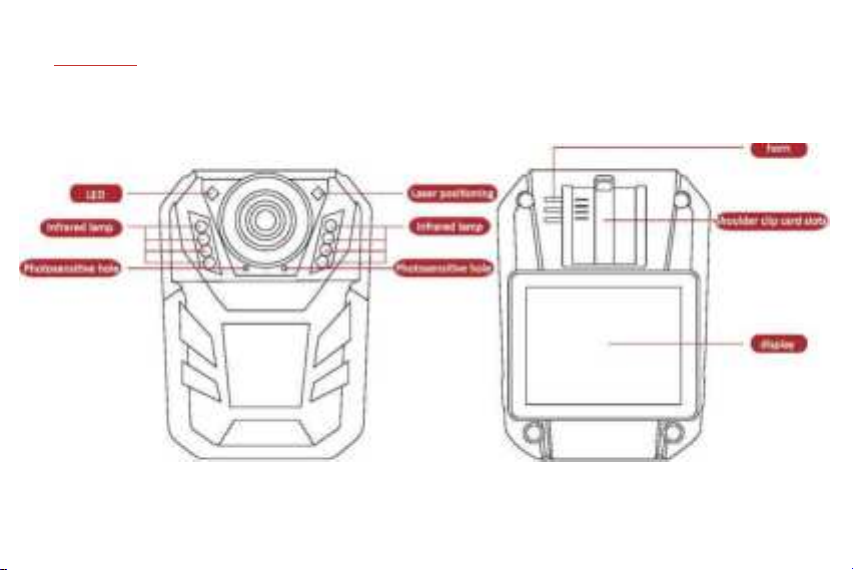
Part guide
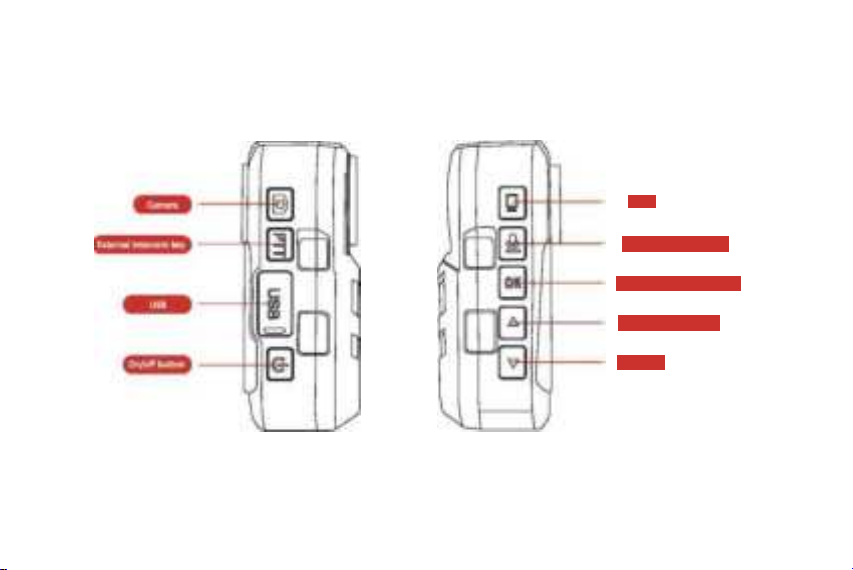
03
video
Record/menu(long press)
Confirm/playbackflong press)
Up/infrared (long press)
Down keys

Product functions
lPower on and off:
Long press the power button to turn on and off the body camera. After starting the body camera, it enters the
standby mode by default. In the standby mode, you can choose to open the menu or take photos, video, audio,
etc.
lHow to record pictures:
In the standby mode, short press the camera button to record a photo, after the photo is completed, it will
enter the standby mode.
lHow to record:
In the standby mode, short press the recording button to enter the recording state, short press the recording
button again to exit the recording and enter the standby mode.
Note: The recorded video will be automatically classified and saved in the body camera.
lHow to capture:
In the standby mode, short press the video button to enter the video recording state. During the video
recording, short press the camera button to take a snapshot, and the captured pictures will automatically be in
the body camera folder.
Note: The captured photos will be automatically classified and saved in the body camera.
lHow to record audio:
In the standby mode, short press the audio button to enter the recording mode, press the recording button
again to exit the recording and enter the standby mode.
Note: The recorded audio will be automatically classified and saved in the body camera.

Product functions
lHow to record video:
In the standby mode, short press the video button to enter the recording mode, press the recording button
again to exit the recording and enter the standby mode.
Note: The recorded video will be automatically classified and saved in the body camera.
lHow to enter the menu:
In standby mode, long press the recording button to enter the menu, you can browse the menu with the up
and down keys, and confirm with the OK button.
lHow to exit the menu:
In the menu page state, short press the recording button to exit the menu and enter the standby mode.
lHow to view files on the body camera:
In the standby mode, long press the OK button to access local files.
Note: The local files are divided into three folders, which can be selected in the upper right corner of
the body camera. Press the up and down buttons to browse the video, and the OK button represents
confirmation. Pictures, audios and videos can be played with the OK button, and the power button can
be selected when returning to the previous layer.
lHow to exit file viewing:
In the process of accessing files, long press the OK button to exit file viewing and enter standby mode.

Product functions
lHow to enter manual infrared night vision:
In the standby state, short press the up button to enter the infrared night vision state. Short press the up
button again to exit infrared night vision.
Note: After the infrared night vision is turned on, the body camera remains in the standby state, so it
does not affect the recording of sounds, pictures and videos.
lHow to use the illuminated button:
In the standby state, press the down button for the first time to turn on the lighting; press the down button for
the second time, the lighting will flash and be accompanied by an alarm sound; press the down button for the
third time, the lighting will turn off, and an alarm will sound Disappears and the body camera enters standby
mode.
Note: After turning on the light, the body camera remains in standby state, so it does not affect the
recording of sounds, pictures and videos.
lHow to download files to other devices:
Open the USB interface of the body camera, use the USB data cable that comes with the body camera,
connect the body camera and the computer (use Windows operating system as much as possible), select the
removable disk, open the folder, and select the corresponding file to download to the computer. Copy, download,
and send to other devices.
lHow to charge:
Use the USB data cable that comes with the body camera and the American standard charging plug for
charging. The charging time is controlled at about 4 hours. Please try to avoid using it in a low battery state
for a long time.

Product functions
lFor other functions, please set and use in the menu key.

Main characteristics
> super night vision function: automatically switch the night vision function, under all-black conditions, you
can see the human figure within 10 meters;
> double filter switcher: no color during the day, more clear at night;
> enhanced security: unauthorized access and delete records file data;
> police officer ID: can edit user number and other information;
> a variety of ID number Settings: according to different users can set different ID number differences;
> super long file name: the file name of all video files contains information such as time, user number; etc.,
which is convenient for data archiving and retrieval;
> external camera (AVIN function): multiple cameras can be selected: such as infrared camera, button
camera, wearing a camera on the brim;
> HD video: 1296P video in full HD;
> video extension function: do not omit any law enforcement screen;
> has three functions of camera shooting, taking photos and recording;
> can replay video and photos on-site;
> video automatic segmentation and preservation: to prevent data loss caused by the wrong operation;
> three kinds of operating tips: vibration, LED lights, sound;
> highlights video tagging features.
05
Table des matières
Autres manuels CAMMHD Appareil photo numérique


