
Caarrier ComfortChoice Edge Manuel utilisateur
ComfortChoice Edge®
Owner’s Manual

2
This document is the property of Carrier Corporation and is delivered on
the express condition that it is not to be disclosed, reproduced in whole or
in part, or used for manufacture by anyone other than Carrier Corporation
without its written consent, and that no right is granted to disclose or so
use any information contained in said document.
Carrier reserves the right to change or modify the information or product
described without prior notice and without incurring any liability.
© 2008, Carrier Corporation

1
You have the Edge®thermostat. This unique device's state-of-the-art
technology makes it easier than ever for you to keep your home comfortable.
Designed to be as smart - and smart-looking - as any of the other electronics in
your home, your new Edge thermostat offers programming options to fit your
lifestyle - not anybody else's. The Edge thermostat can be set for 7-day, 5/2-
day, or 1-day programmable operation. Different heating and cooling set points
and times are programmable for 4 periods per day. The thermostat has no need
for batteries to store user-configured settings in memory. During power loss its
internal memory saves settings for unlimited time, and the clock continues to
run for at least 24 hours. Let this manual show you how easy it is to enjoy the
newest experience in home comfort.
You will love this thermostat.

22
Thermostat display ................................................................................ 4
Thermostat buttons ............................................................................... 6
Setting the time and date ....................................................................... 8
Setting or changing heating/cooling temperature setpoints ................... 10
Holding the temperature ....................................................................... 12
Programming the Thermostat ............................................................... 13
To Set up a different schedule when all days of the week will follow
the same schedule ...................................................................... 14
To Set up a schedule when all days of the week will not follow
the same schedule ...................................................................... 16
Programming a vacation schedule ................................................ 19
Overriding a Utility Curtailment ............................................................. 21
Turning heating/cooling system off/ Using fan ..................................... 22
Using the thermostat to turn the heating and cooling system off ... 22
Using the fan ............................................................................... 22
Using Emergency Heat ........................................................................ 23
Advanced Programming ...................................................................... 24
Advanced programming display codes ........................................ 25
Reset reminders .......................................................................... 26
Contents

3
Adjusting backlighting .................................................................. 27
Keypad lockout ............................................................................ 28
Real-time pricing .......................................................................... 30
Time-of-use/peak pricing ............................................................. 33
Special Features
Hybrid heat (heat pump systems only) ......................................... 36
Service reminders ....................................................................... 36
Auto changeover......................................................................... 36
Smart Recovery........................................................................... 37
Troubleshooting .................................................................................. 37
What If . . .
"Auxiliary heat on" is displayed (heat pump systems only) ....... 37
"Em heat" is displayed (heat pump systems only) ..................... 37
There is a power outage.......................................................... 38
A service reminder message is displayed ................................ 38
Thermostat Error Codes ....................................................... 39
Contents

44
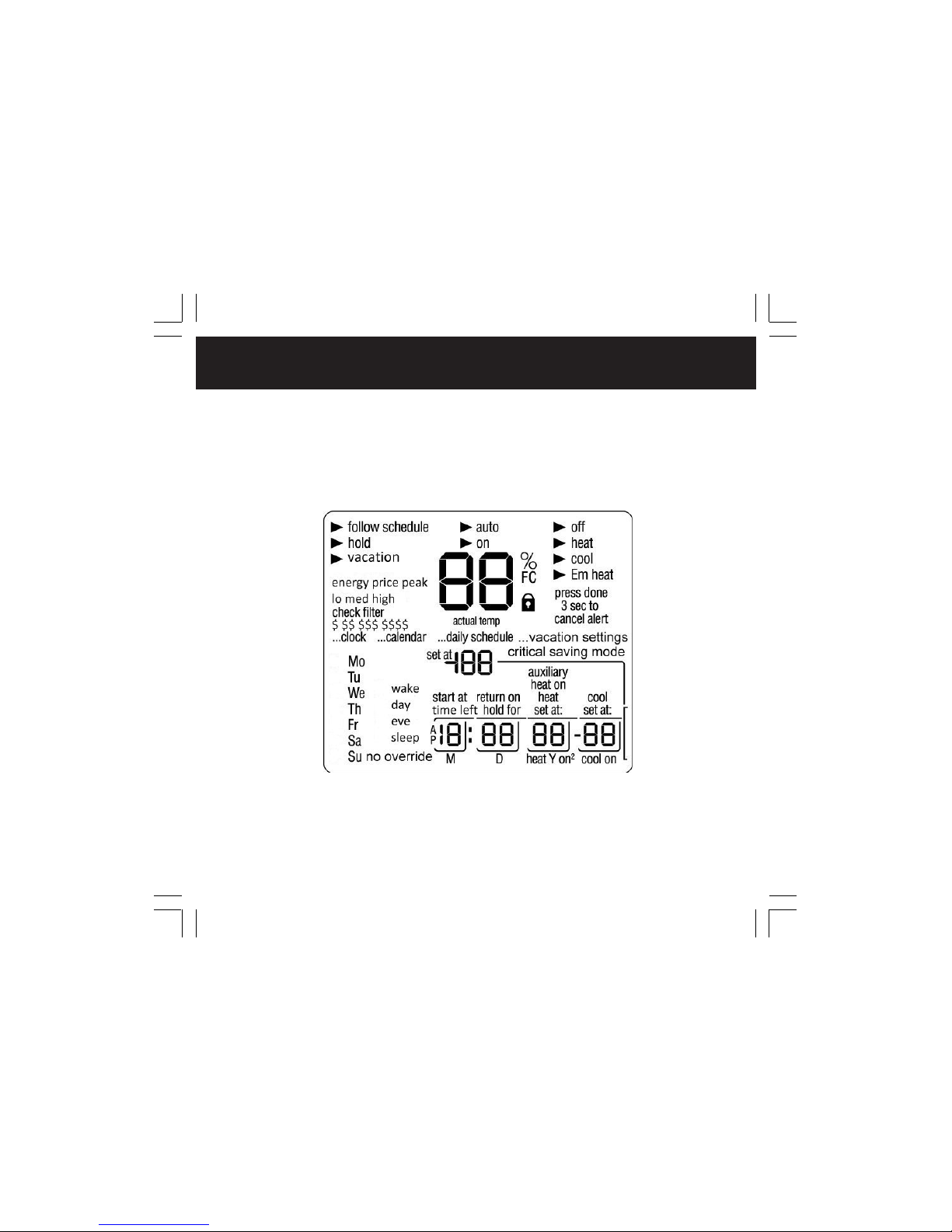
The thermostat display is shown in Figure 1. The following information can be
displayed on the screen:
• Day of the week
• Programming option - indicates which settings are being adjusted (clock,
calendar, daily schedule, vacation settings
• Filter reminder
• Current temperature
• Current program routine - follow scheduled programming, hold current
settings, or run vacation program
• Fan mode - on or auto
• Current system mode - heating, cooling, emergency heat, heat/cool (auto),
off
• FC - Fahrenheit display
• Advanced programming indicators
• Keypad is locked (no padlock means unlocked)
• System is in auxiliary (supplemental) mode
• Cooling set point; cooling on
• Heating set point; heating on (the 2 indicates second stage of heating or
cooling is active)
• Heating setpoint
• Year
• Vacation schedule return date
• Day
Thermostat display
5
• Length of time for temporary temperature hold
• Time left in utility curtailment/real-time pricing (temperature adjustment) events
• Month
• Time period start
• Period of the day
Thermostat display
Figure 1
Thermostat Display

66
holidayholidayoccunoccocc3occ2a
Thermostat buttons
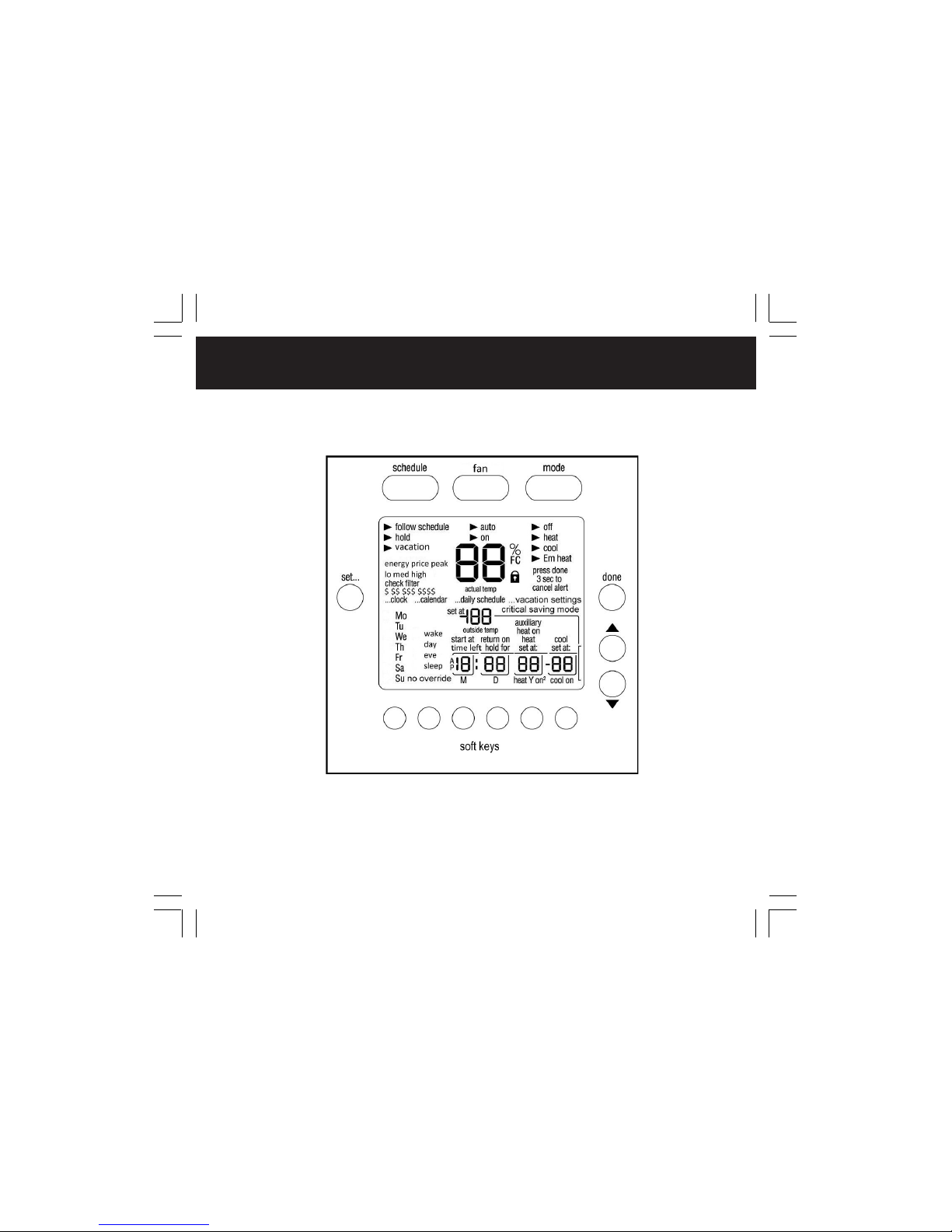
The thermostat has buttons that are accessible on the front panel when you
open the front cover. These buttons are used for various functions such as
raising or lower the desired setpoint and changing the current mode. See
Figure 2. Button functionality is summarized below.
SET BUTTON — Enters the thermostat programming schedule and allows you to
adjust the clock and vacation settings.
SCHEDULE BUTTON —Allows you to choose to follow a schedule, hold the
current set points, or go into vacation mode.
FAN BUTTON — Selects whether the fan operates continuously (on) or only
when needed for heating or cooling (auto)
MODE BUTTON — Selects whether the thermostat is set for heating, cooling,
emergency heat, auto (heat and cool as needed), or off modes.
DONE BUTTON — Saves the settings when completing a setup or programming
step.
UP BUTTON — Increments the currently chosen value (temperature, clock,
calendar, etc.).
DOWN BUTTON — Decrements the currently chosen value (temperature, clock,
calendar, etc.).
“SOFT” BUTTON — There are 6 soft buttons. The soft buttons are used to
select the onscreen indicator directly above the specific button. These
indicators can change based on user actions.
7
Thermostat buttons
Figure 2
Thermostat Buttons

88
This thermostat communicates wirelessly with a communication network. It
automatically obtains the current time and date from the communication
network.
In the event of loss of network communication, you can manually set the
time and date by following the instructions below. If you notice that the time is
not adjusted for daylight saving time you can adjust the hour at any time by
following Steps 1,2, and 3 below.
1. Open the door.
2. Press the set button on the left. The screen will show the word clock on
the left of the display and the time will be shown on the bottom.
3. To set the hour, press the soft button below the hour, and then press
the up or down button to adjust the value.
4. To set the minutes, press the soft button below the minutes, and then
press the up or down button to adjust the value.
5. To set the date, press the set button until the screen displays the word
calendar and the date is shown on the bottom of the screen.
Setting time and date
Table des matières
Manuels Thermostat populaires d'autres marques

EWELLY
EWELLY EW-181 Manuel utilisateur

Prolon
Prolon T1100 Instructions d'installation

Computherm
Computherm Q20 Manuel utilisateur

Heatmiser
Heatmiser neoStat Manuel utilisateur

Aube Technologies
Aube Technologies TH111GFCI-NP 240 VCA Manuel utilisateur

Mars
Mars HEAT CONTROLLER IR Wireless Thermostat Manuel utilisateur


