
C-SCOPE M-SCAN Manuel utilisateur


3. Get Started
4. Features
5. Controls
6. How the M-Scan works
Basic Operation and Description
7. Batteries
8. Preparation
8. Sensitivity
9. Volume
9. Audio Indication
10. Visual Indication
10. North/South Polarity
10. Depth
10. Pinpointing
11. Power Line Indicator
11. Erase
11. Submersion in Water & Searching
12. Application Note 1. Understanding the M-Scan Magnetometer
14. Application Note 2. How Objects Appear to a Magnetometer
16. Application Note 3. Depth
17. Application Note 4. Using near Large Ferrous Objects
18. Application Note 5. Finding the Centre of a Target
Contents

3
Brief Instructions for Use
1. Insert batteries in the holder ensuring they are in the correct
orientation before re-inserting the holder so the contacts touch.
2. Remove any metal items (rings, watches, etc) and electronic
devices (e.g. mobile phones) from about your person.
3. Turn the M-Scan on by pressing O /OFF .
The display should come on.
4. Hold the M-Scan in one hand at 45º to the ground and move
slowly across the area to be searched marking places where the
audio pitch increases.
5. Follow a grid pattern over the area.
6. When the area has been covered and any ferrous material
locations identified return to each location to pinpoint the item
and determine the size more precisely.
7. If too many objects are found the sensitivity is too high,
or there is trash in the ground. Raise the M-Scan off the ground
by 20 inches or 0.5 m and search again.
More detail can be found in the following pages. We recommend
reading this User Guide and the Application otes in full in order
to achieve the best results from the M-Scan.
Get Started
Hold the M-Scan
in one hand at 45º
Follow a grid pattern
over the area.

4
Features
The C.Scope M-Scan magnetic locator is a flux-gate
magnetometer. It responds when it detects ferromagnetic
material (material that is able to be magnetised, such as iron)
by increasing the audio frequency to a higher pitch as the object
is approached and passed. It is not affected by other objects
without a magnetic property. Gold, silver, copper, aluminium
and most other metals have no significant magnetic property
so are not detected.
The M-Scan is made to withstand heavy site use.
The plastic housing is manufactured from high-impact ABS
and the sensor tube is manufactured from lightweight aluminium.
There is a liquid crystal display and loudspeaker to give visual
and audible outputs. There are four main user controls, on/off,
volume up/down, sensitivity up/down and an ‘erase’ button that
can be used to mask nearby disturbances allowing the user to
search near a steel fence, for instance.
The sensitivity setting controls the effective depth that the
M-Scan will find a ferromagnetic object. The M-Scan uses
eight AA batteries in the sealed battery compartment giving
approximately 100 hours of typical use (with high quality
batteries). The standard kit includes a padded carrying case
with shoulder strap.
The display shows the field strength in units of micro Tesla (µT).
There is an analogue bar graph showing signal strength, a four
segment battery indicator, and a flashing power line alert
indicator. It also displays the orth/South polarity
of the detected object.
Display and Control Panel
LoudspeakerBattery Cover
Lower Sensor Upper Sensor

5
1. Power On/Off
2. Volume Up/Down
3. Sensitivity Up/Down
4. Erase Button
5. Bar graph
6. Sensitivity Indicator
7. Volume Indicator
8. Digital Signal Indicator
9. Power Line Warning
10. Battery Indicator
11. Flange Symbol
Refer to Application ote 2 (page 13)
M-SCAN
5
9
2
1 4
10
876
3
11
Controls

6
The M-Scan finds ferromagnetic objects by sensing
the magnetic field radiated by the object. The locator contains
two sensor coil assemblies that are spaced apart and their
outputs electronically finely balanced. This is done so that the
M-Scan can correct for the ever-present magnetic field on the
earth. The two sensors measure the same field due to the earth
because both the coils are relatively close so they experience
the same magnetic lines of force. The earth’s magnetic lines
of force can be regarded as generally parallel but when
a ferromagnetic object is nearby the field strength and direction
of the magnetic lines upon each sensor is slightly different.
This is enough to disturb the critical balance allowing
the M-Scan to produce a different signal.
When no ferromagnetic objects are present, the speaker emits
a steady low frequency tone but as the M-Scan gets closer
to a ferromagnetic object the audio pitch increases until
the strongest signal from the object is directly under the end
of the sensor tube. The pitch is maximum over the strongest
signal and then decreases as the M-Scan is moved away.
(For a more detailed description of the way the field
of an object affects the M-Scan please refer to
the Application otes in this manual.
How the M-SCAN Works
Basic Operation and Description
7
Batteries
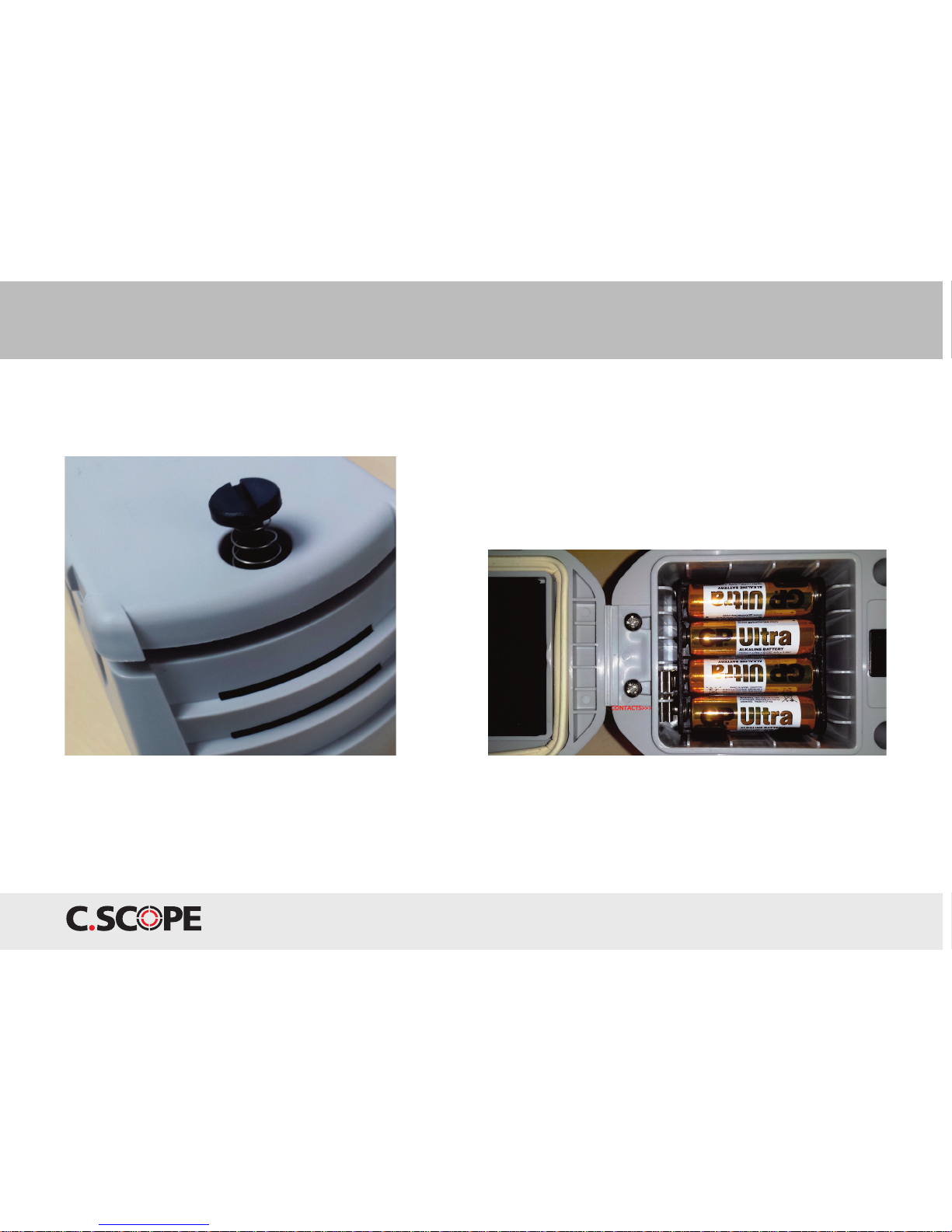
The battery compartment is located on the underside
of the M-Scan. Use a coin to rotate the latch anti clockwise
90° to undo.
Remove the battery holder and fit eight AA alkaline batteries
in the holder before repositioning in the compartment.
Take care to ensure that each battery is in the orientation shown
on the holder (batteries should alternate) and that the holder
is gently pushed to the base of the compartment so the battery
holder contacts touch the mating contacts in the compartment.
Do not force the battery pack into the compartment – check
it is not the wrong way around.
Close the compartment and turn the latch 90° clockwise to lock.
When it is time to replace the batteries, change all eight together
to prevent unnecessarily discharging good batteries alongside
poorly charged ones.
Do not keep batteries in the M-Scan when it is in storage
or if the batteries are in a discharged state.

8
Basic Operation and Description
M-SCAN
Preparation
Remove any metallic object such as a wrist watch, bracelets
or large buckles and keep the sensor tube away from footwear
to prevent false signals as these items may contain magnetic
material. Mobile phones, some headphones and other
electronic products may also contain magnets that can
interfere with the magnetic field nearby causing
spurious results.
Press the O /OFF button once to turn the M-Scan on.
(It can be turned off by pressing it once again).
Check that the battery symbol (on the top right of the display)
shows at least two bars before commencing the search.
The M-Scan will work with one segment showing
but it is not recommended.
Sensitivity
There are four possible settings.
The lowest is S1, rising to S4.
Sensitivity always comes on
at the third highest setting, S3,
and can be varied using
the Sensitivity and
Sensitivity V buttons.
When or Vis pressed
the display will momentarily
show the new setting (eg S2).
V
V

9
Volume
The volume can be adjusted
using the Volume and
Volume V buttons.
There are eight possible
volume settings,
V1 is the quietest
and V8 is the loudest.
The display will momentarily
indicate the new setting (eg V5)
in the bottom centre.
Audio Indication
When no ferrous metal is present, the sound heard
will be a low frequency tone. When the M-Scan
is brought near to ferromagnetic material, such as an iron cover,
the frequency of the audio tone will increase.
There is a standard headphone 3.5mm jack socket under
the cover on the base of the M-Scan. The audio from the load
speaker is not cut out when headphones are connected.
Care should be exercised when choosing headphones
as some may interfere with the operation of the M-Scan.
Only use headphones recommended by C.SCOPE.
Basic Operation and Description
M-SCAN
V

10
Visual Indication
When no ferromagnetic
material is close, the M-Scan
display will show a very low
field strength reading in µH
and the analogue bar graph
will be at 0 or very low.
When nearing ferromagnetic
material the field strength
will increase up to a maximum
reading of 99.9uH.
The analogue bar graph
will also indicate full scale.
North / South Polarity
An arrow pointing towards the indicates north polarity
field has been detected from the object (lower image left).
An arrow pointing towards the S indicates south polarity
field has been detected (top image left).
Many larger objects will show both polarities at opposite
ends of the object as it is traversed.
(See Applications otes in this manual.)
Depth
The depth of buried objects can be estimated by comparing
signal strengths. A low signal strength indicates a very small
amount of ferromagnetic material or a deep buried object.
If the signal is very broad this also indicates a deeply buried
object. If the sensitivity is reduced or the M-Scan is lifted up
0.5m (1.5 ft) and the object traversed again and the signal
disappears then it is likely the object is relatively shallow
or small.
Pinpointing
For larger targets it is best to lower the sensitivity
to aid pinpointing.
M-SCAN
M-SCAN
Basic Operation and Description
Table des matières
Autres manuels C-SCOPE Instrument de mesure


Manuels Instrument de mesure populaires d'autres marques


Endress+Hauser
Endress+Hauser Proline Promag 50 Caractéristiques techniques

Siemens
Siemens SITRANS F Coriolis FCT030 Manuel de la liste des pièces

KLINGER
KLINGER CMF V Series Manuel utilisateur

EXFO
EXFO FTB-2 Manuel d'exploitation et d'entretien

Keysight
Keysight M8290A Manuel utilisateur

ADTEK
ADTEK MW-5 Manuel utilisateur