C-Max CM2 Manuel utilisateur

USER
MANUAL
The CM2
SIDESCAN
SONAR
SYSTEM
(All configurations except
those using MaxPro software)
Issue 3.6
© C-MAX Ltd 2008

CM2 Sidescan Sonar User Manual
Version 3.6 (2008) ii

CM2 Sidescan Sonar User Manual Contents
CONTENTS
(also see Bookmarks if viewing PDF version)
1. Summary of Warnings ………… 1
2. System Components ………… 2
Towfish
Sonar Transceiver (STR)
C-Shell
C-Case 2
C-Case SE
Tow Cables
Accessories
Specifications
3. Installing the System ………… 6
Data Acquisition Subsystem
Tow Cable
Installing a Winch and Pulley (if used)
Securing the "soft" Tow Cable (if used)
Attaching the Towfish
Checking System Operation
Spares and Tools
4. Planning the Survey ………… 11
Survey Plan
Line Spacing
Line Direction
5. Operating the Towfish ………… 13
Pre-launch Check
Launch
Flying the Towfish
Recovering the Towfish
Action if the Towfish Fouls
6. Operating Guidelines ………… 16
7. Notes for the Helmsman ………… 17
Navigation
Steering
Emergency Actions
8. Towfish Commands ………… 18
Towfish Command Set
Bottom-tracking, Up and Down
Mute, On or Off
Shallow Mode, On or Off
Gain Hold, On or Off
Gain, Up or Down
9. Interpreting the Sonar Image ………… 19
Water Column and Bottom Image
Highlights and Shadows
Image Corrections
Causes of Image Defects
10. Routine Maintenance ………… 21
Routine Maintenance
Replacing the Towfish Breakable Washer
11. Storage and Transit ………… 22
Version 3.6 (2008) iii

CM2 Sidescan Sonar User Manual Contents
12. Repair and Replacement ………… 23
Replacing the Towfish PCB
Replacing a Transducer
Repairing the Tow Cable
Replacing the Safety Lanyard
Servicing the Surface Electronics
Servicing the STR
Servicing the C-Shell
Servicing the C-Case 2
Servicing the C-Case SE
13. Troubleshooting ………… 26
14. Interfaces ………… 28
Towfish/Tow Cable
STR
C-Shell
C-Case 2
C-Case SE
15. Specifications ………… 30
Towfish
STR
C-Shell
C-Case 2
C-Case SE
Tow Cables
(Sections 16-22 cover optional accessories)
16. CM2-WIN-300 Winch ………… 33
17. SK172 and SK172E Winches ………… 37
18. Wing Depressor ………… 39
19. Pulleys and Counting Pulleys ………… 41
20. Polemount Bracket ………… 43
21. USBL Transponder Bracket ………… 44
22. Towfish Sensors ………… 45
23. ROV and AUV Configurations ………… 47
24. Warranty ………… 48
Scope
Limitations
Fault Reporting
Returns
Transferability
Version 3.6 (2008) iv

CM2 Sidescan Sonar User Manual 1. Summary of Warnings
1. SUMMARY OF WARNINGS
The warnings summarised here are intended to prevent injury to personnel and equipment in what can be a
hazardous environment.
OPERATORS OF THIS EQUIPMENT ARE RESPONSIBLE FOR THEIR
OWN SAFETY
THE SUPPLIER ACCEPTS NO LIABILITY FOR THE CONSEQUENCES OF
EQUIPMENT USE OVER WHICH IT HAS NO CONTROL
THE GROUND VOLTAGE LEVEL OF ANY EXTERNAL EQUIPMENT,
INCLUDING NAV DATA SOURCES OR ECHO SOUNDERS, MUST BE
CHECKED BEFORE CONNECTION IS MADE TO THE SERIAL PORT OF
ANY ACQUISITION PC OR C-CASE. THE GROUND LEVELS MUST BE
EQUAL OR FLOATING; IF NOT THEN THE INTERNAL CPU PCB MAY BE
DESTROYED (AND DAMAGE SO CAUSED IS NOT COVERED BY
WARRANTY)
DO NOT ALLOW THE TOWFISH TO STRIKE THE BOTTOM OR
OBSTRUCTIONS; THE TOWFISH SINKS WHEN THE BOAT TURNS OR
SLOWS
USE GLOVES TO HANDLE ALL STEEL-ARMOURED TOW CABLES
NEVER ALLOW SLACK IN THE CABLE WHILST THE TOWFISH IS
DEPLOYED
DO NOT EXPOSE THE TRANSDUCERS TO HEAT FROM STRONG
SUNLIGHT
ENSURE THAT ALL ELECTRONIC UNITS ARE DRY BEFORE STORAGE
Version 3.6 (2008) 1

CM2 Sidescan Sonar User Manual 2. System Components
2. SYSTEM COMPONENTS
Towfish
The towfish is the acoustic sensor head. It transmits a very high frequency acoustic pulse (“ping”) at regular
intervals and receives the series of echoes that result from each ping.
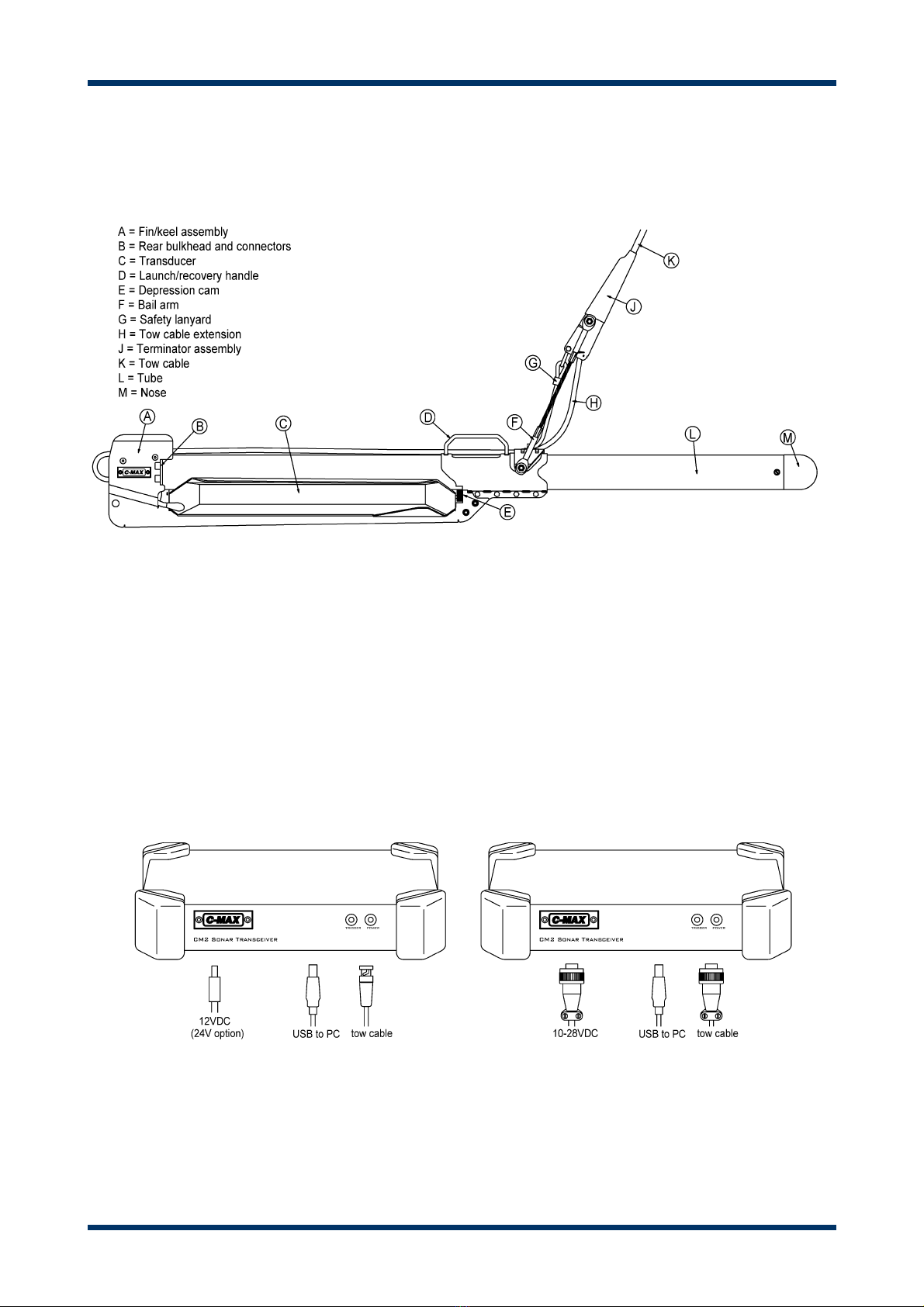
Towfish and Tow Cable Terminator
Three types of CM2 towfish are available, namely DF (325/100kHz), EDF (325/780kHz) and HF (325kHz
only). All are identical externally. These are digital towfish, communicating with the surface electronics via
the tow cable.
Optional additional sensors for the towfish are described in Section 22.
Sonar Transceiver (STR)
The “top end” (i.e. surface electronics) unit provides power for the towfish via the tow cable, receives the
echo data and other information such as the towfish altitude, and sends commands to the towfish. The
primary type of top end unit for the CM2 system is the Sonar Transceiver (or STR). As well as
communicating with the towfish, the STR communicates with the PC that acquires, records and displays the
sonar image. Communication with the PC is via the STR’s USB interface.
Sonar Transceiver (STR) Versions
Two versions of the STR exist, differing in the type of connectors used and in the DC voltage range that they
accept. The version fitted with MIL-C-5015 connectors accepts 10-28VDC. The alternative version, identified
by its BNC connector, accepts voltages in the range 10-18VDC, with 24VDC as an ordering option. Early
versions also featured an analog output, generated from the internal digital signal, for driving “legacy”
acquisition systems and thermal printers.
Version 3.6 (2008) 2

CM2 Sidescan Sonar User Manual 2. System Components
C-Shell
The C-Shell is an optional polypropylene clamshell enclosure for the STR. The C-Shell converts an STR into
a fully waterproof (IP67) unit, complete with waterproof connectors. The STR can be quickly fitted or
removed.
C-Shell, Panel and Connectors
The C-Shell includes a 4-way USB hub that can be used to house a dongle for the acquisition software. The
C-Shell can also be specified with an integral GPS receiver: the GPS output is fed to the hub for
transmission to the external USB link.
Version 3.6 (2008) 3

CM2 Sidescan Sonar User Manual 2. System Components
C-Case 2
C-Case 2 is the first successor to the earlier version that ran MaxPro (under DOS). It is an all-in-one data
acquisition unit with an integral PC, designed for use in the exposed environment of an open boat. It uses
MaxView or third-party acquisition software running under Windows.
C-Case 2, Panel and Connectors
Version 3.6 (2008) 4

CM2 Sidescan Sonar User Manual 2. System Components
C-Case SE
The C-Case SE is also an all-weather data acquisition unit. It takes advantage of the availability of
ruggedized laptop PC’s such as the Panasonic Toughbook series to eliminate the need for the under-panel
integral CPU as fitted to the C-Case 2. Like all the later (non-MaxPro) CM2 systems it uses MaxView or
third-party acquisition software running under Windows.
C-Case SE, Panel and Connectors
Tow Cables
The CM2 tow cables use a single pair of electrical conductors to carry both data and power. There are two
types of tow cable offered with the CM2. “Soft” cable is intended for shallow work, where the cable can be
hauled and veered manually. The alternative is steel-armoured cable handled by a winch. Various diameters
of steel-armoured cable are available, the smallest being 4.7mm used on the CM2-WIN-300 winch.
Accessories
Optional accessories including winches, wing depressor, counting pulleys, polemount bracket and USBL
bracket, are described in Sections 16-21.
Specifications
Specifications for the major components and certain accessories are listed in Section 15.
Version 3.6 (2008) 5

CM2 Sidescan Sonar User Manual 3. Installing the System
3. INSTALLING THE SYSTEM
Data Acquisition Subsystem
The CM2 system uses a PC, running Microsoft Windows, to acquire and display the sonar records. The user
normally supplies this PC. To install the acquisition software on this PC see the MaxView Installation Guide.
For third-party acquisition software see the supplier's manual.
If the CM2 system uses a Sonar Transceiver (STR) or an STR housed in a C-Shell, link it to the acquisition
PC via the USB cable supplied.
Prepare to apply dc power to the STR. If powering from an AC supply, use the 60W power brick supplied
with the STR.
System with Optional Winch and Counting Pulley
Connect the tow cable or winch signal cable (or “deck” cable) to the STR.
Connect a navigation data cable to the PC if required. As GPS and other sources of navigation data often
output via an RS232 serial connection, and as serial ports are becoming less common on PCs, this
connection may require the use of a serial-to-USB converter. Note that if a CM2 C-Shell (fitted with an STR)
is being used, the GPS data from the C-Shell’s optional internal GPS receiver is already mixed with the
sonar data on the C-Shell’s USB output.
If a counting pulley is to be used, connect its cable to the PC. This may also require a serial-to-USB
converter.
Instead of an STR, some CM2 systems are supplied with all-in-one C-Case 2 or C-Case SE data acquisition
subsystems, with integral PC (C-Case 2) or removable panel-mounted PC (C-Case SE). These require tow
cables and power cables fitted with the appropriate connectors. Interface details are available in Section 14.
Version 3.6 (2008) 6
Autres manuels pour CM2
1
Table des matières