
Brookstone Flip Speaker Dock Manuel utilisateur

App-enabled. Holds iPod® or iPhone® devices
for music or movies.
Flip Speaker Dock
682153_INS-Rev. 0611_Flip Speaker Dock_V2
Instructions Doc. Size: 5”W x 4.75”H_Output at 100% Prints 1/0 Black
IDESIGN®

1
TABLE OF CONTENTS
Warnings and Cautions ....................................................2
Location of Controls.......................................................7
Included Accessories......................................................8
Battery Installation.........................................................9
General Speaker Set-up ...................................................9
Inserting iPod/iPhone in a Landscape Position . . . . . . . . . . . . . . . . . . . . . . . . . . . . .10
Using the Flip Speaker Dock..............................................10
iPod/iPhone Compatibility.................................................11
Specifications............................................................11
Using the APP...........................................................12
Troubleshooting ..........................................................14
Warranty.................................................................17

2
682153_INS-Rev. 0611_Flip Speaker Dock_V2
Instructions Doc. Size: 5”W x 4.75”H_Output at 100% Prints 1/0 Black
CAUTION
• TO REDUCE THE RISK OF ELECTRIC SHOCK, DO NOT REMOVE COVER.
THERE ARE NO SERVICEABLE PARTS INSIDE.
• TO REDUCE THE RISK OF FIRE OR ELECTRIC SHOCK, DO NOT EXPOSE
THIS UNIT TO RAIN OR MOISTURE.
The lightning flash with arrow-head symbol within an equilateral triangle
is intended to alert the user to the presence of uninsulated “dangerous
voltage” within the unit’s enclosure that may be of sufficient magnitude
to constitute a risk of electric shock.
The exclamation point within an equilateral triangle is intended to alert
the user to the presence of important operating and maintenance
(servicing) instructions in the literature accompanying the unit.
IMPORTANT SAFETY INSTRUCTIONS
All the safety and operating instructions should be read, adhered to and followed
before the unit is operated.
SAVE THESE INSTRUCTIONS

DANGER
To reduce the risk of electric shock, burns, fire or injury:
1. Do not use while bathing or in a shower.
2. Do not place or store unit where it can fall or be pulled into a tub or sink.
3. Do not place in, drop or submerge in water or other liquid.
4. Do not reach for unit that has fallen into water. Unplug it immediately.
5. Care should be taken so that objects do not fall and liquids are not
spilled onto the unit.
WARNING
1. Keep away from children. This is not a toy.
2. Use this unit only for its intended use as described in this manual.
3. Unplug this unit during lightning storms or when unused for long
periods of time.
4. Never drop or insert an object into any opening.
5. Protect the power cord from being walked on or pinched, particularly at plug
outlets, convenience receptacles and the point where it exits the unit.
6. Do not allow cord to touch hot surfaces. Wrap cord loosely around
the unit when storing.
3

7. The unit should be situated away from direct sunlight or heat sources such
as radiators, electric heaters, heat registers, stoves, or other units (including
amplifiers) that produce heat. Avoid placing on top of stereo equipment that
radiates heat.
8. Never block the air openings of the unit with materials such as clothing,
plastic bags or papers, or place it on a soft surface such as a bed or couch,
where the air openings may be blocked.
9. Do not overload electrical outlet. Use only the power source as indicated.
10. Do not carry this unit by cord or use cord as handle.
11. Never operate this unit if it has a damaged cord or plug, if it is not working
properly, or if it has been dropped or damaged, or dropped into water. If the
unit’s power supply cord or plug is damaged, do not attempt to fix it yourself.
12. To avoid the risk of electric shock, do not disassemble or attempt to repair
the unit. Incorrect repair can cause risk of electric shock or injury to persons
when unit is used.
13. Do not operate in the presence of explosive and/or flammable fumes.
14. Never remove the plug from the socket by pulling the power cord.
4
682153_INS-Rev. 0611_Flip Speaker Dock_V2
Instructions Doc. Size: 5”W x 4.75”H_Output at 100% Prints 1/0 Black

FCC INFORMATION
This equipment has been tested and found to comply with the limits for a Class B
Digital Device, pursuant to Part 15 of the FCC Rules. These limits are designed
to provide reasonable protection against harmful interference in a residential
installation. This equipment generates, uses and can radiate radio frequency energy
and, if not installed and used in accordance with the instructions, may cause
harmful interference to radio communications. However, there is no guarantee that
interference will not occur in a particular installation.
If this equipment does cause harmful interference to radio or television
reception, which can be determined by turning the equipment off and on,
the user is encouraged to try to correct the interference by one or more
of the following measures:
• Reorient or relocate the receiving antenna.
• Increase the distance between the equipment and receiver.
• Connect the equipment to an outlet on a circuit different from that
to which the receiver is connected.
• Consult the dealer or an experienced radio/TV technician for help.
This equipment complies with Part 15 of the FCC Rules. Operation is
subject to the following two conditions:
1. This equipment may not cause harmful interference.
2. This equipment must accept any interference received, including interference
that may cause undesired operation.
Modifications not authorized by the manufacturer may void the user’s authority
to operate this device.
5

BATTERY PRECAUTIONS
• Dispose of the old batteries properly. Do not dispose of the old batteries
in a fire.
• Do not leave the batteries where a child or pet could play with or swallow
them. If the batteries are swallowed, contact a physician immediately.
• The batteries may explode if mistreated. Do not attempt to recharge or
disassemble the batteries.
• Use only fresh batteries of the required size and type. Do not mix old and
new batteries, different types of batteries, or rechargeable batteries of
different capacities.
SAVE THESE INSTRUCTIONS
6
682153_INS-Rev. 0611_Flip Speaker Dock_V2
Instructions Doc. Size: 5”W x 4.75”H_Output at 100% Prints 1/0 Black
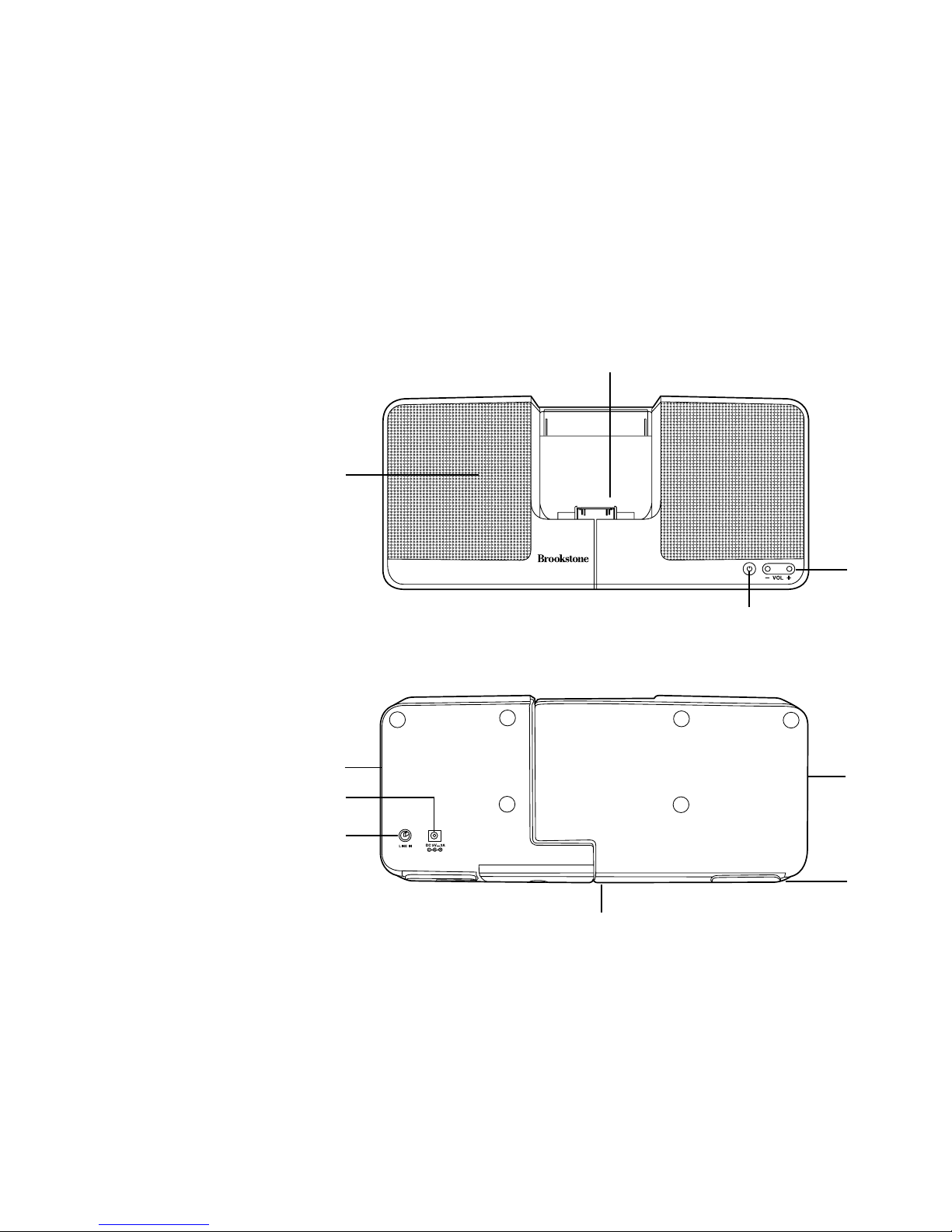
LOCATION OF CONTROLS
4
1
2
3
6
7
9
8
1. iPod/iPhone Dock
2. Volume Control
3. Power Button
4. Speaker (2)
5. Passive Speaker
Radiator (2)
6. DC Input
7. Line-In
8. Horizontal View
Extender
9. Foot (2)
Front
Back
55
7

iPod nano ( 3rd Gen )
iPod nano ( 2nd Gen )
iPod classic 80G
iPod touch
iPod touch 2G
INCLUDED ACCESSORIES
DC Adapter
Line-In Cable
7 iPod/iPhone Clips
8
iPod nano ( 3rd Gen )
iPod nano ( 2nd Gen )
iPod classic 80G
iPod touch
iPod touch 2G
682153_INS-Rev. 0611_Flip Speaker Dock_V2
Instructions Doc. Size: 5”W x 4.75”H_Output at 100% Prints 1/0 Black

OPERATION
BATTERY INSTALLATION
1. Slide the Battery Compartment cover on the base of the unit open.
2. Insert 4 AAA batteries according to the polarity indicators (see below).
3. Close the Battery Compartment door by sliding it securely shut.
GENERAL SPEAKER SET UP
1. Push both FEET on the bottom edge of the unit out for balance.
2. Select the correct iPod/iPhone CLIP and insert into the iPod/iPhone DOCK.
3. Insert your iPod/iPhone into the iPod/iPhone DOCK, or plug in the LINE-IN
CABLE at the back of the unit to attach an auxiliary device.
Note: The LINE-IN signal will be higher priority than the iPod/iPhone signal.
Make sure the LINE-IN CABLE is unplugged when you want to listen
to music from your iPod/iPhone.
4. Connect the DC ADAPTER to a power outlet and the Flip Speaker Dock.
9
Ce manuel convient aux modèles suivants
1
Table des matières
Autres manuels Brookstone Station d'accueil

Brookstone
Brookstone iDesign Power Speaker Manuel utilisateur

Brookstone
Brookstone Universal Dock Manuel utilisateur

Brookstone
Brookstone Bluetooth Tablet Station Manuel utilisateur

Brookstone
Brookstone Boombox Manuel utilisateur

Brookstone
Brookstone 324628 Manuel utilisateur

Brookstone
Brookstone Big BlueT 804336 Manuel utilisateur


