
Bolymedia BA-201 Manuel utilisateur

http://www.bolymedia.com
User Manual
BA-201


http://www.bolymedia.com
Contents
Appearance ......................................................................1
Getting Started..................................................................3
Charging the Battery..................................................3
Inserting or Removing MicroSD Card ........................3
Software Update........................................................4
Power On and Off......................................................4
Setup................................................................................5
Camera Mode............................................................5
LCD Display Screen ..................................................5
Setting Items..............................................................6
Connections....................................................................11
Using a Card Reader...............................................11
Using a USB Cable..................................................11
Using a HDMI Cable................................................11
WIFI Connecting.............................................................13
Mounting Accessories.....................................................15
Specifications..................................................................17
/ Appearance
1
Appearance
/Appearance
2
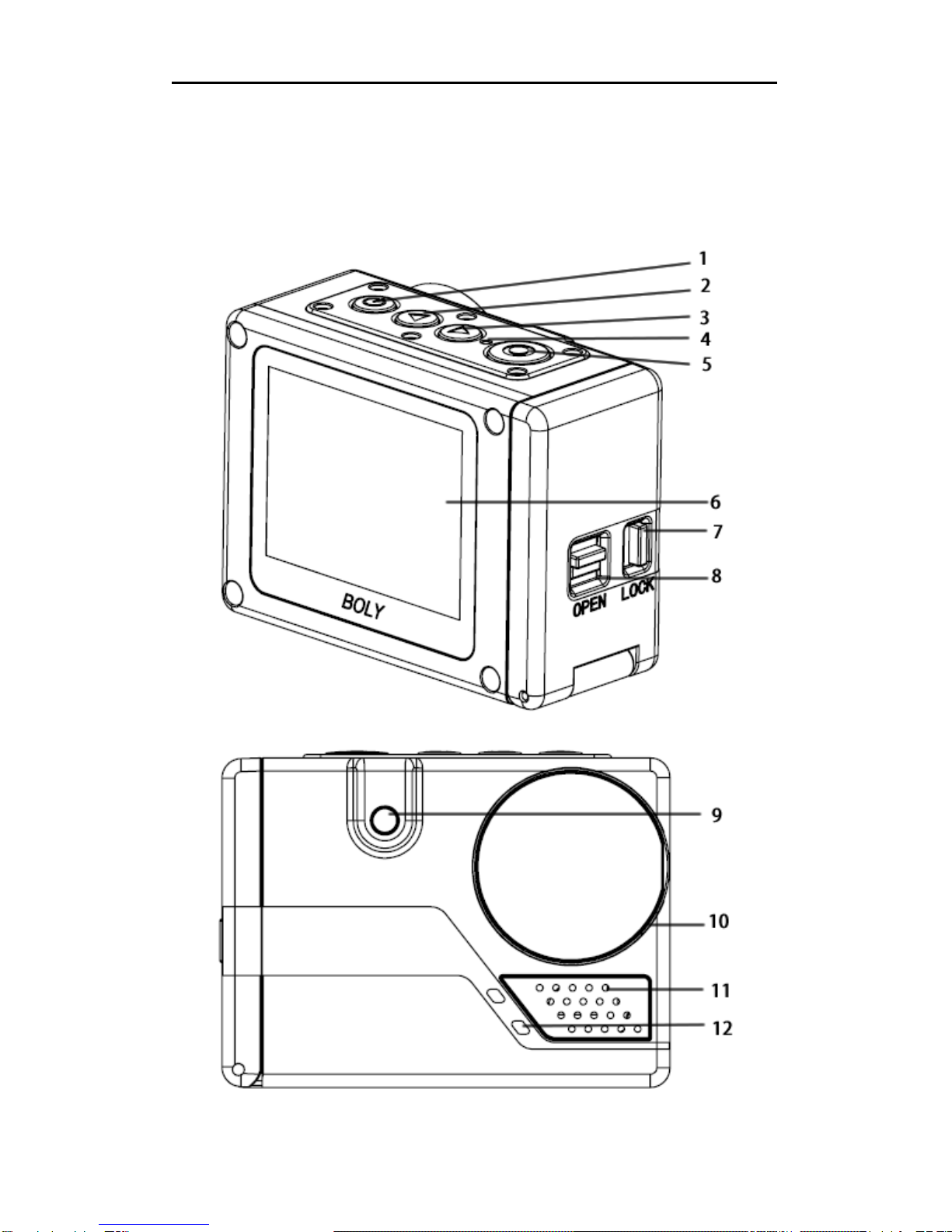
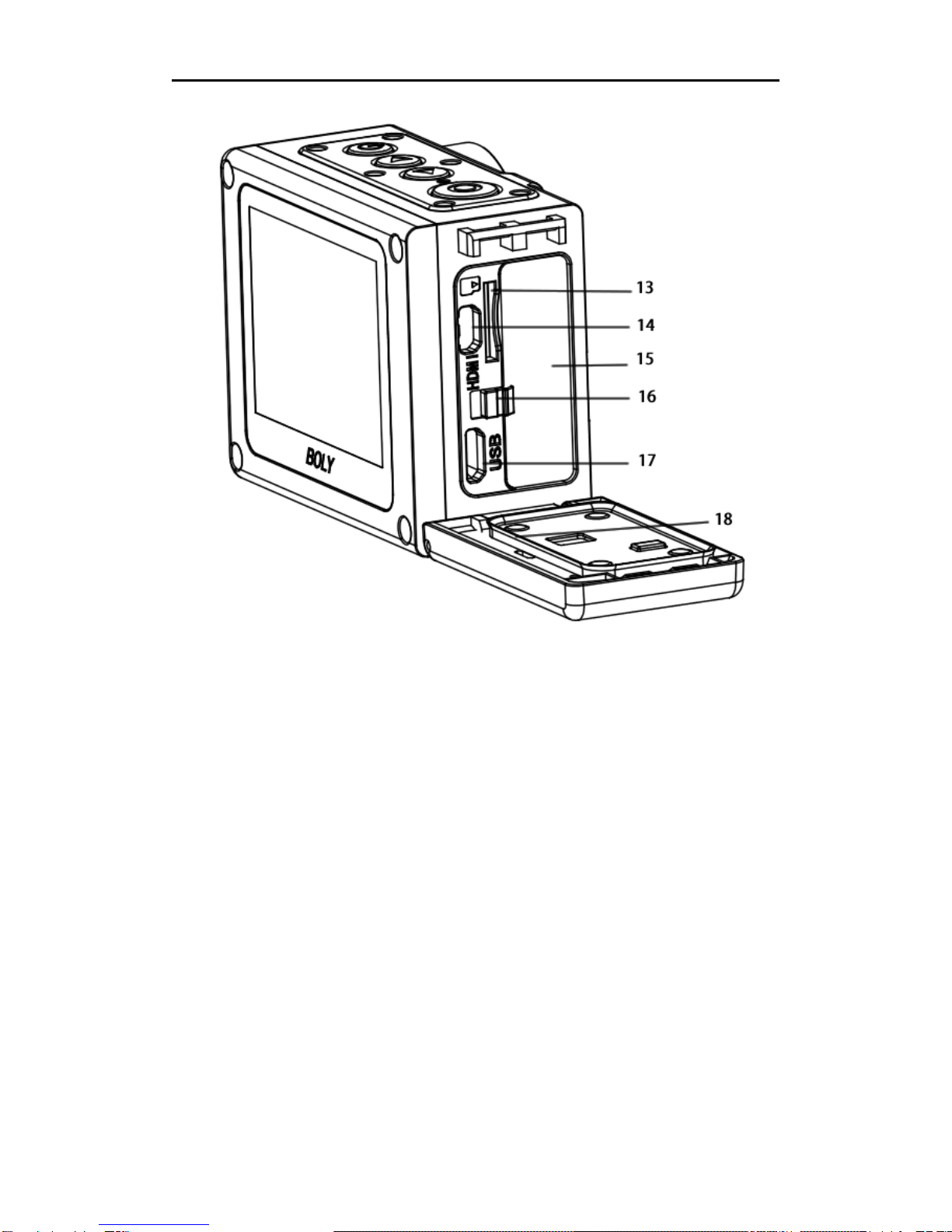
1. Power/Menu 10. Lens
2.Up/Voiceswitch 11.Speaker
3. Down/WIFI switch/Mode 12. Microphone
4. Charging indicator 13. MicroSD card slot
5.Shutter/OK 14.MicroHDMIport
6.LCDDisplay 15.Li-onbattery
7. Battery cover lock 16. Battery buckle
8. Battery cover switch 17. Mini USB port
9.Flash 18.Rubbergasket
All images and illustrations given in this manual are
for explanation purpose and may differ slightly from
the actual product.

/ Getting Started
3
Getting Started
Charging the Battery
Unlock and open the battery door, charge the
battery by connecting the camera to a computer or
other USB charging adapter using the included USB
cable. The charging indicator turns on during
charging and turns off when charging is completed.
NOTICE: Only use chargers marked: output 5V 1A.
If you do not know the voltage and current of your
charger, use the included USB cable to charge the
camera from your computer.
The included lithium-ion battery comes partially
charged. No damage occurs to the camera or
battery if used prior to a full charge.
Inserting or Removing MicroSD Card
Slide the memory card into the card slot according
to the correct icon before powering on the camera.
The camera itself has no storage space , it will not
work well if no microSD card is inserted.
When you want to remove the microSD card, place
your fingernails against the edge of the memory
card and lightly press it further into the slot. It will
springs out far enough to be removed.
NOTE: the camera is compatible with 4GB to 32GB
capacity microSD, microSDHC and microSDXC
memory cards(not included). Boly recommends
using brand name memory cards for maximum

/GettingStarted
4
reliability in high-vibration activities. Avoid liquids,
dust and debris comes to the microSD card during
use. Power off the camera before inserting or
removing the card.
Software Update
To get the latest features and best performance
from the camera, make sure you are using the most
current camera software.
The camera supports updating software through the
microSD card. Note frequent updating software may
cause damage to the camera.
Power On and Off
To Power On:
Long press the Power/Menu button[ ], the LCD
display will light with a short “BolyAcam” animation.
The information will be displayed on the screen
when camera is on.
To Power Off:
Long press the Power/Menu button[ ], the LCD
display will dim with a short “BolyAcam” animation.
/Setup
5
Setup
Camera Mode
The camera supports three modes: Photo Mode,
Video Mode and Playback Mode. In preview status,
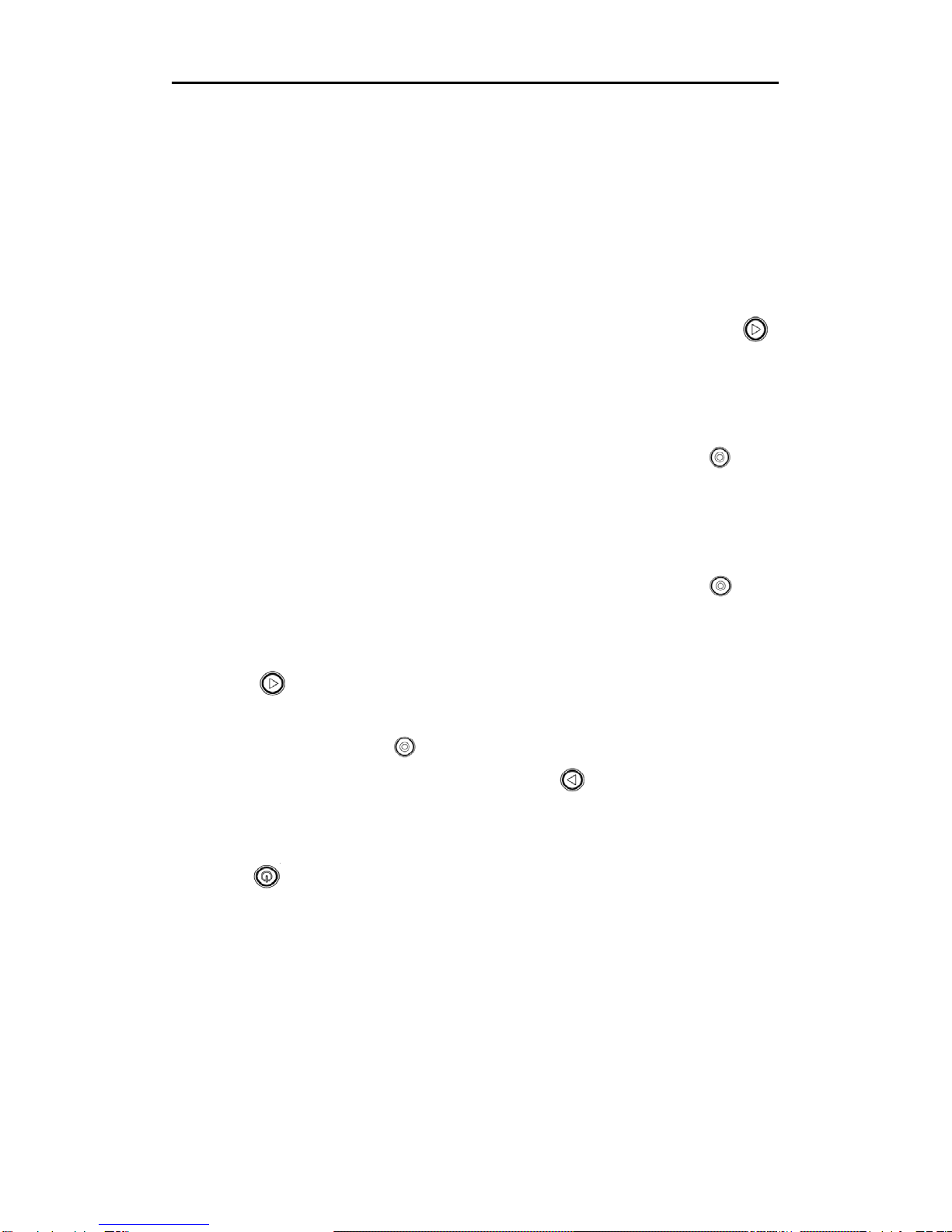
short press Down/WIFI switch/Mode button [ ]
repeatedly to change modes after turning on the
camera. There are different item settings for each
mode.
Video Mode: Press the Shutter/OK button[ ] to
capture a video clip according to custom settings,
the same button to stop. Video Mode is the default
mode.
Photo Mode: Press the Shutter/OK button[ ] to
capture still photos according to custom settings.
Playback Mode: Press Down/WIFI switch/Mode
button [ ] repeatedly to enter playback mode to see
a video or photo which has been taken. The
Shutter/OK button[ ] also helps to playback a video
clip, the Up/Voice switch button[ ] shows you the
prior one.
Also in playback mode, press the Power/Menu
button[ ] to delete or protect photo or video clip.
Once a photo or video clip is protected, it cannot be
deleted. An icon of key shows when a picture or
video clip is protected.
LCD Display Screen
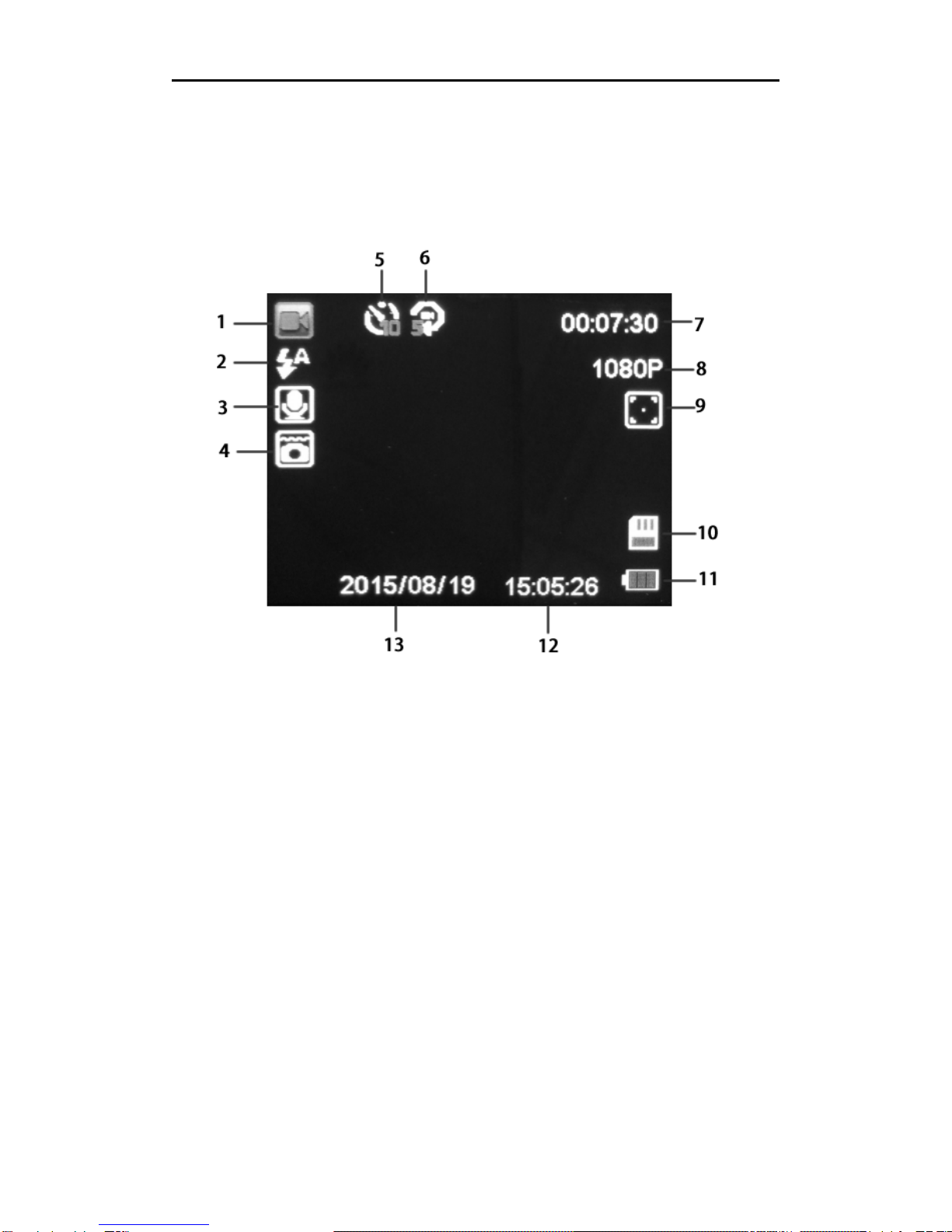
There is a 2’’LCD display screen on the camera
which makes it easy to set up and view the
/Setup
6
parameters for the various camera modes. Take a
few minutes to familiarize yourself with the displays.
It is helpful to bookmark this section and refer to it
when reading through the rest of the manual.
1. Mode 8. Resolution
2. Flash 9. Focus icon
3. Voice control 10.MicroSDcard
4. Underwater 11. Battery icon
5. Capture mode 12. Time
6. Loop/Sequence 13. Date
7. Remaining space
Setting Items
After you are familiar with the basic operations of the
camera, you are now ready for advanced operations.
The options and parameters of the camera are
explained in more detail.
Setting Items contain two kinds of parameters: mode

/Setup
7
parameters and system parameters.
Setting Mode Parameters:
a. Short press Power/Menu button[ ] to enter
settings menu in preview status;
b. Press Up/Voice switch button[ ] or Down/WIFI
switch/Mode button [ ] to select menu list;
c. Press Shutter/OK button[ ] to expand all of the
available options, select the right option you need,
then the Shutter/OK button[ ] to save;
d. Press Power/Menu button[ ] to exit.
VideoMode PhotoMode
Mode Menu Options Description
Video
Mode
Capture
Mode
Single
2S Timer
5S Timer
10S Timer
This parameter defines the delay time
before a video clip begins to record.
The delay begins once you press the
shutter button. The Single option is
for no delay on a video recording.
Resolution
1080FHD
720P
360P
It means video resolution, select the
video resolution you need. Higher
resolution takes up more memory
space.
Loop
Recording
Off
3 Minutes
5 Minutes
10 Minutes
This parameter defines the length of
each video clip during the recording.
Off means there is no interruption
during video recording.
Ce manuel convient aux modèles suivants
1
Table des matières
Autres manuels Bolymedia Caméra d'action


