
BLUESHARK R Series Manuel utilisateur

Blueshark R Series Smart Electric Scooter
User Manual

Thank you for “riding the tide” with Blueshark!
Thank you for purchasing the Blueshark R Series (including the “Blueshark R1” and the “Blueshark R1 lite” smart electric scooters). Wish you
smooth and enjoyable riding.
Safety Precautions
• Before riding, please read this manual carefully and clearly understand the operations of this product and important safety precautions,
and retain it properly for future reference. Failure to do so may result in death or serious injury.
• The Blueshark R Series products are categorized as vehicles. While driving in public areas and on roads, please strictly obey the laws and
regulations of the local country and state.
• Please do not dismantle, modify, alter the vehicle or use unauthorized third-party replacement parts. All losses arising therefrom will be
borne by the user. Failure to follow this warning will void the Warranty Card.
User Feedback
In case of any doubts on Blueshark R Series products, please report it to a Blueshark authorized store or after-sales service center.

Table of Contents
Legal Notice
Link Vehicle
Intended Use
Controls
Vehicle Function & Operations
On Using Battery
Riding Procedure
Safe Riding
Vehicle Maintenance & Service
Maintenance & Repairs
Troubleshooting Checklist
Vehicle DTCs & Solutions
Warranty Records
01
02
03
04
05
12
15
17
20
23
24
27
31

is a registered trademark of Sharkgulf Technologies Group Limited worldwide. Without the prior written permission or
authorization of Sharkgulf Technologies Group Limited, no organization or individual may use, duplicate, modify, transcribe or sell this
trademark in any form or by any means. Sharkgulf will pursue legal responsibility for any individual, company or enterprise that infringes upon
our trademark rights.
This manual contains the use instructions and precautions for various functions of the product. However, due to continuing product
optimization, design or function changes and software upgrades, the actual product may slightly differ from the manual. Please refer to the
actual product.
It is hereby declared that the final interpretation of this manual belongs to Sharkgulf Technologies Group Limited.
Legal Notice
01

Before you activate the vehicle, please place the vehicle in an environment with
good cellular signals, so that you can start the following procedures smoothly.
Step 1
Please search and download the “Blueshark” App in the mobile App store and complete the sign-up;
Step 2
Use the remote control to unlock the vehicle and power on the panel display. Within the time given, following the instructions on the App, so
the vehicle will enter the to-be-linked mode.
Step 3
On the app, tap “Add Vehicle” to enter the linking process. Select “Pre-link Vehicle” to link it according to the vehicle color and the VIN (Vehicle
Identification Number).
Step 4
The linking PIN code will be displayed on the panel screen. Enter the PIN code in the corresponding location of the App to complete the
linking process.
• After the vehicle enters the to-be-linked mode, the vehicle will return to the waiting state if there is no activity within 2 minutes or the
[READY] button is pressed. To re-link the vehicle, please repeat the above steps.
Link Vehicle
02

Thank you for purchasing the Blueshark R Series smart electric vehicle. You will get the following information and materials when you
purchase this vehicle. Please read and follow it carefully.
Please verify the following information when purchasing the vehicle:
"User Manual" "Certificate of Conformity"
"Warranty Card" "Vehicle Activation and linking"
Please confirm the following:
Correct use of vehicles
Methods of daily inspection and routine maintenance
Warranty Policies
• If the vehicle is resold, the manual must always be handed over to the new owner.
• Do not let inexperienced riders or persons without a valid license use your vehicle.
• All parameters or functions of this product are subject to change without notice. For this reason, the illustrations in this manual might
differ from your vehicle. If you have any questions, please contact the Blueshark official customer service center.
Intended Use
Warning symbols and definitions
Indicates precautions related to personal safety.
Means "prohibited" and involves behavior that may cause a safety accident
Indicates that improper use may result in accidental injury
Indicates that improper use may result in personal injury or damage to parts
Attention
03
Warning

Blueshark R Series
Controls
Rear-view mirror
Front
shock absorber
Rear
shock absorber
Brake lever
Rear wheel hub
Rear handgripWindshield
Coat hook
Front brake disc
Front wheel hub Side stand Center stand Electric motor
Footrest
Seat cushion
Rear mud guard
holder
Physical seat lock
Panel screen
Rear brake disc
Front camera*
Rear camera*
Ultrasonic
sensor*
* This component and its related features only apply to the Blueshark R1 and are not meant for the Blueshark R1 lite.
Note: After opening the package, please check whether the vehicle body and all accessories are intact, and all painting surfaces are not
scratched.
04
Speaker*

Blueshark R1 - Instrument Panel & Function Buttons
Vehicle status area
Left turn
indicator
READY status
indicator
Fingerprint
reader
Right turn
indicator
High beam
Riding status area
Low beam
Battery status
indicator
Malfunction
indicator
Map & navigation area
Vehicle Function & Operations
05

Battery level Speed
Cruise control
indicator
Range (km)
Total range
Blueshark R1 Lite - Instrument Panel & Function Buttons
Vehicle Function & Operations
Left turn
indicator
Right turn
indicator
High beam
Low beam
Charging
indicator
Time
Display Regular Gear
Race Mode
Moving
Mode
Lateral
Kickstand
Instruction
BS Signal
Indicator
GPS Signal
Indicator
BLE Connect
Indicator
Ready
Indicator
Low Battery
Indicator
Fault Indicator
Start/Stop
Switch
Music Player
Indicator
Battery status
indicator
Battery
compartment
identification
06
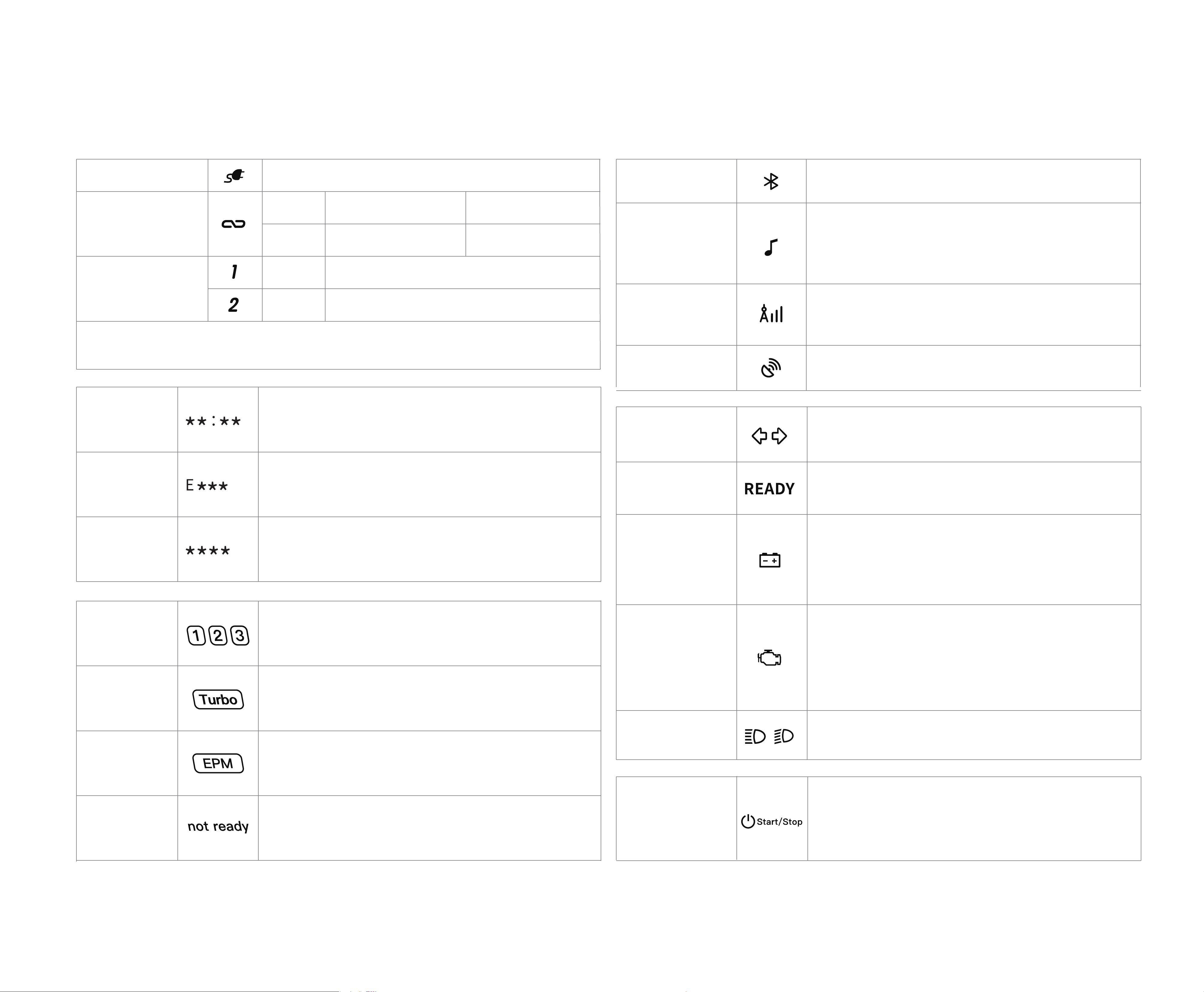
Blueshark R1 Lite Instrument Display and Function
Charging indicator
Time Display
Fault Code
Pairing Code
Regular Gear
Race Mode
Moving Mode
Lateral
Kickstand
Instruction
On 96V Mode
48V Mode
Turbo available
Turbo unavailable
BS Signal
Indicator
GPS Signal
Indicator
BLE Connect
Indicator
Left/Right Turn
Signa
Ready Indicator
Low Battery
Indicator
Fault Indicator
High /Low Beam
When the turn signal lights up, the corresponding
indicator lights up
The indicator is off in parking mode and on in
riding mode
The indicator lights up when the battery is low.
The system will switch the power supply mode,
and it is necessary to charge the flat battery as
soon as possible.
The indicator lights up when the motorcycle
detects an abnormality.It can be detected again
by switching the Start/Stop switch. If any fault is
detected again, please contact the after-sales
personnel.
The indicator lights up when the high/low beam
lights up.
Start/Stop Switch
When the switch is off, press and hold the button
to switch on with the key close to the motorcycle .
When the switch is on, press and hold the button
to switch off.
Music Player
Indicator
The indicator will light up after the
communication module is connected to the
network
The signal will light up after GPS positioning
After BLE connects to the app,
the indicator lights up
If the motorcycle is equipped with audio, you
can play music through Bluetooth connection
and it will light up for a short time during volume
adjustment
Battery in compartment 1 is discharging
The system will automatically obtain the time
according to GPS, but it can only obtain the time
zone information through the app
After detecting a fault, the system will display the
fault of E***, please check the list for related faults
Gear +- can be used to switch gears. As there are
different power modes, the acceleration and
maximum speed may be different
When the motorcycle enters the pairing mode,
the pairing code will be displayed for APP
authentication
In 96V mode, you can enter the race mode,
which means better starting and acceleration
performance
When engaging this gear, the motorcycle can be
moved forward and backward at low speed
Not ready is displayed when the kickstand is down,
and the driving mode cannot be entered
Battery in compartment 2 is discharging
Note: The motorcycle will actively adjust the power supply mode according to
the service condition of the battery.
None
1
2
Battery status
indicator
Battery
compartment
identification
When the battery is charging: On
07
Vehicle Function & Operations
Ce manuel convient aux modèles suivants
2
Table des matières
Manuels Scooter populaires d'autres marques


First Choice Mobility
First Choice Mobility Roma Medical Corella S741 Manuel utilisateur

Carrera
Carrera impel Manuel utilisateur

Afikim
Afikim Superlight SL-3 Manuel utilisateur

CareCo
CareCo ZOOM Manuel utilisateur

Douglas
Douglas Vespa G.S. Manuel utilisateur

Gazelle
Gazelle with BOSCH System Manuel utilisateur