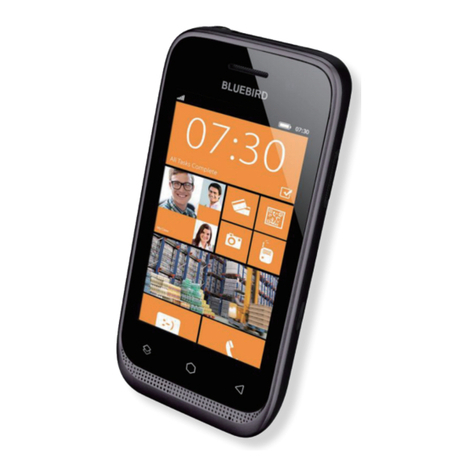
Bluebird RP350 Manuel utilisateur

USER
Manual
Enterprise Rugged PTT Handheld Computer
RP350

This user manual is protected by copyright.
Copyright © 1995-2018 Bluebird Inc. All rights reserved.
Bluebird Inc. is the designer and manufacturer of Bluebird handheld mobiles.
This manual and the programs in this device are protected under international copyright laws, and may not
be copied, distributed, translated, or removed by any means.
Registered Trademark
BLUEBIRD is an emerging global brand, striving to lead the market in performance
and mobility. Their products represent reliability, innovation, and innovative technology.
Bluebird is a registered trademark from the global brand of Bluebird Inc. and is
copyright protected.
•Bluebird and stylized Bluebird Logo are registered trademarks and symbols of Bluebird Inc.
•Qualcomm®IZat™ is a registered trademark of Qualcomm Atheros, Inc.trademark of Qualcomm Atheros,
Inc.
•Adobe®is a registered trademark of Adobe Systems Inc.
•Google™, Android™, Google Play™ and other marks are trademarks of Google LLC.
•All other trademarks and copyrights are the property of their respective owners.
User’s Guidance
Device type User’s guidance
Class B Device
(Household Information & Communication)
This device has qualified the electromagnetic wave suitable
registration and can be used as a household device at a
residential area as well as any other areas.
Type Registration This wireless device may cause propagation interference,
and so, it cannot be used for life-saving services.
Revision History
Revised Version Revised Date Revised Details
1.0.0 20 October 2017 First version released.
1.0.1 30 November 2017 Updated the service center information.
1.0.2 9 February 2018 Google trademark added.
1.0.3 3 September 2018 Updated the device specification.

Contents
This user manual is protected by copyright.
Registered Trademark
User’s Guidance
Revision History
Contents
1 About This Manual
2 Safety Information
2.1 Symbols ............................................................................................................................................... 2
2.2 Device .................................................................................................................................................. 2
2.3 Environment......................................................................................................................................... 3
2.4 Battery and Charging........................................................................................................................... 3
2.5 Distraction............................................................................................................................................ 3
2.6 Frequency Interference........................................................................................................................ 3
3 Overview
3.1 Package Contents ............................................................................................................................... 4
3.2 Your Device.......................................................................................................................................... 5
3.2.1 Front ............................................................................................................................................... 5
3.2.2 Back ............................................................................................................................................... 6
3.2.3 Bottom and Top.............................................................................................................................. 7
4 Getting Started
4.1 Cards ................................................................................................................................................... 8
4.1.1 Installing the Cards.......................................................................................................................... 8
4.1.2 Removing the Cards ....................................................................................................................... 9
4.2 Battery ............................................................................................................................................... 10
4.2.1 Installing the Battery...................................................................................................................... 10
4.2.2 Removing the Battery.................................................................................................................... 11
4.2.3 Charging the Battery .................................................................................................................... 12
4.2.4 Extending the Battery Life ............................................................................................................. 13
5 Basics
5.1 Turning the Device On and Off........................................................................................................... 14
5.1.1 Using Airplane Mode..................................................................................................................... 14
5.2 Resetting the Device.......................................................................................................................... 15
5.3 Using the Touchscreen ...................................................................................................................... 16
5.4 Locking and Unlocking the Device .................................................................................................... 17
5.5 Using the Home Screen..................................................................................................................... 18
5.5.1 Viewing the Status Bar.................................................................................................................. 19
5.5.2 Notification Icons ......................................................................................................................... 19
5.5.3 Status Icons.................................................................................................................................. 19
Contents

Contents
5.6 Customizing Your Home Screen........................................................................................................ 21
5.6.1 Adding Shortcuts or Widgets ........................................................................................................ 21
5.6.2 Arranging Shortcuts or Widgets .................................................................................................... 21
5.6.3 Removing Shortcuts or Widgets.................................................................................................... 21
5.7 Using Your Device with Ease ............................................................................................................. 22
5.7.1 Quick Actions................................................................................................................................ 22
5.7.2 Setting Date and Time .................................................................................................................. 23
5.7.3 Setting the Keyboard and Language ............................................................................................. 23
5.7.4 Adjusting the Screen Brightness ................................................................................................... 23
5.8 Connectivity ....................................................................................................................................... 24
5.8.1 Wi-Fi ............................................................................................................................................. 24
5.8.2 Bluetooth ...................................................................................................................................... 24
6 Applications
6.1 Installing and Uninstalling Apps......................................................................................................... 26
6.1.1 Installing App ................................................................................................................................ 26
6.1.2 Uninstalling App ............................................................................................................................ 26
6.2 Overview of Apps............................................................................................................................... 27
6.3 Phone................................................................................................................................................. 28
6.3.1 Making Calls ................................................................................................................................. 28
6.3.2 Answering Calls ............................................................................................................................ 33
6.3.3 Viewing Call Log ........................................................................................................................... 34
6.3.4 Making Conference Calls .............................................................................................................. 34
6.3.5 Making Emergency Calls............................................................................................................... 35
6.3.6 Making Speed dial ........................................................................................................................ 35
6.3.7 Phone Settings ............................................................................................................................. 35
6.4 Contacts ............................................................................................................................................ 37
6.4.1 Creating Contacts......................................................................................................................... 37
6.4.2 Editing Contacts ........................................................................................................................... 38
6.4.3 Finding Contacts........................................................................................................................... 39
6.4.4 Calling Contacts............................................................................................................................ 39
6.4.5 Messaging Contacts ..................................................................................................................... 39
6.5 Gmail.................................................................................................................................................. 39
6.6 Snapdragon Camera.......................................................................................................................... 40
6.6.1 Taking Photos ............................................................................................................................... 40
6.6.2 Taking Photos in Panoramic Mode ................................................................................................ 40
6.6.3 Recording Videos.......................................................................................................................... 41
6.6.4 Camera Settings ........................................................................................................................... 41
6.6.5 Video Settings............................................................................................................................... 42
6.7 Calendar ............................................................................................................................................ 43
6.7.1 Creating Events............................................................................................................................. 43
6.7.2 Changing Calendar View............................................................................................................... 43
6.7.3 Viewing Events.............................................................................................................................. 43

Contents
6.7.4 Editing and Deleting Events........................................................................................................... 44
6.7.5 Refreshing the Calendar................................................................................................................ 44
6.7.6 Searching for Events ..................................................................................................................... 44
6.7.7 Syncing Events ............................................................................................................................. 44
6.8 Clock.................................................................................................................................................. 45
6.8.1 Alarm and clock ............................................................................................................................ 46
6.8.2 Timer ............................................................................................................................................ 47
6.8.3 Stopwatch .................................................................................................................................... 47
6.8.4 Settings ........................................................................................................................................ 48
6.9 Downloads......................................................................................................................................... 49
6.10 Calculator......................................................................................................................................... 49
6.11 LookieTalkie PTT(Push to Talk) ........................................................................................................ 49
6.12 Google Apps.................................................................................................................................... 49
6.12.1 Chrome....................................................................................................................................... 49
6.12.2 Gmail .......................................................................................................................................... 49
6.12.3 Google........................................................................................................................................ 50
6.12.4 Maps .......................................................................................................................................... 50
6.12.5 Play Music .................................................................................................................................. 50
6.12.6 Play Movies & TV ........................................................................................................................ 50
6.12.7 Drive ........................................................................................................................................... 50
6.12.8 YouTube...................................................................................................................................... 50
6.12.9 Photos ........................................................................................................................................ 50
6.12.10 Hangouts.................................................................................................................................. 50
6.12.11 Voice Search............................................................................................................................. 50
6.12.12 Google Settings ........................................................................................................................ 50
7 Settings
7.1 Wi-Fi................................................................................................................................................... 51
7.2 Bluetooth ........................................................................................................................................... 51
7.3 Data Usage ........................................................................................................................................ 52
7.4 More Settings..................................................................................................................................... 52
7.5 Display ............................................................................................................................................... 53
7.6 Notifications....................................................................................................................................... 54
7.7 Sound ................................................................................................................................................ 54
7.8 Apps................................................................................................................................................... 55
7.9 Storage .............................................................................................................................................. 56
7.10 Battery ............................................................................................................................................. 56
7.11 Memory............................................................................................................................................ 56
7.12 Users................................................................................................................................................ 56
7.13 Tap & pay ......................................................................................................................................... 57
7.14 Location ........................................................................................................................................... 57
7.15 Security............................................................................................................................................ 57
7.16 Accounts.......................................................................................................................................... 58

Contents
7.17 Google ............................................................................................................................................. 59
7.18 Language and Input......................................................................................................................... 60
7.19 Backup and Reset ........................................................................................................................... 61
7.20 Date and Time.................................................................................................................................. 61
7.21 Scheduled power on and off ........................................................................................................... 61
7.22 Accessibility ..................................................................................................................................... 62
7.23 Printing............................................................................................................................................. 63
7.24 About Phone .................................................................................................................................... 63
Appendix A Device Specification
Appendix B Accessories
Appendix C Troubleshooting
Appendix D Safety Regulatory
Appendix E Warranty and Support

1
1 About This Manual
1 About This Manual
The RP350 provides high quality features as a smart terminal using Bluebird’s creative ideas and
technological expertise. This user manual is designed to help users effectively operate the device.
•Please read this manual carefully before using the device for safe and proper use.
•This device may only be used in countries where it is sold.
•The components and colors of this device in this manual may differ from the actual product.
•Features and specifications are subject to change without prior notice.
•Content may vary by software version or by service provider.
•Apps and features may vary by country or region.
•Certain features of this device may have performance issues due to user environment, programs in use, or
peripheral device usage. Bluebird is not liable for any issues caused by third-party apps or accessories.
•Modifying the device’s operating system or installing software from unknown sources may cause device
malfunction or data loss. Improper or unauthorized use of the device is a violation of the Bluebird license
agreement and void your one-year limited warranty.

2
2 Safety Information
2.1 Symbols
This manual uses the following symbols to indicate hazards and additional information.
Symbol Name Description
Warning Indicates situations that could cause injury to yourself or others.
Caution Indicates situations that could cause damage to your device or other
equipment.
Note Indicates additional information that can help you get the most out of the
device.
Please read this safety precaution information carefully. Failure to follow the information provided may
result in fire, electric shock, or other property damage or bodily injuries.
2.2 Device
•Do not press the Power button on the device if the device is wet or do not touch adapter or power
cord with wet hands. There is risk of electric shock.
•Do not use your device in an explosive danger zone.
•If your device becomes wet, do not put your device in heaters, microwaves, etc. to dry it. There is a
risk of explosion or malfunction.
•Do not scratch the device’s touchscreen. Use only your fingers or a compatible pen. Never use an
actual pen, or any other sharp object on the touchscreen.
•Although this device is very sturdy, do not drop, hit, bend, or sit on it on purpose. It can be broken.
•Do not modify, take apart, or repair the device. Contact to your customer service center. Failure to do
so will void your warranty.
•Do not attempt to modify your hardware or software. It may cause device malfunction and void your
warranty.
•You may not be able to use this wireless device in basements, open fields, skyscrapers, or other
places where the signal is weak.
•Backup the data and information from your device. Your data, such as ringtones, texts, and voice
messages, may be erased during repairs or upgrades.
•Do not paint your device. It can damage your screen or your device’s exterior.
•Avoid using or storing this device at extreme temperatures. This device is designed to work at
temperatures between -10°C and 50°C (-2°F and 122°F), and humidity level between 5% and 95%.

2 Safety Information
3
2.3 Environment
•Do not use the device while driving or operating heavy machinery. Doing so may result in death or
serious injury.
•Do not use the device in locations with combustible goods. Doing so may result in an explosion.
•Do not use the device in dusty or hot locations. Doing so may damage the device.
•Do not expose your device to direct sunlight such as on the dashboard of a car for extended periods
of time.
•Do not use the device in humid locations. Doing so may damage the device and void the warranty.
•Do not keep the device close to air conditioner vents. Corrosion within the device may occur due to
condensation from changes in temperature.
•Do not allow children to play with the device.
2.4 Battery and Charging
•Improper battery use may cause fire, explosion, or other hazard.
•If the battery is removed due to impact, heat, submersion, or other damage, there is a risk of
explosion. Keep away from children and animals.
•Do not allow the battery’s contacts to touch things like necklaces, coins, or electric conductors. Do
not give any impact with sharp objects. There is a risk of explosion.
•Use only the approved battery and charger. Using an incompatible battery or charger may cause
device malfunction or other damage, such as fire.
•When you are not using the device for a long period, take out the battery and keep the device and
the battery in a dry, cool place. Also, charge the battery at least once a year. If you keep it without
charging for a long time, it may cause device malfunction.
2.5 Distraction
In some situations, using your device may distract you and cause serious injuries and damages. For
example, avoid talking on the phone or texting while driving or riding a bicycle. It is strictly prohibited by
law in some jurisdictions. If you cannot avoid using your device while driving, stop your vehicle or use
hand-free kit.
2.6 Frequency Interference
•This wireless device may cause radio frequency interference, so use Airplane mode or turn off the
device when prohibited.
•The device emits an electromagnetic fields. It may interfere with your medical devices.
•Do not place credit cards, phone cards, bankbook, and tickets next to the device. The magnetic field
of the device can damage their magnetic strips.

4
3 Overview
3.1 Package Contents
The package includes:
RP350 device Battery
Battery cover Micro USB cable
•The illustrations may differ from your actual items.
•To purchase additional accessories, contact your sales representative.
•You can download your User Manual from www.bluebirdcorp.com. The paper version may be
available for some regions.
•For the power adapter, use the product listed below.
-PSAC30U-090 by Phihong Technology Co., Ltd. (Input: AC 100 ~ 240 V, 50 ~ 60 Hz, 0.5 A /
Output: DC 9.3 V, 3 A)
3 Overview
Table des matières
Autres manuels Bluebird portable

Bluebird
Bluebird BIP-5000 Manuel utilisateur

Bluebird
Bluebird BIP-5000 Manuel utilisateur

Bluebird
Bluebird HF450 Manuel utilisateur

Bluebird
Bluebird EF501R Manuel utilisateur

Bluebird
Bluebird EF401 Manuel utilisateur

Bluebird
Bluebird EF400 Manuel utilisateur

Bluebird
Bluebird BP30 Manuel utilisateur

Bluebird
Bluebird VF550 Manuel utilisateur

Bluebird
Bluebird EF500 Manuel utilisateur

Bluebird
Bluebird HF550X Manuel utilisateur