
Blackline Safety G7 Manuel utilisateur

G7 PowerPack
Technical User Manual


CONTENTS
OVERVIEW
What’s in the box .................................................................................................................................... 4
Hardware details ...................................................................................................................................... 5
OPERATING
How it works............................................................................................................................................... 6
Attaching and removing ..................................................................................................................... 7
PowerPack details.................................................................................................................................... 8
Charging....................................................................................................................................................... 10
SUPPORT
Learn more .................................................................................................................................................. 11
Customer Care........................................................................................................................................... 11
SPECIFICATIONS
Detailed specications.......................................................................................................................... 12
LEGAL NOTICES AND CERTIFICATIONS
Legal notices .............................................................................................................................................. 13
Intrinsically safe......................................................................................................................................... 14

4|| POWERPACK TECHNICAL USER MANUAL
WHAT’S IN THE BOX
Your G7 PowerPack comes with:
G7 PowerPack
PowerPack clasp
PowerPack screw
Phillips #1 screwdriver
Supplementary documentation
OVERVIEW

POWERPACK TECHNICAL USER MANUAL || 5
HARDWARE DETAILS
G7 PowerPack
Charge button
Charge port
Charge lights
(front and back)
Product label
Screw hole
Release tab
PowerPack
clasp
6|| POWERPACK TECHNICAL USER MANUAL
HOW IT WORKS
OPERATING
PowerPack can be attached to G7 to help your device’s battery last longer during your
shift. When attached, PowerPack simultaneously charges and operates G7 – when
PowerPack reaches 0% battery life, G7’s battery will then start to deplete.
How long does G7 PowerPack last?
PowerPack doubles your G7’s typical battery life to (up to 36 hours at normal operation).
Where can I use G7 PowerPack?
PowerPack is certied intrinsically safe, meaning it can be taken on-site to potentially
explosive environments. It is important to note G7’s PowerPack is only functional in
temperatures above 0°C (32°F). PowerPack can also be safely installed and removed in a
hazardous environment.

POWERPACK TECHNICAL USER MANUAL || 7
ATTACHING AND REMOVING
How do I attach G7 PowerPack to my G7 device?
How do I remove G7 PowerPack from my G7 device?
1. Release the clasp from PowerPack by
pressing inward on the release tabs
and pulling the two apart
2. Open G7’s metal clip
3. Using a phillips #1 screwdriver,
unscrew the metal clip’s screw
4. Remove the metal clip
5. Align the hole in PowerPack’s clasp
with the hole on the back of G7
6. Align G7’s metal clip, PowerPack screw
and the hole in PowerPack’s clasp
7. Through the opening in the top of the
clip, screw both PowerPack’s clasp and
the metal clip back on to G7
8. Align the bottom of PowerPack with
G7’s charge port, and slide in to place
until you hear a click
1
2
3
To remove PowerPack from G7, press inward on both release tabs to release from the
clasp. Then, slide PowerPack o of G7.
NOTE: PowerPack will need to be removed from G7 in order to use G7 Dock.
5
6
7
8

8|| POWERPACK TECHNICAL USER MANUAL
G7 POWERPACK DETAILS
How do I know PowerPack is attached to G7?
How can I check my G7 PowerPack’s level?
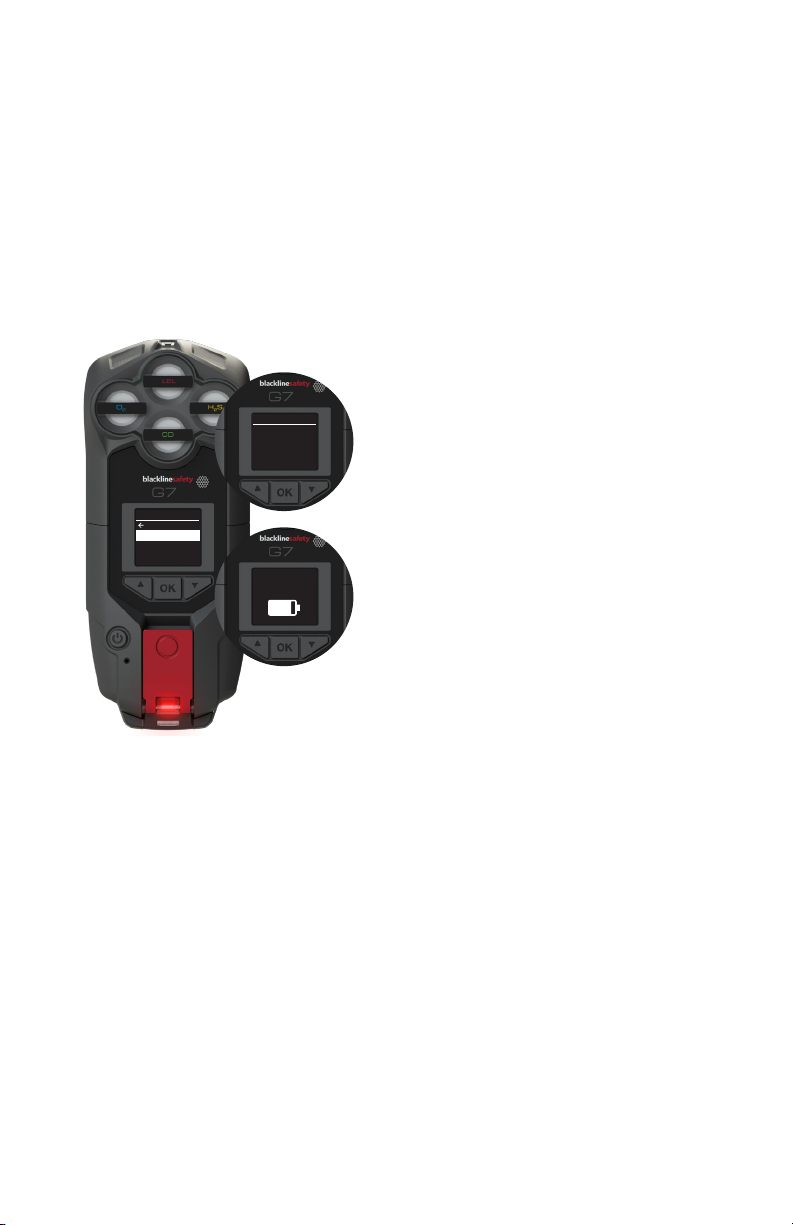
When PowerPack is attached to G7 and is charged, the charge
light will glow red at the bottom of G7 and the battery icon
will display a lightning bolt to show G7 is charging.
If PowerPack is not attached properly or is depleted, the red
charge light will not glow and the lightning bolt will not show
over G7’s battery icon. Check PowerPack’s level and charge if
depleted, or try reattaching again if adequately charged.
NOTE: If G7’s battery is fully depleted, charge must be initiated
by pressing PowerPack’s charge button.
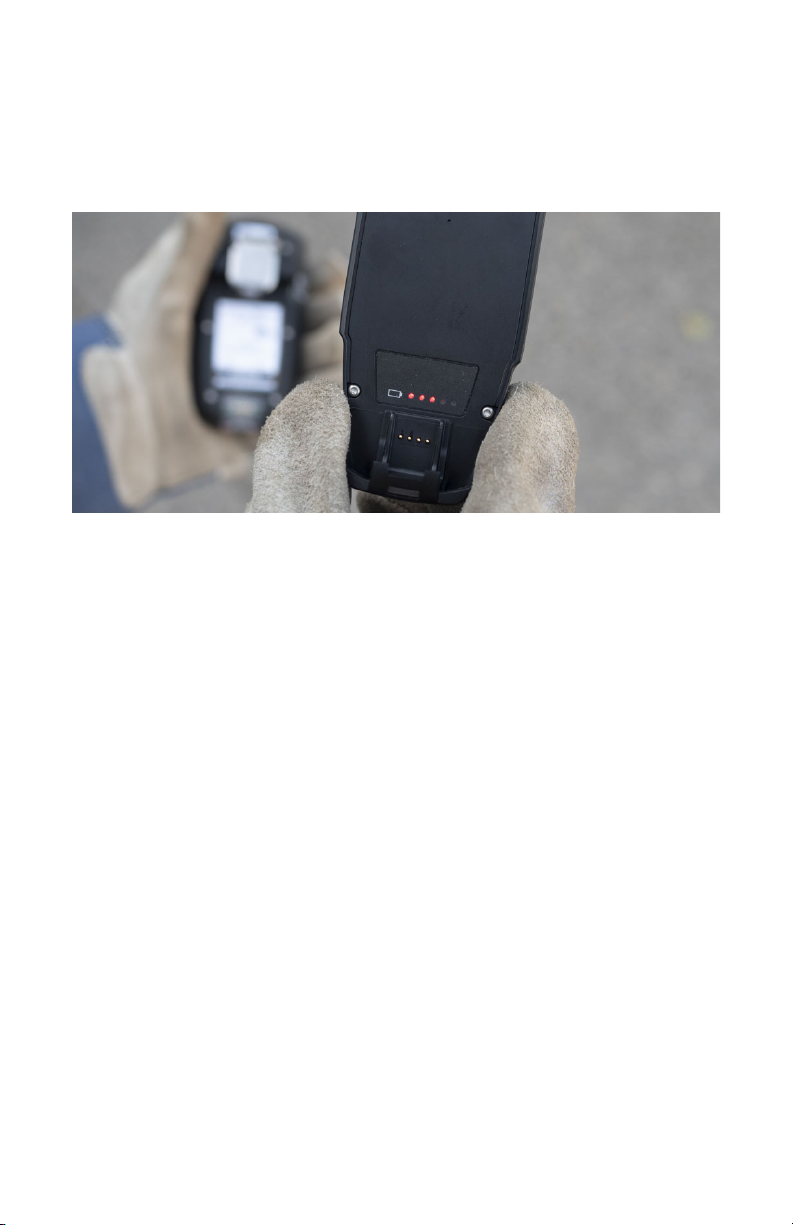
PowerPack’s level can be checked by pressing the charge level button on the back of
the battery, or from the PowerPack section of G7’s accessory menu.
To check PowerPack’s level from the charge level button:
1. Press the button on the back of PowerPack
2. The charge lights will glow to indicate
the battery’s level – ve lights being a full
charge, one light being low battery
1. Use the up, down and OK buttons
to navigate to the accessories
menu option from G7’s main menu
2. Select PowerPack
3. Select battery level
4. Here you will see a visual
representation of PowerPack’s
level. This only represent
PowerPack’s level, not its
combined level with G7
To check PowerPack’s level from G7’s accessory menu:
PowerPack
battery level
POWERPACK TECHNICAL USER MANUAL || 9
What is the PowerPack menu?
The PowerPack menu is available from the accessories option found in
G7’s main menu. This is where you can nd details such as PowerPack’s
information and battery level.
From the PowerPack info option, you can
see details such as PowerPack’s Unit ID (also
available from the product label on the back
of the battery) as well as the rmware version
the battery is using.
PowerPack
Back
Battery level
PowerPack info
PowerPack info
Unit ID
Version
PowerPack
battery level
From the battery level option, you can see
how much charge PowerPack has left. This
battery icon only represents the level of G7
PowerPack, not the combined level with G7.
10 || POWERPACK TECHNICAL USER MANUAL
CHARGING
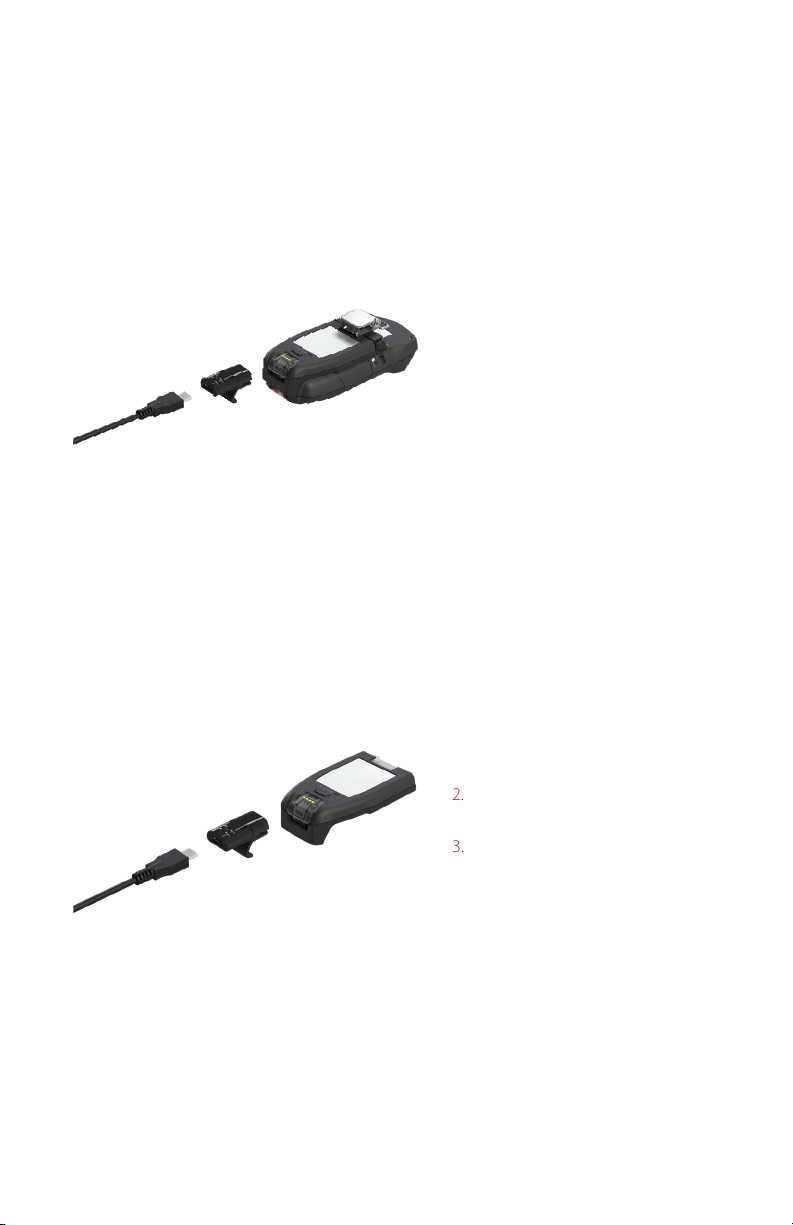
How do I charge my PowerPack when attached to G7?
How do I charge my PowerPack independently?
1. Insert the micro USB into the
charge clip
2. Slide the charge clip onto the
charge port of PowerPack
3. G7’s red charge light will glow.
PowerPack and G7’s battery will
charge in tandem. G7’s device
battery level can be seen on its
screen, and PowerPack’s level
can be seen from the battery
level lights.
1. Insert the micro USB into the
charge clip
2. Slide the charge clip onto the
charge port of PowerPack
3. The red charge light on the front
of PowerPack will glow, and
its level can be seen from the
battery level lights
NOTE: PowerPack can also be charged when attached to G7 with a wall clip, or Blackline’s
ve-bay or 20-bay chargers.
NOTE: PowerPack can also be charged with a wall clip, or Blackline’s ve-bay or 20-bay
chargers.
Charging PowerPack when attached to G7 can take up to 4 hours.
Charging PowerPack independently can take up to 4 hours.
Autres manuels pour G7
1
Table des matières


