
Bizfon 7000 Manuel technique

Guide to Planning and Installing Your Bizfon
System

Guide to Planning and Installing Your Bizfon System
50 Stiles Road • Salem, NH 03079 • 603-870-9400 • www.bizfon.com
© 2004 InSciTek Microsystems, Inc. All rights reserved. Bizfon is a registered trademark. All other names may be trademarks or registered trademarks of their
respective owners
Revised: 31 January 2005 Page i
TABLE OF CONTENTS
CUSTOMER SITE SURVEY........................................................................................................................................1
CUSTOMER INFORMATION ......................................................................................................................................1
PART 1 –EMPLOYEE AND LOCATION INFORMATION.............................................................................................2
PART 2 –PHONE SYSTEM........................................................................................................................................3
VOICE SERVICE DELIVERY..........................................................................................................................................3
CURRENT PHONE SYSTEM .........................................................................................................................................4
BIZFON SYSTEM CONFIGURATION................................................................................................................................5
PHONE SYSTEM FEATURES ........................................................................................................................................7
BIZFON PHONE DEFINITIONS.......................................................................................................................................9
BIZTOUCH™ IP2 CONFIGURATION............................................................................................................................11
PART 3 –IT ENVIRONMENT....................................................................................................................................16
PART 4 –UNIFIED MESSAGING .............................................................................................................................19
PART 5 –PHYSICAL INFRASTRUCTURE................................................................................................................20
PART 6 –DOCUMENTATION ..................................................................................................................................21

Guide to Planning and Installing Your Bizfon System
50 Stiles Road • Salem, NH 03079 • 603-870-9400 • www.bizfon.com
© 2004 InSciTek Microsystems, Inc. All rights reserved. Bizfon is a registered trademark. All other names may be trademarks or registered trademarks of their
respective owners
Revised: 31 January 2005 Page 1
CUSTOMER SITE SURVEY
CUSTOMER INFORMATION
NOTE: Affix Contact’s business card here if available:
Company Name:
Primary Contact/Title:
Address:
Phone/Fax Number:
E-mail Address:
Company Website URL:
Business Type:

Guide to Planning and Installing Your Bizfon System
50 Stiles Road • Salem, NH 03079 • 603-870-9400 • www.bizfon.com
© 2004 InSciTek Microsystems, Inc. All rights reserved. Bizfon is a registered trademark. All other names may be trademarks or registered trademarks of their
respective owners
Revised: 31 January 2005 Page 2
PART 1 –EMPLOYEE AND LOCATION INFORMATION
1. Number of locations:
2. Address of locations:
3. Number of Employees:
4. Client Information: Please list Employee Information, including name and title, contact
information, and e-mailaddress:
5. Are there multiple offices -Will you be interconnecting locations using our site-to-site feature
(requires multiple Bizfon7000 Servers and a VOIP key)?
6. Are you going to have remote users or satelliteoffices (Requires multiple Bizfon Servers and a
VOIP key)?
7. What is your current site-to-site connection method (for example,VPN)?

Guide to Planning and Installing Your Bizfon System
50 Stiles Road • Salem, NH 03079 • 603-870-9400 • www.bizfon.com
© 2004 InSciTek Microsystems, Inc. All rights reserved. Bizfon is a registered trademark. All other names may be trademarks or registered trademarks of their
respective owners
Revised: 31 January 2005 Page 3
PART 2 –PHONE SYSTEM
Voice Service Delivery
1. Who currently is your supplier for Voice Service?
2. How is the current voice service delivered from your provider?
3. Do your currently send your voice over the Internet (VOIP, i.e., Vonage, CallVantage)?
4. If so, who is your Internet Telephony Service Provider (ITSP)?
5. How many outside lines (also known as Central Office Lines) do you currently have?
6. How are the lines provisioned (DID, Inbound vs. Outbound)
7. What features do you get from your telephone service provider?
8. How many Fax Lines do you currently have?
9. How many Alarm Lines do you currently have?
10.Will the Fax or alarm lines be connected through theBizfon 7000 server?

Guide to Planning and Installing Your Bizfon System
50 Stiles Road • Salem, NH 03079 • 603-870-9400 • www.bizfon.com
© 2004 InSciTek Microsystems, Inc. All rights reserved. Bizfon is a registered trademark. All other names may be trademarks or registered trademarks of their
respective owners
Revised: 31 January 2005 Page 4
Current Phone System
1. What is the manufacturer and model number of your current phone system (for example,
Toshiba, Nortel,etc.)?
2. When did you purchase your existing system?
3. What do you like about your current system?
4. What do you dislike about your current system?
5. What is the manufacturer and model number of your phones (handsets)?
NOTE: Proprietary handsets are not reusable in theBizfon system.
6. How many phones do you currently have?
7. What is the manufacturer and model number of your Wireless and Cellular phone?
8. How many Wireless/Cellular phones do you currently have?
9. How do youcurrently answer incoming calls?

Guide to Planning and Installing Your Bizfon System
50 Stiles Road • Salem, NH 03079 • 603-870-9400 • www.bizfon.com
© 2004 InSciTek Microsystems, Inc. All rights reserved. Bizfon is a registered trademark. All other names may be trademarks or registered trademarks of their
respective owners
Revised: 31 January 2005 Page 5
Bizfon System Configuration
1. Describe how incomings calls will be handled during business and after hours. (Use diagram
on following page).
2. How many users/extensions will be required?
3. How many system extensions such as Conference rooms, Lobby phones,etc. will be
required?
4. What is thetotal number of phones required?
5. Are there special handset restrictions required (private lines or separate businesses)?
6. Will you require Service groups for Least Cost Long Distance route (outside resource seize
order)?
7. Are there any Local Area Code dialing requirements (7, 10, or 11 digits)? If so, please specify:

Guide to Planning and Installing Your Bizfon System
50 Stiles Road • Salem, NH 03079 • 603-870-9400 • www.bizfon.com
© 2004 InSciTek Microsystems, Inc. All rights reserved. Bizfon is a registered trademark. All other names may be trademarks or registered trademarks of their
respective owners
Revised: 31 January 2005 Page 6
Do outside lines
appear on
phones?
Live answering or
Auto Attendant?
Extension 20x
route
-
may go to
AutoAttendant
OpenHours
greeting
Open or closed?
Non
-
Business
Hours greetin
g
CustomMessage/
Single digit dials
Do you have a
BizTouchTM IP2
Phone?
Caller dials branch
digit or extension
number to reach
destination route
BizTouch
TM
IP2
Analog or Cisco phones
Call Complete or
held on line
appearance
Yes, Call answer
ed
vialineappearance
Incoming call from
any outside line
Call ends at User
or VM
No, call appearances
only
Live Answer
Auto
Attendent
Afterhours/Holiday

Guide to Planning and Installing Your Bizfon System
50 Stiles Road • Salem, NH 03079 • 603-870-9400 • www.bizfon.com
© 2004 InSciTek Microsystems, Inc. All rights reserved. Bizfon is a registered trademark. All other names may be trademarks or registered trademarks of their
respective owners
Revised: 31 January 2005 Page 7
Phone System Features
Feature Current System
Yes/No
Desired
Yes/No
Auto Attendant
Call detail records
Call Park/Retrieve
Call Transfer (Blind/Announced)
Call Waiting
Caller ID
Conference Calling
Group Extensions/mailboxes. such as sales, service,etc.
Handset-Handset(s) paging
Multiple Auto Attendants
Music On-Hold/Custom On-Hold messages
Overhead Paging
Restricted outbound calling
Shortcuts from Auto Attendants –single digit shortcuts
such as sales, support, billing,etc.
Voice Mail for users/# of ports
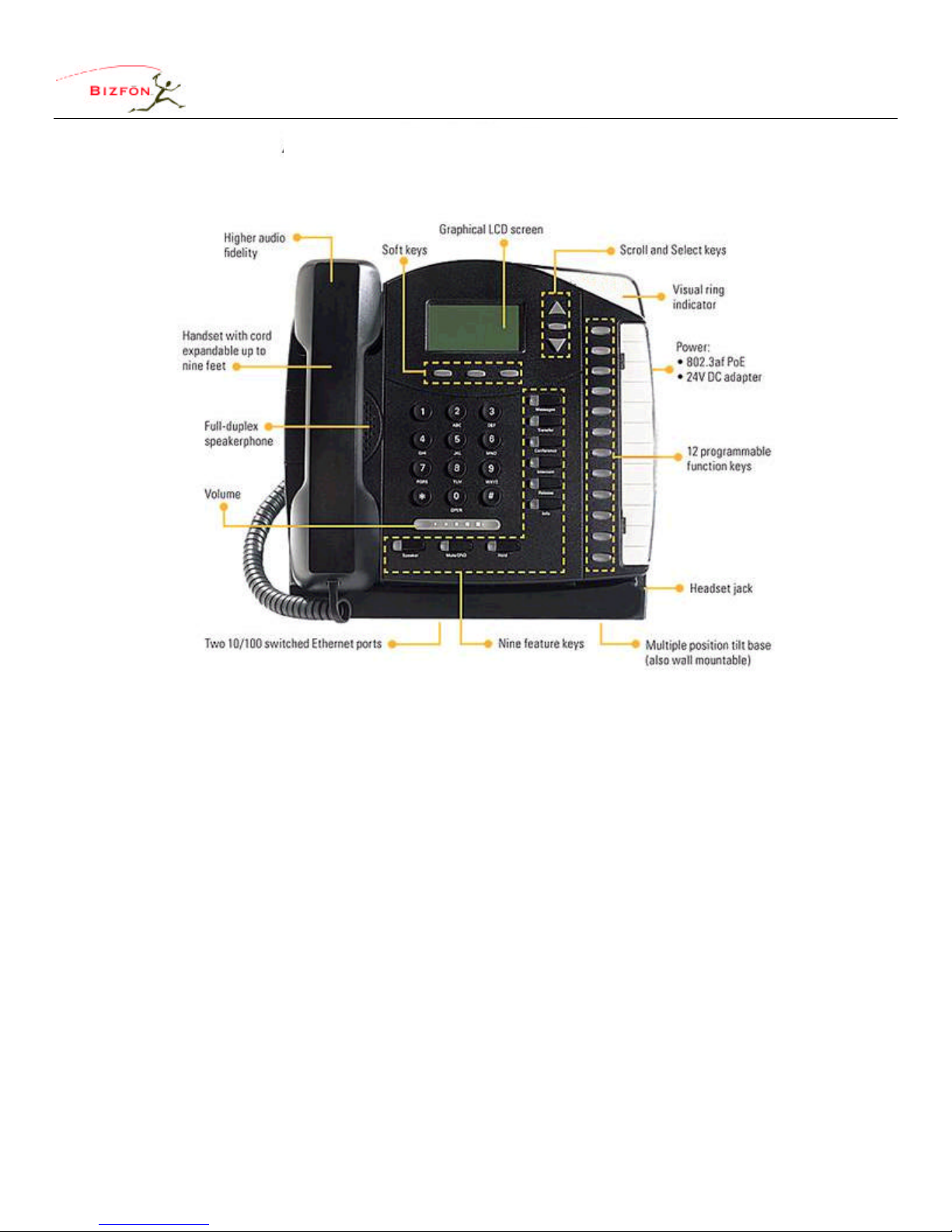
Guide to Planning and Installing Your Bizfon System
50 Stiles Road • Salem, NH 03079 • 603-870-9400 • www.bizfon.com
© 2004 InSciTek Microsystems, Inc. All rights reserved. Bizfon is a registered trademark. All other names may be trademarks or registered trademarks of their
respective owners
Revised: 31 January 2005 Page 8
Biz
Touch™
IP2
Autres manuels pour 7000
4
Ce manuel convient aux modèles suivants
1
Table des matières
Autres manuels Bizfon Système téléphonique


