Beckhoff CU8880-0000 Manuel utilisateur

Installation- and Operating instructions for
CU8880-0000
Ethernet Controller with USB Input
Version: 1.3
Date: 2009-07-16


Table of contents
CU8880-0000 1
Table of contents
1. General instructions 2
Notes on the Documentation 2
Liability Conditions 2
State at Delivery 2
Description of safety symbols 2
2. Product Description 3
Product Overview 3
Power Supply 4
Data connectors 4
USB type B Port (X20) (standard-cable) 4
RJ 45-Port (X10) (standard CAT5-cable) 4
LED Diagnostics 5
3. Installation Instructions 6
Transport and Unpacking 6
Transport 6
Unpacking 6
Mounting / Unmounting 7
Connecting devices 8
Connecting cables 8
4. Operating Instructions 9
Configuration 9
5. Appendix 10
Assembly dimensions 10
Beckhoff Support & Service 11
Beckhoff branches and partner companies 11
Beckhoff Headquarters 11
Beckhoff Support 11
Beckhoff Service 11
Technical data 12
Approvals for USA and Canada 12
FCC: Federal Communications Commission Radio Frequency Interference
Statement 12
FCC: Canadian Notice 12

General instructions
2CU8880-0000
General instructions
Notes on the Documentation
This description is only intended for the use of trained specialists in control
and automation engineering who are familiar with the applicable national
standards. It is essential that the following notes and explanations are
followed when installing and commissioning these components.
Liability Conditions
The responsible staff must ensure that the application or use of the
products described satisfy all the requirements for safety, including all the
relevant laws, regulations, guidelines and standards.
The documentation has been prepared with care. The products described
are, however, constantly under development. For that reason the
documentation is not in every case checked for consistency with
performance data, standards or other characteristics. None of the
statements of this manual represents a guarantee (Garantie) in the
meaning of § 443 BGB of the German Civil Code or a statement about the
contractually expected fitness for a particular purpose in the meaning of
§ 434 par. 1 sentence 1 BGB. In the event that it contains technical or
editorial errors, we retain the right to make alterations at any time and
without warning. No claims for the modification of products that have
already been supplied may be made on the basis of the data, diagrams
and descriptions in this documentation.
© This documentation is copyrighted. Any reproduction or third party use of
this publication, whether in whole or in part, without the written permission
of Beckhoff Automation GmbH, is forbidden.
State at Delivery
All the components are supplied in particular hardware and software
configurations appropriate for the application. Modifications to hardware or
software configurations other than those described in the documentation
are not permitted, and nullify the liability of Beckhoff Automation GmbH.
Description of safety symbols
The following safety symbols are used in this operating manual. They are
intended to alert the reader to the associated safety instructions.
Danger This symbol is intended to highlight risks for the life or health of personnel.
Warning This symbol is intended to highlight risks for equipment, materials or the
environment.
i
Note This symbol indicates information that contributes to better understanding.

Product Description
CU8880-0000 3
Product Description
Product Overview
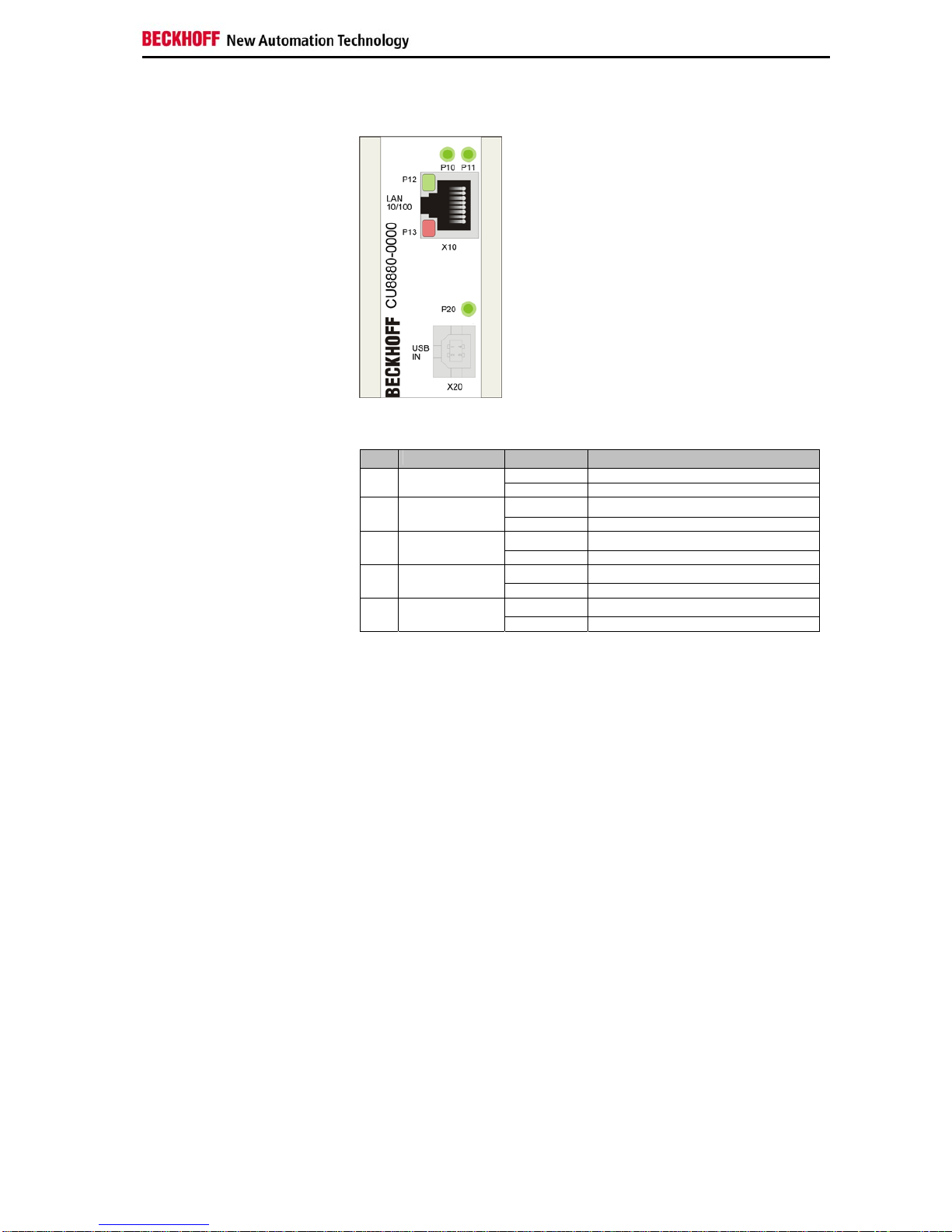
View of the CU8880-0000
The CU8880 USB-to-LAN adapter places an additional industrially-suited
and independent Ethernet interface at the user’s disposal. In this way, four
or more Ethernet interfaces can be implemented, depending on the system
configuration. The CU8880 is used for necessary IT communication, so
that the respective on-board Ethernet interfaces are available for EtherCAT
or real-time Ethernet communication. Drivers for the USB-to-LAN adapter
are available for Windows XP Professional, and Windows XP Embedded.
•user-friendly installation via integrated top hat rail adapter
•power supply via USB - no supply voltage necessary
•compact industrial design
•clear quick diagnosis by separate LEDs.

Product Description
4CU8880-0000
Power Supply
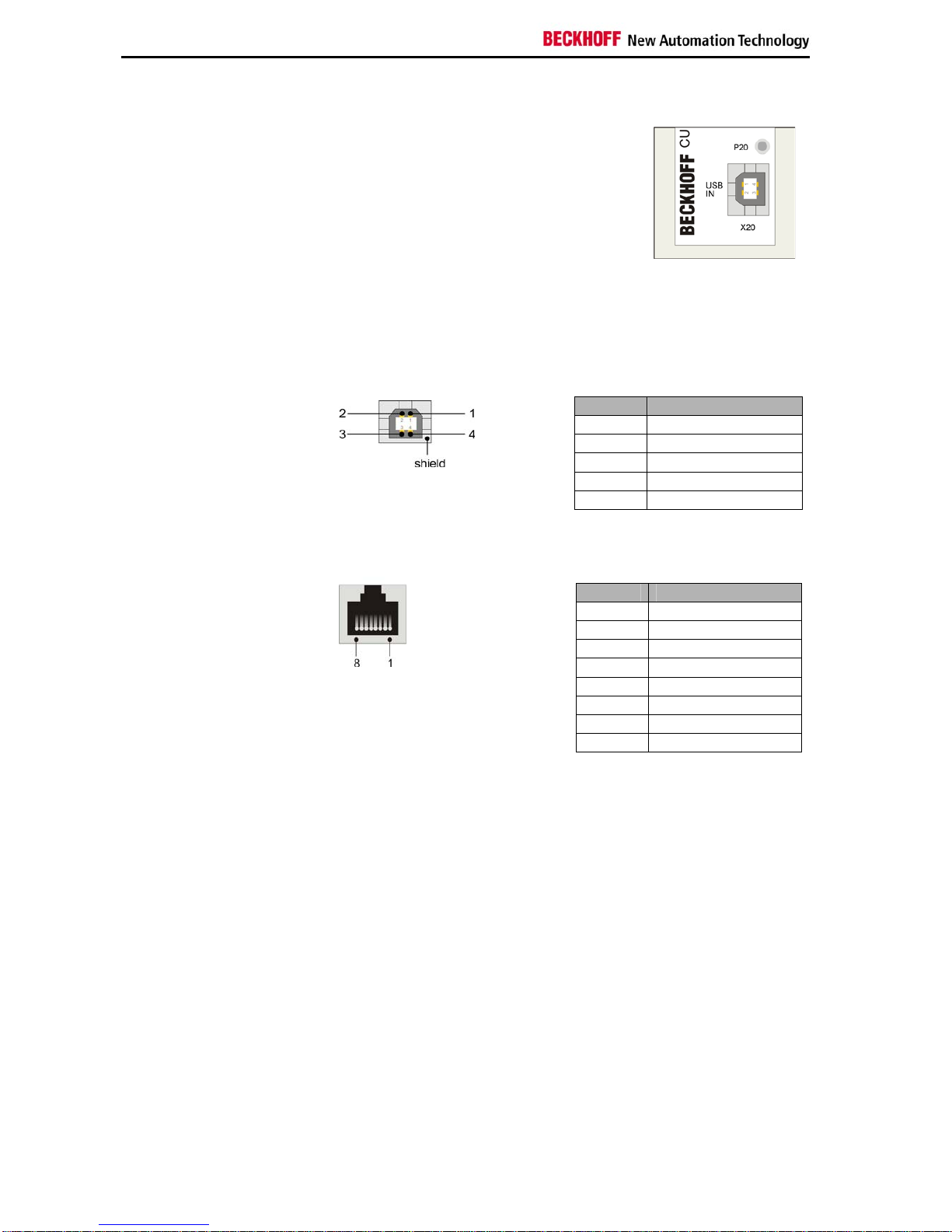
Power supply via USB-port The Ethernet controller does not need any
additional power supply. The power supply
(5 V DC) is realized by the USB connector.
The LED P20 lights green when power supply
is connected.
Data connectors
The connector are 1 USB port Type B and a RJ45-connector. The pins
are described below:
USB type B Port (X20) (standard-cable)
USB type B Port
Pin Signal
1 VCC
2 Data -
3 Data +
4 GND
shield shield
RJ 45-Port (X10) (standard CAT5-cable)
RJ 45 Port
Pin Signal
1 TX+
2 TX-
3 RX+
4 n.c.
5 n.c.
6 RX-
7 n.c.
8 n.c.

Product Description
CU8880-0000 5
LED Diagnostics
LED Diagnostics
The following table shows the possible states for the LEDs:
LED Assignment Status Meaning
off no power supply connectedP20 power supply lights green 5 VDC via USB-Port
offP10 Ethernet port
lights green Ethernet Collision
offP11 Ethernet port lights yellow Ethernet full duplex
offP12 Ethernet port lights Ethernet Link
off Ethernet Speed 10MBitP13 Ethernet port lights Ethernet Speed 100MBit

Installation Instructions
6CU8880-0000
Installation Instructions
Please also refer to chapter General instructions.
Transport and Unpacking
The specified storage conditions must be observed (see chapter Technical
data).
Transport
Despite the robust design of the unit, the components are sensitive to
strong vibrations and impacts. During transport, the unit should therefore
be protected from excessive mechanical stress. Therefore, please use the
original packaging.
Warning
Danger of damage to the unit!
If the device is transported in cold weather or is exposed to extreme
variations in temperature, make sure that moisture (condensation) does not
form on or inside the device.
Prior to operation, the unit must be allowed to slowly adjust to room
temperature. Should condensation occur, a delay time of approximately 12
hours must be allowed before the unit is switched on.
Unpacking
Proceed as follows to unpack the unit:
1.Remove packaging.
2.Do not discard the original packaging. Keep it for future relocation.
3.Check the delivery for completeness by comparing it with your order.
4.Please keep the associated paperwork. It contains important
information for handling the unit.
5.Check the contents for visible shipping damage.
6.If you notice any shipping damage or inconsistencies between the
contents and your order, you should notify Beckhoff Service.

Installation Instructions
CU8880-0000 7
Mounting / Unmounting
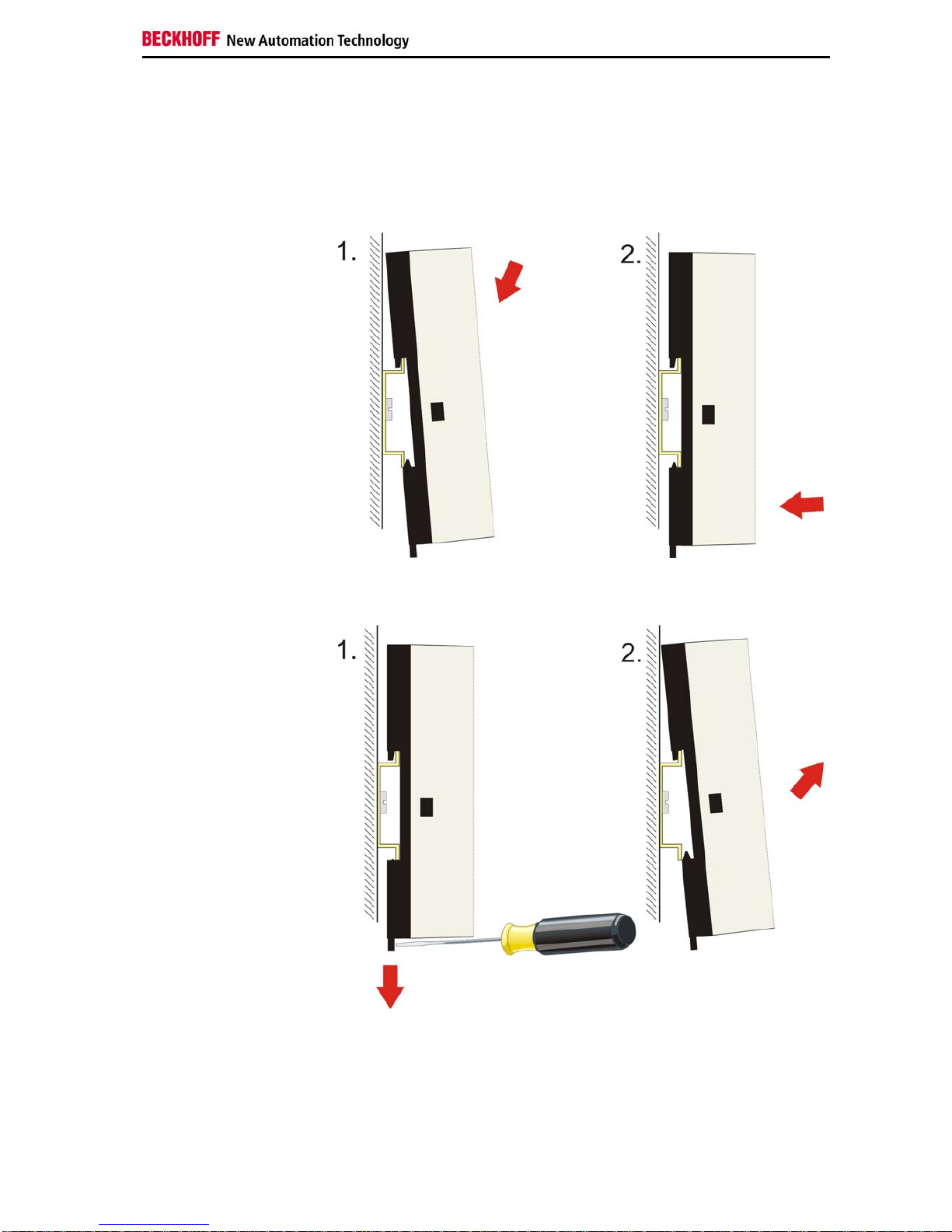
The CU8880 can be snapped onto a 35 mm mounting rail conforms to
EN 50022.
Mounting the Ethernet
Controller Just push the unit on the upper side under the rail (figure 1) and snap in
the lower side as shown below (figure 2):
Unmounting the Ethernet
Controller To release the CU8880 from the mounting rail pull down the locking clip
with a screwdriver (figure 1) and pull off the device from the rail (figure 2):

Installation Instructions
8CU8880-0000
Connecting devices
Warning
The power supply plug must be withdrawn!
Please read the documentation for the external devices prior to connecting
them.
During thunderstorms, plug connector must neither be inserted nor
removed.
When disconnecting a plug connector, always handle it at the plug. Do not
pull the cable!
Connecting cables
The connections are documented in the section Product Description.
When connecting the cables to the CU8880, proceed according to the
following sequence:
•Switch off all the devices that are to be connected.
•Disconnect all the devices that are to be connected from the power
supply.
•Connect all the cables between the CU8880 and to the devices
that are to be connected.
•Reconnect all devices to the power supply.
Table des matières
Manuels Routeur réseau populaires d'autres marques

NETGEAR
NETGEAR FS526T - Switch Manuel utilisateur

Korenix
Korenix JetNet 5710G Series Manuel utilisateur

Automated Logic
Automated Logic ZN551 Manuel du propriétaire

Cisco
Cisco ASR 1000 Series Manuel de l'opérateur

EnGenius
EnGenius ESR-9710 Manuel utilisateur

Cisco
Cisco 805 Series Instructions d'utilisation et de sécurité