
Bauhn AAVCW-0419 Manuel utilisateur

INSTRUCTION MANUAL
Model Number: AAVCW-0419
Action Camera
1300 886 649 Model: AAVCW-0419 Product Code: 64588 04/2019
www.tempo.org
AUS

21300 886 649 Model: AAVCW-0419 Product Code: 64588 04/2019
www.tempo.org
AUS

3
1300 886 649 Model: AAVCW-0419 Product Code: 64588 04/2019
www.tempo.org
AUS
Welcome
Congratulations on choosing to buy an BAUHN®product.
All products brought to you by BAUHN®are manufactured to the highest
standards of performance and safety and, as part of our philosophy of
customer service and satisfaction, are backed by our comprehensive 1 Year
Warranty.
We hope you will enjoy using your purchase for many years to come.
Version number
Date
1.0
Apr 2019

41300 886 649 Model: AAVCW-0419 Product Code: 64588 04/2019
www.tempo.org
AUS
Welcome 3
General Information & Safety Instructions 5
Product Overview 6
Accessories 7
Getting Started 9
Instructions 12
Settings 20
Specications 24
Other Useful Information 25
Warranty Details 26
Repair and Refurbished Goods or Parts Notice 27
Contents

5
1300 886 649 Model: AAVCW-0419 Product Code: 64588 04/2019
www.tempo.org
AUS
General Information & Safety Instructions
Read this manual thoroughly before rst use and keep it in a safe place
for future reference. The safety precautions enclosed herein reduce the
risk of re, electric shock and injury when correctly adhered to. Follow all
instructions and take notice of all warnings to reduce the risk of re or
electric shock.
This product complies with Australian Safety standard AS/NZS 60950 to ensure
the safety of the product.
The RCM is a visible indication of a product’s compliance with all applicable ACMA
regulatory arrangements, including all technical and record-keeping requirements.
Usage Conditions and Restrictions
• Shooting brightness: This camera is designed for use under suitable light
conditions. Do not aim it directly at the sun and other strong light sources in order
to avoid damaging the optical sources. Do not store the camera in strong direct
sunlight.
• At the beach: Water, sand, dust or particles containing salt may damage the
camera. Therefore, take care when using the camera at the beach or near water,
to avoid water or sand entering the camera. In areas where water could enter the
camera, always use the waterproof housing. If sand has settled on the camera or
lens, gently blow it off.
• Storage conditions: Store the camera in a cool and dry place with good
ventilation. Avoid storage in areas that are excessively hot or humid.
• Dust: Do not use the product in environments with high dust density to avoid dust
settling on the camera lens or other components.
• Cleaning: In case dirt, dust or sand has accumulated on the camera, blow off any
lose particles and then clean the camera with a soft, clean and dry cloth, suitable
for cleaning optical instruments. If needed, use a specic lens cleanser. Do not
clean the camera with an organic solution. Never touch the lens surface with your
nger.
• Usage restrictions: This product is not intended for use by persons (including
children) with reduced physical, sensory or mental capabilities, or lack of
experience and knowledge, unless they have been given supervision or instruction
concerning use of the product by a person responsible for their safety.
• Children: Supervise children to ensure they do not play with the product.
• Damage: This camera contains no parts you can repair yourself. Do not attempt
to disassemble, repair or modify it. In case of damage, contact our After Sales
Support line for advice on repair or replacement, or refer servicing to qualied
personnel only.
• Liability: We assume no liability for any eventual damages or injury caused by
misuse of the product or noncompliance with these instructions.

61300 886 649 Model: AAVCW-0419 Product Code: 64588 04/2019
www.tempo.org
AUS
Product Overview
1 OK/Shutter button: Take a photo/start video recording/stop video recording/
conrm a selection.
2 Wi-Fi indicator: Flashes in yellow when the Wi-Fi mode is turned on, and will
light solid after connected to wi external Wi-Fi device such as a smart phone.
3 Power/Mode button: Turn the camera on/off; switch modes and menus.
4 Lens: Wide angle lens.
5 Micro HDMI port: Connect to external screens.
6 Micro USB port: Charge the camera, or transfer data from/to computers.
7 Micro SD card slot: Insert a Micro SD card for photo/video storage.
8 Microphone: For audio recording during video recording.
9 Charging indicator: Lights up in red when the camera is charging.
10 Working indicator: Lights up in blue when the camera is turned on, and will ash
when recording a video.
11 LCD Screen: For viewing playback and seeing what is captured through the lens.
12 Up/Down buttons: Move up/down in a menu. The up button can also be used
as a shortcut for entering Wi-Fi mode.
13 Speaker: For audio during video playback, and for alert sounds.
14 Capture button: Press to take a photo.
15 LED indicator: Indicates that a button has been pressed.
16 Video button: Press to start recording a video/stop recording. Press and hold
the button to turn the LCD screen on/off.
14
15
16
2
34
9
10
5
13
12
12
11
6
7
8
1
7
1300 886 649 Model: AAVCW-0419 Product Code: 64588 04/2019
www.tempo.org
AUS
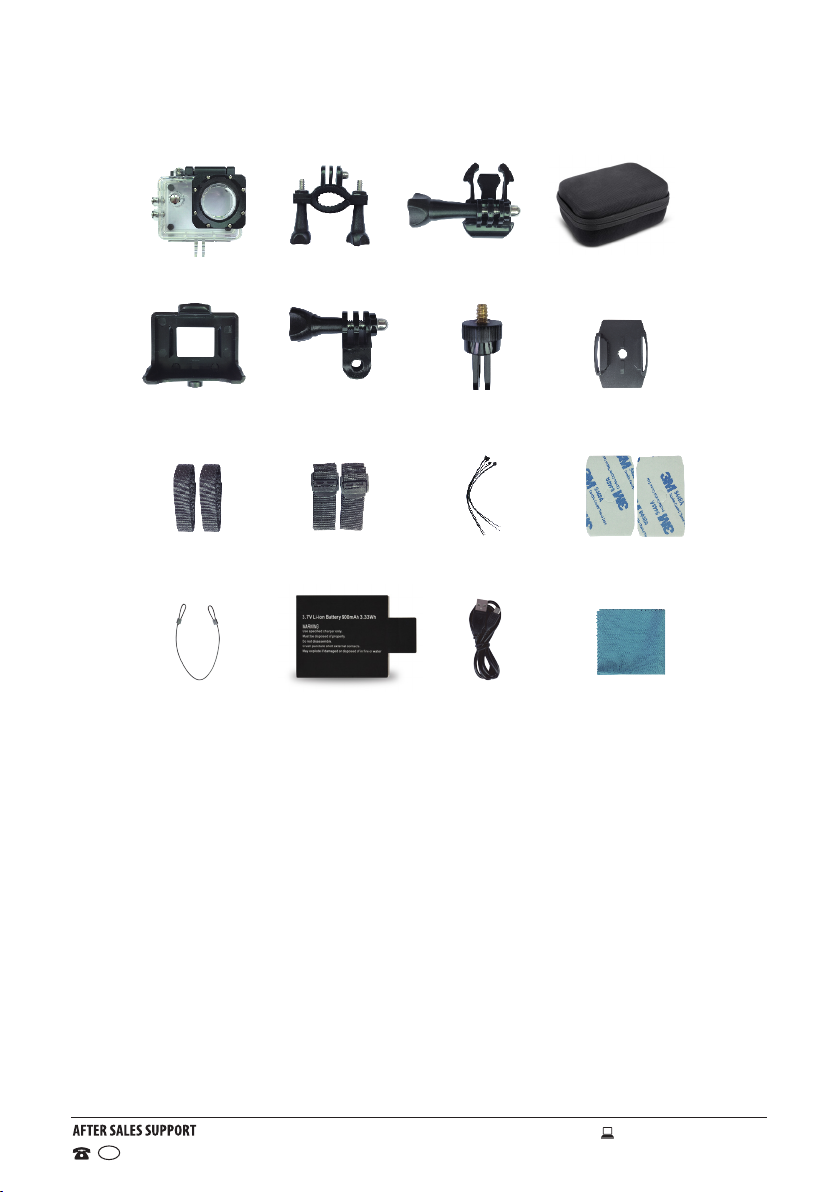
Accessories
1 Waterproof Case
2 Bicycle Mount
3 Pedestal
4 Carrying Case
5 Back Clip
6 Switch Support
7 Commutator
8 Helmet Mount
9 Velcro Straps (x2)
10 Locking Strap (x2)
11 Cable Ties (x3)
12 3M Adhesive Pads (x2)
13 Wire Cable
14 Battery (x2)
15 USB Cable
16 Cleaning Cloth
1
5
9
13
2
6
10
14
3 4
7
11
15
4
8
12
16

81300 886 649 Model: AAVCW-0419 Product Code: 64588 04/2019
www.tempo.org
AUS
1. Slide the latch to
the right and pull back
on the top clasp.
2. Push down on the
clasp to release it
from the case.
3. Lift the clasp up
to open the case
andaccess the
camera.
Assembly Instructions and Suggestions
Waterproof Case Removal
Accessories (Cont.)
Bicycle Mount
Camera
Switch Support Waterproof Case
Waterproof Case
Helmet Mount Pedestal Long Pole Waterproof Case

9
1300 886 649 Model: AAVCW-0419 Product Code: 64588 04/2019
www.tempo.org
AUS
Getting Started
Before First Use
• Unpack the product but keep all packaging materials until you have
made sure your new Action Camera is undamaged and in good working
order. Plastic wrapping can be a suffocation hazard for babies and young
children, so ensure all packaging materials are kept out of their reach.
• Inspect the supplied USB cable and ensure it is undamaged. Do not use it
for charging the product if the cable is damaged.
• Read this manual to familiarise yourself with the product, including its
buttons, functions and accessories. Pay particular attention to the safety
instructions on the previous pages.
Charging the Lithium Battery
The battery has been partially charged at the factory. To perform all
functions, we recommend you fully recharge the battery before using the
camera for the rst time.
• Ensuring that the camera is switched off, connect the camera to a
computer or use a standard 5V 0.5A wall adaptor using the supplied USB
charging cable.
• The indicator will illuminate during charging. It will turn off once the
battery is fully charged.
• A full charge generally takes about 4 hours.

10 1300 886 649 Model: AAVCW-0419 Product Code: 64588 04/2019
www.tempo.org
AUS
Getting Started (Cont.)
Installing a Memory Card
The camera does not come equipped with any
built-in memory storage. An external Micro SD
card is required to capture and save any images or
recordings. Ensure that the Micro SD card you have
inserted has a maximum capacity of 64GB.
• Make sure the camera is switched off before
inserting the memory card.
• Insert a Micro SD card into the SD card slot (as
illustrated) on the left side of the camera next to
the Micro USB port. You will hear a click sound
when the the card is locked in. Make sure the card
is fully inserted.
• To remove the Micro SD card, gently press the end of the memory card
inward and the card will eject.
Memory Card Precautions
A Micro SD card is a precision electronic component. Always handle it with
care. Protect the card from static electricity and strong shocks.
If you are installing a previously used memory card into the camera, make
sure to back up any data stored on the card, to avoid possible data loss.
To avoid any loss of data or damage to the Micro SD card, adhere to the
following:
• Do not bend, drop or subject the card to shock.
• Do not expose the card to high temperatures, humidity or direct sunlight.
• Do not expose the card to static or electromagnetic elds.
• Do not remove the memory card while it is in use.
• Do not touch the metal surface of the card with your ngers or objects.
• Do not use the memory card beyond its lifespan.
We strongly recommend you back up all data on the Micro SD card to
another storage device so you do not risk losing any data in case of an
unexpected device failure or accident. We do not assume liability for any
loss of data due to misuse or malfunction. Data backup is your personal
responsibility.
Table des matières
Autres manuels Bauhn Caméra d'action


