Bat-caddy X3 Series Manuel utilisateur

User Manual
X3 Series
(X3, X3 Pro & X3R)
X3 X3 Pro
X3R

1
ATTENTION: PLEASE FOLLOW ALL ASSEMBLY INSTRUCTIONS AND
READ AND UNDERSTAND THE OPERATING INSTRUCTIONS BEFORE YOU
OPERATE THE CADDY, EITHER MANUALLY OR BY REMOTE CONTROL.
TABLE OF CONTENTS
Page
Packing List …………..…………………………………………………..……………………………………………2
1. Standard Parts (X3 & X3-Pro)………………………………………………………………………...2
2. Standard Parts (X3R)……………………………………………………………………………………...2
3. Optional Accessories………………………………………………………………………………………2
Parts Glossary………………………………………………………….………………………………………………3
1. X3 & X3-Pro…………………………………………………………………………………………………..3
2. X3R………………………………………………………………………………………………………………..4
Assembly Instructions……………………………………….………………………………………………..…...5
1. X3 & X3-Pro…………………………………………………………………………………………………..5
2. X3R………………………………………………………………………………………………………………..8
Operating Instructions……………………………………………………………………………....................10
1. X3, X3 Pro & X3R……………….……………………………….………………………………………… 10
-T-Handle Control Functions……..……………………………………………………………10
-Additional Functions……………….………………………………………………………………11
-Remote Control Instructions (X3R Only)…………………………………………………..13
Maintenance & Additional Instructions…………….…………………………………………………14
1. Battery Charging and Maintenance…………….………………………………………………….14
2. Testing Your Caddy……………………………………………………………………………………….15
3. Recommendations for Efficient and Safe Operation………………………………………..16
4. General Maintenance……………………………………………………………………………………17
5. Electronic Systems………….…………………………………………………………………………….17
Technical Specifications………………..……..…...…………………………………….................................19
1. X3 & X3 Pro………………………………………………………………………………………………..19
2. X3R….…………………………………………………………………...……………………………………20
Troubleshooting Guide………..………..………….….………………………………………………………22
Frequently Asked Questions (FAQs)………..……………………………………………………….…23

2
PACKING LIST
1. Standard Parts (X3 & X3 Pro)
1 Caddy Frame
2 Rear Wheels (Left & Right)
1 Battery Pack (Lead Acid or Lithium Battery, Bag, Leads)
1 Charger
1 Tool Kit
1 User Manual, Warranty, Terms & Conditions
2. Standard Parts (X3R)
1 Caddy Frame
1 Anti-Tip Wheel & Pin
2 Rear Wheels
1 Battery Pack (Lead Acid or Lithium Battery, Bag, Leads)
1 Charger
1 Tool Kit
1 Remote Control (needs 2 AAA Batteries)
1 User Manual, Warranty, Terms & Conditions
3. Optional Accessories (X3, X3 Pro, X3R)
1 Scorecard Holder
1 Cup Holder
1 Umbrella Holder
1 Seat Cushion, Stand, & Hardware
1 Carry Case
NOTE:
This device complies with part 15 of the FCC Rules and with Industry Canada license‐exempt RSS
standard(s). Operation is subject to the following two conditions:
(1) This device may not cause harmful interference, and
(2) this device must accept any interference received, including interference that may cause undesired
operation.
NOTE: THE MANUFACTURER IS NOT RESPONSIBLE FOR ANY RADIO OR TV INTERFERENCE
CAUSED BY UNAUTHORIZED MODIFICATIONS TO THIS EQUIPMENT
SUCH MODIFICATIONS COULD VOID THE USER’S AUTHORITY TO OPERATE THE EQUIPMENT
Bat-Caddy X3R
FCC ID: QSQ GC827322
IC ID: 10716A

3
PARTS GLOSSARY
1. X3 & X3 Pro
1. T-Handle with Control Face Faceplate and Manual Speed Control
2. Upper Bag Support
3. Upper Bag Support Bungee Pigtails
4. Battery with Leads and Carrying Case
(12V Sealed Lead Acid or Lithium Deep Cycle)
5. Rear Wheels (Left & Right)
6. Wheel Hub with Locking Mechanism
7. Rear Wheel Rubber Tread
8. Battery Tray with Plug Receptacle
9. Lower Bag Support and Fender with Support Strap and TrackingAdjustment
Mechanism
10. Front Wheel
11. Frame Locking Hinge (2 locks on X3 Pro)
12. 110-240V Charger

4
2. X3R
1. T-Handle with Control Face Faceplate and Manual Speed Control
2. Upper Bag Support
3. Upper Bag Support Bungee Pigtails
4. Battery with Leads and Carrying Case
a) (12V 34/35Ah Sealed Lead Acid Deep Cycle)
5. 2 Identical Rear Wheels
6. Wheel Hub with Locking Mechanism
7. Rear Wheel Rubber Tread
8. Battery Tray with Plug Receptacle
9. Lower Bag Support and Fender with Support Strap and TrackingAdjustment
Mechanism
10. Front Wheel
11. Frame Locking Hinge
12. 110-240V Charger
13. Remote Control Handset
14. Anti-tip Wheel with Pin (not shown)
15. Dual Motors and Gearboxes (not shown)

5
ASSEMBLY INSTRUCTIONS
1. X3/X3 Pro
1. Unpack all items carefully and check inventory.
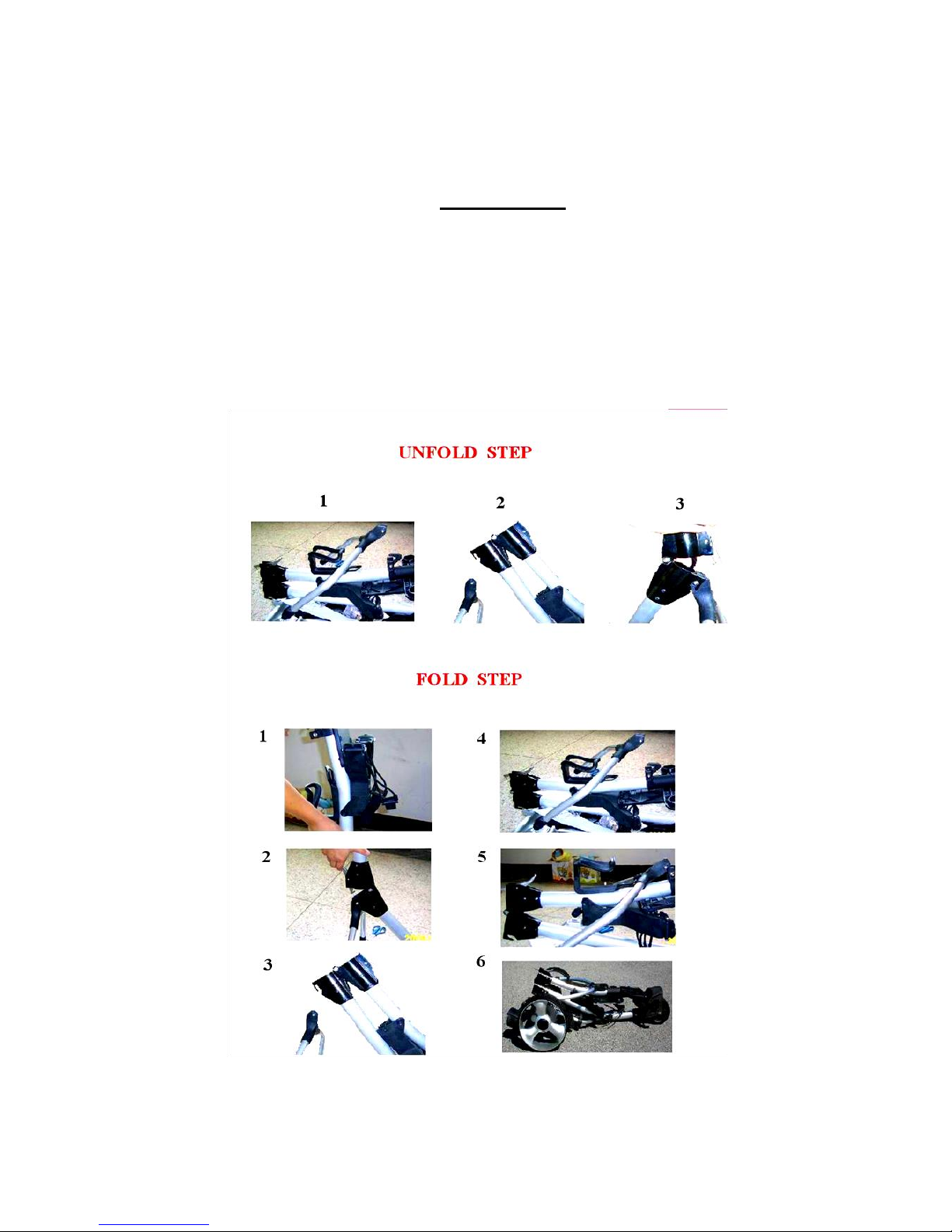
2. Place frame structure (one piece) on soft and clean ground to protect frame from
being scratched. Erect frame by unfolding and connecting the main frame tube
together at the joint and locking the Y-shape lower support structure to the main
frame with the frame lock mechanism.
a. X3

6
X3 Pro
3. Attach wheels to axles by pushing wheel locking button on the wheel hub and
inserting the axle extension into the wheel. Make sure to keep the locking button
on wheel hub pushed in during this process, in order to enable the axle
extensions to be inserted all the way into the wheel so the axle sprocket locks
into the hub. If not locked in, the wheel will not be connected to the clutch and will
not be propelled or come off! Test the lock by trying to pull the wheel out. To
disassemble the wheels, proceed in reverse order.
Attention: Make sure that the right wheel (marked R) is attached to the right side
and the left wheel (marked L) to the left side (seen from behind in driving
direction), as the wheels have built-in one way clutches. The caddy will not move if
the wheels are not on the proper side. Reverse the action to remove the wheels.

7
4. Place battery pack on battery tray and fasten Velcro strap around battery tightly.
Insert 3 prong battery plug into caddy outlet so notch aligns properly with plug. It
is recommended NOT to fasten the screw on the plug to the outlet, so in case of tip
over the cable can unplug from the socket.
Note: Before connecting make sure that Rheostat Speed Control on handle is
in OFF position!
5. Install optional accessories, such as Scorecard/Beverage/Umbrella holder, below
handle in the foreseen places or receptors. Instructions provided separately.

8
2. X3R
1. Unpack all items carefully and check parts inventory.
2. Place frame structure (one piece) on soft and clean ground to protect frame from
being scratched. Attach wheels to axles by pushing wheel locking button on the
wheel hub and inserting the axle extension into the wheel. Make sure to keep the
locking button on the wheel hub pushed in during this process, in order to
enable the axle extensions to be inserted all the way into the wheel. If not
locked in, the wheel will not be connected to the clutch and will not be propelled or
will fall off! Test the lock by trying to pull the wheel out. To disassemble the wheels
proceed in reverse order.
3. Erect Frame by unfolding and connecting the main frame tube together at the joint
and locking the Y-shape lower support structure to the main frame with the frame
lock mechanism. Proceed in reverse for folding the caddy.

9
6. Place the battery pack on the battery tray and fasten the Velcro strap around the
battery tightly. Insert the 3-prong battery plug into the caddy outlet so the notch
aligns properly. It is recommended NOT to fasten the screw on the plug to the
outlet, so in case of tip over the cable can unplug from the socket.
Note: Before connecting, make sure that the Rheostat Controller is in OFF (0)
position, and the remote control is stored securely!
4. Insert Anti-tip Wheel into frame holding bar and secure with pin.
7. Install optional accessories, such as Scorecard/Beverage/Umbrella holder, below
handle in the foreseen places or receptors. Separate instructions provided.
5. Unpack remote control and install batteries with plus and minus poles as indicated
in the diagram in the receiver compartment of the unit. Now you are ready to learn
and understand the functions of the manual and remote controls.
Autres manuels pour X3 Series
4
Ce manuel convient aux modèles suivants
2
Table des matières
Manuels Scooter populaires d'autres marques

First Choice Mobility
First Choice Mobility Roma Medical Corella S741 Manuel utilisateur

Carrera
Carrera impel Manuel utilisateur

Afikim
Afikim Superlight SL-3 Manuel utilisateur

CareCo
CareCo ZOOM Manuel utilisateur

Douglas
Douglas Vespa G.S. Manuel utilisateur

Gazelle
Gazelle with BOSCH System Manuel utilisateur