
Barbieri Spectropad Series 2 Manuel utilisateur
Operating Manual
edition 08/14 for Firmware version 6.00 or newer
Reflection spectrophotometer
for digital imaging market
Series 2


Barbieri Spectropad
Operating Manual Spectropad Series 2 - Page 3
1.
Contents
1. IntroductIon
..................................................................................... 4
1.1 What you can do WIth thIs Instrument
.................................... 5
1.2 unpackIng the Instrument
..................................................... 6
1.3 components
......................................................................... 7
2. puttIng Into operatIon
....................................................................... 8
2.1 Battery chargIng
.................................................................. 8
2.2 usB connectIon
................................................................... 9
2.1 product regIstratIon
.......................................................... 12
3. usIng the Instrument
...................................................................... 13
3.1 statusBar
.......................................................................... 13
3.2 BegInner-mode
.................................................................. 13
3.3 touch panel
....................................................................... 14
3.4 shoWIng Instrument InformatIon
.......................................... 14
3.5 calIBratIon
........................................................................ 15
3.6 measurIng reflectIve samples
.............................................. 16
3.7 measure thIn reflectIve samples
.......................................... 18
4. chart measurIng mode
..................................................................... 19
5. doc measurIng mode
....................................................................... 22
measurIng areference strIp
............................................... 23
measurIng acontrol strIp
.................................................. 24
6. spot measurIng mode
....................................................................... 26
6.1 Image QualIty mode
............................................................ 29
6.2 lIne measurIng mode
........................................................... 30
7. settIngs
......................................................................................... 31
7.1 WIfI Interface confIguratIon
................................................ 31
7.2 BegInner mode confIguratIon
.............................................. 33
8. Instrument maIntenance
.................................................................. 34
8.1 changIng the reference WhIte
.............................................. 34
8.2 packIng the Instrument for transport
.................................. 34
9. specIfIcatIons
................................................................................. 35

Barbieri Spectropad
Page 4 - Operating Manual Spectropad Series 2
1.
IntroduCtIon
We congratulate you on your choice!
We from BARBIERI electronic are proud of presenting to you the spec-
trophotometer Spectropad. This instrument features the latest tech-
nology in precise optics, state-of-the-art electronics and software
functionality. It is especially created for use in digital imaging market
and in particular for industrial printing applications.
May we suggest you read the operating manual first for fully enjoying
the capabilities of this instrument; thus you will be able to get familiar
with its functions step by step. As always, Barbieri electronic supports
you with a one year warranty through its service organizations. Please
get in touch with us in case of need.
May we also thank you for the confidence you have put in us by pur-
chasing this instrument.
Stefan Barbieri
Managing Director

Barbieri Spectropad
Operating Manual Spectropad Series 2 - Page 5
1.1
What you Can do WIth thIs Instrument
The Spectropad introduces a new way of accurate color control in in-
dustrial printing.
Based on the high precision Barbieri qb-technology, a technology spe-
cifically designed for industrial printing applications, this instrument
features highest measuring accuracy which forms the basis to highest
color quality on your printed results.
The instrument has been designed according to ISO 13655-2009.
Quality control
With its DOC option (digital output control) you can check print quality
directly on the printer with immediate feedback if printing conditions
are within tolerances.
Printer calibration and profiling
The chart measurement ability allows you to quickly measure calibra-
tion and profiling charts.
Spot color measurement
The instrument allows measurement of single colors and indication of
the respective L*a*b* values and Delta E deviations against reference
colors.
Barbieri Spectropad
Page 6 - Operating Manual Spectropad Series 2
1.2
unpaCkIng the Instrument
The instrument is delivered with the following components:
1. Barbieri Spectropad
2. Rechargeable battery module
3. Power adapter/ charger
4. USB cable
5. USB stick or CD with software/ drivers
6. Quick Guide in printed format
7. Microfiber cleaning cloth
For security reasons, the rechargeable battery is separately packed
with the instrument. This assures transport security by guaranteed
switch-off of WiFi signals.
Before putting into operation the instrument, please insert the re-
chargeable battery module into its slot.
Charge the battery for 2 hourse before use.
Barbieri Spectropad
Operating Manual Spectropad Series 2 - Page 7
1.3
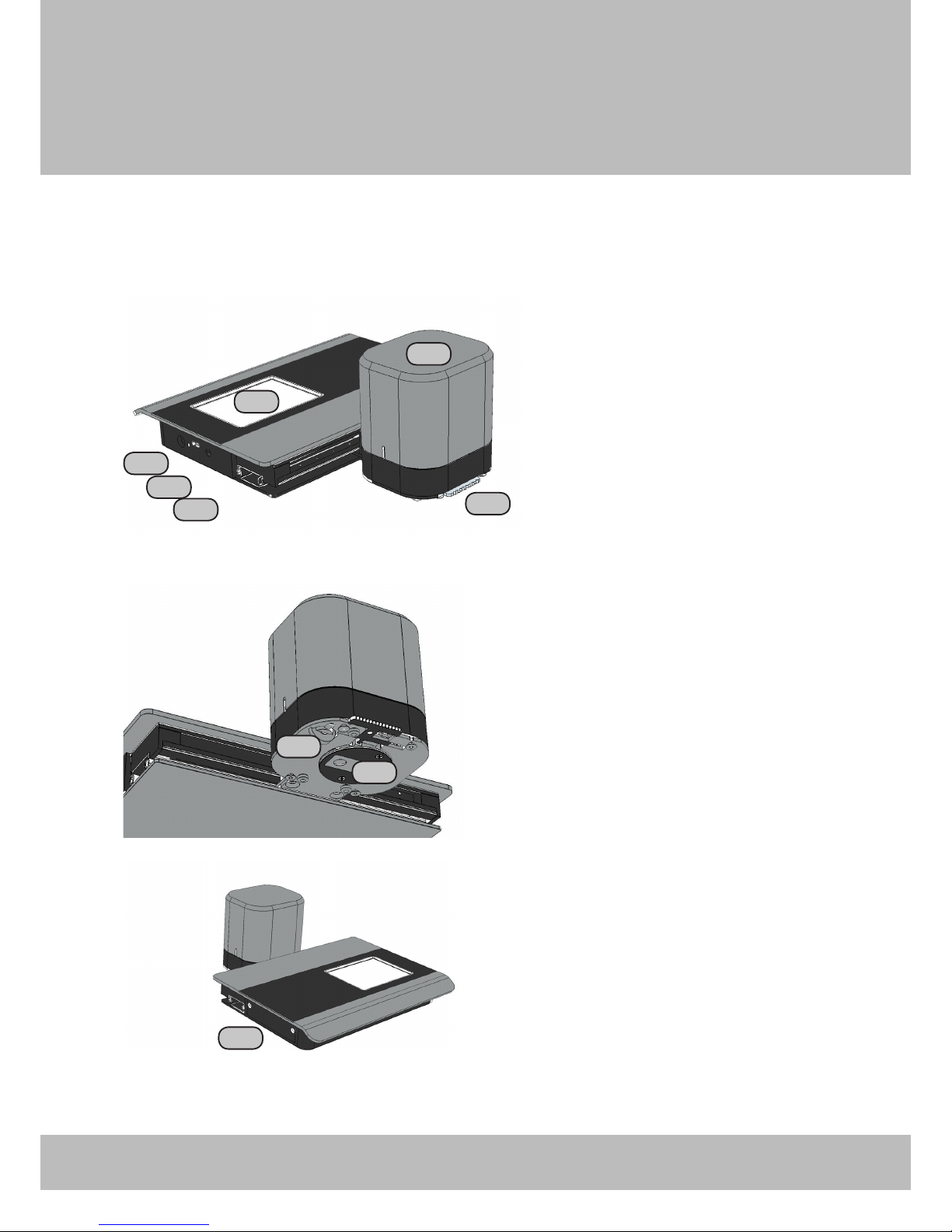
Components
1: Measuring head
2: Touch display
3: Calibration switch
4: On/Off switch
5: USB connector
6: Power connector
7: Reference white
8: Position wheel
9: Battery holder
1
2
3
4
5
6
7
8
9
Barbieri Spectropad
Page 8 - Operating Manual Spectropad Series 2
2.
puttIng Into operatIon
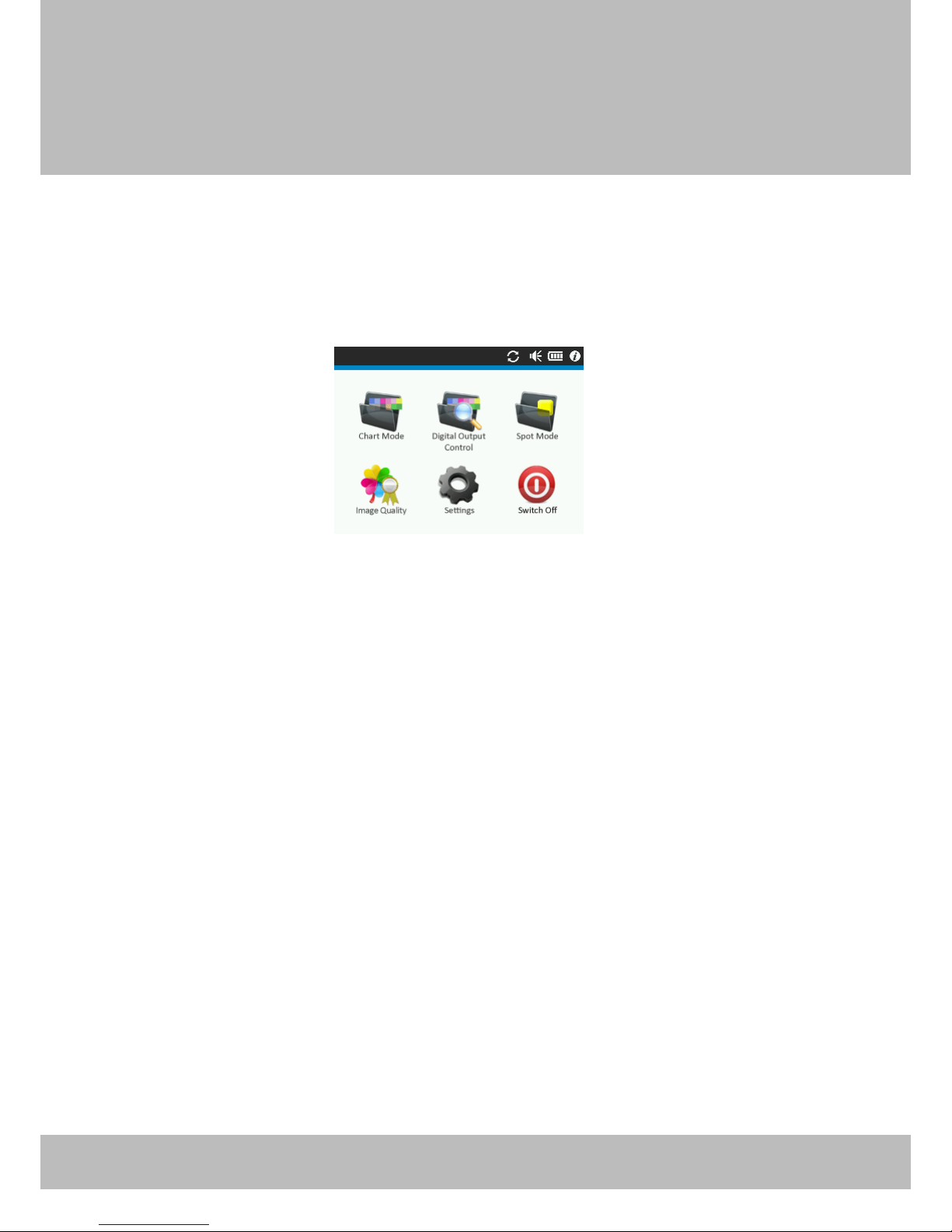
The instrument is switched on, by shortly pressing the On/Off button.
The main screen appears:
To switch off the device, select the “Switch off” button on the screen or
alternatively press the On/Off switch on the instrument.
Pressing the On/Off switch for more than 5 seconds will force the in-
strument to switch off in case it is in a blocked condition.
2.1
Battery ChargIng
The instrument is equipped with a rechargeable battery. The battery
can be charged by connecting the power adapter to the instrument.
A LED near the power connector indicates the correct charging. When
instrument is switched on, the battery indicator in the status line indi-
cates additionally if battery is charging.
Charging is finished after approx. 4 hours charge time with power
adapter.
Note: The battery is charged also over the USB cable when connected,
but only when instrument is switched off. Charging time is approx. 20
hours over USB cable.

Barbieri Spectropad
Operating Manual Spectropad Series 2 - Page 9
2.2
usB ConneCtIon
Before connecting the instrument to the computer, please install the
Barbieri Gateway measuring software supplied on the USB stick/CD
accompanying your instrument.
This will also install the required USB driver.
Then connect the instrument with your computer and launch the Bar-
bieri Gateway software.
Installing on a Mac computer under OS X
Switch off the Spectropad. Insert the supplied USB stick/CD-Rom into
your computer, run the Gateway Installer program and follow the in-
structions.
Check if driver is correctly installed:
• Switch on instrument
• Open “System Information” (About this Mac/ More info...)
• Show the “System Report” and check “Hardware/ USB”. The in-
strument “Spectropad” must be listed

Barbieri Spectropad
Page 10 - Operating Manual Spectropad Series 2
Installing on a PC with Microsoft Windows XP or later
Switch off the Spectropad. Insert the supplied USB stick/CD-Rom into
your computer, run the Gateway Installer program and follow the in-
structions.
The USB driver is now on your computer.
• Connect the Spectropad to the computer using the supplied USB
cable.
• Switch the Spectropad on.
There are two drivers to be installed for the connection between your
computer and Spectropad:
1. High speed USB to serial converter
2. USB virtual serial port driver
The installation procedures are guided automatically by an installation
wizard.
Note: The two installations follow automatically each other!
Your new Hardware is now installed and ready for use!
Table des matières
Autres manuels Barbieri Instrument de mesure


Manuels Instrument de mesure populaires d'autres marques


Endress+Hauser
Endress+Hauser Proline Promag 50 Caractéristiques techniques

Siemens
Siemens SITRANS F Coriolis FCT030 Manuel de la liste des pièces

KLINGER
KLINGER CMF V Series Manuel utilisateur

EXFO
EXFO FTB-2 Manuel d'exploitation et d'entretien

Keysight
Keysight M8290A Manuel utilisateur

ADTEK
ADTEK MW-5 Manuel utilisateur