
BALCO HE180433 Manuel utilisateur

INSTRUCTION MANUAL
MODEL NUMBER: HE180433
4K ACTION CAMERA
16mp
4k 60fps 30m
with case wi-fi



5
After Sales Support
Warranty Note
If you experience any issues with this product or its
performance is not what you had expected, please contact
us at Winplus before returning the item to the store.
It is likely that we can resolve any problems for you via
phone or email.
We can be reached on:
Phone: 0800 496 9698 (24/7)
Email: [email protected]
Web: www.balcolifestyle.com/uk
Important
Getting the most out of your Action Camera:
Read the manual carefully
It will help you set up with ease
Visit www.balcolifestyle.com/uk
We have additional support videos and guides
Call After Sales Support - 44 800 496 9698
We’re always happy to help

6
After Sales Support
Safety Instructions
• Donotleavethecamerainhightemperatureenvironments(over35°C),especiallyinaparkedcar
withthewindowsclosedinsummer.Hightemperaturesmayshortenthelifespanofthiselectronic
device,damagethebatteryormeltplasticparts
• Toreducetheriskofdamagingcomponents,donotexposethisproducttodusty,dirty,orsandy
areas
• Donotdrythecamerawithanexternalheatsourcesuchasamicrowaveovenorhairdryer
• DonotoperateinorexposetheActionCameratothefollowingconditions:directsunlight,air
conditioners,heatersoranyotherextremetemperatures.Avoidviolentvibration.Neverstorenextto
aheatsourceorindirty,humidorwetplaces
• Handlewithcare.AvoiddroppingtheCamera,especiallyonahardsurface.Donotcrush,squeeze,
puncture,bend,deform,shredorsubmergetheActionCamerainliquid
• ExposingtheActionCameratoopenamescancauseanexplosion
• Donotoperatetheproductwithwethands.Doingsomaycauseanelectricshock
• Keepthecameraclean.Tomaintain,regularlywipewithaclean,dry,lintfreecloth
• Pressthebuttonsgently.Pressingtoohardcandamagetheproduct
• Donotattempttodismantle,modifyorrepairtheunityourself.Thiswillvoidthewarranty.Doingso
mayalsocausere,electricshock,ormalfunction.Sendthecameraoranyotheraccessoriestoa
professionalservicecentreformaintenanceifandwhenrequired
• DonotuseadamagedormodiedUSBcablewiththecamera.Damagedormodiedpowercords
maycauseanexplosion,re,ormalfunction
• Thisproductisintendedforpersonaluseonlyandisnotintendedforcommercialuse
• Keepoutofreachofinfants,children,orpets.Thereisariskofthemswallowingsmallcomponents.
Childrenshouldbesupervisedtoensuretheydonotplaywiththisappliance.Closesupervisionis
necessarywhenanyapplianceisusedbyornearchildren
• Noresponsibilitywillbetakenfordamagessueredbytheuserorthirdpartiesasaresultof
inappropriatehandlingoruseoftheproduct,itsaccessoriesorbyoperationalfailure.
• Theillustrationsincludedinthisusermanualareforreferenceonly
• ThesupplierisNOTresponsibleforthelossofanydata/contentduringoperation
• Attentionshouldbedrawntotheenvironmentalaspectsofbatterydisposal
• Donotstorebatterieswithhazardousorcombustiblematerial;storeinacool,dry,ventilatedarea
awayfromexcessiveheat,directsunlightorre
• CAUTION:Dangerofexplosionifbatteryisincorrectlyreplaced.Replaceonlywiththesameor
equivalenttype
• Batteryshallnotbeexposedtoexcessiveheatsuchassunshine,reorthelike
• OnlyuseattachmentsandaccessoriesspeciedbyBalco
• Unplugthisapparatusduringlightningstormsorwhenunusedforlongperiodsoftime
• BeforeyoustartusingtheActionCameraitisassumedthatyouagreetotheabovestatements

7
After Sales Support
Contents
Safety Instructions 6
Product Overview 9
Parts List 10
Setup & Operation 11
Chargingthebatteries 11
InsertingamicroSDcard 11
Waterproofhousing 12
Poweringon&o 13
Modeselection 13
Videorecording 14
Photomode 14
Playback 15
Connectingtoanexternaldisplay 15
Settingthedateandtime 15
Action Camera App 16
Instructions 17
Mainmenu 17
Cameramode 17
Playbackmode 18
Settingsmode 18
Technical Specications 19
FAQs 20
Disposal 21
Maintainance and Storage 21

8
After Sales Support
ThisproductcomplieswithEUWEEEDirective(2012/19/EU).Thisproductbearsaclassicationsymbolforwasteelectricaland
electronicequipment(WEEE).
ThismarkingindicatesthatthisproductshouldnotbedisposedwithotherhouseholdwastesthroughouttheEU.Toprevent
possibleharmtotheenvironmentorhumanhealthfromuncon¬trolledwastedisposal,recycleitresponsiblytopromotethe
sustainablereuseofmaterialresources.Toreturnyouruseddevice,pleaseusethereturnandcollectionsystemsorcontactthe
retailerwheretheproductwaspurchased.Theycantakethisproductforenvironmentalsaferecycling.
Hereby,WinplusAustralasiadeclaresthattheradioequipmentActionCameraisin
compliancewithDirective2014/53/EUand2011/65/EU.ThefulltextoftheEUdeclarationofconformityisavailableatthefollowing
internetaddress:https://balcolifestyle.com/download/HE180433-ECDOC.PDF
PackagingmaterialsoftheproductaremanufacturedfromrecyclablematerialsinaccordancewithourNationalEnvironment
Regulations.Donotdisposeofthepackagingmaterialstogetherwiththedomesticorotherwastes.Takethemtothepackaging
materialcollectionpointsdesignatedbythelocalauthorities.

9
After Sales Support
Product Overview
1. Power / M Button
2. OK / shutter button
3. Up / Wi-Fi button
4. Down / microphone button
5. Lens
6. Micro USB port
7. microSD card slot*
8. Micro HDMI port
9. Battery door
10. Battery latch
8
9 10
1
2
3
4
56 7
Description of function keys:
• Power / M button:TurnstheActionCameraonando.SwitchesbetweenmodesofPhoto&Video.
YellowLEDlightsupwhentheActionCameraison
• Up / Wi-Fi indicator:Moveupinamenu.Orholdbuttondownfor3secondstoactivatethe
camera’sWi-Finetwork
• Down / microphone button:Movedowninamenu.Orholdbuttondownfor3secondstoactivate
theaudioinvideomode
• microSD card slot:Supportsupto128GB(Notincluded-Class10recommended)
• Micro USB port:Tochargethecameraortransferdatatoandfromcomputers
• Micro HDMI port:ToconnecttheActionCameraexternalscreens
• OK/Shutter button:Takeaphoto/startvideorecording/stopvideorecording/conrmaselection.
Holdfor3secondstoenterActionCamera’smenu
*microSD card is not included
TOP VIEW
BOTTOM VIEW
FRONT VIEW
LEFT VIEW RIGHT VIEW
10
After Sales Support
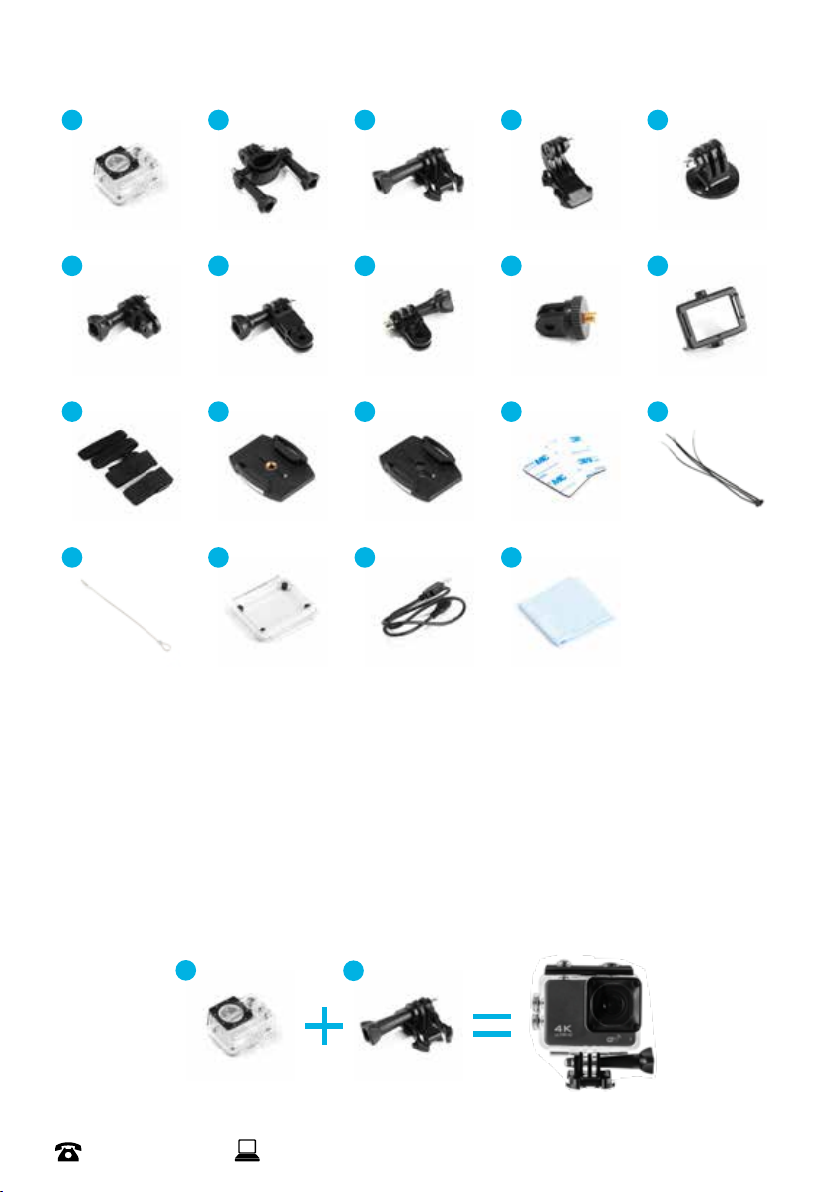
Parts List
1. Waterproofhousing
2. Handlebar/polemount
3. Mount1-Bucklemount
4. Mount2-Verticalsurfacebucklemount
5. Mount3-Tripodmount
6. Mount4-Mountingsystem
7. Mount5-Mountingsystem
8. Mount6-Mountingsystem
9. Mount7-Universalscrewadaptor
10. Mountingframe
11. 4xhookandloopsstraps
12. Helmetmount1
13. Helmetmount2
14. 2x3Madhesivetabs
15. Tethers
16. Metaltether
17. Spareprotectivebackdoor
18. MicroUSBcable
19. Microbrecloth
1
6
11
16
2
7
12
17
3
8
13
18
4
9
14
19
5
10
15
13
Table des matières


