
AVProAlliance AViMUX4 Guide de l'utilisateur
iMUX4
PROFESSIONAL MICROPHONE
MULTIPLEXER
Operation and Application Manual
MIC 1 MIC 2 MIC 3 MIC 4
MICROPHONE MULTIPLEXER
iMUX4
MICROPHONE
SELECTION
1
2
3
4
1-4
AVProAlliance.com
PO Box 90703, Sioux Falls, SD 57109
1
iMUX4
PROFESSIONAL MICROPHONE
MULTIPLEXER
Operation and Application Manual
MIC 1 MIC 2 MIC 3 MIC 4
MICROPHONE MULTIPLEXER
iMUX4
MICROPHONE
SELECTION
1
2
3
4
1-4
AVProAlliance.com
PO Box 90703, Sioux Falls, SD 57109

2
TABLE OF CONTENTS
SAFETY PRECAUTIONS............................................................................................................3
DESCRIPTION
Introduction..........................................................................................................................4
Features................................................................................................................................4
Specifications.......................................................................................................................5
Controls................................................................................................................................6
Supplied Accessories...........................................................................................................7
Kit Accessories ....................................................................................................................8
OPERATION
Introduction..........................................................................................................................9
Power On/Off Switching......................................................................................................9
Battery Installation/Replacement.........................................................................................9
Microphone Selection Switching…...................................................................................10
Microphone Input Calibration Controls.............................................................................11
iAI2 Microphone Calibration.............................................................................................11
APPLICATIONS
Introduction........................................................................................................................12
Measurement Setup............................................................................................................12
Microphone Room Placement............................................................................................13
Real Time Analyzing –Multiplexing Microphones for Spatial Averaging ......................13
SERVICE AND WARRANTY INFORMATION ....................................................................14

3

4
Every precaution has been taken in the design of the iMUX4 to
insure that it is as safe as possible. However, safe operation
depends on you, the operator.
1. Never exceed the limits of the iMUX4 as given in the
specification section or other special warnings in this manual.
2. Always be sure that your equipment is in good working order.
Broken or frayed test leads or cables can be dangerous exposing
you to circuit voltages.
3. Remove test leads immediately following measurements to reduce
the possibility of shock.
4. Do not work alone when working under hazardous conditions.
Always have another person available in case of an accident.
5. Never assume that a cable shield is at earth ground potential.
Both static and electrical voltages can be present on a cable’s
sheath.
6. Always follow standard safety procedures.
When in doubt, be careful.
WARNING
Please observe these Safety Precautions
There is always a danger present when using electronic test equipment.
Unexpected voltages can be present at unusual locations in defective
equipment and distribution systems. Become familiar with the
equipment with which you are working, and observe
the following safety precautions.

5
DESCRIPTION
Introduction
The iMUX4 Microphone Multiplexer is the perfect instrument to expedite the testing,
adjustment, and documentation of the acoustically averaged frequency response of cinema
theaters, home theaters, churches, halls, banquet rooms, meeting rooms, clubs, or any other
venue in which great sound in the least amount of time is a requirement. The iMUX4 features
common XLR input and output microphone connections.
Because room resonance modes cause
different low frequency response in different
parts of any small room, equalizing the
response for multiple listening positions can
be a long process of repeated measurements at
multiple locations and change-and-check
equalization adjustments. Adjusting for
smooth response in just one or two listening
positions may leave other positions with
uneven, boomy, or wimpy bass response.
Averaging multiple measurements manually
is time-consuming and doesn't give you a
real-time display to immediately indicate
results of room adjustments.
The iMUX4 Microphone Multiplexer, with a
high resolution RTA, provides measurements
of the average response of a listening room or
multiple listening positions. This allows you
to position subwoofers or adjust equalizers as
you immediately see the measured results of
your adjustments. When you complete your
adjustments, you can store one RTA
measurement to document the average
response of the room.
Features
Provides a single, spatially-averaged acoustic input from up to four microphone positions
for Real Time Analyzer measurements.
Provides a continuously updated average measurement of the overall response of the
listening area to allow easy equalization adjustments and average response documentation.
Avoids the problem of making room adjustments based on the acoustic response of just a
single point in a room or of manually averaging measurements to determine needed
adjustments.
Performs four microphone multiplexed sampling, as used by all major cinema/home
theater organizations, for a good average of overall room response.
Measure the averaged output of two, three, or four attached microphones, or monitor
individual microphones for gain equalization.
Internal microphone supply voltages and preamps eliminate the need for extra boxes and
simplify setup.
Portable, battery-operated design eliminates the need for AC power connections.
Unit power is controlled by phantom voltage from the connected RTA.

6
Specifications
Frequency Response: 20Hz-20kHz +/- 2 dB
Dynamic Range: 30 dB to + 120 dB (SPL) input
Inputs
Microphone Inputs: Four
Type: Balanced
Connector: XLR Female
Input Impedance: 40 kohms nominal
Freqeuncy Response: 20Hz –20kHz +/-2 dB
Dynamic Range: 25dB to = 120dB SPL
Maximum Input Level: 135 dB SPL
Gain Adjustment: ±4 dB
Phantom Mic Power: 48 volts
Output
Output: One
Type: Balanced
Connector: XLR Male (Pins 2 & 3 signal, pin 1 ground)
Output Impedance: 110 ohms +/- 20%
Microphone Selection: Manual selection of Mic 1, Mic 2, Mic3, or Mic 4.
Automatic alternating switched selection of attached
microphones.
Microphone Switching: Approximately one second dwell time per microphone
Mic. Dwell Time Range: 0.5 sec to 1.5 sec. (Factory adjusted to approx. 1 sec.)
Power
Power: Internal 9 V battery Pack (6 AA cells)
Power Switching: Controlled from RTA (Phantom voltage on/off)
General
Case: Metal
Size: (3.25" x 7.5” x 4.25") HWD
Weight: 1 lb. 5 oz. w/supplied battery installed
7
Controls
MIC 1 MIC 2 MIC 3 MIC 4
MICROPHONE
MULTIPLEXER
iMUX4
MICROPHONE
SELECTION
1
23
4
1-4
6.
Multiplex
Rate
MIC 1 IN
MIC 2 INMIC 3 IN
MIC 4 IN
CAL 1
CAL 2
CAL 3
CAL 4
OUTPUT
2.
4.
1.
7. 5. 1.
3.
6.
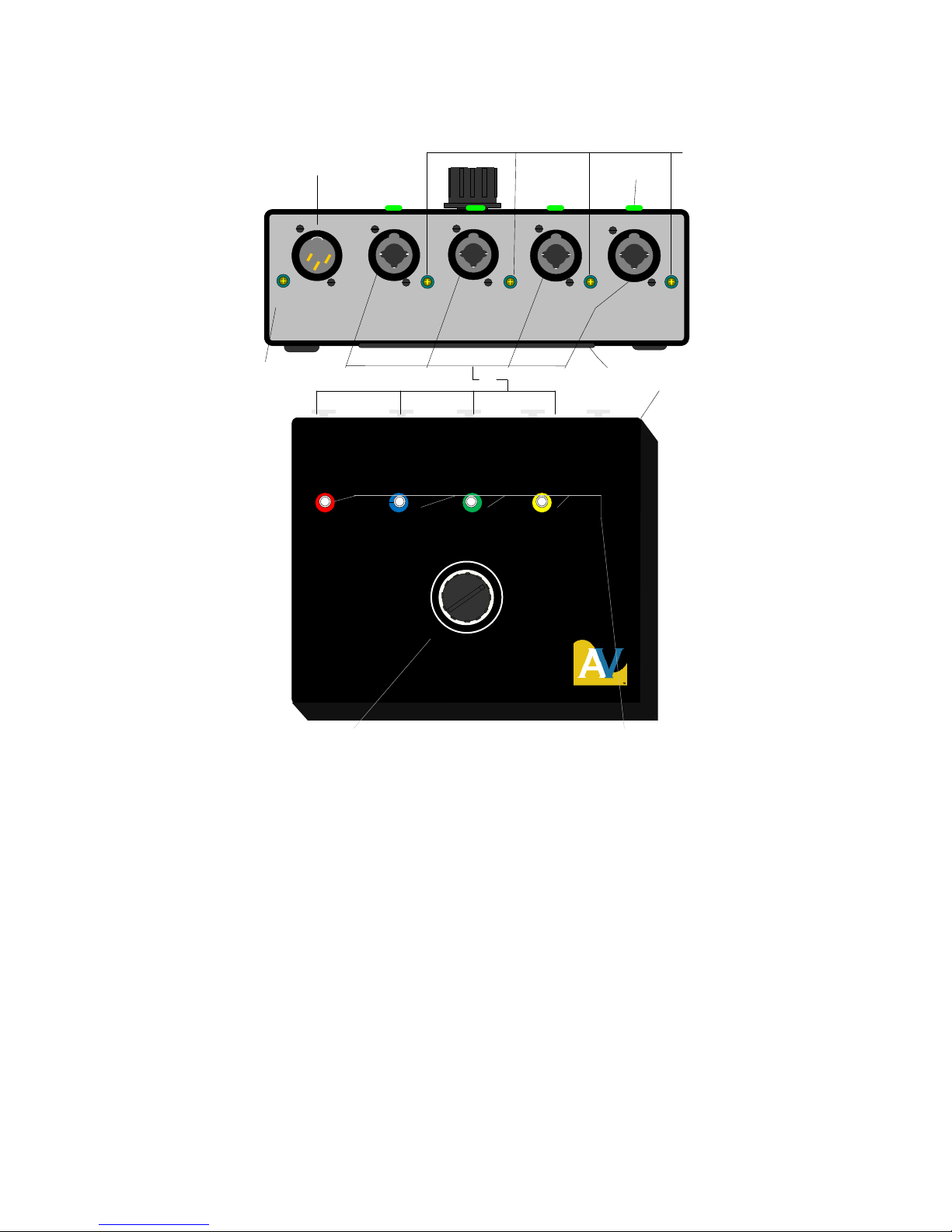
Figure 1. iMUX4 Controls
1. MIC OUTPUT CONNECTOR: Connects output of iMUX4 to the MIC INPUT jack of the
RTA for sound measurements.
2. MICROPHONE SELECTION SWITCH: Switches the microphone inputs (5) to the MIC
INPUT Connector (1).
3. BATTERY COMPARTMENT: Contains AA batteries used to power the iMUX4 and
provide phantom power to microphones.
4. CAL 1, 2, 3, 4 MIC LEVEL CALIBRATE ADJUSTMENTS: Variable gain controls to
adjust the microphone input levels for proper calibration of the individual microphones.
5. MIC 1, MIC 2, MIC 3, MIC 4 INPUT CONNECTORS: Connects the external individual
microphones to the inputs of the iMUX4.
8
6. LED(s) TEST CONDITION INDICATORS: A LED indicates the RTA is connected and
turned on to activate the iMUX4. Constant LED illumination indicates that microphone input
is selected and a microphone is connected and powered. Flashing LEDs indicate low
batteries which can produce erroneous measurements.
7. MULTIPLEX RATE CONTROL: Adjusts dwell time or the time each microphone is
sampled.
Supplied Accessories
1.
2.
3. AA AA AA AA AA AA
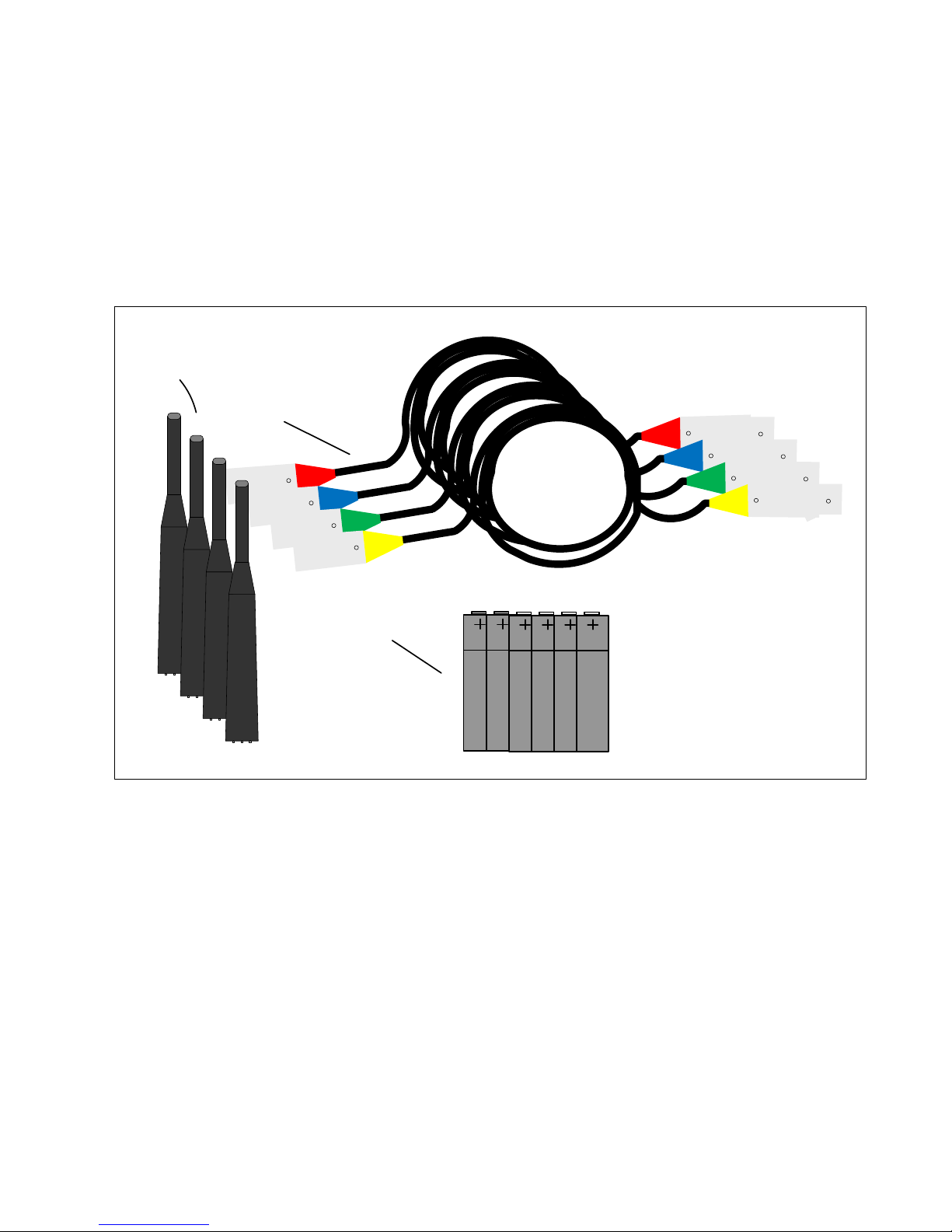
Figure 2. Accessories
1. (4) color coded 20 foot microphone extension cables, XLR male to XLR female (13G122):
Connects the individual microphones to the MIC INPUTS of the iMUX4. Five cables are
supplied with the iMUX4 including the jumper to the RTA
2. Microphone (39G1156): Meets or exceeds ANSI S1.4 Type 2 specifications. Measurement
microphones that connect to the MIC Inputs of the iMUX4. Four microphones are supplied
with the iMUX4.
3. AA Batteries: Comprise nine volt battery pack to power the iMUX4. Six batteries are
supplied with the iMUX4 to be installed into the battery compartment.
4. Case (not shown): Your iMUX4 is installed in an intuitively designed case designed for
rapid deployment and secure storage of cables, microphones, and accessories ready for use.
9
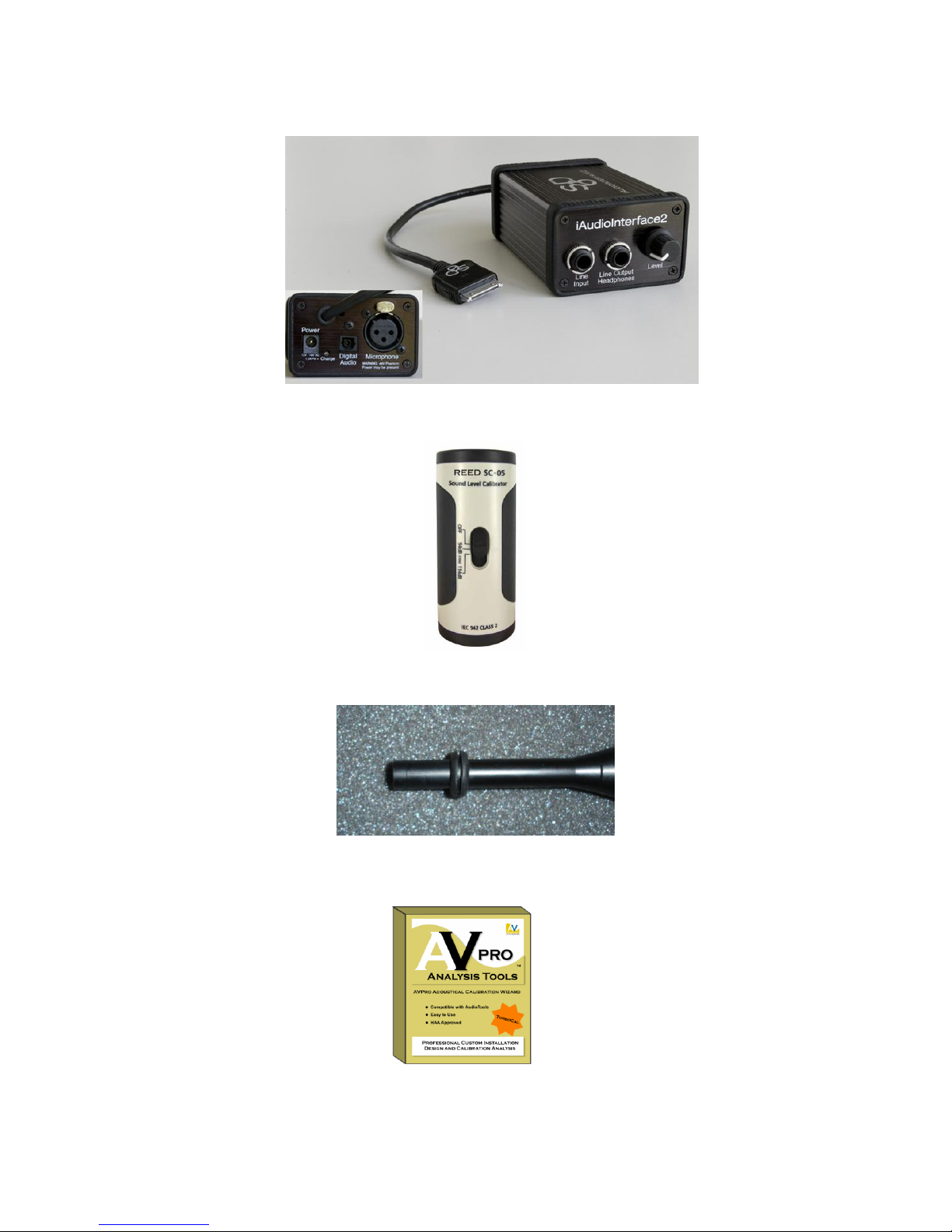
Kit Accessories (Kit Only)
Figure 3. Studio Six Digital iAudioInterface2 (iAI2) (available from AVProAlliance.com)
Figure 4. Reed SC-05 microphone calibrator (available from AVProAlliance.com)
Figure 5. Microphone with 9/32” grommet sound seal used to seal microphone
inlet while using Reed SC-05 calibrator
Figure 6. AVPro 2.0 Software; Home Theater acoustical analysis, design and
calibration wizard (available from AVProAlliance.com)
Table des matières
Manuels Système de microphone populaires d'autres marques


Sennheiser
Sennheiser Evolution Wireless Digital EW-DX EM 2 Manuel utilisateur

Alpha Technologies
Alpha Technologies RBMS Manuel utilisateur

SWIT Electronics Co.,LTD.
SWIT Electronics Co.,LTD. CW-S150 Manuel utilisateur

Shure
Shure UA844 Manuel utilisateur

Panasonic
Panasonic SHFX70 - DVD HOME THEATER WIRELESS SYSTEM Manuel utilisateur

Pyle
Pyle PDWM5000 Manuel utilisateur