
Avol itrio Manuel utilisateur
www.AVL21c.com
User’s manual
(COMPOSITE Model)
REV. C. 1.0
Wireless Sender
Full HDFull HDFull HDFull HDFull HD
Full HD
English
English
Contents
3
Caution for Safety
Caution for Safety 4.....................................
Introduction
Product Introduction
Major Feature
6
6
...................................
........................................
Package Contents
Package Contents 7.....................................
Installation
WiFi Transmitter / Receiver installation order & how to install
PLC Transmitter / Receiver installation order & how to install
Operation checklist from LED status
Device with HDMI : Connect through HDMI port
How to install IR-Flasher
LAN Transmitter / Receiver installation order & how to install
11
12
13
14
15
16
........
........
.........................
................
.................................
........
Product Specication
Specication
Supported port
Video Format Supported
Audio Format Supported
Change WiFi Frequency
Factory Reset
Software upgrade
17
18
19
20
20
20
21
........................................
.......................................
................................
................................
.................................
........................................
.....................................
Q & A
Q & A 22.............................................
Operation Control & Function
Transmitter Front
Transmitter Rear
Receiver Front
Receiver Rear
Remote Control
8
8
9
9
10
.....................................
......................................
.......................................
........................................
......................................
English
Caution for Safety
4
Please read this user’s manual carefully before using the product.
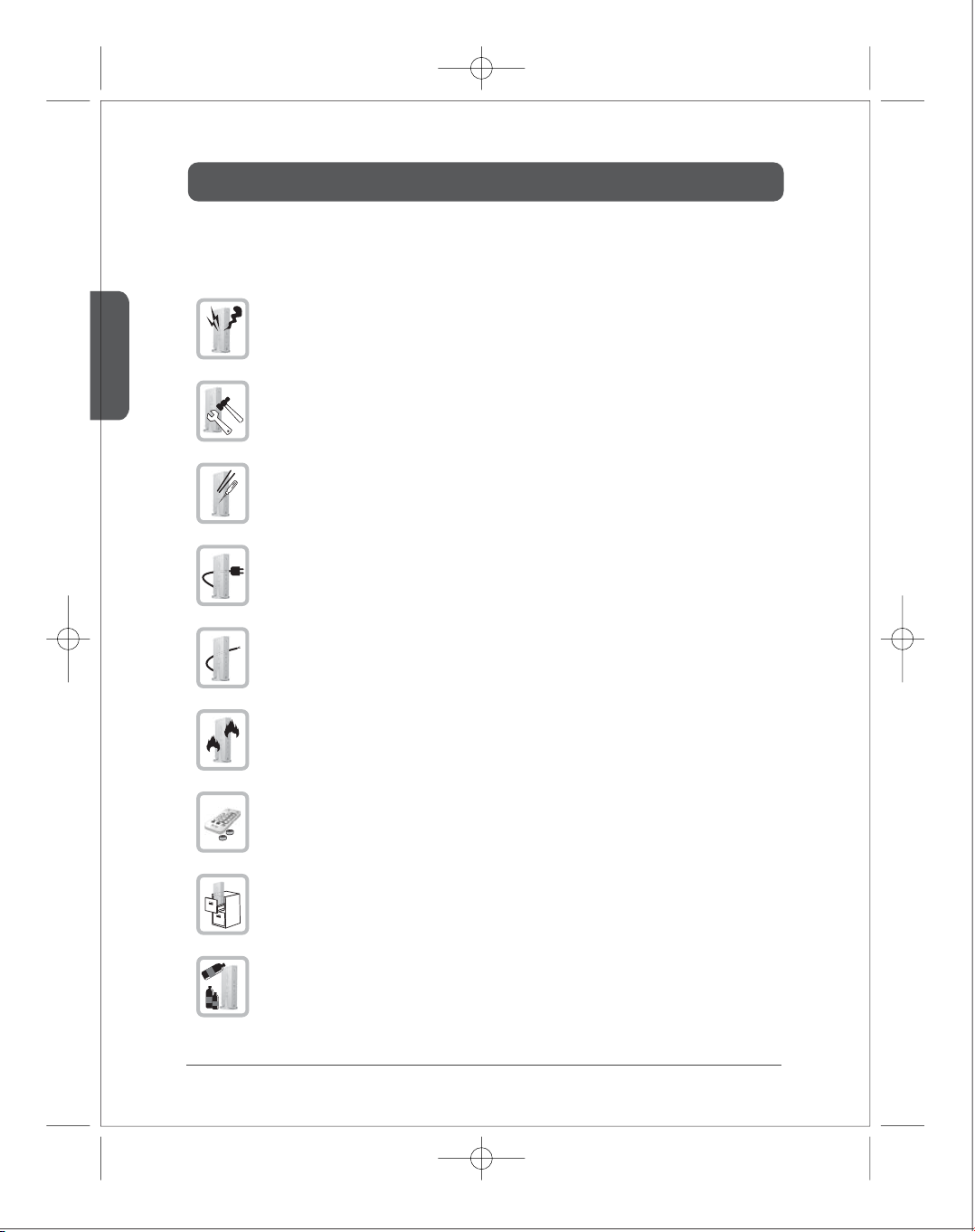
If there is any strange sound, smoke or odor, pull the cable o immediately.
(It may cause re or electric shock)
Do not disassemble.
(It may cause re or electric shock.)
Do not put any sharpen object into the venting hole of the product.
(It may cause re or electric shock.)
Ensure to plug the product rmly.
(It may cause overheating or re if it plugs unstably.)
Ensure not to use the damaged cable.
( It may cause re or electric shock.)
Keep the product away from heaters or stoves.
(It may cause a re.)
Keep the battery of remote control out of reach of children.
Do not place the production on a bed, sofa or inside a closet that is not good for
ventilation.
(It may cause overheating or re.)
Do not use the product in close distance from the inammatory substance or combustible
spray.
(It may cause re.)
Caution for Safety
English
5
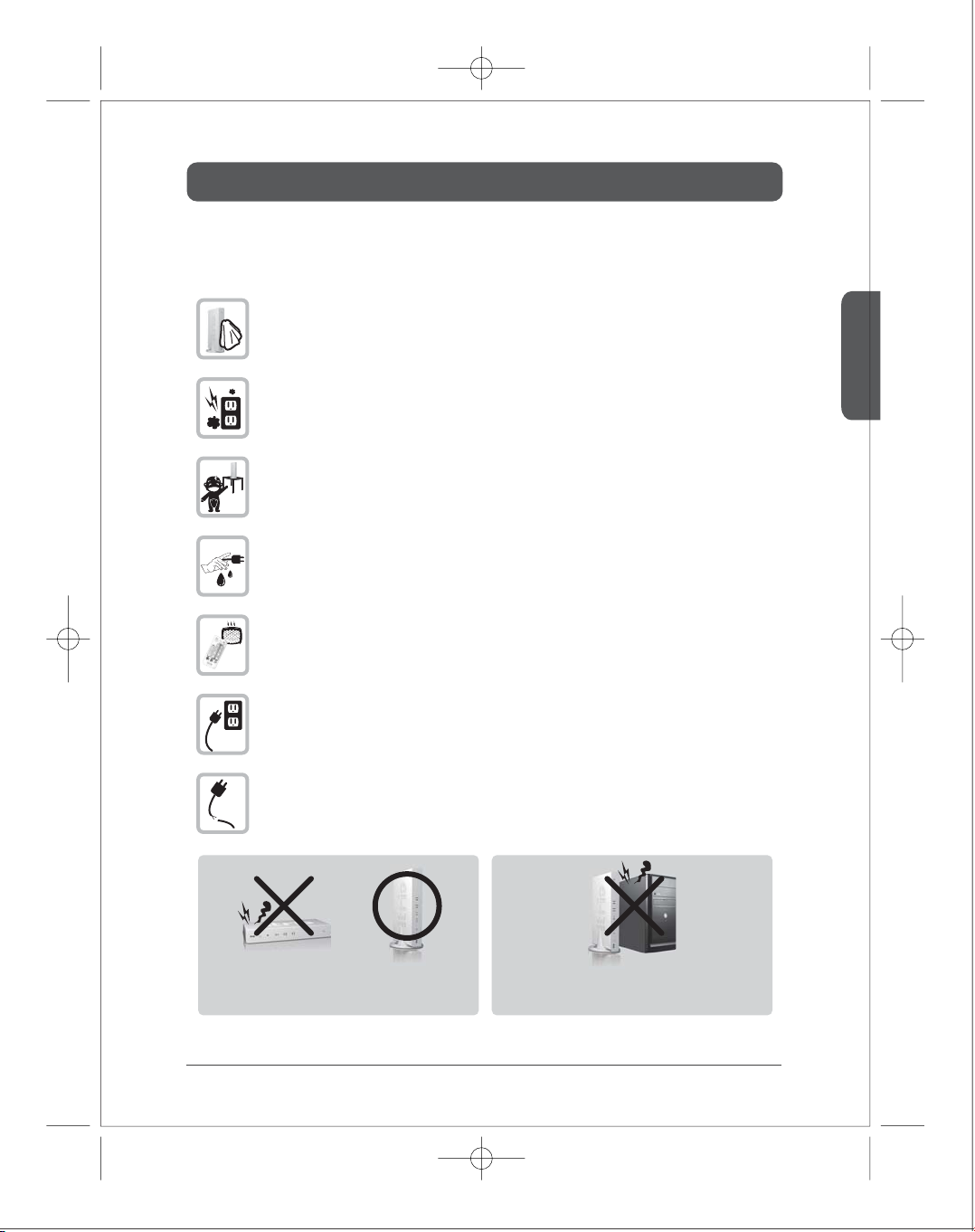
Always wipe the product o with soft fabric, not water mop.
(Water may come inside the product through the venting hole, and it may cause
electric shock.)
Keep clean the power plug and the outlet.
(Dirt may cause a short circuit and re.)
Keep the product out of reach of children.
Don’t unplug the power cord with a wet hand.
(It may cause electric shock.)
The heat and humidity may cause the damage to the remote control.
Unplug the power cord if you don’t use the product for a long time.
(Dirt may cause heat, re or electric shock.)
Ensure not to be damaged to the power cord.
(Damaged power cord may cause re or electric shock.)
Please use the devices in a stand position with stand cradle.
When you use the devices in laid down, it may cause the malfunction
of the devices because of the raise temperature of internal.
Don't place the devices near the heating product.
It may cause the malfunction of the devices because of the raise
temperature of internal.
Place the product 5cm apart from the wall for ventilation of heat.
Introduction
English
6
■ Product Introduction
■ Major Feature
●
●
●
●
●
●
●
1080p60 Full HD encoding/decoding with H.264 Baseline Prole (Level 4.2)
Low latency
- Latency of encoding-decoding in 1080p60 HD: Within 30ms
Supports both digital(HDMI) and analog(RGB, Component, D-Sub) video/audio
Supports Wireless or Wireline
- IEEE 802.11n 5 GHz WiFi
- Power line communication (PLC) modem
- LAN connection
Internal Antenna (Supporting MIMO)
HDMI-v1.3 (HDCP-v1.1) compliant.
Supports both DTV & VESA standards
- DTV : 1920x1080i60/p60, 1280x720p60, 720x480i60/p60
- VESA : WSXGA+(1680x1050), SXGA(1280x1024), WXGA(1280x800), XGA(1024x768),
SVGA(800x600), VGA(640x480)
itrio, using WiFi wireless solution, is the device for sending 1920x1080 Full HD video sources to other
location in your house. Once you connect Full HD video sources such as Set top box, Blu-ray player,
Multi media player, DVD player or PC to the transmitter and connect the display device to the receiver,
you can enjoy wirelessly Full HD video anywhere in your house.
itrio uses IEEE802.11n draft 2.0 standard WiFi technology for wireless connection. In case the wireless
connection is interfered, you can use PLC (power line communication) modem without additional
cable installation. You can also enjoy itrio through a LAN cable connection via LAN port.
Package Contents
English
7
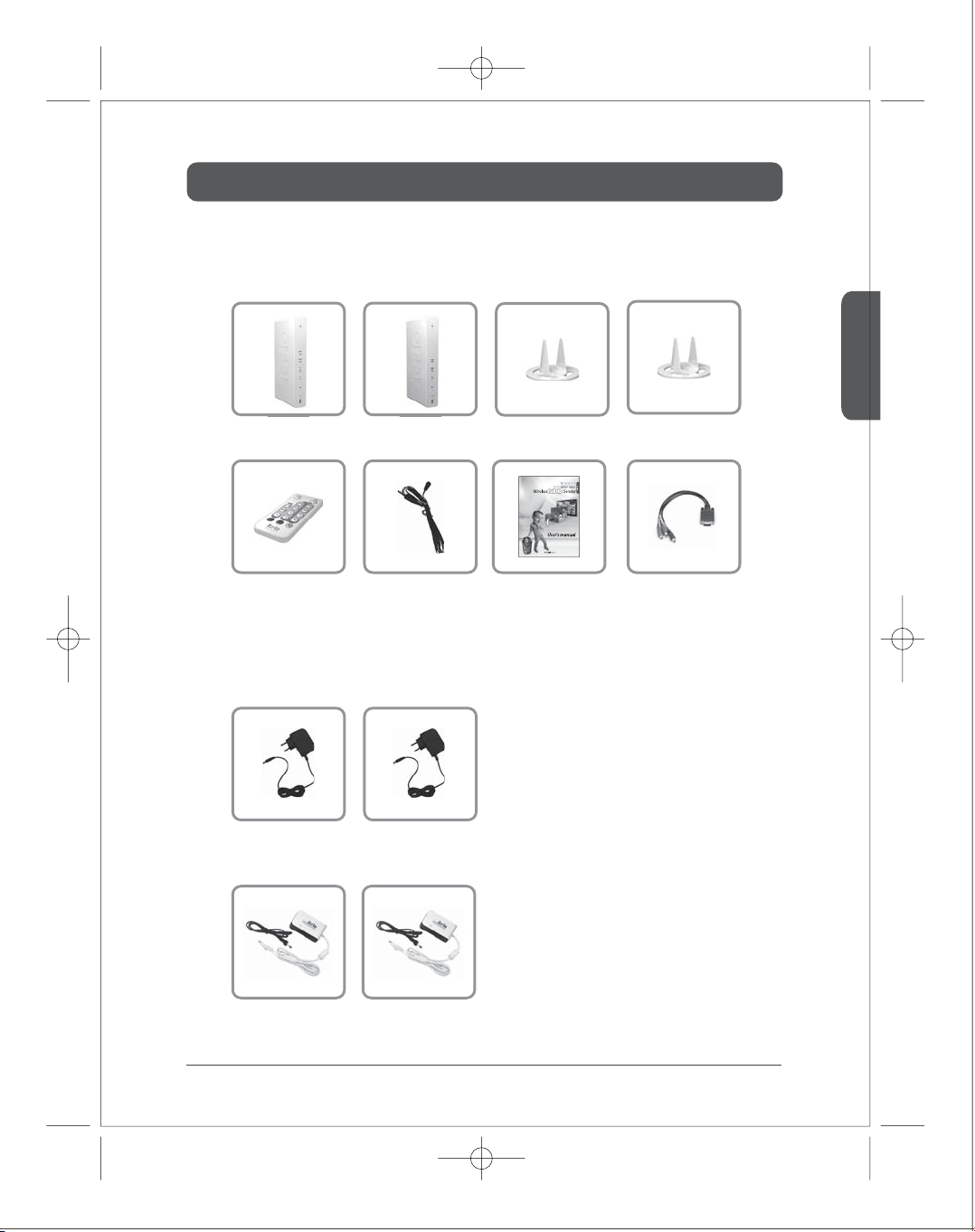
■
※Before you use the product, check the following components are all present.
Transmitter Receiver Stand1 Stand2
■
Adapter1 Adapter2
Components
Adapter by model
PLC1 PLC2
Remote Control IR-Flasher
- HD-W100 / HD-L100
- HD-P100
User’s Manual Component adaptor
Operation Control & Function
English
8
■
■
1
2
3
4
5
6
7
1
2
3
4
5
6
7
8
Description
Function
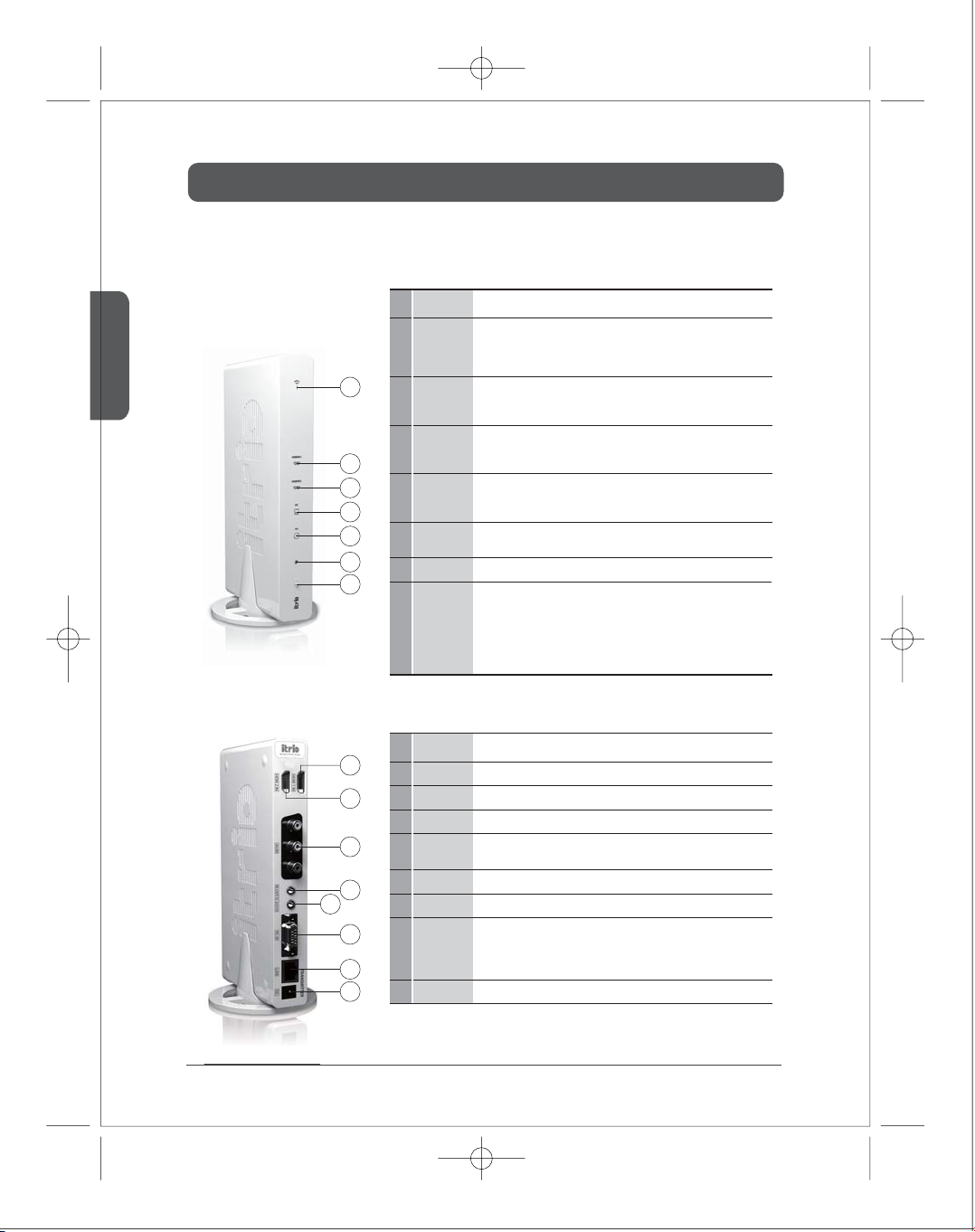
HDMI2-IN
AV-IN
IR-OUT
PC AUDIO-IN
2
3
4
5
HDMI 2 input port (correspond to ‘HDMI2’ on the remote control)
HDMI1-IN
1
HDMI 1 input port (correspond to ‘HDMI1’ on the remote control)
Composite or SCART input port (correspond to ‘AV’ on remote control)
PC-IN
6
Support component input through component gender.
It will be used for the following feature
Stereo Audio input port
DC
8
Power input port
Connect IR Flasher to control external devices which are connected to the
transmitter.
LAN
7
Power and
Source Button
Description
Function
1
IR window
2
IR receiving window from remote control.
AV
3
4
PC
HDMI2
5
It will be on when the HDMI2 port is selected for the video input.
If the cable is not connected or video signal is not fed into properly, LED will blink.
6
HDMI1
It will be on when the HDMI1 port is selected for the video input.
If the cable is not connected or video signal is not fed into properly, LED will blink.
7
Power/Link LED
○
○
Press it shortly to turn the power on.
When power on,
-
-
Press shortly : Press to select the video input source. Each press the power
button will cycle through the available video input "HDMI1
→
MHMI2
→
PC
→
AV
→
HDMI1" in sequence.
Press longer : Press and hold more than 3 seconds to turn the power o.
○
○
○
Connection to PLC modem
Direct connection to LAN cable
Connection to PC for the system conguration setting
Transmitter Front
Transmitter Rear
It will be on when the AV-IN port (Composite or Scart) is selected for the video
input.
It will be on when the PC-IN port is selected for the video input.
If the cable is not connected or video signal is not fed into properly, LED will blink.
○
○
○
Blink : System booting or establishing link between the transmitter and the receiver.
Quick Blink : Software upgrading or wireless/LAN mode switching.
On : Finish of link establishment is completed between the transmitter and the
receiver.
Operation Control & Function
English
9
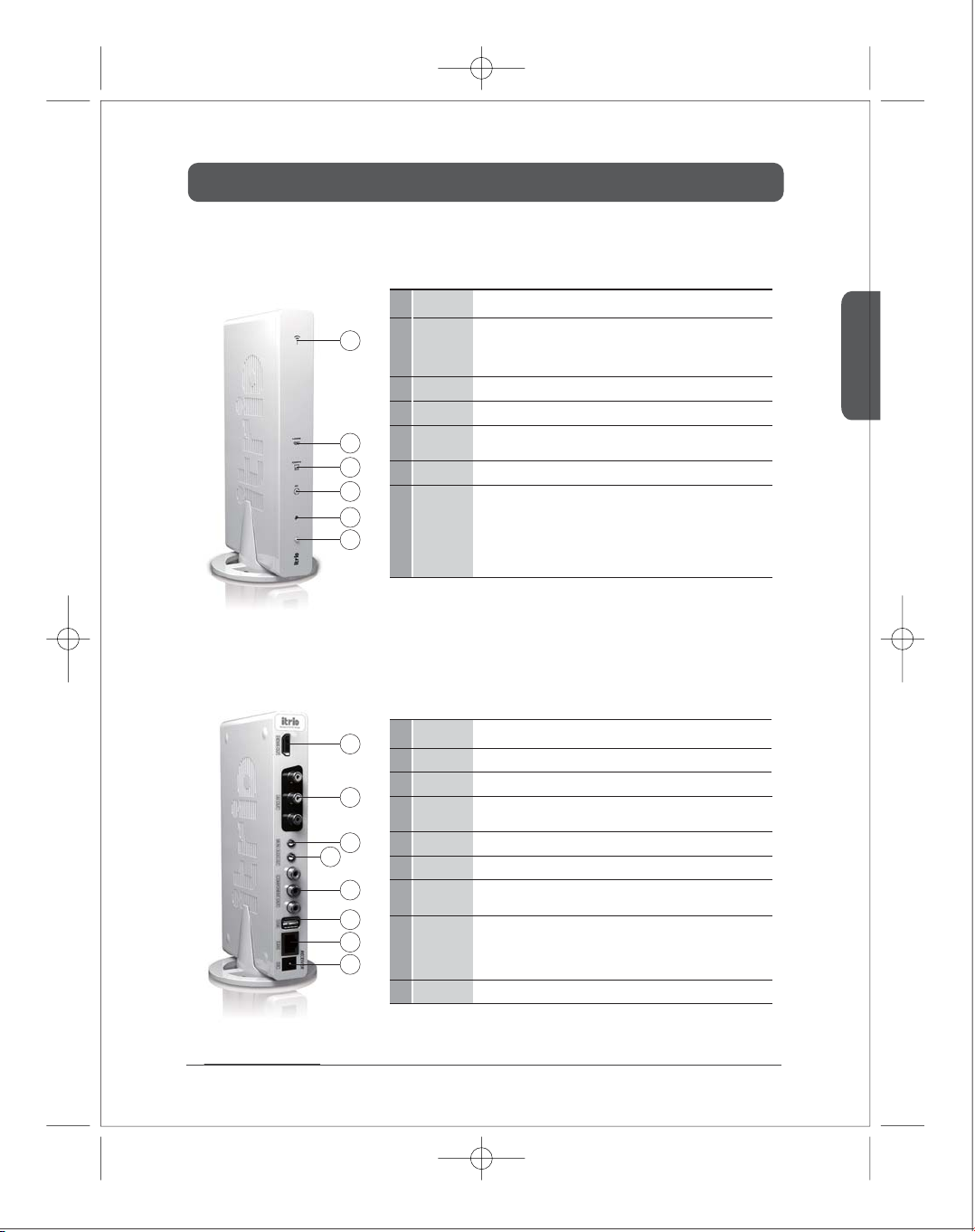
AUDIO-OUT
4
Connect additional IR Extender in order to extend receiving the
remote control.(purchase separately)
○
○
Press it shortly to turn the power on.
When power on,
-
-
Press shortly : Press to select the video input source. Each press the power
button will cycle through the available video input "HDMI
→
COMPO
→
AV
→
HDMI " in sequence.
Press longer : Press and hold more than 3 seconds to turn the power o.
■
■
Receiver Front
Receiver Rear
1
2
3
4
5
6
1
2
3
4
5
6
7
8
Description
Function
AV-OUT
2
HDMI-OUT
1
HDMI output port
IR-IN
3
COMPONENT-OUT
5
Component output port
Stereo Audio output port
DC
8
Power input port
Composite or Scart output port
LAN
7
USB
6
This USB port is for software upgrade.
(For more information, please refer to Software upgrade on page 17. )
Power and
Source Button
Description
Function
1
IR window
2
IR receiving window from remote control.
3
4
COMPO
5
HDMI It will be on when the HDMI-OUT port is selected for the video output.
6
Power/Link LED
○
○
○
Blink : System booting or establishing link between the transmitter and the receiver.
Quick Blink : Software upgrading or wireless/LAN mode switching.
On : Finish of link establishment is completed between the transmitter and the
receiver.
AV It will be on when the AV-OUT port (composite or SCART) is selected for the video
output.
It will be on when the COMPONENT-OUT port is selected for the video output.
LAN cable will be used for the following feature
○
○
○
Connection to PLC modem
Direct connection to LAN cable
Connection to PC for the system conguration setting
Operation Control & Function
English
10
12
5
4
3
68
7
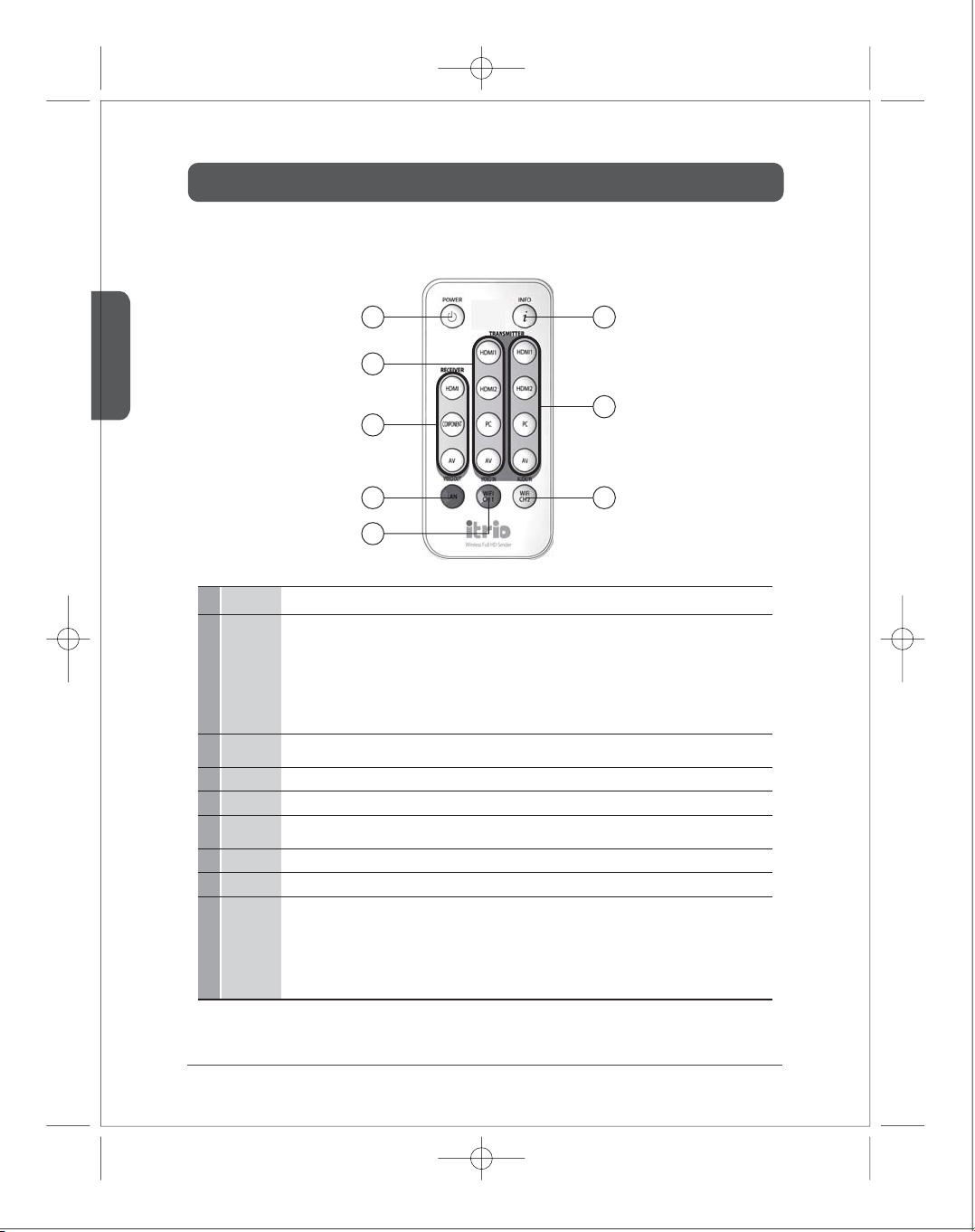
■ Remote control
Description
Function
Display the current resolution, input / output ports, channel, WiFi reception (1/5~5/5). (5/5 strongest, 1/5 weakest)
It appears when you press and disappears automatically after around 20 seconds.
Note1. If the power is o abnormally, the user's conguration may not be saved.
Note 1.
Note 2.
Note 3.
Note 4.
⑥~⑧are functioned HD-W100 model only.
⑥~⑧are applied only when you press the button more than 5 seconds. On the normal link stage, if you change either TX or RX both device
will be changed simultaneously.
Otherwise you should change on TX and RX separately. (Info screen appears on the display for 3 seconds if it changes appropriately.
It will be rebooting when you change for ⑥~⑧. Power/Link LED will blink in a short time and reboot.
Link may be interfered caused by wrong setting or malfunction of ⑥~⑧button. In this case, please select desired communication mode
(LAN/WiFi) or channel to each transmitter and receiver using remote control.
INFO
2
AUDIO IN
5
VIDEO OUT
3
VIDEO IN
4
Select VIDEO input port on the transmitter (HDMI1, HDMI2, PC, AV)
Select VIDEO output port of the receiver (HDMI, COMPO , AV)
LAN(Red)
6
WiFi Ch1(Green)
7
WiFi Ch2(Yellow)
8
Select WiFi (Wireless) mode, Ch2.
* TX : Transmitter, RX : Receiver
Select WiFi (Wireless) mode, Ch1.
Select LAN (Cable) mode.
POWER
1
○
○
○
Power on :
- If you turn on TX or RX when power/Link LED is on , both devices will be power-on simultaneously within 10 seconds.
- You have to turn on each of TX and RX separately when power/Link LED is o, it may takes around 1 min 30 seconds for booting up.
Power o (press shortly) : When you turn o TX or RX, both devices will be power-o simultaneously and only power LED will be on.
Power o (press more than 4 sec) : When you turn o TX or RX, both devices will be power-o simultaneously, and LED will be o.
Power will be completely turned o.
To turn on/o the power of transmitter and receiver.
Select AUDIO input port on the transmitter (HDMI1, HDMI2, PC, AV)
Audio port is selected same with video port as a default. But you can select particular audio port using this button.
Installation
English
11
1)
2)
3)
4)
5)
6)
7)
8)
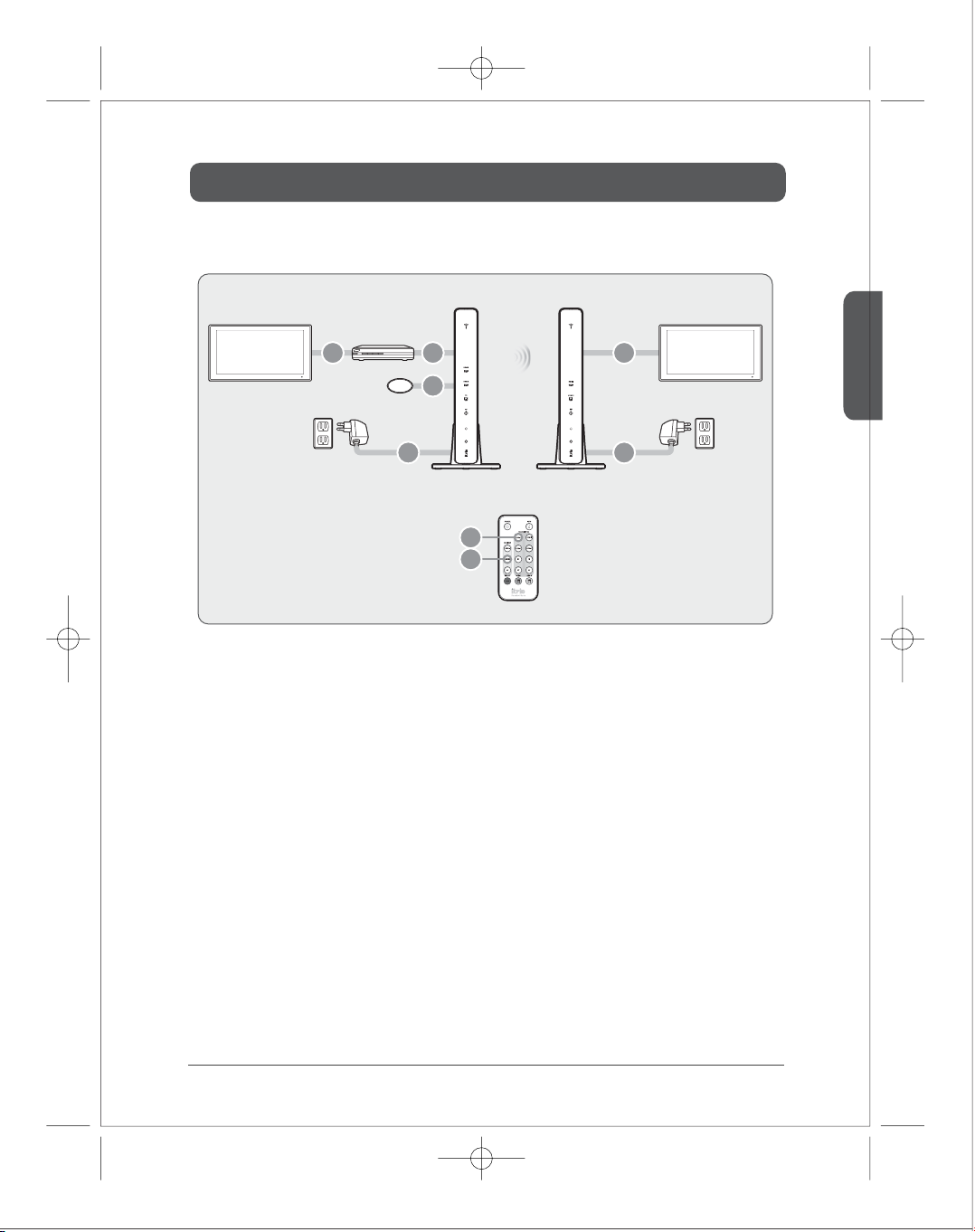
Connect external devices to TV.
Connect external devices to the transmitter through HDMI/COMPONENT/COMPOSITE port.
Attach the IR Flasher in front of IR window of external devices.
Connect the receiver to TV through HDMI/COMPONENT/COMPOSITE port.
Connect the power adapter of the transmitter.
Connect the power adapter of the receiver.
It would takes around 1 min30sec to be turned on.
Select the input port of the transmitter using either remote controller or button on the front of the device after
the system is on.
Select the output port of the receiver using either remote controller or button on the front of the device.
■ WiFi product
IR Flasher
External Device
TV1 TV2
Adapter Adapter
Transmitter Receiver
124
3
56
7
8
Table des matières


