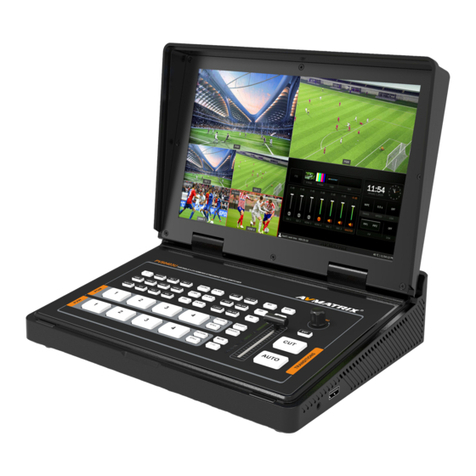
AVMATRIX HVS0401 Manuel utilisateur

MINI 4 CHANNEL HDMI/DP LIVE STREAM
MULTI-FORMAT VIDEO SWITCHER


USING THE UNIT SAFELY
Before using this unit, please read below warning and precautions which provide important information
concerning the proper operation of the unit. Besides, to assure that you have gained a good grasp of
every feature of your new unit, read below manual. This manual should be saved and kept on hand for
further convenient reference.
Warning And Cautions
※To avoid falling or damage, please do not place this unit on an unstable cart, stand, or table.
※Operate unit only on the specified supply voltage.
※Disconnect power cord by connector only. Do not pull on cable portion.
※Do not place or drop heavy or sharp-edged objects on power cord. A damaged cord can cause fire or
electrical shock hazards. Regularly check power cord for excessive wear or damage to avoid possible fire
/ electrical hazards.
※Ensure unit is properly grounded at all times to prevent electrical shock hazard.
※Do not operate unit in hazardous or potentially explosive atmospheres. Doing so could result in fire,
explosion, or other dangerous results.
※Do not use this unit in or near water.
※Do not allow liquids, metal pieces, or other foreign materials to enter the unit.
※Handle with care to avoid shocks in transit. Shocks may cause malfunction. When you need to
transport the unit, use the original packing materials or alternate adequate packing.
※Do not remove covers, panels, casing, or access circuitry with power applied to the unit! Turn power off
and disconnect power cord prior to removal. Internal servicing / adjustment of unit should only be
performed by qualified personnel.
※Turn off the unit if an abnormality or malfunction occurs. Disconnect everything before moving the unit.
Note: due to constant effort to improve products and product features, specifications may change without
notice.


1
CONTENTS
1. BRIEF INTRODUCTION...............................................................................................................................2
1.1. Overview...................................................................................................................................................... 2
1.2. Main Features............................................................................................................................................. 2
2. INTERFACES................................................................................................................................................. 3
2.1. Rear Interfaces............................................................................................................................................3
2.2. Tally PIN Definition.....................................................................................................................................3
3. SPECIFICATION............................................................................................................................................4
4. FRONT CONTROL PANEL..........................................................................................................................5
5. OPERATION INSTRUCTION...................................................................................................................... 6
5.1. Multiview Output Layout............................................................................................................................ 6
6. USB CAPTURE..............................................................................................................................................6
7. MENU SETTING............................................................................................................................................ 6
7.1. PGM and Multiview Output Format..........................................................................................................6
7.2. Audio Setting............................................................................................................................................... 7
7.2.1. Mixing Mode.............................................................................................................................................7
7.2.2. AFV Mode.................................................................................................................................................7
7.3. PIP Mode..................................................................................................................................................... 8
7.4. Main Menu Setting......................................................................................................................................8
7.4.1. System Settings.......................................................................................................................................9
7.4.2. Network Settings..................................................................................................................................... 9
7.4.3. Device Info..............................................................................................................................................10
8. SOFTWARE CONTROL AND TIME SETTING...................................................................................... 10
8.1. Software control........................................................................................................................................ 10
8.2. Time Setting.............................................................................................................................................. 10

2
1. BRIEF INTRODUCTION
1.1. Overview
HVS0401 is a micro-designed metal case with a 4-channel HDMI/DP multi-format video Switcher that
allows video switching, audio mixing, and different conversion effects. Input signal automatic detection,
PGM output can be scaled, compatible with a variety of equipment, more flexible. USB output can be
directly connected to a computer. The cost-effective switcher will be your perfect choice for live streaming
applications.
1.2. Main Features
4 channel inputs: 4×HDMI,1×DP (for optional).
Outputs:2×HDMI PGM,1×HDMI multiview.
USB3.0 to connect PC to realize live streaming.
Auto/Cut transitions and Mix/Fade effects.
PiP function, both size and position is adjustable.
Audio mixer: 3.5mm stereo/RCA Audio& HDMI.
GPIO interface for live tally system embedded audio.
FTB for emergency.

3
2. INTERFACES
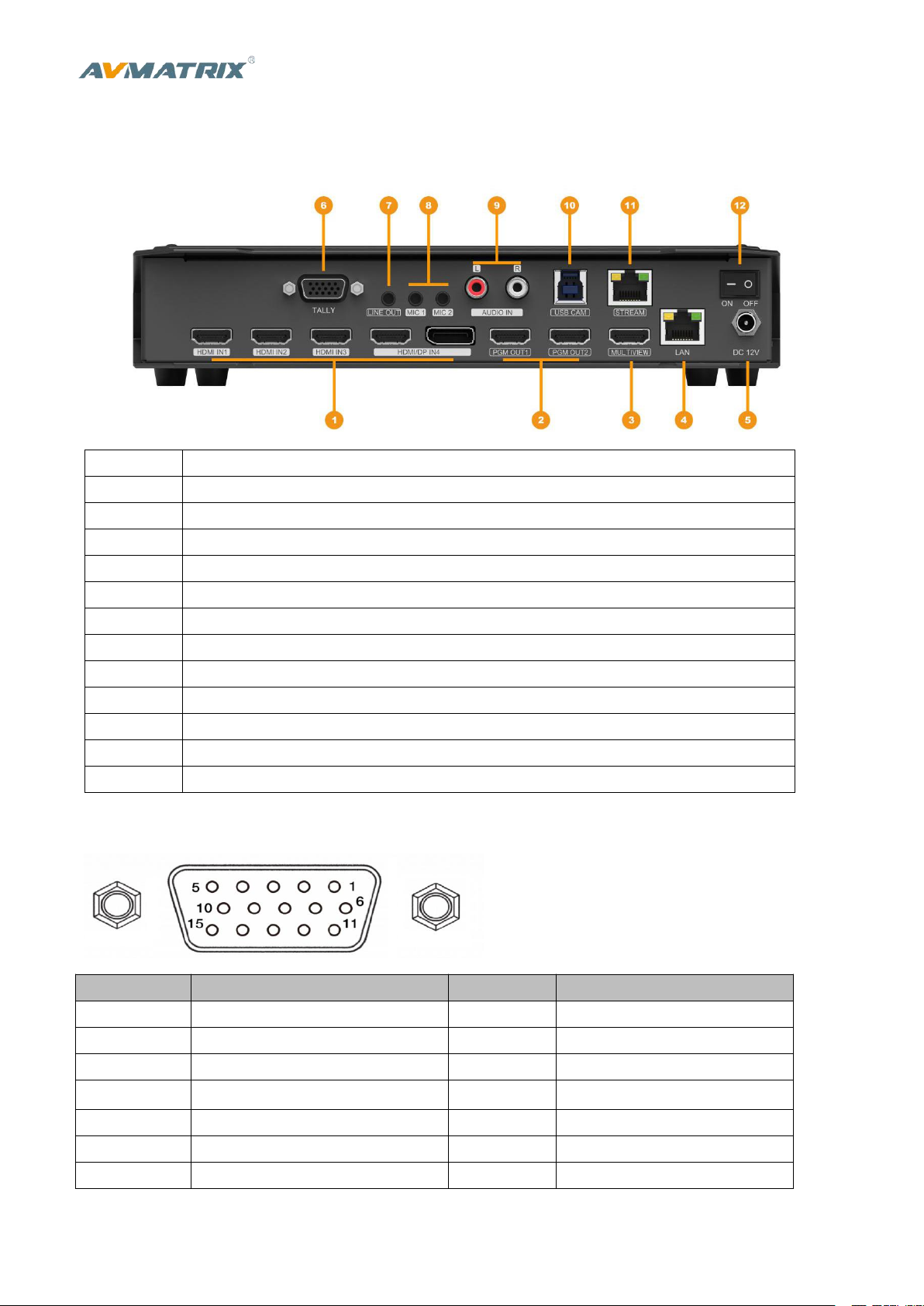
2.1. Rear Interfaces
1
HDMI/DP IN
2
HDMI PGM OUT
3
HDMI MULTIVIEW OUT
4
RJ45 FOR UPDATE
5
DC 12V
6
GPIO (for tally)
7
ANALOG AUDIO OUT (3.5mm, LINE OUT)
8
ANALOG AUDIO IN (3.5mm, LINE IN)
9
ANALOG AUDIO (RCA L/R) IN
10
USB TYPE-B, FOR WEB CAM
11
RJ45 RESERVED FOR UPDATESTREAM
12
DC 12V
13
POWER SWITCH
2.2. Tally PIN Definition
PIN
Definition
PIN
Definition
11
PGM-IN1
6
PVW-IN1
12
PGM-IN2
7
PVW-IN2
13
PGM-IN3
8
PVW-IN3
14
PGM-IN4
9
PVW-IN4
15
PGM-IN5
10
PVW-IN5
3
PGM-IN6
4
PVW-IN6
5
GND

4
3. SPECIFICATION
CONNECTION
Video In
CH1~CH3: HDMI type-A(100Ω) ×3; CH4: HDMI type-A(100Ω)/ Display Port×1
Video Out
PGM: HDMI type-A(100Ω) ×2; Multiview: HDMI type-A(100Ω) ×1,
USB CAM: USB2.0 type B×1; RJ45×1: Reserved for Live Stream
Analog Audio In
3.5mm stereo audio (Line in) ×2, RCA(L/R) ×1
Analog Audio Out
3.5mm stereo audio (Line out) ×1
PC Control Port
RJ45×1
Other Interface
Tally: DB-15 port×1, TF Card Slot ×1: Reserved
FUNCTIONS
Transitions
AUTO/ CUT
Functions
Wipe/ Mix/ Fade/ FTB
Layouts
PiP/ Multiview
STANDARDS
HDMI In Format
Support
1080p 60/59.94/50/30/29.97/25/24/23.98/23.976,
1080i 50/59.94/60,
720p 60/59.94/50/30/29.97/25/24/23.98,
576i 50, 576p 50, 480p 59.94/60, 480i 59.94/60
PC HDMI/DP In Format
Support
1920×1080,1680×1050, 1600×900, 1440×1050, 1366×768, 1360×768,
1280×1024, 1280×960, 1280×800, 1280×768, 1280×720, 1280×600, 1152×864,
1024×768, 800×600
HDMI PGM Out
1080p 60/50/30/25/24, 1080i 60/50
USB Capture Out
Up to 1080p 60
Multiview Out
1080p 50/60
HDMI Color Space
RGB 444/ YUV 444/ YUV 422
OTHERS
Current
12V, 1.5A, 18W
Dimension (LWD)
238.5 × 140.5 × 43.5mm
Weight
785g
Temperature
Working: -20℃~60℃, Storage: -30℃~70℃

5
4. FRONT CONTROL PANEL
1
PVW:1-4
Selecting the signal source for Preview. Bar for color bar.
2
PGM:1-4
Selecting the signal source for Program. Bar for color bar.
3
AUDIO
Support 2-ch audio mixing, AFV & MIX Audio mode,
Source selecting, volume + & volume -
4
FUNC. BUTTON
F1: Set PGM out format from 1080P 50/60/30/25/24Hz, 1080I 50/60Hz.
F2: IN4 source switch between HDMI and DP.
F3: Set audio volume of USB streaming media OFF/20/40/60/80/100%.
F4: Set the audio of PGM mute.
F5: Rotate USB streaming media 90 degrees clockwise.
F6-F8: Reserved.
5
OTHER FUNC.
FTB: Fade to Black, used for emergency.
PIP: Picture in Picture.
STILL: PGM output still.
6
MENU
For menu control
7
SPEED
Control transition rate
8
AUTO
Performs an automated switch between Program and Preview.
9
CUT
Performs a simple immediate switch between Program and Preview.
10
EFFECTS
Wipe, mix & fade transitions

6
5. OPERATION INSTRUCTION
5.1. Multiview Output Layout
The Multiview includes PGM (Program), PVW (Preview), 4 HDMI signal sources, menu, clock, and status
display of Function key, Still, UVC, and working temperature.
6. USB CAPTURE
The switcher's USB output is based on UVC (USB video class) and UAC (USB audio class) standard. No
additional drivers must be installed. After installation in operating system, the relevant video and audio
devices will be added. In the Windows Device Manager, for example, it will appear two new devices:
•Under Camera: Switcher USB Video
•Under Audio inputs and outputs: Switcher USB audio
Use a third-party Video Media Player software like OBS, PotPlayer, VLC, Windows Media Player to play
and store the captured video content.
7. MENU SETTING
7.1. PGM and Multiview Output Format
PGM output format can be set from menu or F1 button (refer to part 4). There are 1080P
50/60/30/25/24Hz, 1080I 50/60Hz selectable for PGM outputs. The Multiview output is follow PGM at
1080P 50/60Hz format.
Table des matières
Autres manuels AVMATRIX Changer

AVMATRIX
AVMATRIX HVS0402U Manuel utilisateur

AVMATRIX
AVMATRIX PVS0403U Manuel utilisateur

AVMATRIX
AVMATRIX PVS0605 Manuel utilisateur

AVMATRIX
AVMATRIX HVS0401E Manuel utilisateur

AVMATRIX
AVMATRIX HVS0403U Manuel utilisateur

AVMATRIX
AVMATRIX PVS0613 Manuel utilisateur

AVMATRIX
AVMATRIX PVS0615 Manuel utilisateur

AVMATRIX
AVMATRIX PVS0615U Manuel utilisateur

AVMATRIX
AVMATRIX PVS04043U Manuel utilisateur

AVMATRIX
AVMATRIX VS0601U Manuel utilisateur