
AVIEM Systems Spring MT 500 Manuel utilisateur

Line Interactive UPS
Spring MT 500
Spring MT 750
Spring MT 1000
Spring MT 1500
Quick S

CONTENT
IMPORTANT SAFETY INSTRUCTIONS......................................................1
1. Introduction...............................................................................................4
2. Description of Features.............................................................................4
3. Package Contents ....................................................................................4
4. Product Overview .....................................................................................5
5. Installation and Initial Startup....................................................................9
6. Functions & Operation............................................................................12
7. Software Installation on your PC ............................................................13
8. Maintenance ...........................................................................................14
9. Trouble Shooting.....................................................................................16
10. Specifications........................................................................................17

1
IMPORTANT SAFETY INSTRUCTIONS
SAVE THESE INSTRUCTIONS –This manual contains important instructions
for models Spring MT 500/750/1000/1500 that should be followed during
installation and maintenance of the UPS and batteries.
This product is specially designed for PCs and it is not recommended for
use in any medical equipment, life-supporting system and other specific
important equipment.
Do not plug household appliances such as hair dryers, microwave ovens
or vacuum cleaners to UPS.
Do not attach a power strip or surge suppressor to the UPS.
Do not plug the UPS into its own output.
Connection to any other type of receptable other than two-pole, three-wire
grounded receptacle may result in shock hazard as well as violate local
electrical codes.
To reduce risk of overheating the UPS, do not cover the UPS´ cooling
vents.
This unit intended for installation in a controlled environment (temperature
controlled, indoor area free of conductive contaminants). Avoid installing
the UPS in locations where there is standing or running water or
excessive humidity and do not use it in any of the following environments:
oAny area with combustible gas, corrosive substance or heavy dust.
oAny area with extraordinarily high or low temperature (above 40˚C or
below 0˚C) and humidity of more than 90%.
oAny area exposed to direct sunshine or near any heating apparatus.
oAny area with serious vibrations.
oOutdoor.
The utility power outlet shall be near the equipment and easily accessible.
In the event of an emergency, press OFF button and disconnect the
power cord from the AC power supply to properly disable the UPS.

2
The internal short circuiting of the UPS will lead to dangers such as
electric shock or fire; therefore do not allow liquids or any foreign object to
enter the UPS. No water containers (such as a water glass) or any other
liquid-containing vessels shall be placed on the top of the UPS so as to
avoid such dangers as electric shock.
Please do not use the UPS in excess of the rated load capacity.
Unplug the UPS prior to cleaning and do not use liquid or spray detergent.
Risk of electric shock, do not attempt to disassemble the unit. No user
serviceable parts inside. Refer servicing to qualified service personnel.
If UPS is to be stored for a long time, it is recommended to recharge the
batteries (by connecting the utility power to UPS, switch “ON”), once a
month for 24 hours to avoid a full battery discharge.
In case smoke is found coming out from the device, please cut off the
power supply quickly and contact the distributor.
The UPS contains one/two large-capacity batteries. So the shell shall not
be opened, otherwise such dangers as electric shock will be caused. If
any internal overhaul or replacement of the battery is required, please
contact the distributor.
Servicing of batteries should be performed or supervised by personnel
knowledgeable of batteries and the required precautions. Keep
unauthorized personnel away from batteries.
A battery can present a risk of electrical shock and high short circuit
current. The following precautions should be observed when working on
batteries:
oRemove watches, rings, or other metal objects from the hand.
oUse tools with insulated handles and wear rubber gloves and boots.
oDo not lay tools or metal parts on top of batteries.
oDisconnect charging source prior connecting or disconnecting
batteries terminals.
When replacing batteries, replace with the same type and number of the
sealed lead-acid batteries.
The maximum ambient temperature rating is 40°C.

3
Do not dispose of battery or batteries in a fire. The battery may explode.
Do not open or mutilate the battery or batteries. Released electrolyte is
harmful to the skin and eyes. It may be toxic.
Icon Φ on the rating label stands for phase symbol.
This pluggable type A equipment with battery already installed by the
supplier is operator installable and may be operated by laymen.
During the installation of this equipment it should be assured that the sum
of the leakage currents of the UPS and the connected loads does not
exceed 3.5mA.
Attention, hazardous through electric shock. Also with disconnection of
this unit from the mains, hazardous voltage still may be accessible
through supply from battery. The battery supply should be therefore
disconnected in the plus and minus pole of the battery when maintenance
or service work inside the UPS is necessary.
In the event that there is fire occurring in the vicinity, please use
dry-power extinguishers. The use of liquid extinguishers may give rise to
the danger of electric shock.
Operate altitude should not exceed 2000m.
This product complies with the safety and environmental regulations in
EU.
If the time arises to throw away your product, please recycle all the
components possible. Batteries and rechargeable batteries are not to be
disposed in your domestic waste! Please recycle them at your local recycling
point. Together we can help to protect the environment.

4
1. Introduction
Spring MT series is an intelligent and compact line interactive UPS
(Uninterruptable Power Supply) which is designed to protect your personal
computer or sensitive electronic equipments from all forms of power
interference, including complete power failures. It is equipped with many
features that allow any attached equipment to operate longer and more
reliability.
2. Description of Features
Easy to use and install utilized microprocessor control to maximize the
reliability and efficiency
Equipped with built-in boost and buck AVR function
DC Cold start function
Green Power Function for energy saving
Auto restart while AC recovery.
Provides AC Overload protection
RJ11/RJ45 (in/out) LAN/Modem/Phone line protection
IEC/FR/DIN/NEMA various output.
3. Package Contents
You should have received the following items inside of package:
UPS Unit
USB Cable
AC Input Power Cord
AC output Power cord
(only for IEC models)
Software CD
User Manual

5
4. Product Overview
I: Front Panel:
II: Rear Panel---IEC:
500VA/750VA
1000VA/1500VA
AC input
RJ11/RJ45 LAN/Modem/phone
line protection
USB port
IEC outlet
AC input
RJ11/RJ45 LAN/Modem/phone
line protection
USB port
IEC outlet
Fan
ON/OFF button
Scroll down button
Mute button
LCD display

6
Rear Panel---FR:
500VA/750VA
1000VA/1500VA
AC input
RJ11/RJ45 LAN/Modem/phone
line protection
USB port
FR outlet
AC input
RJ11/RJ45 LAN/Modem/phone
line protection
USB port
FR outlet
Fan
Rear Panel---DIN:
500VA/750VA
1000VA/1500VA

7
AC input
RJ11/RJ45 LAN/Modem/phone
line protection
USB port
DIN outlet
AC input
RJ11/RJ45 LAN/Modem/phone
line protection
USB port
DIN outlet
Fan
Rear Panel---NEMA:
500VA/750VA
1000VA/1500VA
AC input
RJ11/RJ45 LAN/Modem/phone
line protection
USB port
NEMA outlet
AC input
RJ11/RJ45 LAN/Modem/phone
line protection
USB port
NEMA outlet
Fan
8
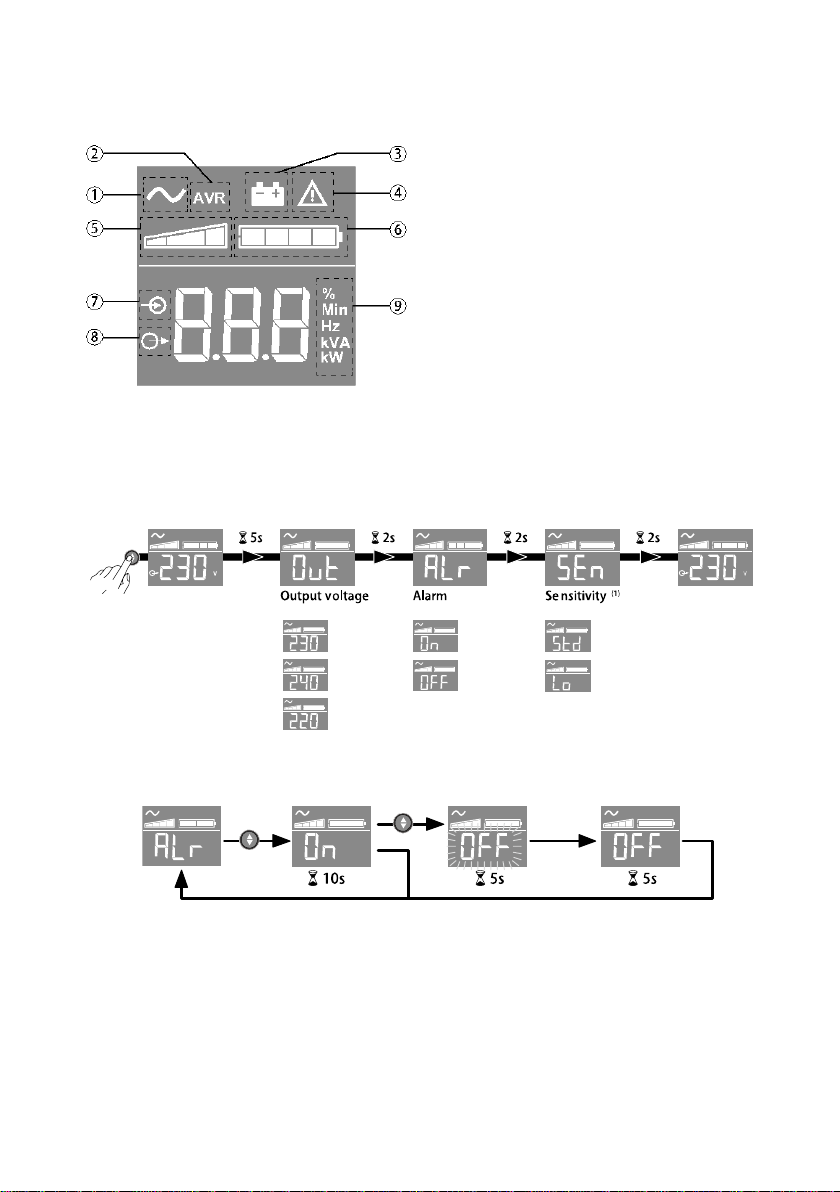
III: LCD description:
IV: UPS setting through the LCD:
Release scroll down button to select menu
Example of setting
Save the new value
LCD will shut off if there is no activity for 3 minutes.
(1) In low sensitivity mode (Lo) UPS will tolerate more fluctuations in power
and will go on battery power less often. If the connected load is sensitive to
power disturbances, keep the sensitivity as Standard (Std).
UPS ON
AVR mode
Battery mode
Internal fault
Output load level
Battery level
Input measurements
Output measurements
Measuring unit
Ce manuel convient aux modèles suivants
3
Table des matières
Autres manuels AVIEM Systems UPS

Manuels UPS populaires d'autres marques

Pylontech
Pylontech Victron & Pylontech US5000 Manuel utilisateur

Tecnoware
Tecnoware EVO DSP PLUS MM 6.8 Manuel utilisateur

Mecer
Mecer ME-1000-WTU Manuel utilisateur

Mustek
Mustek PowerMust 530(B) Plus Manuel d'installation et d'exploitation

Emerson
Emerson Liebert NXL series Manuel utilisateur

MAKELSAN
MAKELSAN BOXER SERIES Manuel utilisateur


