ATBS DV900 Black Box Manuel utilisateur

ATBS Technology Co. http://www.tpms.tw/
DV900/DV939/DV708
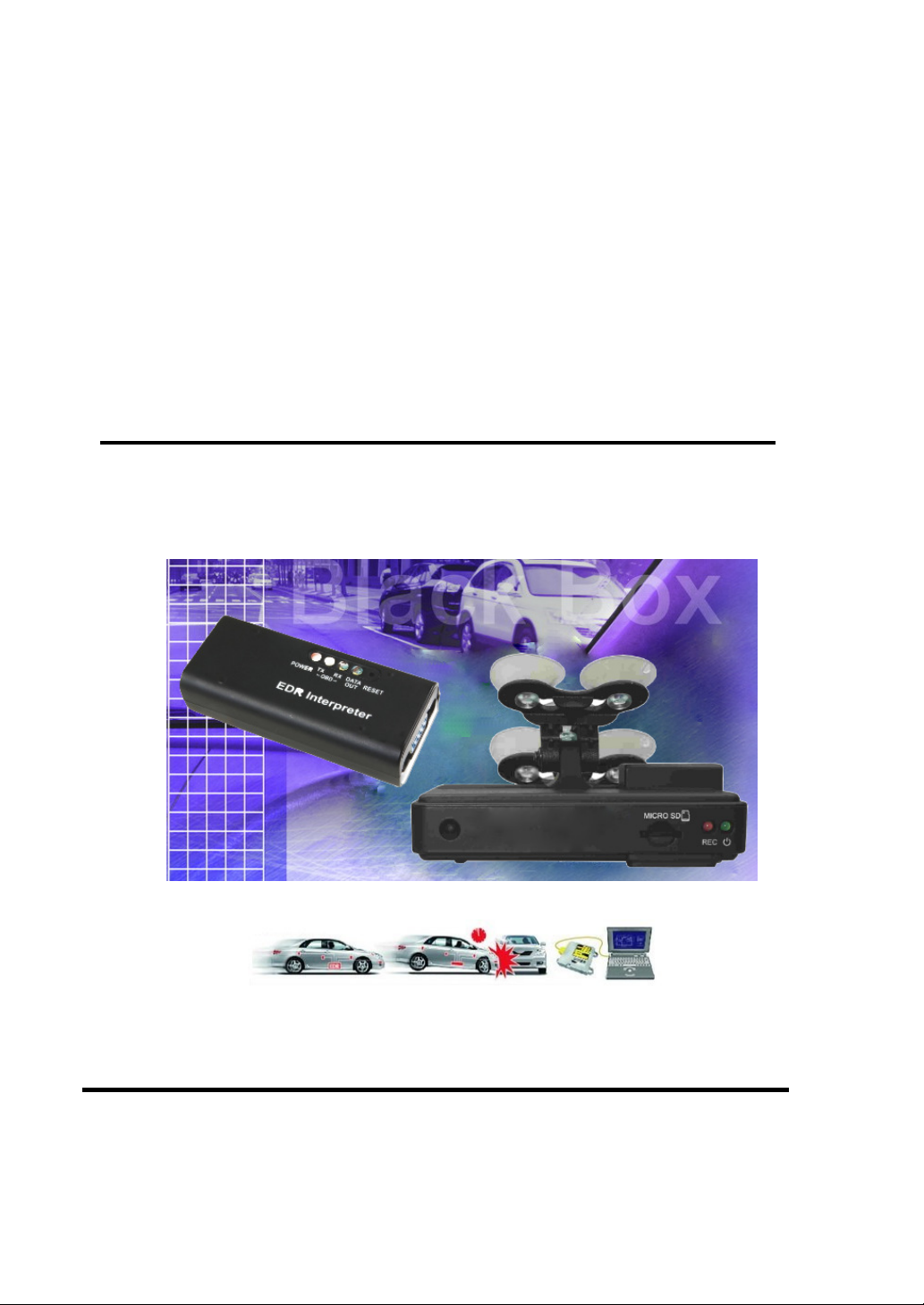
Black Box
Vehicle Video Recorder
User Manual
2011 JAN. V1.0

ATBS Technology Co. http://www.tpms.tw/
Table of Contents
A. Features ......................................................................................................... 1
B. Specification.................................................................................................... 1
C. Structure of Product ........................................................................................ 3
D. Dimension........................................................................................................ 4
E. Installation Guide............................................................................................. 5
F. Led Indicator Instruction................................................................................... 8
G. Software Player Instruction ............................................................................. 9
H. Formatting Memory Card ............................................................................... 14
I. Caution ...........................................................................................................15
J.
Troubleshooting …………………………………………………………………...15

- 1 -
A. Features
1.
Ideal for personal car, taxi, trucks and buses.
2.
Easy to install. Small in size to prevent blocking the driver's view.
3. Plug-n-Play. It can be recorded traffic information and outside driving
conditions and inside sounds simultaneously.
4. 4mm view angle 90 degrees(optional lenses M12)
5. Store with Micro-SDHC Card (recommend to use Class4 above
grade.)
6. Image data stored in Micro-SDHC Card can be completely against
the vehicle moving in the shock.
7. No needs to operate when plug the card to start recording with power.
8. The full recording time and date can be showing in the monitor
directly Overall Quick Search Event Log.
9.
Ending File in Particular Format Saved Fine in Condition of Power Cut No
Battery
10. Professional file formats, without built-in lithium battery, no needs to
afraid of heat and bursting concerns, it is the real black box.
11. Using professional-grade compression engine with data files can’t be
modified to construct the best recorder.
12. Without any electromagnetic radiation or any electromagnetic
interference, the car will not interfere with GPS or wireless devices.
13. Using OBD2 connect to vehicle’s ECU communication, plug and play.
Traffic information can be translated to Excel file for traffic accident
analysis
B. Specifications
Item Specification
Chipset H.264 Image compression chip
Sensor Device VGA CMOS Sensor
View Angle 4mmLens with view angle 90 degrees(optional for
M12)
Voltage Start transient voltage 5V ± 5%
Operating Temp. -10
℃
~ 70
℃

- 2 -
Storage Device Silicon Power or Transcend Micro SDHC card Class 4
or above,
(m in capac it y 4G a bove)
Recording Frame 640x480 Highest 30fps( NTSC ) / 25fps( PAL )
Recording content Date, time, image, sound data, and traffic information
Storage Device Specific format for specific software player.
Microphone Built-in microphone
Time Setup To set the time with Player in the micro SD card
Input and output device
(a)AV out( 1 Vp-p composite video output,
75ohms )
。
(b) Red Light: recording.
(c) Green light: Power
Note: The system is divided into NTSC / PAL both.
Accessories
A. EDR interpreter and cable configured:
DV900: AT0428H (support 25 protocols/ 500 car
models) and CB0428_12V cable.
DV939:AT1939H and CB1939/CB0428_24V cable
DV708:AT1708H and CB1708/CB0428_24V cable
DV948:AT3648H and CB0428_12V cable
B. TV out cable
C. User manual
D. CD (Contains software player & manual)
Description
We suggest to format Micro SDHC card first with
Player and then put the card to record. Also the
machine E26 could format Micro SDHC card
automatically with a few minutes without interruption.
Important notice
Memory card formatted using the playback software,
windows will recognize the remaining capacity about
80MB for copy the playback software to memory card.

3
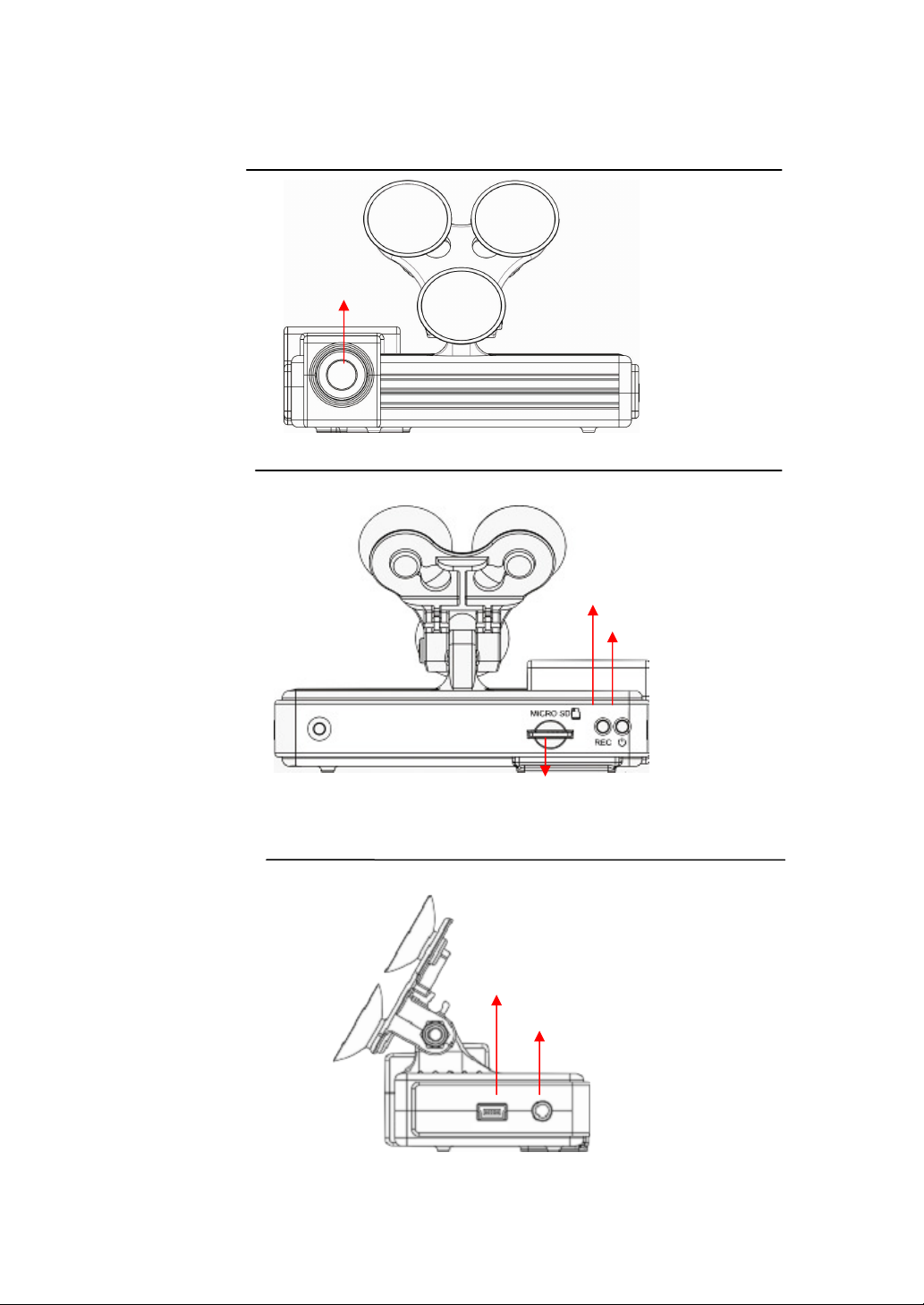
C. Structure of Product
Front View
Back view
Side view
Len
Connect to EDR
AV out
Micro SD card
Record
Power LED

4
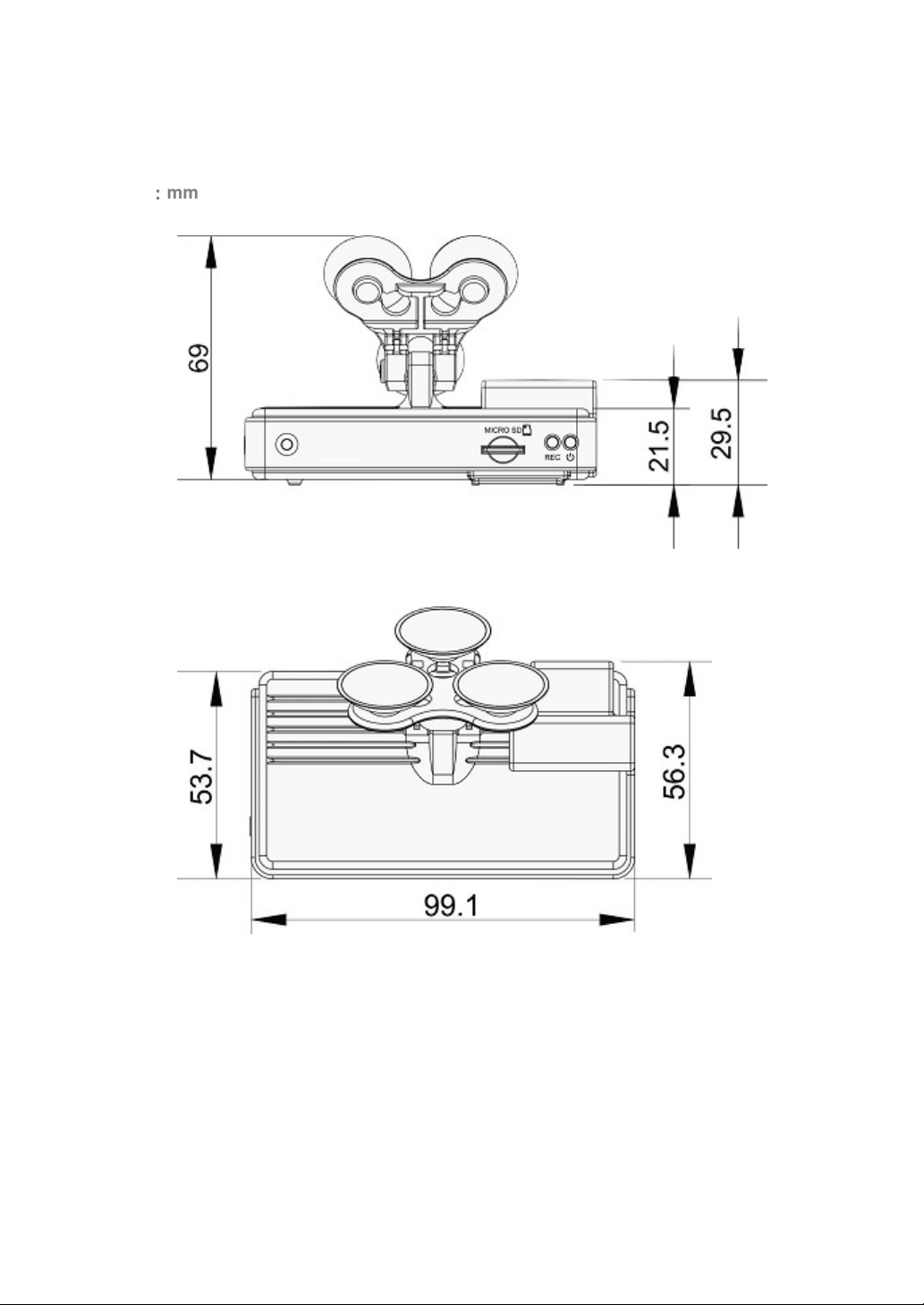
D. Dimension
Unit
:
::
:
mm

5
E. Installation Guide
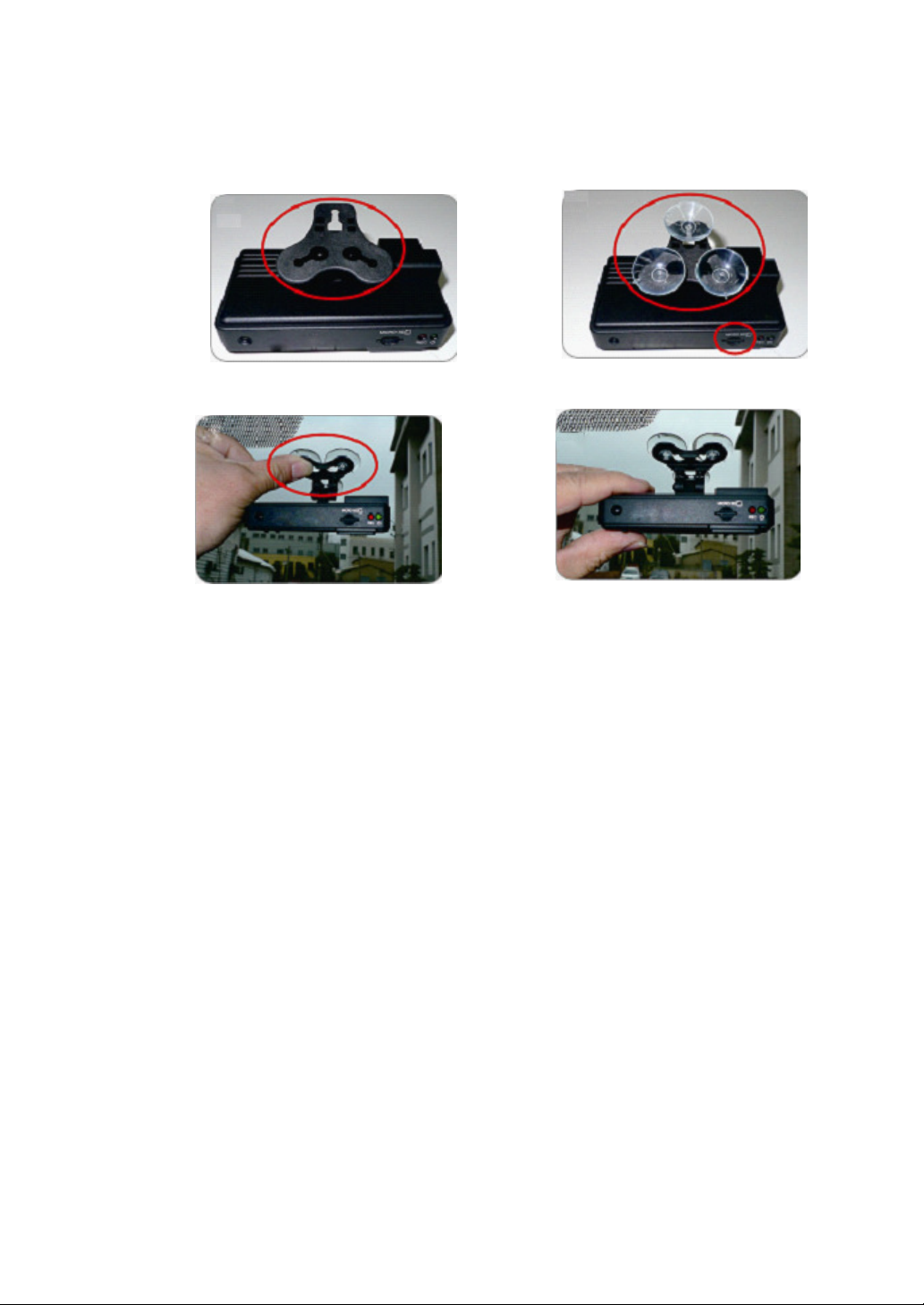
1.
Make the bracket facing upward.
2.
Assemble the sucking disc and
Micro SD card.
3.
Set up the machine in proper
position.
4.
Adjust the viewing angle.

6
5.
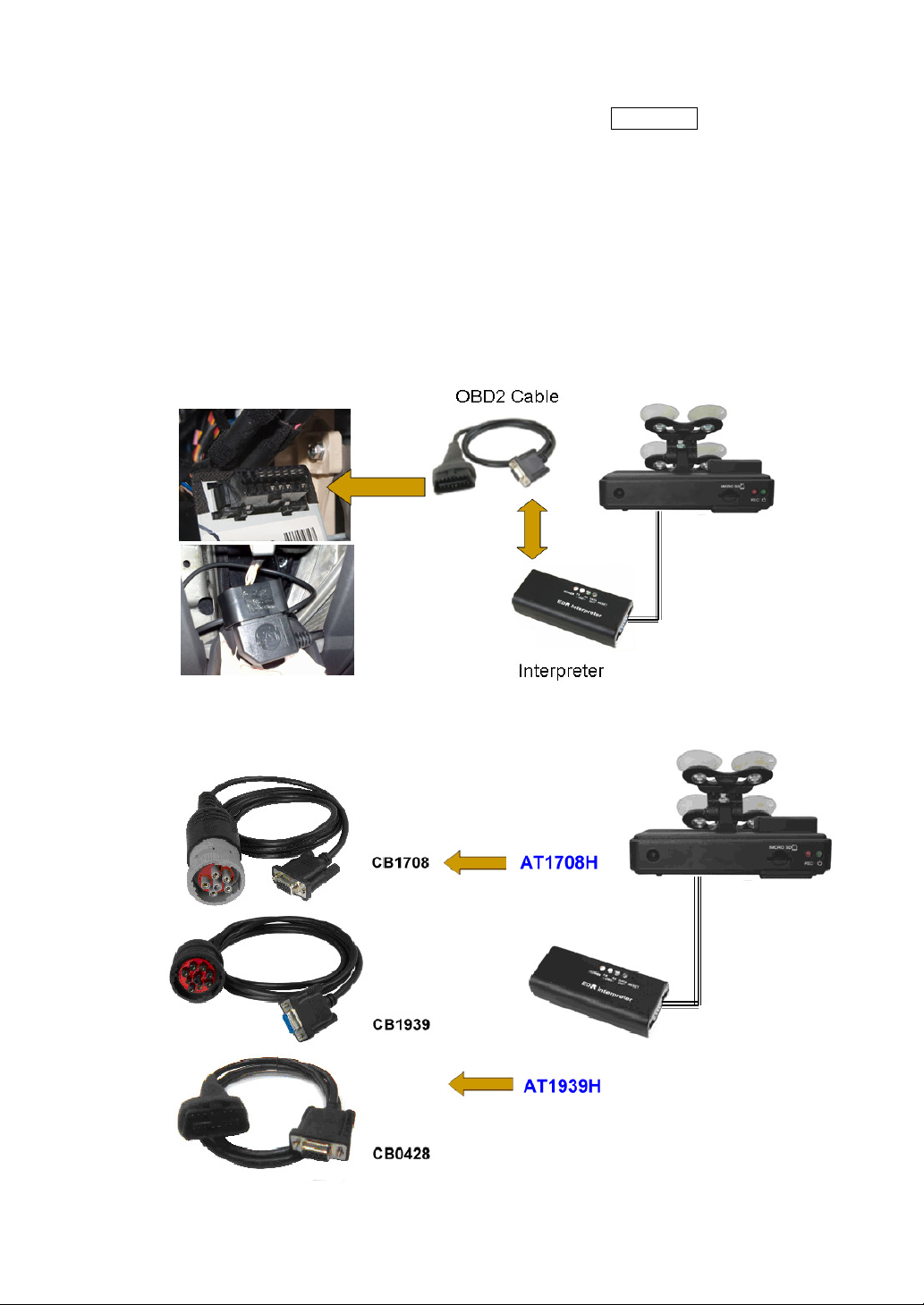
Install Interpreter: find OBD2 connecter & plug in. Use DVR cable to connect DVR
with interpreter.
The interpreter and cable must be in accordance with car model configuration, but
the DV900 / DV939 DVR is configured the same.
DV900 : for passenger car, OBD2 cable & AT0428H
DV939 : for J1939 heavy duty vehicle, configured with CB1939 or CB0428 ( OBD2
24V) cable , AT1939H interpreter
DV708 : for J1708 heavy duty vehicle, configured with CB1708 cable , AT1708H
interpreter.
DV948 : for FUSO,BENZ truck, Hyundai, HINO, and ISO CAN protocol vehicles,
configured with CB0428-24V cable, AT3648H interpreter.
5.1 DV900 model
5.2 DV939 & DV708:
AT0428H

7
6
.
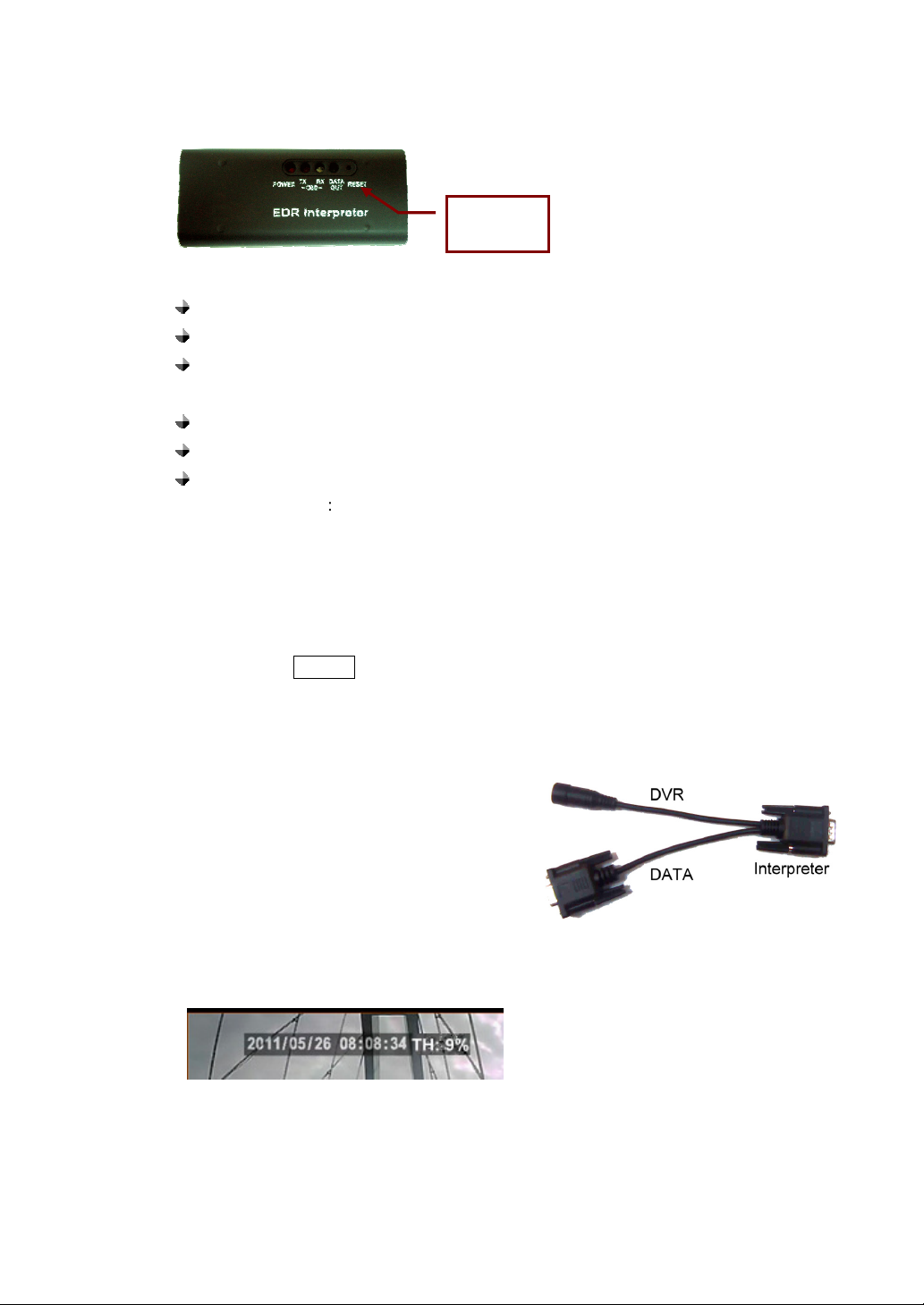
Learning Interpreter
6.1 Feature
Automatically searches for protocols.
RESET button for clear protocol memory.
Provide speed, rpm, throttle, battery voltage, engine loading, Emergency
Braking, DTC, Distance and temperature message.
OBD TX LED: indicate interpreter send data to vehicle.
OBD RX LED: indicate interpreter receive data from vehicle response.
DATA OUT: indicate interpreter send data out to DVR.
6.2 Learning protocol
:
6.2.1 ACC ON, do not start engine.
6.2.2 The interpreter start to learn protocol, in the same time power LED lighting, and
OBD TX led flash every one second. In case learning is successful, OBD2 TX,
RX and RS232 LED will flash to indicate data transfer status, the correct
protocol will be saved in memory also.
NOTE: To press RESET button over 1 second that will clear protocol memory.
6.3 After interpreter learning was successful, the DV900/DV939/DV708 red light
flashes mean the video and traffic information are recorded.
6.4 Interpreter cable:
The Interpreter offers 2 channels output,
one is for DVR another is spare data
output, the data channel is a RS232
interface; you can connect with a device to
monitor vehicle traffic information.
6.5 AV out confirm:
You can use AV out display to confirm the traffic information data whether it is
saved. Normally it will display image and date, time and throttle information.
RESET
Button

8
F. Led Indicator Instruction
1. Power On / Recording
Power on and wait for about a minute and then boot the machine
completely. In the boot process, the green indicator will light on
about one minute; the red indicator will flash, that is on recording.
I. LED light indicator:
●
RED light will be flashing during recording.
●
GREEN light will be on when connect the power well.
II. Power Off / Stop Recording
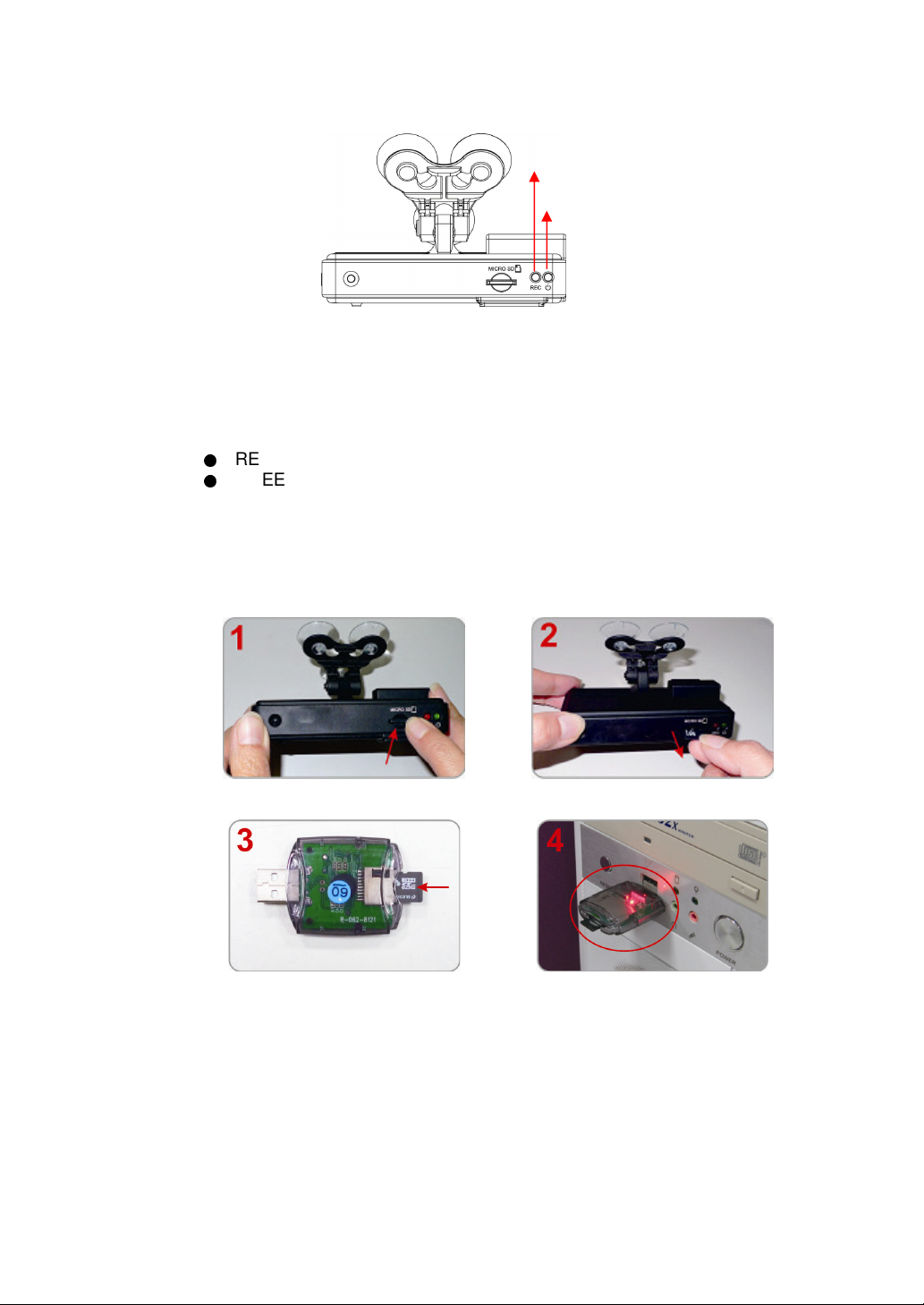
When the power is off, the machine will stop recording. You can remove
the SDHC card and put it to the card reader to connect to the PC for
playing the recorded files.
How to read the files from micro SD card?
Force reduction SD card, SD card pop
up lightly.
Remove the card from the machine.
Insert the SDHC card into the card
reader (please make sure the
direction is correct).
Connect the card reader to the PC
5. Read the memory card folder; or the entire memory card data backup on the
PC side of the path C: \ BlackBox folder directory.
6. Choose to play the file: the implementation of the product CD folder ATBS
Record
Power LED
Ce manuel convient aux modèles suivants
2
Table des matières