
Associated Research SC6540-HH Manuel utilisateur

SC6540
Model SC6540
SAFETY CHECKLIST
Survey the test station. Make sure it is safe & orderly.
Always keep unqualied/unauthorized personnel away from the test area.
Familiarize yourself with safety protocols in the event of a problem.
Exercise caution and never touch products or connections during a test.
Train operators. Never touch clips directly and always connect the return lead rst.
You should always know when a test is being performed.
WARNING: THIS GUIDE WAS CREATED FOR OPERATORS HAVING SOME FAMILIARITY WITH ELECTRICAL SAFETY
TESTING. AN ELECTRICAL SAFETY TESTER PRODUCES VOLTAGES AND CURRENTS THAT CAN CAUSE HARMFUL
OR FATAL ELECTRIC SHOCK. TO PREVENT ACCIDENTAL INJURY OR DEATH, THESE SAFETY PROCEDURES MUST
BE STRICTLY OBSERVED WHEN HANDLING AND USING A TEST INSTRUMENT. CONTACT US AT
INFO@ARISAFETY.COM FOR MORE INFO ON HOW TO GET TRAINED ON ELECTRICAL SAFETY TESTING.
Quick Start Guide
CUS
TÜV Rheinland

2
FRONT PANEL CONTROLS
1
2
3
4
POWER INDICATOR: Indicates the power has been turned ON. For a
SC6540 Main, this lights up when the power switch on the rear panel of the
unit is turned ON. For a SC6540 Secondary, this lights up when the power
switch on the host instrument is turned ON.
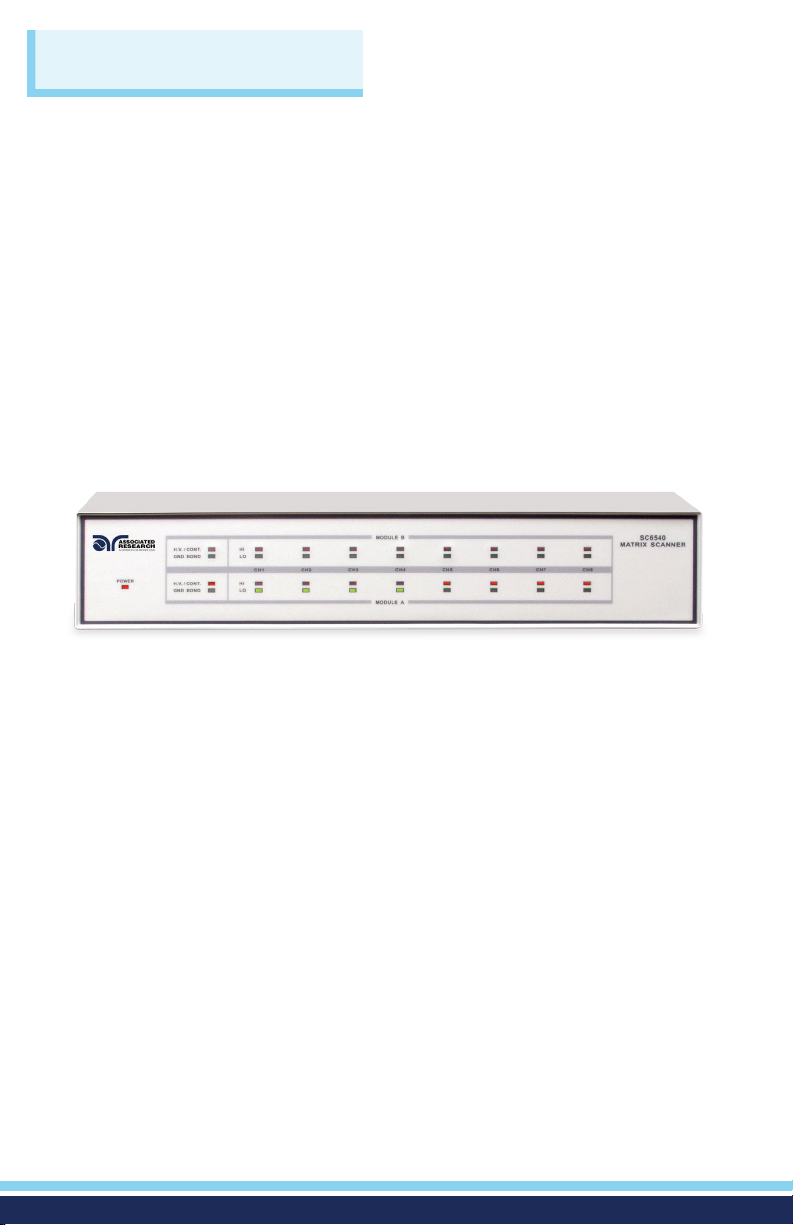
MODULE TYPE INDICATOR: These LED’s indicate the type of module that
is installed for the corresponding module slot. If the red LED illuminates, it
indicates that the installed module is a High Voltage/Continuity module. If
the green LED illuminates, it indicates that the installed module is a Ground
Bond module.
MODULE B CHANNEL STATUS INDICATORS: These LED’s indicate the
status of each individual channel on Module B. If the red LED illuminates, it
indicates a High Voltage/Continuity Current/Ground Bond channel. If the
green LED illuminates, it indicates a Return channel.
MODULE A CHANNEL STATUS INDICATORS: These LED’s indicate the
status of each individual channel on Module A. If the red LED illuminates,
it indicates a High Voltage/Continuity Current/Ground Bond channel. If the
green LED illuminates, it indicates a Return channel.
1 2
3
4

3
BACK PANEL CONTROLS
1 2 3 4
5 6 7 8 9
1
2
3
4
5
6
7
8
9
(Secondary Scanner, HGS, Back Panel)
SCANNER BUS INPUT: Interconnect port for the control cable between
the SC6540 Secondary and an automated Associated Research electrical
safety tester or SC6540 Main scanner.
SAFETY GROUND CONNECTOR: Must be connected to a known good
ground system to ensure operator safety.
HIGH VOLTAGE INPUT: Connector for input of high voltage from the host
instrument.
GROUND BOND OUTPUTS: Output channels for application of high
current for Ground Bond tests. These outputs are only available on SC6540
Scanners that are congured with a Ground Bond Module.
SCANNER BUS OUTPUT: Interconnect port for the control cable to
another SC6540 in a multiple SC6540 system.
ADDRESS SWITCHES: 8-pin DIP switch used to address the modules in a
SC6540 Secondary or used to configure the address of a SC6540 Main.
CURRENT INPUT JACK: Connector used to attach the high current input
lead or Continuity Current input lead from the host instrument.
RETURN INPUT: Connector for the return of the host instrument with the
SC6540. This connection provides the Return Current path for the High
Voltage, Ground Bond Current, and Continuity Current.
HIGH VOLTAGE OUTPUTS: Eight individual output channels for High
Voltage tests and Continuity tests. These outputs are only available on
SC6540 Scanners that are congured with a High Voltage Module.

4
BACK PANEL CONTROLS
BUS INTERFACE: Standard connector for interconnection to the USB/RS-232
Bus interface. Optional IEEE-488 interface or Ethernet Interface may be
substituted for the USB/RS-232.
FUSE RECEPTACLE: To change the fuse, unplug the power (mains) cord and
turn the fuse receptacle counter-clockwise. The fuse compartment will be
exposed. Replace the fuse with one of the proper rating.
INPUT POWER RECEPTACLE: Standard IEC 320 connector for a standard
NEMA style line power (mains) cord.
POWER SWITCH: Rocker style power switch with international ON ( | ) and
OFF (0) markings.
INPUT VOLTAGE SWITCH: Line voltage selection is set by the position of the
switch. In the “left” position it is set for 110–120 volt operation, in the “right”
position it is set for 220–240 volt operation.
1 2 3 4 5
1
2
3
4
5
(Main Scanner, HGM, Back Panel)

5
SCANNING CONFIGURATIONS
The SC6540 is available in two basic configurations according to how it sends
and/or receives data: a Main and a Secondary. A Main Scanner can only be
controlled remotely via a PC. A secondary Scanner can be controlled locally by
an Associated Research testing instrument or by a Main Scanner.
MAIN
A Main Scanner communicates directly with a PC via a USB/RS-232 (standard),
GPIB interface, or Ethernet. This model receives control information from a PC
and can also deliver instructions to up to four additional Secondary Scanners.
A Main Scanner can be distinguished by its power module located on the
upper left side of the rear panel.
POWER MODULE
SECONDARY
A Secondary Scanner only receives data. The data that the Secondary
receives can come from a Main Scanner (remote control) or directly from an
Associated Research instrument (local control). A Secondary Scanner can be
distinguished by its input control bus located on the upper left side of the
rear panel.
INPUT CONTROL BUS

6
BACK PANEL CONFIGURATIONS
The modular design allows for a variety of configurations. In addition to Main
or Secondary configurations, the scanners can also be set-up with the following
configurations: 8 or 16 High Voltage testing channels, 8 High Voltage and
Ground Bond testing channels, and 8 or 16 Ground Bond testing channels.
Model SC6540 HNM
8 Channel High Voltage Scanner
Model SC6540 HGM
8 Channel High Current Scanner
8 Channel High Voltage Scanner
Model SC6540 GGM
16 Channel High Current Scanner
*Also available in secondary
configurations
The different configurations (shown right)
are indicated by the following alpha
designators.
M = Main Scanner
H = 8 High Voltage Channels
HH = 16 High Voltage Channels
G= 8 Ground Bond Channels
GG = 16 Ground Bond Channels
N = Empty Module
S= Secondary
Model SC6540 HHM
16 Channel High Voltage Scanner
Model SC6540 GNM
8 Channel High Current Scanner

7
CONNECTIONS
WARNING: UNDER CERTAIN CONDITIONS HIGH VOLTAGE CAN APPEAR ON THE CABINET
OF THE SC6540. THE GROUND TERMINAL ON THE REAR PANEL OF THE SC6540 MUST BE
CONNECTED TO A GOOD EARTH GROUND TO ENSURE OPERATOR SAFETY.
CAUTION: MULTIPLE HIGH VOLTAGE OR CONTINUITY CURRENT CHANNELS CAN BE SET TO
ACTIVATE SIMULTANEOUSLY. HOWEVER, WHEN CONFIGURED THIS WAY THE SC6540 CANNOT
PROVIDE AN INDICATION OF WHICH OUTPUT DETECTED FAILURE. THEREFORE, EACH ITEM
OR TEST POINT WOULD HAVE TO BE RE-TESTED INDIVIDUALLY IF THE OPERATOR NEEDS TO
DETERMINE THE EXACT POINT OF FAILURE.
OPERATING THE SC6540 WITH HYPOTULTRA®
RETURN
COM.
POWER
SCANNER BUS OUTPUT ADDRESS
A B
RS232Barcode Ethernet
GND
T2A 250V
VOLTAGE
SELECTOR
115V ~/ 250V ~
2AMAX., 50Hz / 60Hz
CH1
H.V.
CH2 CH3 CH4 CH5 CH6 CH7 CH8
CAUTION
HIGH VOLTAGE
5.0 KY MAX.
CAUTION
HIGH VOLTAGE
5.0 KY MAX.
CURRENT
CH1 CH2 CH3 CH4 CH5 CH6 CH7 CH8
115
1 2 3 4 5 6 7 8
ON
HypotULTRA
SC6540 Main
To PC
SENSE-RETURN
CURRENT SENSE+ SCANNER 2 SCANNER 1
T6.3A 250V
GND
100-120~/200-240V~
700VAMAX., 50Hz/60Hz
SIGNAL INPUT
CAL.
SIGNAL OUTPUT
CAUTION
HIGH VOLTAGE
5KVAC MAX .
6KVDCMAX.
REMOTE INTERFACE
SCANNEROUTPUT
INPUT
RS232
SENSE-RETURN
CURRENT SENSE+ SCANNER 2 SCANNER 1
T6.3A 250V
GND
100-120~/200-240V~
700VAMAX., 50Hz/60Hz
SIGNAL INPUT
CAL.
SIGNAL OUTPUT
CAUTION
HIGH VOLTAGE
5KVAC MAX .
6KVDCMAX.
REMOTE INTERFACE
SCANNEROUTPUT
INPUT
RS232
HypotULTRA
SCANNER BUS INPUT
RETURN
SCANNER BUS OUTPUT ADDRESS
A B
CH1
H.V.
CH2 CH3 CH4 CH5 CH6 CH7 CH8
CAUTION
HIGH VOLTAGE
5.0 KY MAX.
CAUTION
HIGH VOLTAGE
5.0 KY MAX.
CURRENT
1 2 3 4 5 6 7 8
ON
SC6540 Secondary
COM. CH1 CH2 CH3 CH4 CH5 CH6 CH7 CH8

8
OPERATING THE SC6540 WITH HYPOTULTRA (Continued)
SETUP
The SC6540 Scanner channels can be set as High (H) for High Voltage or Continuity
testing output, Low (L) for the Return connection, or Open (O) for OFF. Channel
setup is done using the HypotULTRA menu or accompanying automation software.
For information on SC6540 setup through Associated Research’s Autoware® 3
Automation Software, consult the Autoware® 3 help le.
The following setup procedure will refer to setup through the HypotULTRA setup
menu: from the Test Parameter Review screen (ACW, DCW, CONT, or IR) you can
scroll to nd the Scanner settings. Below is an example of the ACW Withstand Test
Parameter Review screen.
The above images show a HypotULTRA with 8 Internal Scanner channels and 8
external channels. The “Int Scanner” parameter in the menu pertains to an internal
8-channel Scanner and the “ExtScanner1” parameter pertains to an 8-channel high
voltage SC6540 Scanner.
To set the Scanner channels use the back (<) and forward (>) arrows and set the
channels to High (H), Low (L) or Open (O). Use the enter key ( ) to save the values
and move on to the next test parameter.
H (High) – High voltage output channel for a high voltage test or current output for a
continuity test.
L (Low) – High voltage return channel for a high voltage test or a current return for a
continuity test.
O (Open) – Channel is neither an output nor a return.
CONNECTIONS
Note: Each Scanner port on the rear panel of the HypotULTRA can only control 8 channels
of each type (HV or HC) at a time, which makes it possible to control a maximum total of 16
possible external Scanner channels. To control more than 16 external channels, automation
software must be used along with a SC6540 Main and a PC.
9
CONNECTIONS
OPERATING THE SC6540 WITH HYPOTULTRA (Continued)
OPERATION
Secondary Scanner Power
Once the SC6540 secondary is connected to the HypotULTRA, the “power on”
LED will light up as soon as the power switch of the HypotULTRA is turned on.
Main Scanner Power
The SC6540 main is powered on by flipping the switch on the rear panel of the
unit to the ON position. The SC6540 Scanner channels will activate when the
TEST signal is sent via a PC.
LED Indicators
During a test, individual LED indicators for each output indicate whether the
output is set as High, Low, or Open. If the channel is set as a High Voltage
Output or Continuity Current Output, the red LED will light up. If the channel is
set as Return, the green LED will light up. If the High Voltage channel is set to
Open, no LED will light up.
Once the SC6540 is incorporated into a test system, it will act as an extension of
the HypotULTRA. The outputs will only activate while a test is being performed
and will deactivate when the test is not running. When a failure is detected, the
test will stop, the output will be deactivated and the HypotULTRA will give a
visual and audible indication of failure. If steps were connected in sequence, the
HypotULTRA will indicate a failure once it reaches the output that is connected
to the defective device. The SC6540 will not continue to test the other outputs
until the RESET button is pressed, the defective item is removed, and the TEST
switch is pressed once again. The SC6540 will then begin to test from the rst
step in the program.

10
CONNECTIONS
OPERATING THE SC6540 WITH OMNIA II®8204
GROUND BOND CONNECTIONS
The rear panel of the SC6540 can include up to 16 output terminals for Ground Bond
testing if this conguration is selected at the time of purchase. *We recommend using
standard 12 gauge wire for operation at 30 amps, and 10 gauge wire for 40 amps.
The wires should be attached using the hook-style crimp lugs provided, to minimize
connection resistance. The Kelvin connection of an Associated Research Ground
Bond tester will end at the Ground Bond input terminals of the SC6540 Scanner. For
this reason, the wire lengths going from the SC6540 High Current output and the
High Current Return should be kept as short as possible to limit the effect of test lead
resistance.
OMNIA II
SENSE+
H.V.
SENSE-
CURRENT RETURN
SIGNAL INPUT
SIGNAL OUTPUTSCANNER 1 SCANNER 2
RS232
T10A 250V
GND
CAT. II
115V~ /230V~
10A MAX., 50Hz/60HZ
CAUTION
HIGH VOLTAGE
5KV MAX.
CAUTION
HIGH VOLTAGE
5KV MAX.
GROUND
TEST
OUTPUT
CH
H.V.
TEST
OUTPUT
OUTPUT
REMOTE INTERFACE
INPUT
G-COM. CH1 CH2 CH3 CH4 CH5 CH6 CH7 CH8
RETURN
COM.
POWER
SCANNER BUS OUTPUT ADDRESS
A B
RS232Barcode Ethernet
GND
T2A 250V
VOLTAGE
SELECTOR
115V ~/ 250V ~
2AMAX., 50Hz / 60Hz
CH1
H.V.
CH2 CH3 CH4 CH5 CH6 CH7 CH8
CAUTION
HIGH VOLTAGE
5.0 KY MAX.
CAUTION
HIGH VOLTAGE
5.0 KY MAX.
CURRENT
CH1 CH2 CH3 CH4 CH5 CH6 CH7 CH8
115
1 2 3 4 5 6 7 8
ON
SC6540 Main
To PC
Ce manuel convient aux modèles suivants
1
Table des matières


