Assa Abloy HID FARGO HDP5000 Manuel utilisateur

Printing and Encoding Solutions
FARGO® HDP5000
Card Printer/Encoder
Installation Guide
PLT-05709 A.0
Guía de instalación

© 2021 HID Global Corporation/ASSA ABLOY AB. All rights reserved.2
HDP5000
Card Printer/Encoder
INSTALLATION GUIDE
This Installation Guide is for informational purposes only. HID Global makes no warranties, expressed or implied, in this summary.
This document may not be reproduced, disseminated or republished in any form without the prior written permission of HID Global
Corporation.
HID, HID Global, the HID logo, Fargo, HDP and Asure ID are the trademarks or registered trademarks of HID Global Corporation,
or its licensors, in the U.S. and other countries. All other trademarks and registered trademarks are property of their respective
companies.
Contact your local authorized Fargo Integrator for technical support.
Maximize the performance of your
Fargo Card Identity System. Ask your
authorized Fargo Integrator about:
• Fargo Asure ID®Photo ID Software
• Fargo Issuance Management Software
• Holographic Overlaminates
• Fargo Accessories
• Extended Warranties
For additional information, visit www.hidglobal.com.
Contents
See the HDP5000 User Guide, P/N L000950, for Safety information.
Consulte la Guía del usuario HDP5000, P/N L000950, para obtener información sobre la seguridad.
Póngase en contacto con su integrador autorizado local de Fargo para asistencia técnica.
Part List................................................................................................................................................................................................. 3
Printer Installation.............................................................................................................................................................................4
Dual-Sided Printing Module..........................................................................................................................................................11
Lamination Module......................................................................................................................................................................... 14
Printer Driver Installation ..............................................................................................................................................................19

© 2021 HID Global Corporation/ASSA ABLOY AB. All rights reserved. 3
Card Printer/Encoder
HDP5000
INSTALLATION GUIDE
Part List
Dual-Sided Printing Module Upgrade
Actualización del módulo de impresión de
dos lados
Lamination Module Upgrade
Actualización del módulo de laminación
Upgrade Tool
Dual-Sided
Printing Module
Power Supply Input Card
Cartridge
Printer Installation Guide
Output Card
Hopper Printer Driver
CD
Printer
Limited
Warranty
(Torx 10)
Power Supply
Lamination Module Upgrade Tool
(Torx 10)
Lista de piezas
Printer Lamination
Dual-Sided Printing Printer Driver

© 2021 HID Global Corporation/ASSA ABLOY AB. All rights reserved.4
HDP5000
Card Printer/Encoder
INSTALLATION GUIDE
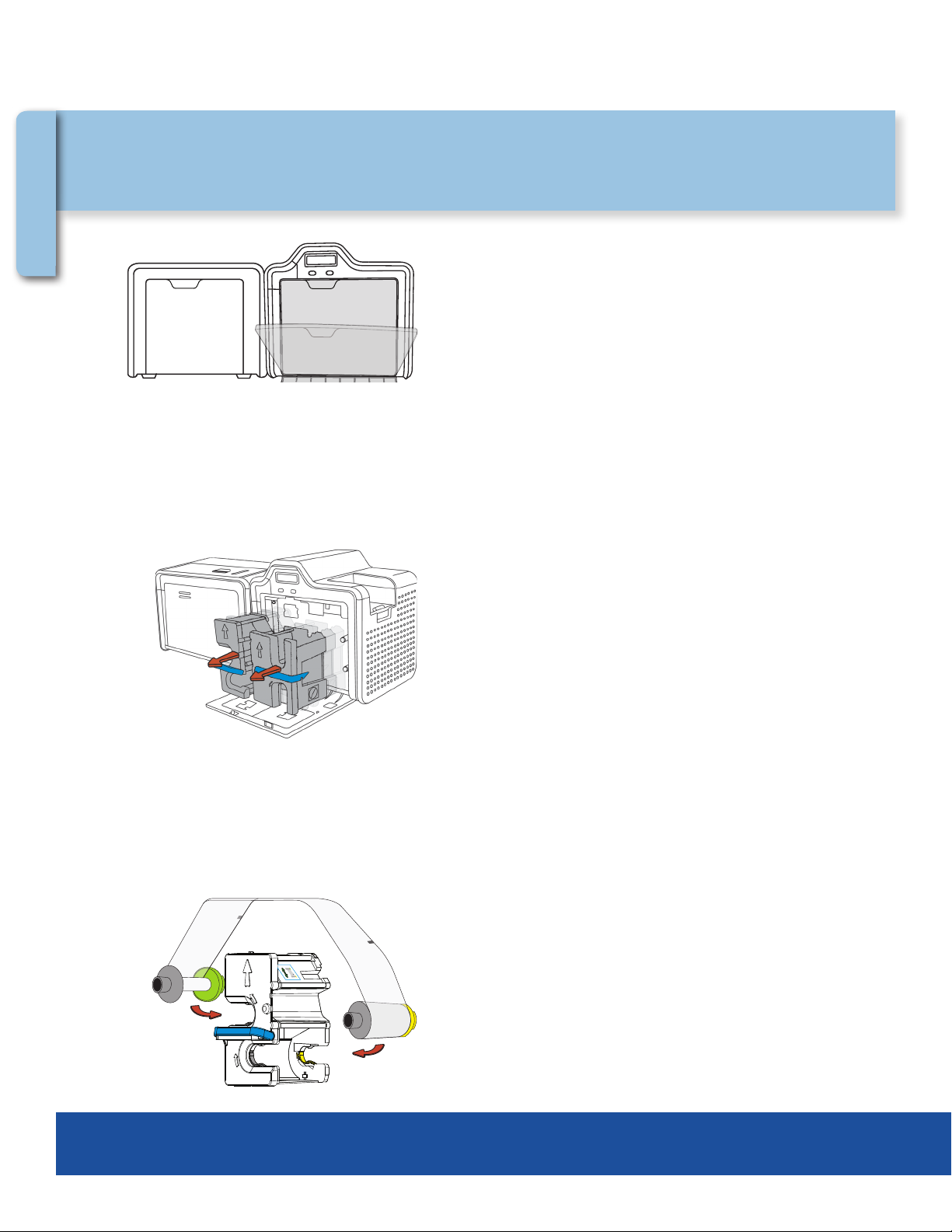
Remove HDP lm cartridge and print ribbon cartridge.
Retire el cartucho de la película HDP y el cartucho de la cinta de
impresión.
Load HDP Film into HDP lm cartridge until rolls click.
Cargue la película HDP en el cartucho de la película HDP hasta
que escuche un clic.
Pull open the cover.
Hale la cubierta para abrirla.
1
2
3
Printer Installation Instalación de la impresora
Printer

© 2021 HID Global Corporation/ASSA ABLOY AB. All rights reserved. 5
Card Printer/Encoder
HDP5000
INSTALLATION GUIDE
Load the print ribbon into the print ribbon cartridge until rolls click.
Cargue la cinta de impresión en el cartucho de la cinta de
impresión hasta que escuche un clic.
Insert the HDP Film cartridge into the printer until it clicks.
Inserte el cartucho de la película HDP en la impresora hasta que
escuche un clic.
Tighten HDP Film.
Tense la película HDP.
4
5
6
Printer

© 2021 HID Global Corporation/ASSA ABLOY AB. All rights reserved.6
HDP5000
Card Printer/Encoder
INSTALLATION GUIDE
Close printer front cover.
Cierre la cubierta frontal de la impresora.
Insert the print ribbon cartridge into the printer until it clicks.
Inserte el cartucho de la cinta de impresión en la impresora hasta
que escuche un clic.
Tighten print ribbon.
Tense la cinta de impresión.
7
8
9
Printer

© 2021 HID Global Corporation/ASSA ABLOY AB. All rights reserved. 7
Card Printer/Encoder
HDP5000
INSTALLATION GUIDE
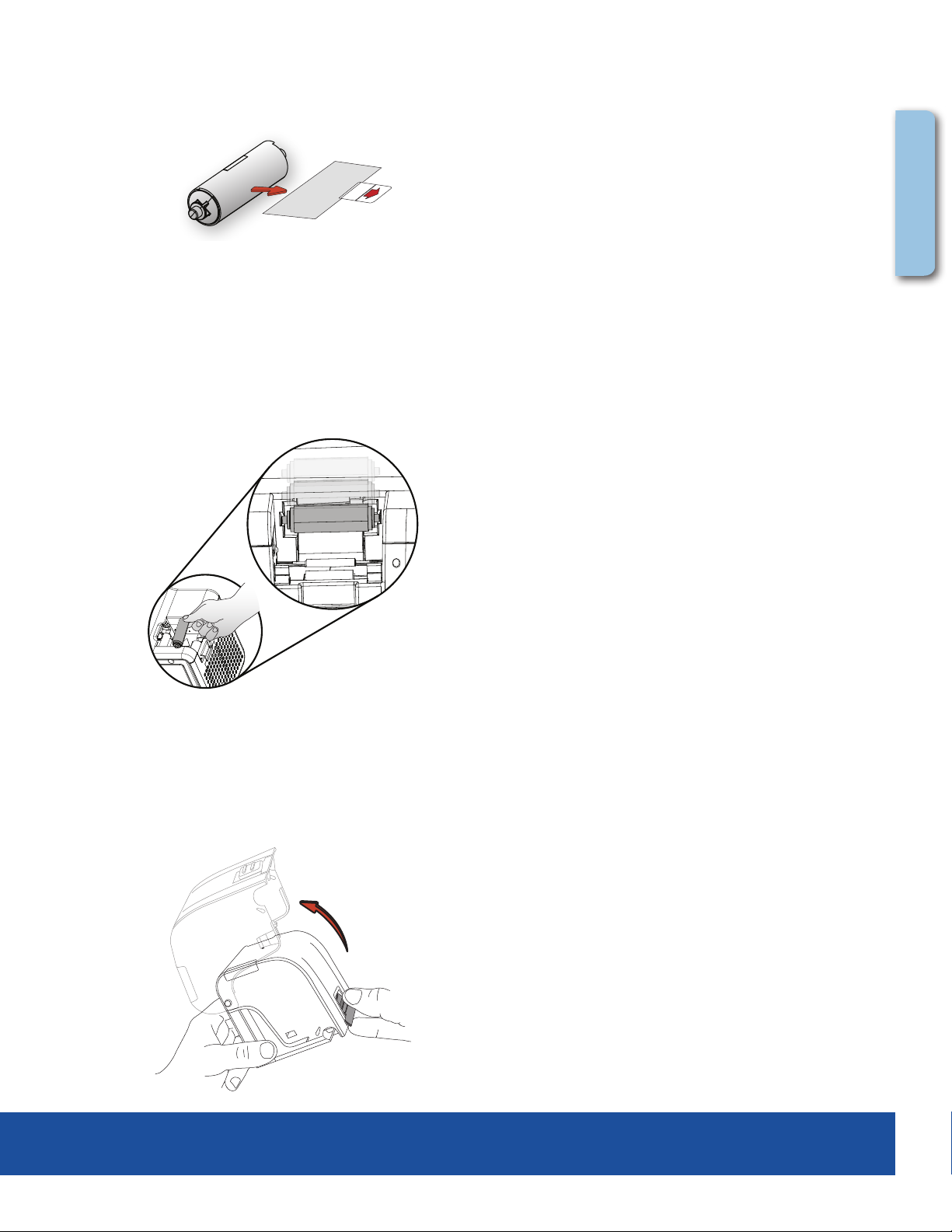
Insert the card cleaning roller into the card input area.
Inserte el rodillo de limpieza de tarjetas en el área de entrada
de tarjetas.
Remove the protective sleeve from the card cleaning roller.
Retire la correa protectora del rodillo de limpieza de tarjetas.
10
11
12
Press the button to open the input cartridge.
Note: Card input cartridge will remain open if opened completely.
Presione el botón para abrir el cartucho.
Note: El Cartucho permanecerá abierto, si se abre completamente.
Printer

© 2021 HID Global Corporation/ASSA ABLOY AB. All rights reserved.8
HDP5000
Card Printer/Encoder
INSTALLATION GUIDE
HDPii
Place card input cartridge onto printer and push until it clicks.
Instale el alimentador de tarjetas en la impresora,
presione hasta que escuche un clic.
Load cards into the card input cartridge.
Cargue las tarjetas en el alimentador de tarjetas.
13
14
15
Place card Output Hopper onto output side (left) of the unit
and push down until it clicks.
Coloque el colector de tarjetas en el lado de salida
(izquierdo) de la impresora y empuje hacia abajo hasta
que escuche un clic.
Printer

© 2021 HID Global Corporation/ASSA ABLOY AB. All rights reserved. 9
Card Printer/Encoder
HDP5000
INSTALLATION GUIDE
Connect power supply to printer.
Conecte la fuente de energía a la impresora.
For a printer connection using USB, do not connect USB
cable at this time.
Para una impresora con conexión USB, por favor no
conecte el cable de USB en este momento.
17
16
If smart card encoders are installed in the printer, install the
drivers for the encoders at this time. Refer to the installation
note in the supply pack for further details.
Attention:
!
Si hay codicadores de tarjeta inteligente instalados en
la impresora, instale los drivers para estos codicadores
ahora. Referirse a las notas de instalación en el paquete de
información para más detalles.
Atención:
!
Attention:
!
18
Printer

© 2021 HID Global Corporation/ASSA ABLOY AB. All rights reserved.10
HDP5000
Card Printer/Encoder
INSTALLATION GUIDE
Insert software installation CD and follow the on-screen instructions
Inserte el CD de instalación y siga las instrucciones exhibidas en la pantalla.
19
The HDPii printer is shipped with a security feature enabled that prevents unauthorized use, to disable this security
feature:
(a) Contact Fargo Technical Support at http://www.fargosupport.com/contact.asp and ll out the form.
(b) Attach a copy of the invoice from the printer and submit the contact form.
Technical support responds with instructions to disable the security feature.
La impresora HDPii es enviada de la fábrica al cliente con una función de seguridad activada. Esa evita el uso de la
impresora por personas no autorizadas. Para desactivar esta función de seguridad:
(a) Comuníquese con la asistencia técnica de Fargo en la dirección
http://www.fargosupport.com/contact.asp y llene un formulario.
(b) Adjunte una copia de la factura de la impresora y envíe el formulario de contacto.
La asistencia técnica de Fargo le enviará las instrucciones para desactivar esa función de seguridad.
20
Printer
Table des matières