
Arirang AR-36L Manuel utilisateur

USER’S MANUAL
AR-36L
SPECIAL FEATURES
Support for disks
- MIDI-DVD,DVD, DVD-R, SVCD, VCD, CD, CD-R, CD-RW, MP3,MP4.
Karaoke support various functions
- Function of presetting the song and helps to preset 99 songs.
- The list of new songs.
- Favorite songs.
- Language is displayed in Vietnamese and English.
- Reserve the song and clear the reserved song.
- Adjust the song’s key and tempo appropriate with each voice.
- Increase/decrease the song’s melody as desired.
- Install greetings/lines on the screen in Vietnamese.
- Score and applause as preference
Qualitative picture, transparent and clear sound
- Decoding technique MPEG1, MPEG2 and MPEG3, DIVX(Code3.11-5.0).
* Note: not support absolutely 100% for DIVX formats.
- High quality sound with digital effect.
- High quality video background (MPEG2).
Other special features:
- Unique VOCAL/CHORUS technique with the lively effect of vocal/chorus
- USB interface: play picture and audio data of all formats MP3,MP4,WMA,WAV…
-
DVD disc can play up to 135’, including 8 languages and 32 different
captions
- MPEG-2 helps compress picture with high quality sound; creates the great, lively
audio and picture as in the theaters.

NAME OF EACH PART
Front panel:
Display screen:
Rear panel:
Power
USB port
Micro port
Keys of numbers
Reserve the song
Keys
to control
Displayed
screen
Micro volume
Key volume
5.1 channel audio port

* Accessories:
- 01 Midi Karaoke disc
- 01 User’s manual
- 01 Vietnamese song book
- 01 Remote control
- 01 Pair of AAA batteries
- 01 Set of AV cable (03 wires)
BASIC CONNECTION
Subwoofer Speaker
Rear speaker (right)
Rear speaker (left)
5.1 channel Amplifier
Front speaker (right)
Front speaker (left)
Center speaker

REMOTE CONTROL
1. iFUN: turn on/off the cheer scoring
2. SETUP: set the device’s configuration
3. MUTE: turn on/off the volume of device
4. ANGLE/ADD SONG:
+ MIDI: add song to the list of favorite songs
+ DVD: select view angle (supported by disk)
5. SUBTITLE/3D EFFECT:
+ MIDI: a few sound effects
+ DVD: turn on/off caption language (supported by disk)
6. ZOOM: zoom in/zoom out pictures being played (DVD/VCD)
7. CLEAR: clear the code of the song incorrectly entered
8. MENU:

+ MIDI: set Karaoke feature
+DVD/VCD: enter to main MENU, on/off PBC (VCD2.0)
9. MALE: select male tone when the song being played (MIDI)
10. STEP/RESTART:
+ MIDI: replay the song being played
+ DVD/VCD: slowly play each picture
11. SLOW/SELECTED SONG:
+ MIDI: List of reserved songs
+ DVD: Slowly play pictures (x2/x4/x8/x16/x32)
12. PRIORITY: Play/Store the priority song (MIDI)
13. TEMPO +/-: fast/slow tempo of the song (MIDI)
14. MELODY +/-: increase/decrease the song melody
15. REV/FWD: fast reverse/forward for Track/Chapter
16. AUDIO/LANGUAGE:
+ MIDI: Change of language when searching the song
+ DVD/VCD: select audio output
17. VOCAL: turn on/off lyric/chorus. Select audio output (MP4)
18. OSD: display the disc contents being played
19. F1/NEW: clear the song (SELECTED SONG), list of new songs
20. REPEAT:
+ MIDI: repeat the song being played
+ DVD/VCD/CD: repeat the whole disc/track
21. OPEN/CLOSE: load/eject the disk tray
22. Number keys: input the code of the song
23. RESERVE: reserve the code of the song (MIDI)
24-28. ECHO+/-: increase/decrease the effect of echo
25. APPLAUSE/TITLE:
+ MIDI: effect of applause
+ DVD: select each TITLE in disc (supported by DVD disk)
Note: The remote control is directed to the device in the range of 30 degrees with a maximum distance of
7-8m
26. FEMALE: select Female tone (MIDI)
27. RETURN: return to previous operation
29. STOP: stop the song being played
30. KEY +/-: increase/decrease the song key
31. NEXT/PREV (CHAR +/-):
+ MIDI: increase/decrease the song characters in search
+DVD/VCD: to previous/next Track/Chapter
32. SEARCH/SMART SELECT:
+ MIDI: Search for a song as per its title or author
+ DVD/VCD: fast searching to the desired time
33. F3/FAVORITE SONG: list of favorite songs, move down the song in selected song
34. F2/POPULAR: list of popular songs, move up the song in selected song

CONFIGURATION SETTING
* Press SETUP key on the remote control to start setting:
1. Language installation:
- Language: set language for the device
- Caption: caption language (supported by DVD disk)
- Voice-over: voice-over language (supported by DVD disk)
- Disc language: default language in disc play (supported by DVD disk)
2. Display setting:
- Display: set the displayed mode
+ Normal/PS: display in normal mode 4:3PS but lost picture when displaying in 16:9 mode
+ Normal/LB: display in normal mode 4:3LB but not lost picture when displaying in 16:9 mode
+ Wide: display in 16:9 mode
- Color system:

+ Automatic
+ NTSC
+ PAL
- Angle: Turn on/off the effect of view angle (supported by DVD disk)
3. Audio installation:
- Digital output: digital audio output
+ Off
+ BTS: Stereo output
+ LPCM: Coaxial output
- Downmix:
+ LT/RT (supported Dolby Prologic by amplifier)
+ Stereo
+ 5.1 Channel
- Dual mono:
+ Stereo:
separate 2- channel audio
+ L-mono: Only left-channel audio
+ R-mono: Only right-channel audio
+ Mix-mono: Mix audio of left/right 2-channel
- Dynamic: linear compression only has the effect on disk having Dolby Digital support
- LPCM output: sampling frequency 48KHz/96KHz
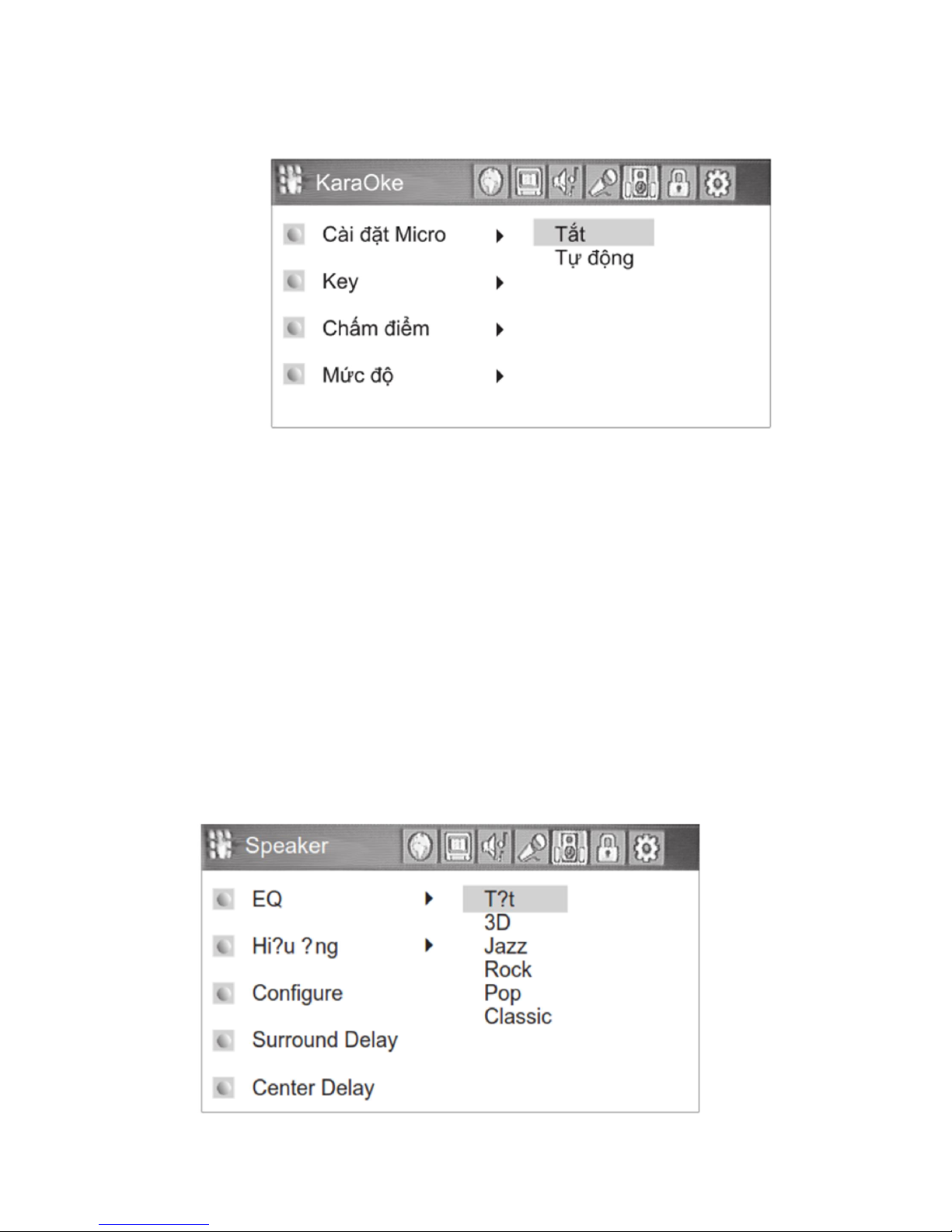
4. Karaoke installation:
- Micro setting:
+ Off
+ Automatically
- Micro volume: increase/decrease micro volume
- Echo: increase/decrease the effect of echo
- Key: increase/decrease the key
- Scoring: select the way to score
+ Off
+ Normal
+ Automatically
- Scale:
+ Non professional
+ Normal
+ Professional
5. Effect setting:

- EQ: Adjust the timbre, support for 5 timbres
- Effect: default setting in 8 sound effects
- Configure
- Surround Delay: the delay of rear speaker 0ms-25ms
- Center Delay: the delay of center speaker 0ms-5ms
6. Children lock:
- Change: Set the code to lock children from seeing the movie that is not suitable for their ages
(supported by DVD disk)
- Limit: Set limit to lock children
+ Kid safe: Highest
+ Adult: No lock
- Default: Restore the manufacture’s default settings
* Default code:”000000”
7. MIDI setting:

- Melody: on/off the song melody
- Cheer scoring (iFUN): on/off
- Background picture: DVD/blue
- Set the favorite song: the number of favorite songs is stored
- Drive lock: lock the drive in MIDI use
- Coin Function: on/off the mode of coin use
DVD/VCD/CD PLAY
1. Put disc in the tray:
+ Press OPEN/CLOSE key to eject the disk tray then put disc in the tray (Note: label
located above the disk, not placed the disc askew to avoid scratch and damage when the
device is operating)
+ Press OPEN/CLOSE or PLAY to load the disc tray
2. Play disc:
3. To Next/Previous 1 Track/Chapter:
- When title of DVD disk has a lot of Chapters or VCD disk has a lot of Tracks, move to other
Chapters or Tracks by the following way:
+ Press to move to next Chapter/Track
+ Press to move to previous Chapter/Track
+ For VCD/CD disk, when in stop mode, select Track by number keys to play. For VCD2.0,
select PBC OFF feature to choose the song.
4. Fast Forward/Rewind:
+ When the device is playing, press or to fast Forward/Rewind
+ Press “PLAY” key to continue playing
+ Have 6 levels to increase/decrease the speed of fast forward/rewind, each level
corresponding with each key press x2/x4/x8/x16/x32
5. Stop the program being played:
+ Press “STOP” key to stop, press “PLAY” to continue playing
6. Pause and slowly move the frame (DVD/VCD):
+ Press “PLAY/PAUSE” key to pause
+ Then press “STEP” key to slowly move each frame
Play
Pause
Stop
Fast forward
Fast rewind
To next Track/Chapter
To previous Track/Chapter
No effect
Table des matières
Autres manuels Arirang Système de karaoké


Manuels Système de karaoké populaires d'autres marques


Karaoke Warehouse
Karaoke Warehouse Player 2000 Manuel utilisateur

VocoPro
VocoPro DVG-888K II Manuel utilisateur

ION
ION DISCOVER KEYBOARD USB Manuel utilisateur

The Singing Machine
The Singing Machine SMVG-620 Manuel utilisateur

Singsation
Singsation CENTER STAGE FREESTYLE Manuel utilisateur

RSQ
RSQ NEO K-2 Manuel utilisateur


