
Aquavx Pro Manuel utilisateur
Quick Start Guide
Aquavx Pro™
1. Remove the Front Plate
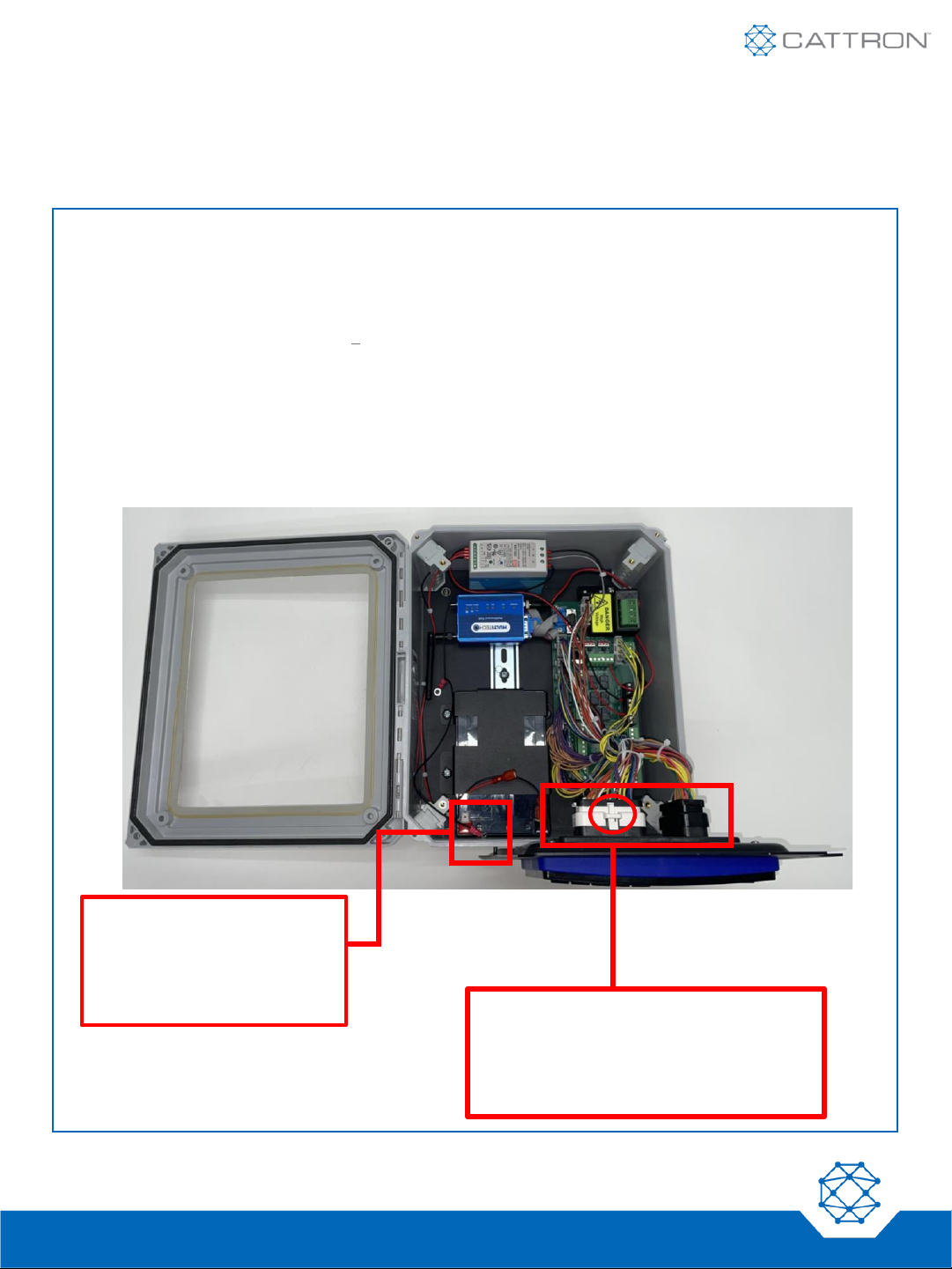
1. Remove the front plate of the Aquavx Pro by unfastening the four screws located at each corner of the
panel.
2. The front plate is connected via 2 bulkhead connectors and an earth ground connection on the bottom-
left of the plate. Removing these connections during install will allow more mobility inside the unit.
•Detach the earth ground connection by unfastening the nut to the bottom left of the plate.
•Optionally, detach the bulkhead connectors by lifting the lock and pulling the connector.
Earth Ground
Connection
(Unfastened) Bulkhead Connectors
(lock mechanism
circled)
Nimble: 9M01-3200-A001 | EN-2024-01-V1
Quick Start Guide
Aquavx Pro™
2. Wire Your Aquavx Pro
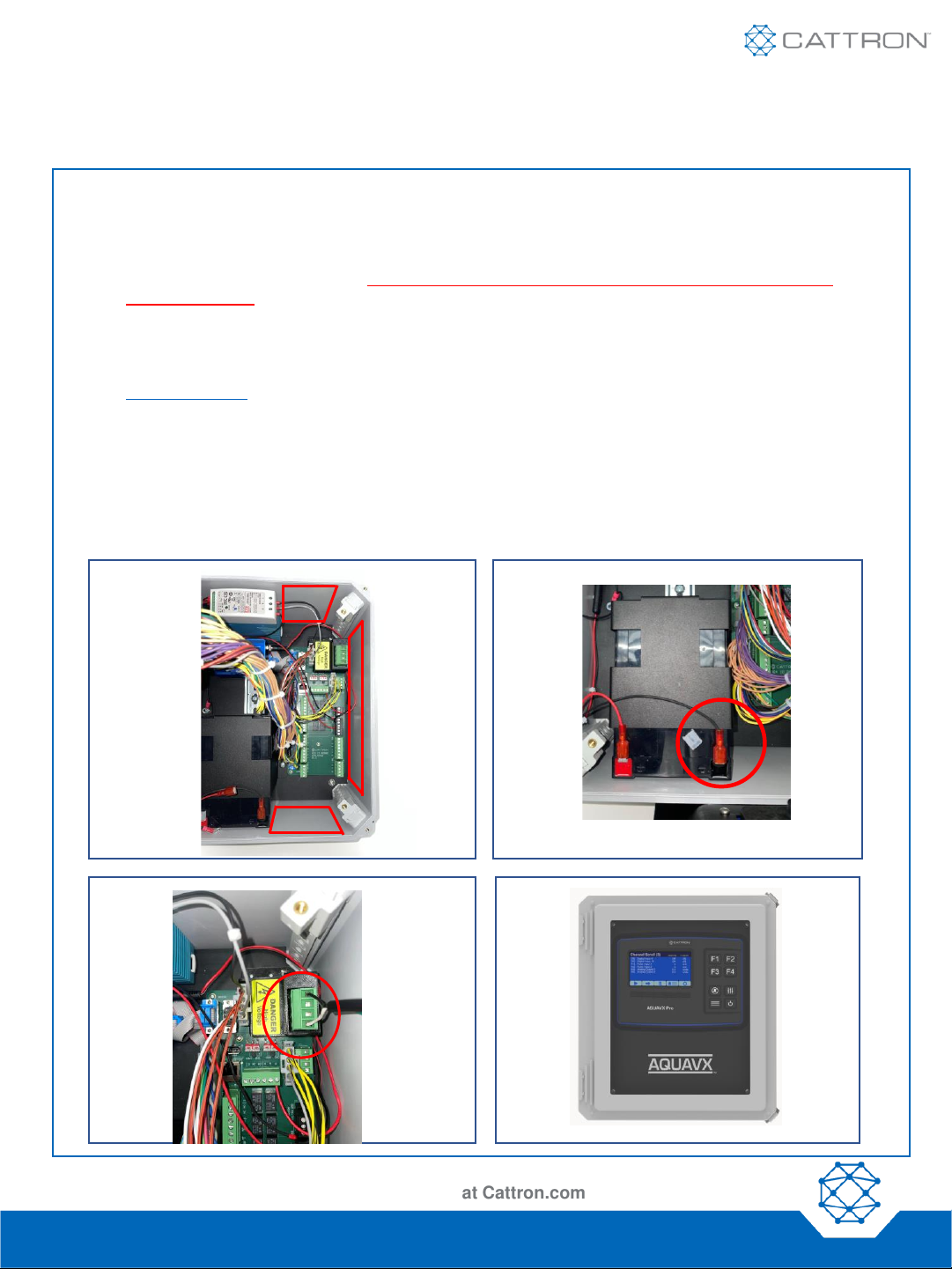
1. Drill holes in the unit enclosure for the power feed and the amount of I/O wiring required. Affix the
necessary conduit fittings and assure proper waterproofing. Entry points are physically labeled on the
outside of your unit upon delivery. Drilling into the unit outside of these entry points will void the
system warranty.
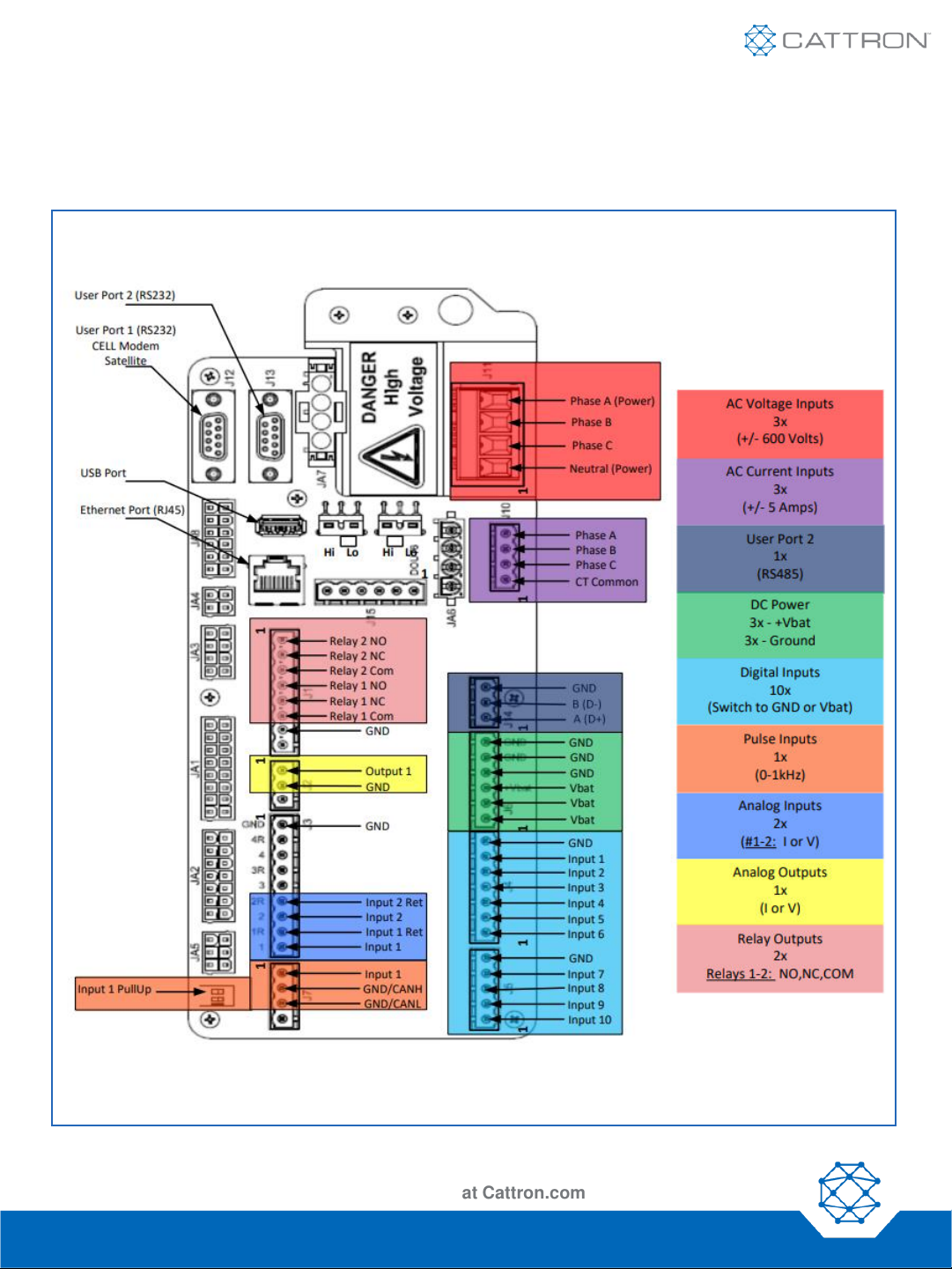
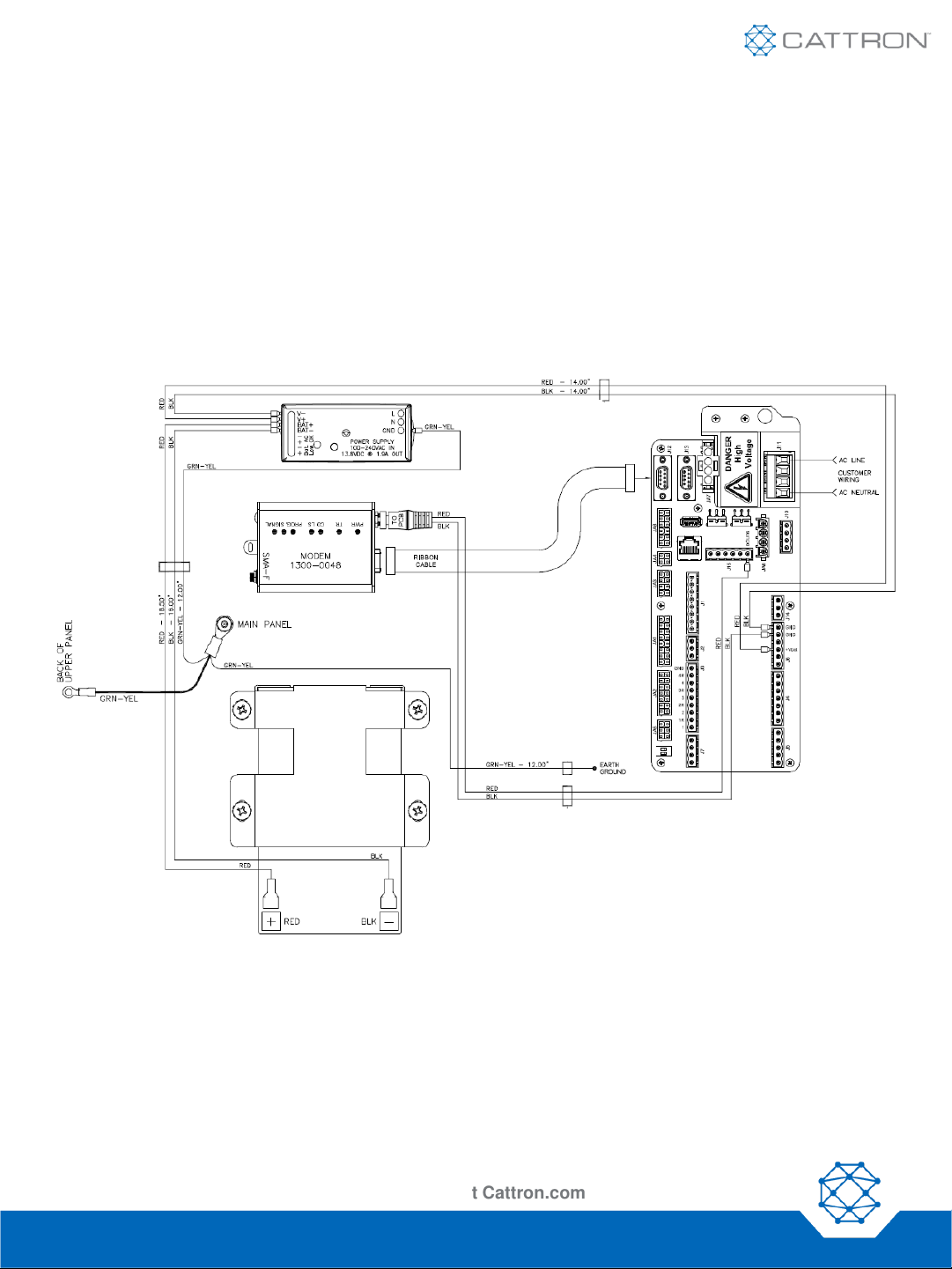
2. Wire I/O connections using the screw terminals on the quick disconnect plugs in their respective
channels and connect the black terminal to the back-up battery. See Figure 1 for a quick reference
diagram. For more detailed information, reference the schematic drawings and online manual found at
www.cattron.com.
3. Remove the AC Voltage (J11) connector and wire 100-240 VAC power to the Phase A (Black) and
Neutral (White) terminals. Attach the black wire from the power supply BAT- terminal to the negative
battery post. Note: Do not re-insert the AC Voltage (J11) connector before completing all wiring
connections including the I/O and bulkhead connectors.
4. When you are ready, re-insert the AC Voltage (J11) connector and secure the earth ground connection
back onto the panel.
Configuration Sheets and Manuals Are Available at Cattron.com
Nimble: 9M01-3200-A001 | EN-2024-01-V1
1. 2.
3. 4.
Quick Start Guide
Aquavx Pro™
Configuration Sheets and Manuals Are Available at Cattron.com
I/O Connection Quick Reference Guide
Figure 1
Nimble: 9M01-3200-A001 | EN-2024-01-V1
Quick Start Guide
Aquavx Pro™
Configuration Sheets and Manuals Are Available at Cattron.com
3. Access RemoteIQ
•If you purchased a data plan with the hardware, your device arrives activated and ready to use. If you have
877.399.2937.
•Navigate to http://my.remoteiq.com. Log in with the credentials that you provided us or contact customer
service if you need to create credentials.
•If your system is preconfigured, the I/O will arrive programmed per the configuration sheet you provided to
us. If it is not preconfigured or if changes are required, the Aquavx Pro can be programmed via a locally
connected PC, remotely over the cellular network, or the controller on the unit. Programming instructions
can be found in the manual. If you need configuration assistance, contact customer support.
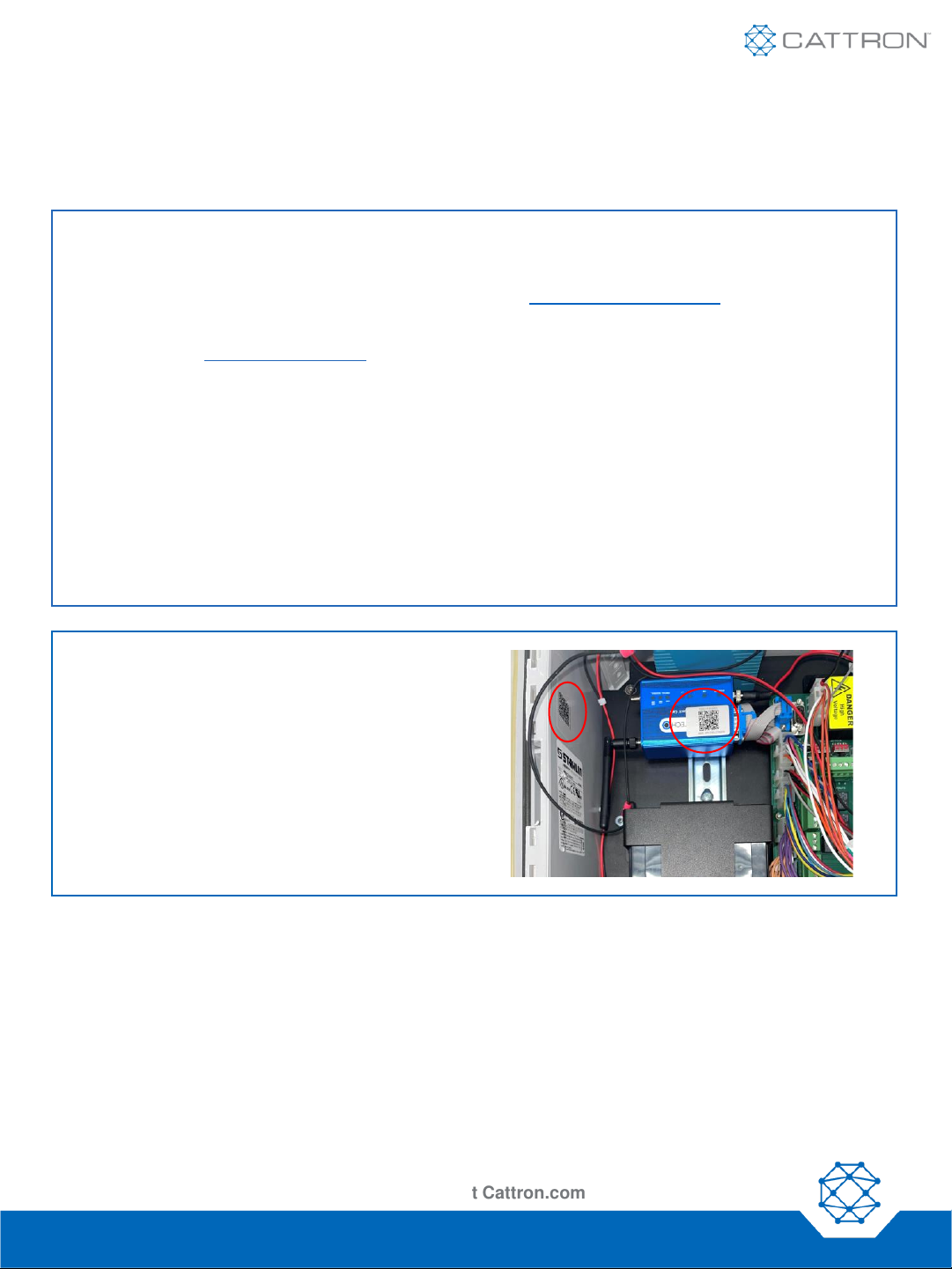
4. Access Device Information
Using a QR Code scanning app, scan the QR
codes on the Aquavx device to access device
identification information such as IMEI, SIM, IP,
and Serial Numbers
Nimble: 9M01-3200-A001 | EN-2024-01-V1
Quick Start Guide
Aquavx Pro™
Configuration Sheets and Manuals Are Available at Cattron.com
Wired Aquavx Pro
Note: For satellite modem installations, connect modem directly via the external
cable.
Nimble: 9M01-3200-A001 | EN-2024-01-V1
Table des matières
Manuels Instrument de mesure populaires d'autres marques


Endress+Hauser
Endress+Hauser Proline Promag 50 Caractéristiques techniques

Siemens
Siemens SITRANS F Coriolis FCT030 Manuel de la liste des pièces

KLINGER
KLINGER CMF V Series Manuel utilisateur

EXFO
EXFO FTB-2 Manuel d'exploitation et d'entretien

Keysight
Keysight M8290A Manuel utilisateur

ADTEK
ADTEK MW-5 Manuel utilisateur