Apache Technologies STORM Manuel utilisateur

STORM Laserometer
Operator's Manual
™

Thank you for purchasing anApache Technologies, Inc. product.
Your laser product is a premium quality tool that has been
designed and manufactured to provide years of precise and
reliable performance.
This manual is an important part of your purchase as it will
familiarizeyouwiththeunitandexplainthenumerousfeaturesthat
have been designed into it. Please read this manual thoroughly
before use.
Please contact yourApache dealer or theApache factory should
you have questions regarding specic applications or if you require
additional information.
IMPORTANT: Fill out the Warranty Registration Card and return
it to Apache Technologies, Inc.
Please record your information below for future reference.
Serial Number: ______________________
Date of Purchase: ______________________
Purchased From: _______________________
_______________________
Phone: _______________________

Table of Contents
1 General Description .........................................................2
2 Front View ........................................................................3
3 Rear View ........................................................................4
4 Operation - Installing the Batteries ..................................5
5 Operation - Primary Switch Functions .............................6
6 Operation - Secondary Switch Functions ........................7
7 Liquid Crystal Display ......................................................8
8 Special Functions ..........................................................13
9 Menu Functions .............................................................14
10 Rod Clamp .....................................................................17
11 Specications .................................................................18
12 Warranty ........................................................................19
13 Maintenance and Safety ................................................20
14 CE Declaration of Conformity .............. Inside Back Cover
P/N ATI 400043-02 Rev B

2
1 General Description
The STORM™ laserometer is designed to receive reference
elevation information from all rotating laser levels. A large 5.0
inch(127 mm)verticalreceptionwindowcapturesthelaserbeam
using patented SuperCell™ receiving technology.
ElevationinformationisoutputviaLiquidCrystalDisplays(LCD's)
on the front and rear and Light Emitting Diodes (LED's) on the
front. A beeper also emits an adjustable audible tone.
The LCD's indicate elevation information graphically
with arrows and bars and numerically. A proportional
growing arrow graphic indicates high, low, or on-grade.
A numeric elevation display indicates on-grade and how far the
laserometer is from on-grade.
Accuracy levels, units of measure, sound levels, and various
other user options are selectable to meet a variety of job
requirements.
The unit has been specically designed for use in harsh
constructionenvironments.Stroberejectiontechnology,overmolded
housings,recessedwindows,waterproofdesignanddurabilityare
incorporated into every detector.
A general purpose clamp is included and designed to mount
the detector on various grade rods and staffs. A secondary
offset mounting location provides additional versatility is certain
applications. A patented reversible wedge on the clamp allows
sure grip mounting to round, oval, square, and rectangular rods,
as well as various sizes of wooden staffs.

3
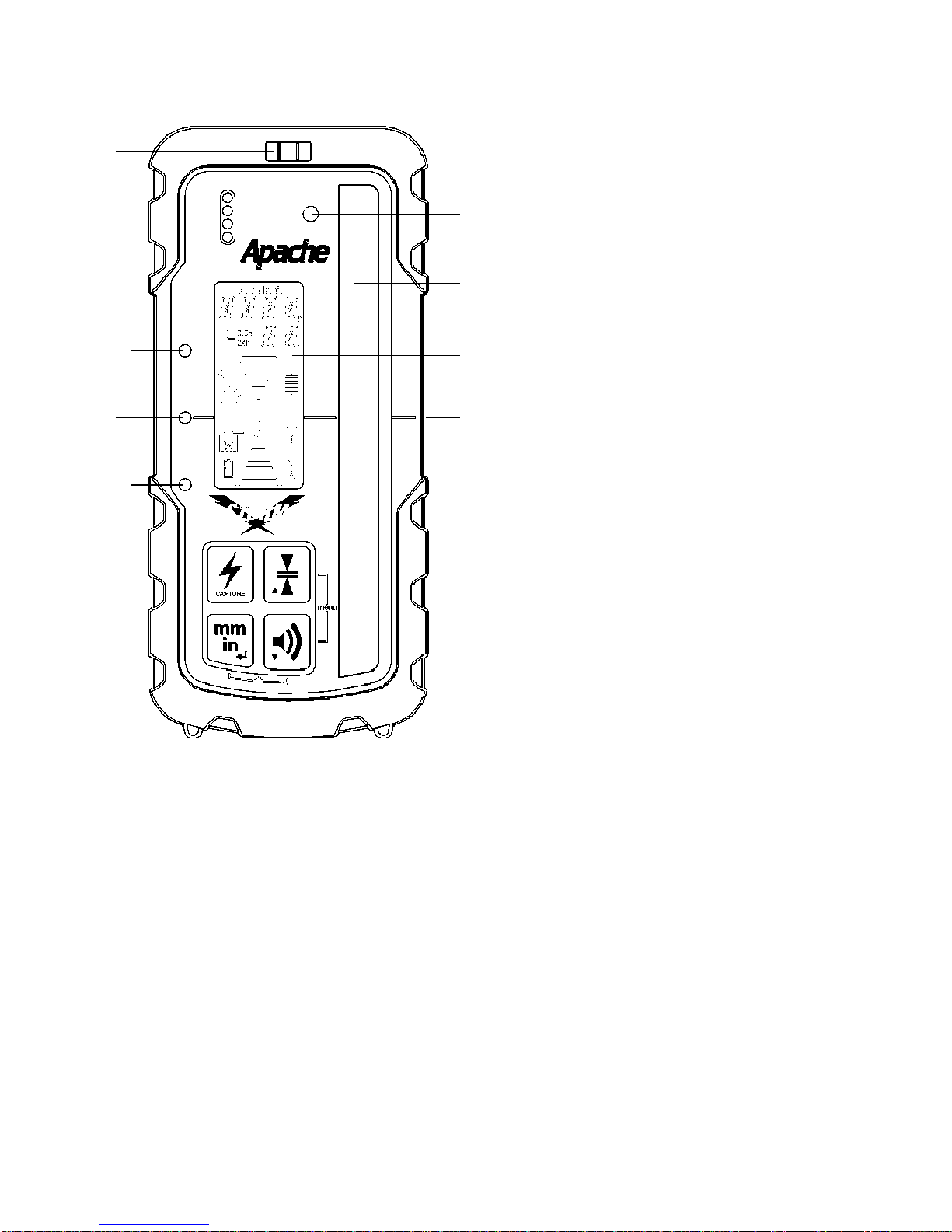
1.Keypad-Power,Accuracy,
Units,andVolumeswitches.
Refer to §5 & 6 for detailed
operation.
2. LED's - Easy to see
Light Emitting Diodes show
position of laserometer
relative to the laser beam.
Greenforon-gradeandRed
for high or low.
3. Beeper output - Fast
audible signal is too High;
lower to get to on-grade.
Solid signal is On-grade.
Slow signal is too Low; raise
to get to on-grade.
4. Bubble Vial - aids in
keeping laserometer level
for accurate readings.
5. Photo-Sensor - Anti-strobe sensor detects strobe lights and
rejects their input on laser reception.
6. SuperCell Reception Window - Five (5) inches (127 mm) of
reception range. Window must be directed toward laser.
7. LCD (front and rear) - Displays elevation information and
laserometer settings and status. Refer to §7 for details.
8. On-grade Mark - Aligned with laser on-grade reading.
2 Front View
4
6
7
5
1
2
3
8

4
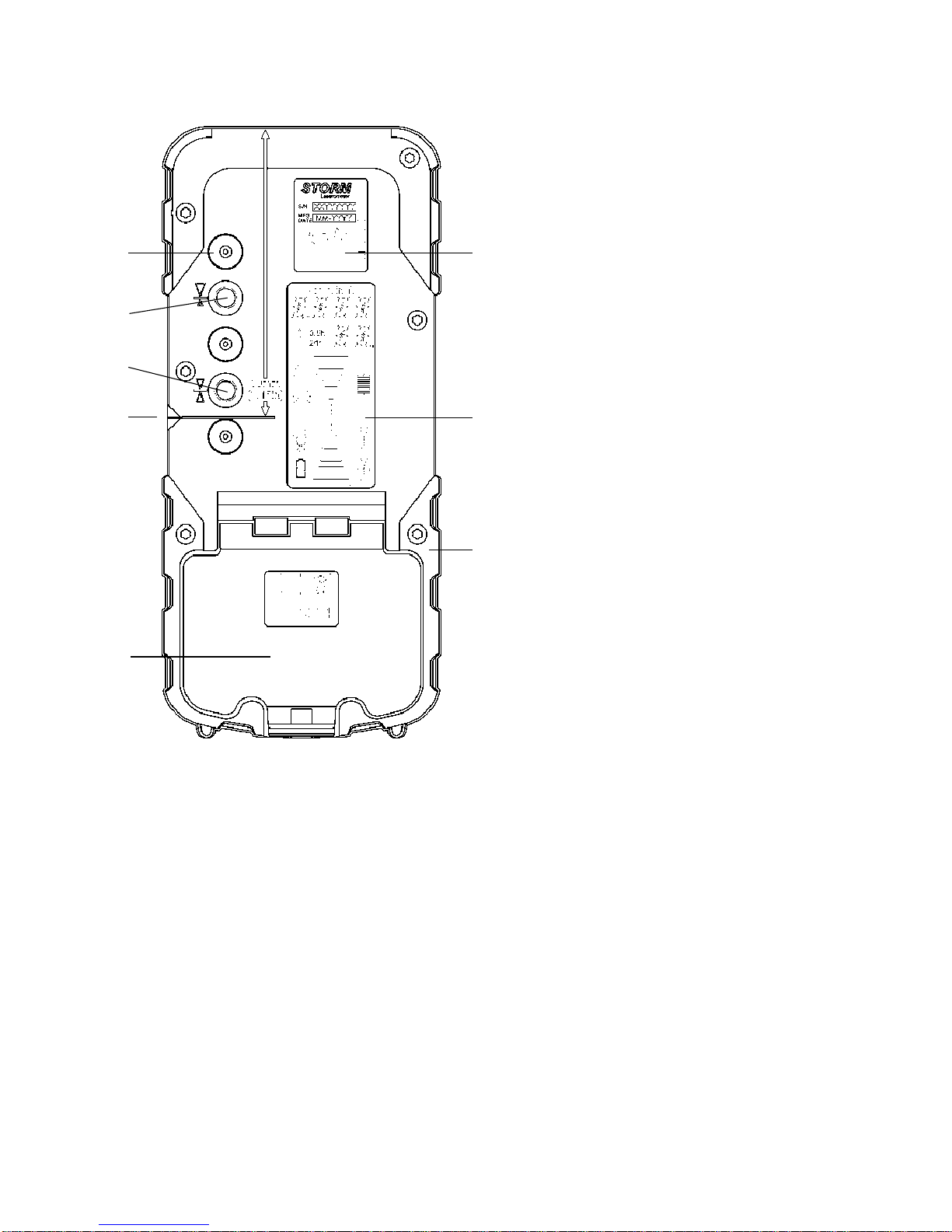
9. Battery Door & Latch
- Waterproof housing
holds two "AA" alkaline
batteries.
10. Marking Notch - Used
totransferormarkelevation
position in handheld
applications. Aligns with
center on-grade position.
Top of detector is 3.15 in
(80 mm) from marking
notch.
11. Captive Screw Thread,
Center on-grade clamp
position. Insert accepts
rod clamp screw to secure
detector to the clamp. See
§7.11 for additional clamp
information.
12. Captive Screw Thread, Offset on-grade clamp position.
Allows a larger above grade display for certain applications.
See §7.12 for additional clamp information.
13. Clamp Guides (3) - Dimples align rod clamp.
14. Serial Number / ID Label
15. Rear LCD - Refer to §7 for details.
16. Rubber over mold - Protects the unit from accidental drops.
3 Rear View
9
10
11
12
14
15
16
13

5
4 Operation - Installing the Batteries
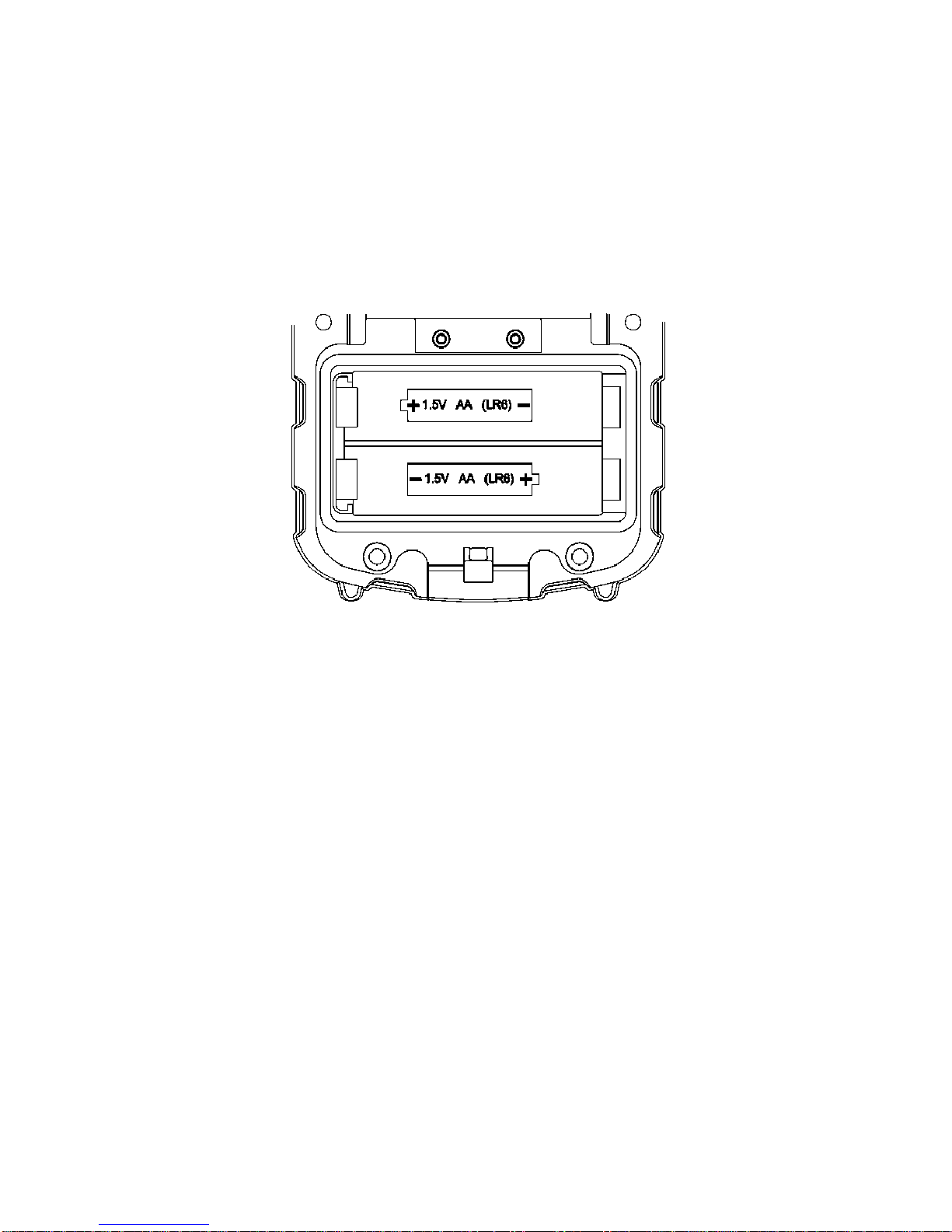
1. Open the battery door using a coin or similar pry device to
release the battery door tab.
2.InserttwoAAbatteriesnotingtheplus(+)andminus(-)diagrams
inside the battery housing.
3. Close the battery door. Push down until it "clicks" into the shut
position.

6
5 Operation - Primary Switch Functions
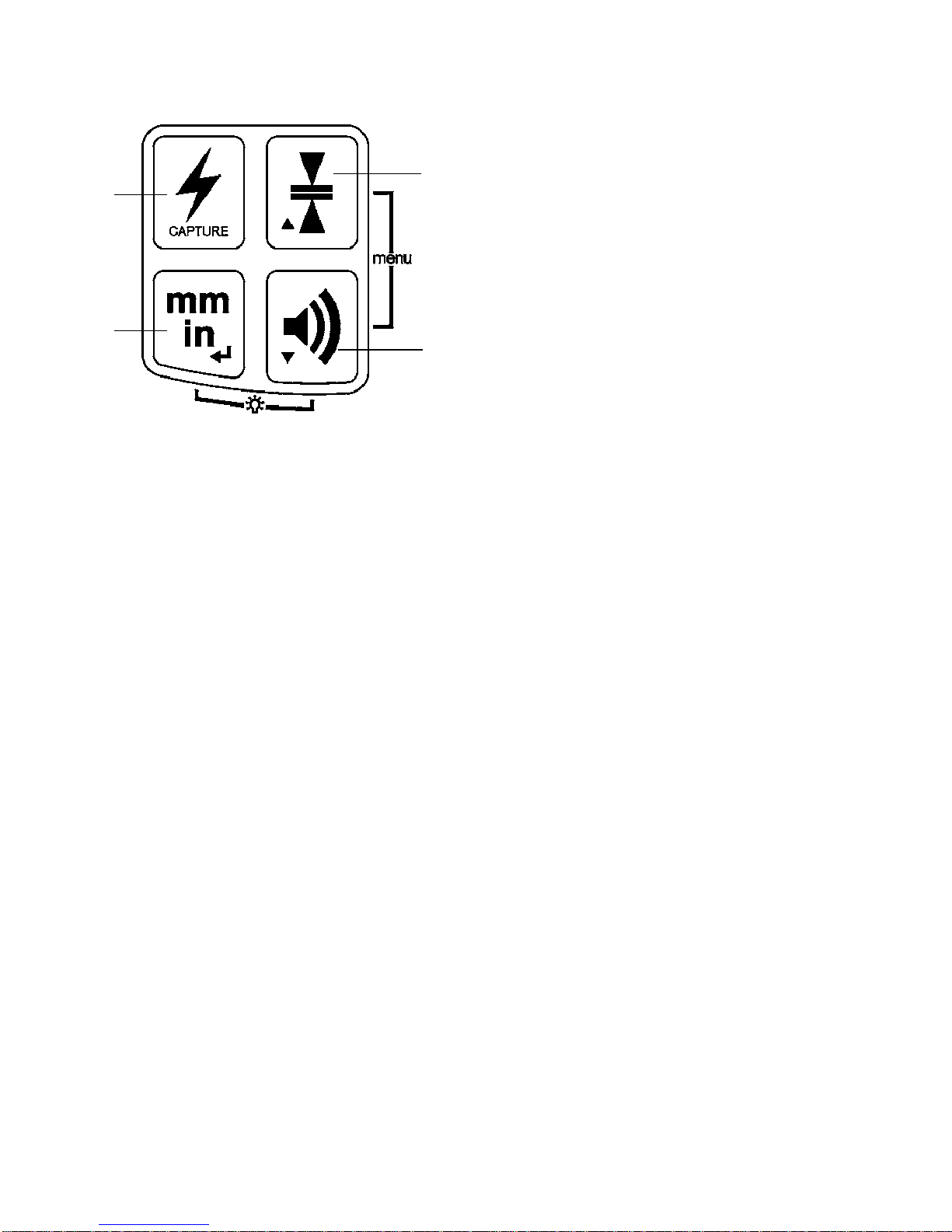
1. Power Switch - Press the
power switch to turn power
ON. All LED's, the LCD,
and the beeper will come
on momentarily. CAL will be
displayedandLED'ssequenced
as the unit goes through a
self-calibrating procedure for
approximately 3 seconds.
NOTE: Do not power up the unit in a laser beam or strobe.
If detected, the unit will revert to the previous calibration.
Press and hold the Power switch for 2 seconds to turn power OFF.
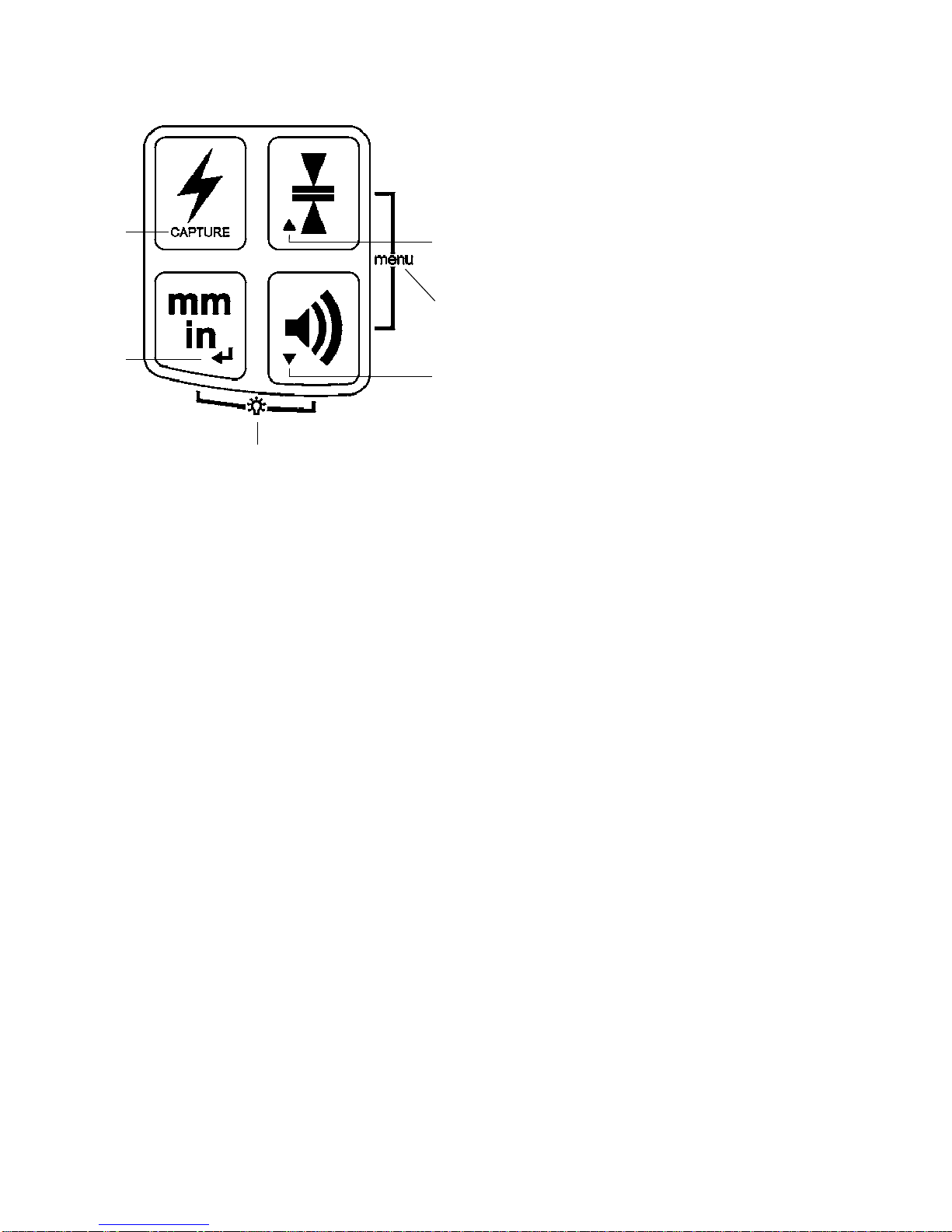
2. Units of Measure Switch - Press once to display the current
settings in the numeric display area. Press again while the
units are displayed (within one second) to change the current
selection. Subsequent presses will scroll through the setting
selections of centimeters (cm), millimeters (mm), inches (in),
fractional inches (in), and feet (ft). For fractional inches, the
fraction bar will be displayed on the LCD. The selected setting
will always be displayed on the top of the LCD.
3. Volume Switch - Pressing the switch cycles High, Medium,
Low and Off. One beep is emitted at the selected volume when
changed. When sound if Off, a single beep will signal that a laser
beam has been detected.
4. Accuracy Switch - Press once to numerically display current
accuracy settings on the LCD. Press again while the accuracy is
displayed (within one second) to change the current selection.
Subsequent presses will scroll through ve accuracy options
(Ultra Fine, Super Fine, Fine, Medium, Coarse). Refer to §11,
Specifications, for details.
4
1
23

7
6 Operation - Secondary Switch Functions
5. LED Display - Pressing
the Units and Volume
switches together enables
the selection of LED's ON
Bright, ON Dim, or OFF.
Press together to cycle the
selection. The LED's will
display the current level of
brightness selected as the
switches are pressed. The
LED light bulb symbol on
the LCD will also change to
display the selected setting.
6. Menu - Pressing the Accuracy and Volume switches together
enables entry into the Menu functions. Refer to §9 for details.
6a. In the Menu mode, the up arrow (Accuracy switch)
scrolls the menu up.
6b. In the Menu mode, the down arrow (Volume switch)
scrolls the menu down.
6c. In the Menu mode, the enter arrow (Units switch) enters or
selects the available options.
7. Capture -Allows a reading to be recorded. Refer to §8, Special
Functions, for detailed operation of the Capture function.
NOTE: Units, Volume, Accuracy and LED Brightness are stored
in memory and will be retained when the unit is turned off or
when batteries are replaced.
7
5
6
6a
6b
6c

8
7 Liquid Crystal Display
1
2
3
4
5
6
78
12
9
10
11
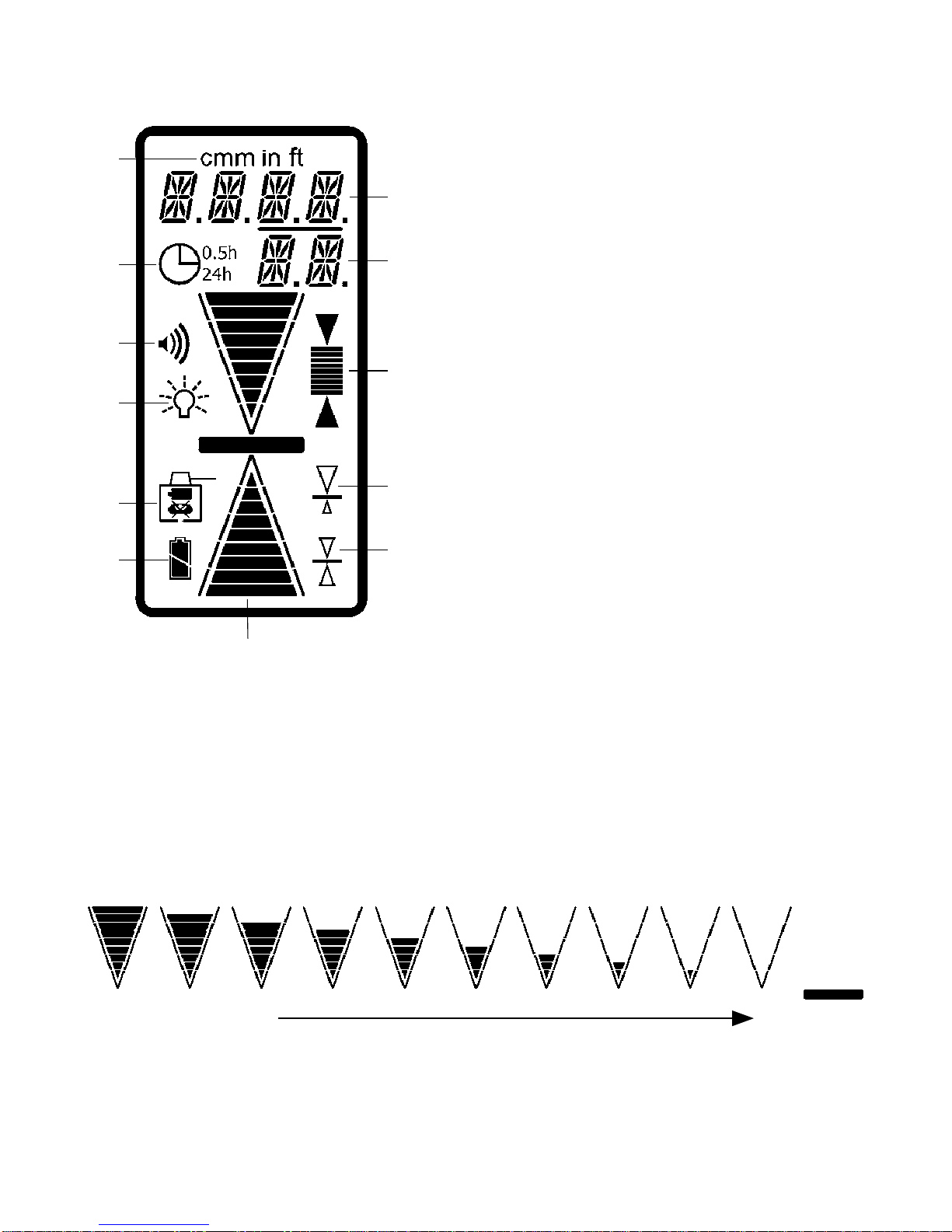
1. Grade Indication Arrows - 10 individual levels of grade
information for above and below grade. Arrow size increases as
distance away from on-grade increases.
Arrow bars can be selected to represent the selected deadband
or can be proportional to the vertical reception range. Refer to §9
for details. Horizontal bar indicates on-grade.
1. Grade indication arrows
2. Battery status indicator
3. Laser out-of-level / laser low
battery indicator
4. LED brightness level
5. Beeper volume level
6. Auto shut-off timer
7. Units of measure
8. Numeric elevation /
Menu text display
9. Numeric elevation for fractional
inches / Menu text display
10.Accuracy (deadband) indicator
11. Offset on-grade clamp location
12.Center on-grade clamp location
Lower to on-grade On-grade
Out-of Beam display - a sequence of arrows will indicate if the
receiver has moved beyond the vertical reception range and will
indicate which direction to move to get back to the laser beam.
The display can be turned on or off. Refer to §9 for details.
Table des matières
Manuels Instrument de mesure populaires d'autres marques

Endress+Hauser
Endress+Hauser Proline Promag 50 Caractéristiques techniques

Siemens
Siemens SITRANS F Coriolis FCT030 Manuel de la liste des pièces

KLINGER
KLINGER CMF V Series Manuel utilisateur

EXFO
EXFO FTB-2 Manuel d'exploitation et d'entretien

Keysight
Keysight M8290A Manuel utilisateur

ADTEK
ADTEK MW-5 Manuel utilisateur