Amphony 480 Manuel

R
User and Installation Guide
Wireless Audio Amplifier
5.8 GHz
Model 480

Contents
Unpacking
Selecting the audio channel
Connecting the amplifier
Placing the amplifier
Troubleshooting
Technical specifications
Safety information
Limited Warranty
................................................................................. 3
...................................................... 3
........................................................... 4
.................................................................. 6
........................................................................ 7
............................................................ 9
................................................................... 10
..................................................................... 12

Step 1 Selecting the audio channel
Select the wireless audio channel which the amplifier should receive by using a small
screwdriver and toggling the red switch at the bottom of the amplifier.
Note:
Unpacking:
This product requires the Model 400 Multi Channel Audio Transmitter for operation (not
included).
Check that this package contains:
One 5.8 GHz Wireless Audio amplifier - Model 480, one 36 V AC adapter (wallwart), one short
speaker cable.
User and Installation Guide
R
Page 3
Left
1
Off
Off
On
On
Right
2
Off
On
Off
On
Channel 1
Channel 2
Channel 3
Channel 4
Zone A Left
Zone A Right
Zone B Left
Zone B Right
Setting Audio Channel
ON
1 2
Channel Switch

Copyright (C) 2010 Amphony. All rights reserved.
The information contained herein is subject to change without notice. Revisions
may be issued to advise of such changes and/or additions.
All product names, trade names, or corporate names mentioned in this
document are acknowledged to be the proprietary property of the registered
owners.
This device complies with part 15 of the FCC Rules. Operation is subjected to
the following two conditions: 1) This device may not cause harmful interference
and 2) this device must accept any interference received, including interference
that may cause undesired operation.
Caution: Any changes or modifications not expressly approved by the party
responsible for compliance could void the user's authority to operate the
equipment.
User and Installation Guide
R
Step 2 Connecting the amplifier
Connect the DC power input of the amplifier with the supplied large 36 V AC
adapter (wallwart). Connect the amplifier to the AC adapter
connecting the AC adapter to the power outlet to avoid sparks due to rush-in
current.
Connect the amplifier to regular passive loudspeakers via the supplied speaker
cable. Observe the correct polarity when connecting the speakers.
ATTENTION: BEFORE
ATTENTION!
Do not connect the amplifier to active speakers or active subwoofers!
Use the Model 400 Wireless Audio receiver to connect to active
speakers.

User and Installation Guide
R
Wireless Audio Amplifier
DC 36 V
Power outlet
AC adapter
Passive speaker
Speaker connections:
Model 480
DC 36V
Page 5

Step 3 Placing the amplifier
For best reception, we recommend that the amplifier be placed within the line of
sight from the transmitter. If possible, the amplifier should be placed right side up
with its front toward the transmitter.
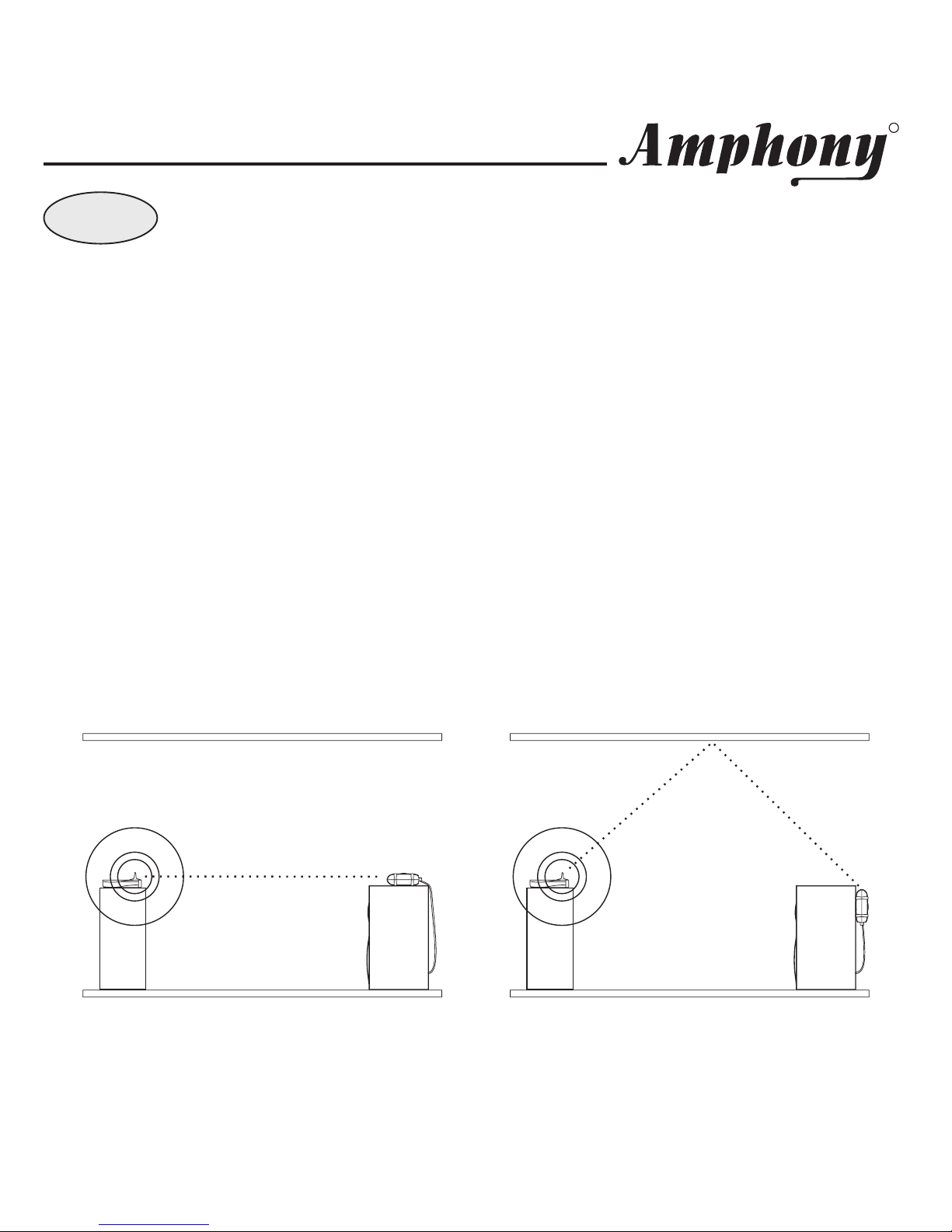
Example 1 below shows the optimum placement of the amplifier. If no line of sight
is possible, place the amplifier such that there is the minimum possible number of
walls and obstacles between the transmitter and amplifier.
You can mount the amplifier vertically as shown in Example 2 by using the 2 screw
openings at the bottom. In this case, the operating range is reduced compared to
mounting the amplifier right side up.
The amplifier incorporates a directional antenna which prefers signals transmitted
toward the front of the amplifier. Therefore, the front of the amplifier should always
be facing toward the direction of the strongest transmitter signal.
This product will not work properly from within an enclosed metal cabinet.Note:
User and Installation Guide
R
Example 1: Amplifier placed
on top of a speaker
Example 2: Amplifier mounted
vertically behind a speaker
Transmitter
Speaker
Amplifier
Transmitter
Speaker
Amplifier
line of sight
indirect connection
(reflected signal)
Page 6

Troubleshooting
User and Installation Guide
R
Problem Possible Cause Solut ion
No aud io at am plif ier Fau lty AC ad ap ter
or f au lt y p ower outle t
Ch eck t he amplifier p ower su p ply .
St r ong int erf ere nce S ee u nde r “S trong In te rf erenc e“ o n n ext
page.
Au di o vol ume to o low S ee b elow u nde r “A ud io vo lum e t oo low” .
Audio is dist ort ed Am p lifie r volum e
co ntrol s et to o h igh
L ower th e sou rc e a udi o vol ume u ntil
clippingstops.
St r ong int erf ere nce S ee u nde r “S trong In te rf erenc e“ o n n ext
page.
Re ceiver au d io lev el
is too low
Au di o vol ume to o low R ais e th e s ource au dio volum e to ac hie ve
th e desi re d a ud io lev el. Con ne ct
tran smit te r to an a d jus ta ble a u dio o ut put
Am p lifie r volum e
co ntr ol s et to o low
Adjust the amplifier volume control to
a chiev e d esir ed au d io le vel.
Audio d rops o ut
intermittently or
crac kle s
St r ong int erf ere nce S ee u nde r “S tr ong In te rf erenc e“ o n n ext
page.
Unstable power
su pply
See under “Unstable power supply“
below.
Audio d rops o ut
intermittently or
crac kle s
St r ong int erf ere nce S ee u nde r “S tr ong
In te rfer en ce“ o n n ext pag e.
Unstable power
su pply
E nsu re th at t h e p ower ou tle t
delivers a stable vol tage. Very
strong surges orvol tage
f luctu atio ns may c ause audio
dropouts. Try using asurge
protector.
Page 7

For up-to-date troubleshooting advice, visit www.amphony.com
User and Installation Guide
R
Problem Possible Cause Solut ion
T ran sm itt er r an ge is
extremely sh ort
Strong interference In some cases, there may be strong
in ter f er enc e pre ve n tin g pr o per rece pt ion
o f t he aud io si gn al wh ich ca n be cau sed
b y 5. 8 G Hz cordless te leph on es o r 5. 8
G Hz wire less ne tworks . Either elimin at e
th e interf eren ce, l ocate the b a se un it of
th e cordle ss p hon e i n an oth er r o om, s et
th e wi re les s n etwor k to use t h e 5.1 GHz
frequency band rather than 5.8 GHz,
relocate the trans mitter, relocate or
re ori ent the a mp lif ie r t o impro ve
reception.
Too m an y ob sta cle s A udi o will d r op out if there ar e to o man y
o bst acles b e twe e n th e t ra nsmitt er and t he
a mplif ier, tr y rel ocati ng th e tr ansmitt er or
rec eiver t o imp rove r ec e ption .
Page 8

Technical Specifications:
User and Installation Guide
R
Frequency response: 2 Hz ... 20 kHz
Output power: 150 W (80 Wrms)
Number of wireless audio channels: 4
Signal-to-noise ratio: typ. 96 dB
Total harmonic distortion: 0.04 %
Audio latency: < 1 ms
Power efficiency: 90 %
Automatic power-down feature
Page 9

READ THESE SAFETY INSTRUCTIONS CAREFULLY AND
HEED ALL WARNINGS IN THIS MANUAL.
POWER SOURCE
To product malfunction, and to protect against electric shock, fire or personal injury,
please observe the following:
• This product has been designed to work with 120-volt AC current using
the supplied AC adapters. Connection to a line voltage other than that or
use of non-compatible AC adapters may create a safety and fire hazard
and may damage the product.
• Do not run power cords under rugs or carpets or place heavy objects on
them.
• Damaged or deformed power cords are hazardous and should be
replaced immediately by a qualified service technician.
LOCATION
• Do not place this product in direct sunlight, or near heat sources.
• Keep this product away from strong magnetic objects.
CARE
• Do not place any object containing water or other liquids on this product.
• Do not remove the cabinet. Touching parts inside the cabinet could result
in electric shock and damage to the product.
• Do not use this product outdoors or in cars.
VOLUME CONTROL
• Do not turn up the amplifier volume while listening to a portion with very
low level input or no audio signal to avoid damage to your speakers
during a peak level audio portion.
• Turn the amplifier volume control to minimum prior to connecting or
disconnecting the transmitter or amplifier and prior to switching audio
sources as this may cause loud clicks which can damage your speakers.
IMPORTANT SAFETY INFORMATION ATTENTION!
User and Installation Guide
R
Page 10
Table des matières
Autres manuels Amphony Amplificateur